
12 Best Online Proofing Software in 2026, Compared
Compare the 12 best online proofing software tools on price, free plans, file support and approvals, with every price checked November 8, 2026.
 Shamim Mia, Founder, SerpAstraLast verified November 8, 202614 min read
We compare pricing pages, documentation and public reviews. We never accept payment for rankings.

Key takeaways
- Filestage leads for most teams at $199/month with unlimited reviewers, followed by Ziflow at $199/month and PageProof at $249/month — all three are dedicated proofing platforms with free trials.
- ReviewStudio is the cheapest per-seat option at $12/user/month on annual billing, while Pastel is the cheapest way to collect feedback on a live website, with a free plan.
- The single most important buying factor is what the price counts: flat team plans, per-seat plans and per-MarkUp plans behave very differently as your team grows.
- Three tools publish no price at all — Adobe Workfront and inMotion ignite quote every deal, and Admation's $35/user/month comes from review directories, not its own site.
On this page
Quick comparison
| Tool | Best for | Starting price | Free plan |
|---|---|---|---|
| Filestage | Marketing teams and agencies that want a dedicated review and approval workflow with unlimited reviewers | $199/mo | Yes (free plan) |
| Ziflow | Creative teams that need multi-stage approvals, audit trails and support for 1,200+ file types | $199/mo | Yes (free plan) |
| PageProof | Comms and creative teams that want encrypted proofing with Adobe and chat integrations | $249/mo | No (trial only) |
| ReviewStudio | Video and media teams that want the cheapest per-seat proofing with frame-level comments | $15/mo | Yes (free plan) |
| GoProof | Small Adobe Creative Cloud teams that want proofing inside their design apps | $159/mo | No (14-day trial) |
| Wrike | Teams that want proofing inside a full work-management platform, not a standalone tool | $10/mo | Yes (free plan) |
| Pastel | Web designers and freelancers collecting feedback on live websites through a share link | $35/mo | Yes (free plan) |
| MarkUp.io | Design and web teams that review a steady volume of sites, images, PDFs and video | $79/mo | No (14-day trial) |
| Aproove | Enterprises and regulated teams that need compliance controls and structured approval workflows | $88.70/mo | No (free trial) |
| Admation | Marketing teams in regulated industries that want briefs, proofing and approvals in one workflow | $35/mo | No (free trial) |
| Adobe Workfront | Large marketing organizations already running Adobe Creative Cloud at scale | Custom quote | No (no trial) |
| inMotion ignite | In-house creative teams that want proofing tied to project management and resource planning | Custom quote | No (free trial) |
Make one of these tools?
We re-check this list every quarter. Send a correction, request a review, or ask about a clearly labeled sponsored spot.
Request a listingThe best online proofing software

Filestage
Best for: Marketing teams and agencies that want a dedicated review and approval workflow with unlimited reviewers
Filestage is a dedicated review and approval platform: every plan is built around routing files to the right people and collecting their comments in one place. Starter costs $199 a month flat, covers 10 team members and includes unlimited projects and files, version comparison, due dates and reminders, custom branding and password-protected links. Reviewers are free on every plan, and the free plan covers one active project and five new files a month.
The catch is the flat price. A solo designer pays the same $199 as a ten-person team, so count your monthly file volume on the free plan first. AI reviewers and automations wait for Business at $329 a month. Buy Filestage when review and approval is a daily job for a team; buy ReviewStudio or Pastel when the budget is small and the volume is low.
What we like
- Flat pricing with 10 team members included, so the bill does not grow with every hire
- Unlimited reviewers on every plan, including the free plan, so clients never need a paid seat
- Covers video, images, PDFs, live websites, audio and HTML banners in one review flow
- Version comparison, due dates and reminders are included on Starter, not held for Business
Watch out for
- Starter is a flat $199 a month, so a solo user pays the same as a ten-person team
- AI reviewers and automations wait for Business at $329 a month
- Recent G2 reviewers mention price increases and a learning curve for new reviewers

Ziflow
Best for: Creative teams that need multi-stage approvals, audit trails and support for 1,200+ file types
Ziflow is the workflow-heavy pick: proofs move through defined stages with their own reviewers and decisions, and every comment and approval is logged in an audit trail. Standard costs $199 a month billed annually, covers 15 users, and includes unlimited proofs and reviewers with 1 TB of storage. It supports more than 1,200 file types, including video, HTML5, 3D files and live websites, and it is SOC 2 compliant.
The step-ups are where the price jumps. A 16th user moves you to Pro at $329 a month, and the ReviewAI automated checking that headlines the product is Enterprise only. The free plan covers two users and one workflow stage, which is enough to test the routing but not to run a team. Choose Ziflow when approvals have stages and sign-off must be provable; choose Filestage for a simpler flat workflow.
What we like
- Multi-stage approval workflows with a full audit trail on every proof
- Supports more than 1,200 file types, including video, HTML5, 3D files and live websites
- Unlimited proofs and unlimited reviewers on every paid plan
- SOC 2 compliance suits teams in regulated industries
Watch out for
- Standard covers 15 users, so a 16th user means Pro at $329 a month
- ReviewAI automated checking is Enterprise only, not on Standard or Pro
- The free plan allows only 2 users, 2 GB of storage and a single workflow stage

PageProof
Best for: Comms and creative teams that want encrypted proofing with Adobe and chat integrations
PageProof is the highest-rated tool in this list at 4.8/5 on G2 across 391 reviews, and its support score is the best reviewers report in the category. Team costs $249 a month billed monthly, or $2,499 a year, and covers 250 PI credits with two proof and checklist templates. Proofing is fully encrypted, with digital signing and a full audit and compliance export, and native integrations cover Adobe Creative Cloud, monday.com, Asana, Slack and MS Teams.
The trade-off is the entry price. There is no free plan, only a trial, and Team Plus at $499 a month holds single sign-on, scheduled proofs and advanced co-branding. Reviewers also note the lack of a folder structure when projects pile up. Pick PageProof when security, sign-off records and support matter most; pick Filestage or Ziflow when the same $199 buys a wider workflow.
What we like
- Highest G2 score in this list at 4.8/5, with the strongest support score reviewers cite
- Fully encrypted proofing with digital signing and a full audit and compliance export
- Native integrations with Adobe Creative Cloud, monday.com, Asana, Slack and MS Teams
- Flat team pricing, so adding reviewers never raises the bill
Watch out for
- No free plan — the entry point is $249 a month, with only a trial to test it
- Team Plus at $499 a month holds single sign-on, scheduled proofs and advanced co-branding
- Reviewers note the lack of a folder structure when managing many projects

ReviewStudio
Best for: Video and media teams that want the cheapest per-seat proofing with frame-level comments
ReviewStudio is the value pick because it charges per seat and the seat is cheap: Pro costs $15 per user a month billed monthly, or $12 on annual billing, with unlimited guest reviewers. Comments land on the exact video frame, PDF page or image, with versioning and a compare mode that shows what changed between rounds, and a task list turns comments into assigned work. The free plan covers three active reviews.
The limits are caps, not features. Pro allows 10 active reviews and 25 GB of storage per user, and Advanced removes the review cap but needs five users, so the real Advanced entry is $100 a month. Reviewers also note slow loading on large files. Choose ReviewStudio when a small team reviews media all day; choose Filestage when the review count is high and flat pricing wins.
What we like
- Cheapest per-seat price here at $12/user/month on annual billing, with unlimited guest reviewers
- Frame-level comments on video, PDFs and images, with versioning and compare mode
- A task list built from comments turns feedback into assigned work without a second tool
- Free plan covers 3 active reviews, enough to run a real client proof before paying
Watch out for
- Pro caps each user at 10 active reviews and 25 GB of storage
- Advanced removes the review cap but needs a 5-user minimum, so the real entry is $100 a month
- Reviewers note slow loading on high-resolution files and a mobile experience that lags the desktop

GoProof
Best for: Small Adobe Creative Cloud teams that want proofing inside their design apps
GoProof is built for teams that live in Adobe Creative Cloud: its extension sits inside the design apps, so approver comments flow back to the designer without exporting files or switching tools. Connect costs $159 a month billed monthly, or $129 on annual billing, and covers up to two users with unlimited proofs and reviewers and 500 GB of storage. It also integrates with monday.com, and Pro adds single sign-on and 1 TB of storage.
The user cap is the catch. Connect covers two people, so a five-person team needs Pro at $329 a month billed monthly, or $259 on annual billing. There is no free plan, only a 14-day trial, and the G2 score rests on just 15 reviews. Pick GoProof when Adobe is where the work happens; pick Filestage when the team is bigger than two.
What we like
- Deep Adobe Creative Cloud integration: comments flow back into the design app
- Unlimited proofs and unlimited reviewers on every plan
- 500 GB of storage on Connect, with single sign-on on Pro
- Integrates with monday.com as well as Adobe apps
Watch out for
- Connect covers only 2 users, so a 5-person team needs Pro at $329 a month
- No free plan, only a 14-day trial
- Only 15 G2 reviews, so the 4.3/5 score rests on a small base

Wrike
Best for: Teams that want proofing inside a full work-management platform, not a standalone tool
Wrike is not a proofing tool with project management added; it is a work-management platform with proofing inside it, and that is the point. Team costs $10 per user a month billed annually for 2 to 15 users, with Gantt charts, dashboards and AI Essentials, and a free plan covers the basics. Feedback, tasks, timelines and approvals live in one place, so nothing is lost between the proof and the project plan.
Read the tiers carefully before you buy. Proofing and approvals sit on Business at $25 per user a month, not on Team, and seats are sold in bundles of five, so a six-person team pays for ten seats. Reviewers also warn of a steep learning curve. Choose Wrike when the team wants one platform for everything; choose a dedicated tool when proofing is the only job to fill.
What we like
- One platform for tasks, Gantt charts, dashboards and proofing, so feedback lives where the work is
- AI Essentials included on Team, the cheapest paid tier
- Free plan covers the basics for a team trying the platform
- More than 4,500 G2 reviews, the largest review base in this list
Watch out for
- Proofing and approvals sit on Business at $25/user/month, not on Team at $10
- Seats are sold in bundles of 5, so a 6-person team pays for 10 seats
- Reviewers warn of a steep learning curve before the platform pays off

Pastel
Best for: Web designers and freelancers collecting feedback on live websites through a share link
Pastel does one thing well: paste a website URL, share the link, and clients click anywhere on the live page to leave a pinned comment, with nothing installed on the site. Pro costs $35 a month billed monthly, or $29 on annual billing, for two users and three active canvases, with unlimited guest reviewers. It also reviews PDFs, emails, uploaded images and video, and the free plan covers one user and one active canvas.
The canvas cap decides the real price. A third active project, or a third person on the team, moves you to Team at $99 a month billed annually, and trackers and integrations wait for that tier too. The G2 score rests on just 14 reviews. Choose Pastel when the work is websites and clients must comment without signing up; choose MarkUp.io when the volume is higher.
What we like
- Turns any live web page into a review canvas with nothing to install on the site
- Guests comment by clicking the page, with no account needed
- Free plan suits a solo designer with one active canvas and unlimited reviewers
- Also reviews PDFs, emails, uploaded images and video, not only websites
Watch out for
- Pro covers only 2 users and 3 active canvases, so a 3-person team needs Team at $99 a month
- Trackers and integrations arrive on Team, not Pro
- Only 14 G2 reviews, so the 4.5/5 score rests on a small base

MarkUp.io
Best for: Design and web teams that review a steady volume of sites, images, PDFs and video
MarkUp.io prices by volume, not by seats: Pro costs $79 a month for 50 MarkUps, with unlimited users, so adding reviewers never adds a seat charge. A MarkUp can be a live website, an image, a PDF or a video, with more than 30 file types supported, and guests comment without signing up. Video comments are frame-precise, tying each note to a timestamp, and a 14-day trial lets a team test the flow.
The allowance is the whole pricing story. Fifty MarkUps a month suits a steady pipeline, but the 51st costs $4 in batches of ten, and past 100 the next published plan is Business at $499 a month. There is no free plan. Choose MarkUp.io when the team is large and monthly volume is predictable; choose Pastel when volume is low and the budget is tight.
What we like
- Unlimited users on every plan, so the whole team and every client can comment
- Reviews live websites, images, PDFs, video and more than 30 file types
- Guests comment without signing up, which keeps client reviews frictionless
- Frame-precise video comments tie every note to a timestamp
Watch out for
- Pro caps at 50 MarkUps a month; extra MarkUps cost $4 each in batches of ten
- Past 100 MarkUps a month the next published plan is Business at $499 a month
- No free plan — the free tier was retired, and Pro is the only self-serve entry

Aproove
Best for: Enterprises and regulated teams that need compliance controls and structured approval workflows
Aproove is a work-management and proofing platform built for enterprises where approval is a compliance event, not a chat thread. The entry plan costs $88.70 per user a month on annual billing, with a five-user minimum, and covers unlimited reviewers with 25 proofs per user a month. Workflows route files by metadata, tasks track who must sign off, and print and packaging teams get colorimetric display support options for color-critical work.
Two things need checking before you buy. Aproove publishes no price list, so the $88.70 figure comes from review directories and must be confirmed with sales, and the five-user minimum makes the real entry about $443.50 a month. G2 carries only two reviews, so buyer references matter more than public scores. Choose Aproove when governance and audit trails decide the purchase.
What we like
- Structured approval workflows with task management and metadata-driven routing
- Built for print and packaging accuracy, including colorimetric display support options
- Unlimited reviewers and 25 proofs per user a month on the entry plan
- Suits healthcare, finance and manufacturing teams with strict sign-off rules
Watch out for
- No published price list: the $88.70 figure comes from review directories, so confirm it with sales
- A 5-user minimum makes the real entry about $443.50 a month on annual billing
- G2 carries only 2 reviews, so there is no meaningful public rating to check

Admation
Best for: Marketing teams in regulated industries that want briefs, proofing and approvals in one workflow
Admation, from Simple Marketing Solutions, manages the whole creative production process: a structured brief starts the job, online proofing collects the feedback, and approvals close it, with a tamper-proof audit trail throughout. Basic costs $35 per user a month according to Capterra and Software Advice, since Admation publishes no price list. It suits banking, insurance and health teams that need mandatory compliance checklists, and it is used by large Australian brands including Bupa and Woolworths.
The review score is the warning sign. Admation holds 3.6/5 on Capterra across 227 reviews, the lowest in this list, with ease of use rated 3.0 and reviewers calling the interface clunky. The price also needs confirming with the vendor. Choose Admation when the brief-to-approval workflow and compliance checklists matter more than polish; otherwise the dedicated tools above are easier to use.
What we like
- Covers the full job: structured briefs, online proofing, approvals and project management
- Side-by-side revision comparison with a tamper-proof audit trail
- Mandatory compliance checklists suit banking, insurance and health teams
- Used by large Australian brands including Bupa, Woolworths and Tourism Australia
Watch out for
- Admation publishes no price list: the $35 figure comes from Capterra and Software Advice
- Lowest review score in this list at 3.6/5 on Capterra, with ease of use rated 3.0
- Reviewers call the interface clunky and the approval process slow to navigate

Adobe Workfront
Best for: Large marketing organizations already running Adobe Creative Cloud at scale
Adobe Workfront is enterprise work management with proofing built in, sold in three tiers — Select, Prime and a top tier — that Adobe does not price publicly. Asset review and approval sit alongside task management, resource planning, portfolio reporting and goal tracking, and the Adobe Creative Cloud and Experience Cloud integrations are the deepest in this list. It holds 4.4/5 on Capterra across 1,500 reviews, the largest enterprise review base here.
The cost of entry is a sales process, not a checkout. There is no free trial, third-party guides estimate $30 to $99 per user a month plus implementation that can run $5,000 to $50,000, and reviewers warn implementation takes weeks to months. Choose Workfront when a large marketing organization already runs Adobe at scale; a smaller team will get approved work faster from the dedicated tools above.
What we like
- Asset review and approval sit inside a full enterprise work-management platform
- Deep Adobe Creative Cloud and Experience Cloud integration for Adobe shops
- Portfolio reporting, resource management and goal planning in one system
- More than 1,500 Capterra reviews, the largest enterprise review base here
Watch out for
- No published prices and no free trial, so every deal starts with a sales call
- Third-party guides estimate $30–$99/user/month plus implementation, which can run $5,000–$50,000
- Reviewers warn implementation takes weeks to months, not days

inMotion ignite
Best for: In-house creative teams that want proofing tied to project management and resource planning
inMotion ignite is a creative-operations platform rather than a standalone proofing tool: online proofing sits alongside workflow automation, project management and resource planning, so the review step is one part of a managed production pipeline. Automatic reminders and notifications keep deadlines visible, and a free trial is available before talking to sales. It is built for in-house marketing and creative teams running high volumes of content.
The price is the problem for a buyer comparing options: inMotion publishes no price list, so every deal is quoted, and there is no public G2 or Capterra rating we could verify, which means buyer references matter more than review scores. Choose inMotion ignite when the team wants proofing inside a full creative-ops system; choose a dedicated tool when proofing is the only job.
What we like
- Proofing, workflow automation, project management and resource planning in one platform
- Built for marketing and creative teams running high volumes of content
- Automatic reminders and notifications keep review deadlines visible
- Free trial available before talking to sales
Watch out for
- Pricing by quote only, with no published starting price to budget against
- No public G2 or Capterra rating we could verify, so buyer references matter more
- A full creative-ops platform, so a team that only needs proofing buys more than it uses
The best online proofing software replaces the email thread where feedback goes to die. Instead of annotated PDFs, screenshot markups and files named final_final_v3, the whole team comments on one version of the work, approves it in place, and moves on — and every price in this list was checked on the vendor's own pricing page on November 8, 2026.
We ranked the 12 tools below by fit for the most common buyer: a small creative team or agency that reviews designs, video, PDFs and live web pages with clients. Dedicated proofing platforms come first, then the per-seat value picks, then the all-in-one platforms where proofing is one feature among many, and finally the quote-only enterprise tools.
How to choose the best online proofing software
- Count what the price counts. Flat plans (Filestage, Ziflow, PageProof) cost the same for 2 users or 15; per-seat plans (ReviewStudio, Wrike, Admation) climb with headcount; MarkUp.io charges by MarkUps per month. Price the tool at your real team size, not the headline figure.
- Check the file support. Ziflow handles more than 1,200 file types including 3D files, while Pastel and MarkUp.io focus on websites, images, PDFs and video. If you review packaging artwork or HTML5 banners, the narrow tools will not fit.
- Count reviewers, not users. Every tool here lets clients comment for free through a share link. The people who need paid seats are the ones sending proofs and managing the workflow.
- Check the approval workflow. Single-step sign-off suits a freelancer; multi-stage approvals with an audit trail suit regulated teams. Ziflow and Admation are built for the second case.
- Test the free plan or trial with a real proof. The free plans here cap users, projects or active reviews, so run one genuine client round through the tool before paying — it shows the limits faster than any demo.
Proofing is one system in your stack, not the whole stack. If the work also needs to be found online, our guide to marketing platforms for small business SEO covers the visibility side, and the ad agency software guide covers the project side. And before you publish the pages you just got approved, run your titles through the free SERP snippet preview tool — it shows exactly how the title and description will look in Google.
Whatever you shortlist, try it with a real client round before you pay. The free plans and trials in this list are long enough to run one genuine proof — your files, your reviewers, your approval step — and that round tells you more than any review can. Check two things in the trial: that clients can comment without signing up, and that the version history shows exactly what changed between rounds.
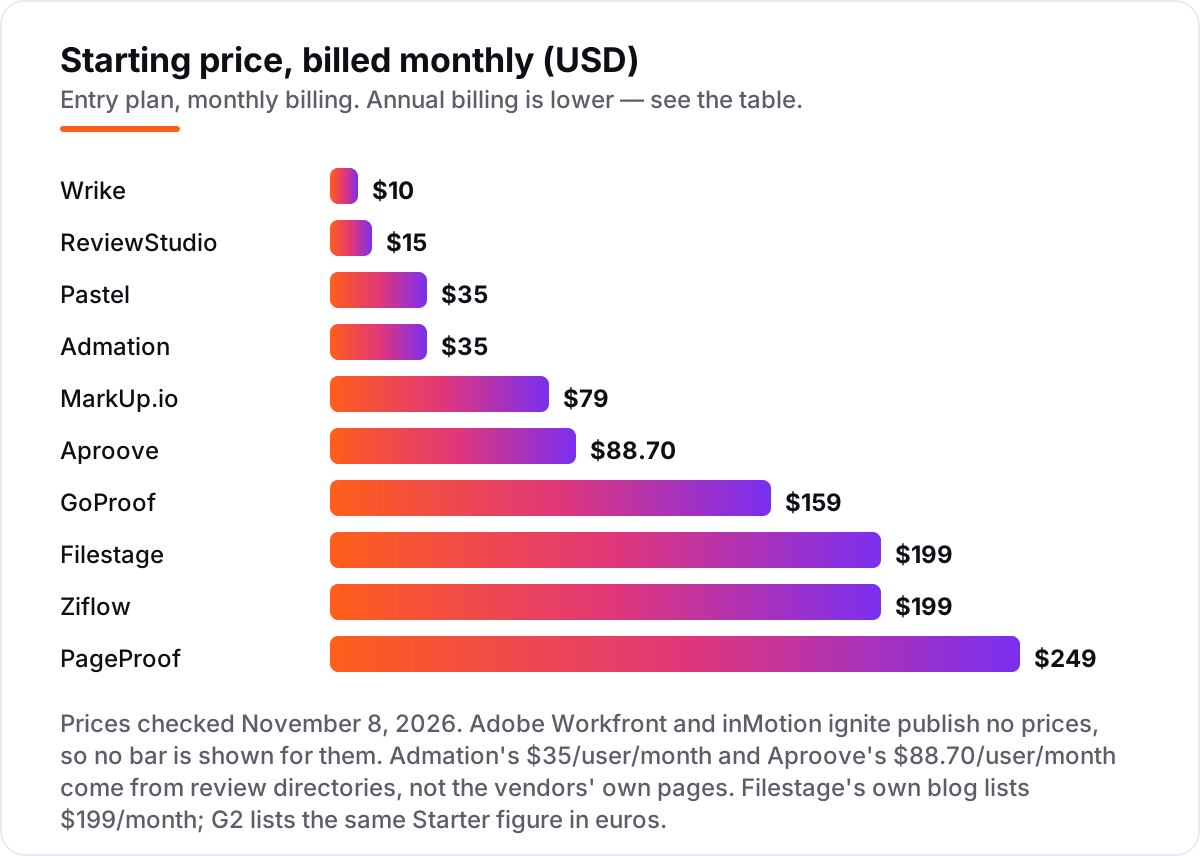
Online proofing software pricing: what you will actually pay
Take a five-person creative team that reviews about 40 proofs a month. On list prices, the subscription costs $60 a month on ReviewStudio Pro billed annually, $79 on MarkUp.io Pro, $99 on Pastel Team billed annually, $125 on Wrike Business billed annually, $175 on Admation, $199 on Filestage Starter or Ziflow Standard, $249 on PageProof Team billed monthly, $259 on GoProof Pro billed annually, and $443.50 on Aproove billed annually. Two of those numbers need adjusting before they are real: Wrike Team at $50 a month does not include proofing, so the real Wrike figure is Business at $125, and GoProof Connect at $129 covers only two users, so a five-person team needs Pro at $259.
Over a year, that is $720 on ReviewStudio, $948 on MarkUp.io, $1,188 on Pastel Team, $1,500 on Wrike Business, $2,100 on Admation, $2,388 on Filestage or Ziflow, $2,499 on PageProof Team billed annually, $3,108 on GoProof Pro, and $5,322 on Aproove. The same five people and the same 40 proofs cost $720 a year at the cheap end and $5,322 at the dear end — a $4,602 gap that comes entirely from the pricing model and the tier that holds the features, not from the proofing itself.
Three costs sit outside every number above. First, the caps: MarkUp.io charges $4 for every extra MarkUp past 50 a month in batches of ten, ReviewStudio Pro stops at 10 active reviews per user, and Pastel Pro stops at 3 active canvases. Second, the quote-only tools: Adobe Workfront and inMotion ignite publish no prices, and third-party guides estimate Workfront at $30 to $99 per user a month plus implementation. Third, the annual discount: most tools here cut 15 to 25 percent for yearly billing, so a monthly price is not the price you pay if you commit for a year.
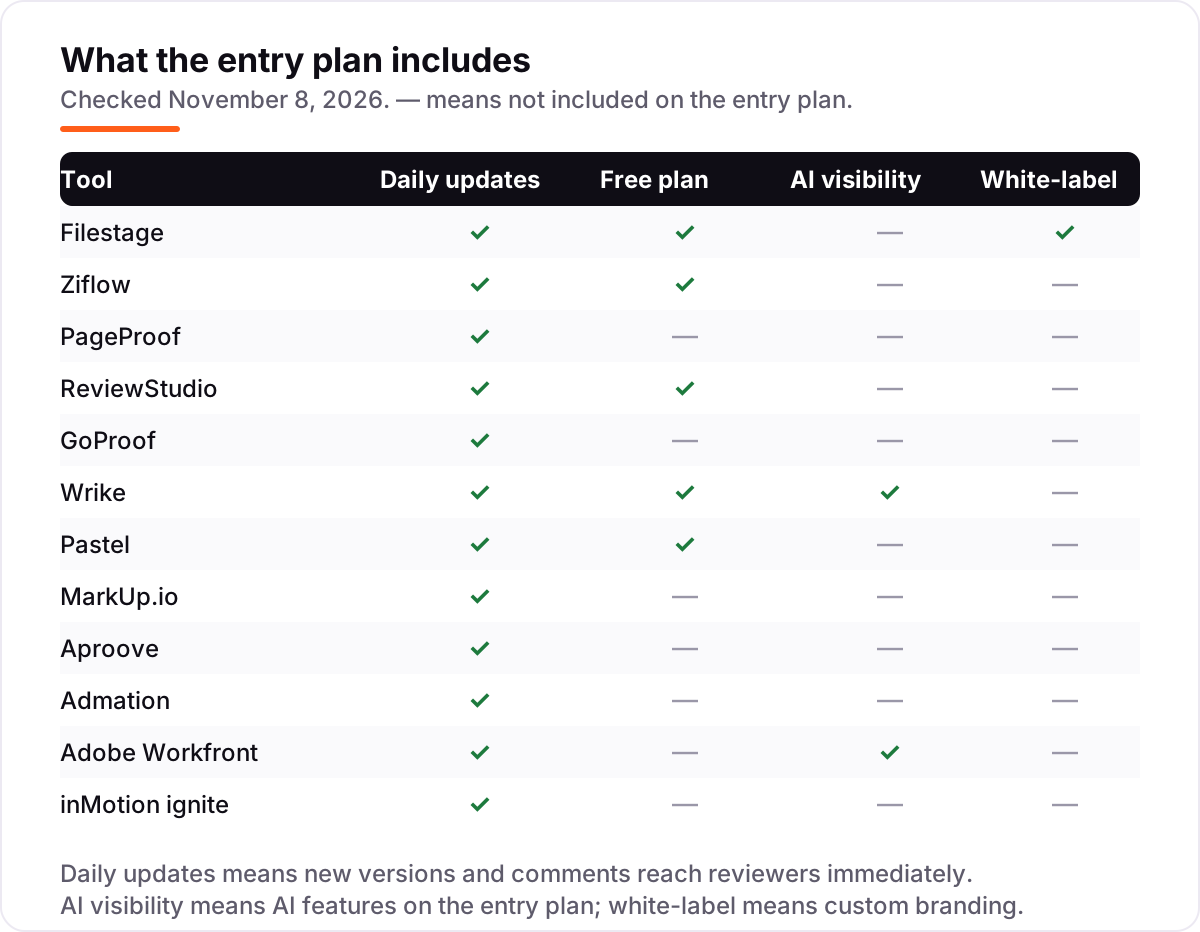
Know the difference: proofing software vs project management software
The confusion in this category is between commenting on the work and managing the work. Proofing software collects feedback and approvals on the asset itself — the design, the video, the live web page — with comments pinned to the exact frame or pixel. Project management software tracks tasks, timelines and workloads. They solve different problems, and most teams need both.
That is why the list splits the way it does. Filestage, Ziflow, PageProof, ReviewStudio, GoProof, Pastel, MarkUp.io and Aproove are proofing-first: they integrate with project tools rather than replacing them. Wrike, Adobe Workfront and inMotion ignite bundle both, so the proof lives inside the project plan — but you pay for the whole platform, and on Wrike proofing itself waits for the Business tier.
A second distinction is reviewers versus users. On every tool here, the client who approves the work is a free guest, and the paid seats belong to the people sending proofs. So the price that matters is the price for your team, not for your client list — a five-person agency pays for five seats, not for fifty approvers.
Quick comparison: tool type by need
| Buyer | Best pick | Why |
|---|---|---|
| Solo freelancer on a budget | ReviewStudio | $12/user/month on annual billing, free plan covers 3 active reviews |
| Most small agencies | Filestage | Flat $199/month, 10 seats included, unlimited reviewers |
| Regulated approvals | Ziflow | Multi-stage workflows and audit trails, $199/month |
| Live website feedback | Pastel | Free plan, Pro is $29/month on annual billing |
| Team already in Wrike or Adobe | Wrike | Proofing inside the platform you run, Business is $25/user/month |
| High-volume design reviews | MarkUp.io | Unlimited users, $79/month for 50 MarkUps |
Mistakes to avoid
- Comparing a flat price with a per-seat price. Filestage at $199 a month is cheaper than ReviewStudio at $15 a seat once the team passes 13 people, and dearer for a team of two. Do the multiplication at your headcount.
- Buying the entry tier, then finding proofing is not in it. Wrike Team at $10 a user has no proofing; the feature waits for Business at $25. Check the tier, not the brand.
- Ignoring the cap that bites first. MarkUp.io stops at 50 MarkUps a month, ReviewStudio Pro at 10 active reviews per user, and Pastel Pro at 3 active canvases. The cap you hit first is your real starting price.
- Paying for the enterprise tool when the job is proofing. Workfront and inMotion ignite are full creative-ops platforms with quote-only pricing and weeks of implementation. Buy them when the whole operation needs managing, not when only the approvals need fixing.
- Trusting a rating with two reviews. Aproove has no meaningful public rating, and inMotion ignite has none we could verify. Ask for buyer references instead of reading a score that barely exists.
How we chose
We checked each vendor's own pricing page on November 8, 2026 and recorded the starting price exactly as shown, including the annual-billing figure where the page lists one, and we ranked the tools by fit for the most common buyer — a small creative team or agency reviewing work with clients — not by brand size. Two prices could not be verified on the vendor's own page: Admation publishes no price list, so its $35/user/month comes from Capterra and Software Advice, and Aproove's $88.70/user/month comes from review directories citing the vendor's site — both are disclosed here, not presented as vendor-verified. Filestage's own blog lists $199/month while G2 lists the same Starter figure in euros; we used the vendor's dollar figure. Ratings come from fresh copies of the G2 and Capterra pages checked November 8, 2026. Aproove's rating is omitted because G2 carries only 2 reviews, and inMotion ignite's because no G2 or Capterra listing could be verified. Deltek ConceptShare was excluded: it is no longer actively developed. No vendor paid for a place in this list, and none of the links here are affiliate links.
What to do next
Start with the free plan or trial of your top pick and run one real client round through it. Check that clients can comment without an account, that the version history is clear, and that the approval step records who signed off. If the proofs are sorted but new customers are not finding you, our monthly SEO service handles the visibility side — or compare providers in our guide to SEO companies for small business. Once your tools are in place, find out what's holding your rankings back.
Your stack only works if people find you
SerpAstra fixes what keeps your site off page one and makes it easy for AI assistants to recommend.
Get a free audit→Sources we checked (22)
- Filestage pricing — filestage.io/pricing (checked November 8, 2026)
- Ziflow pricing — ziflow.com/pricing (checked November 8, 2026)
- PageProof pricing — pageproof.com/pricing (checked November 8, 2026)
- ReviewStudio pricing — reviewstudio.com/pricing (checked November 8, 2026)
- GoProof pricing — goproof.net/pricing (checked November 8, 2026)
- Wrike pricing — wrike.com/pricing (checked November 8, 2026)
- Pastel pricing — usepastel.com/plans (checked November 8, 2026)
- MarkUp.io pricing — markup.io/pricing (checked November 8, 2026)
- Aproove pricing — aproove.com/pricing (checked November 8, 2026)
- Admation product page — simple.io/products/simple-admation (checked November 8, 2026)
- Adobe Workfront — workfront.com (checked November 8, 2026)
- inMotion ignite — inmotionnow.com (checked November 8, 2026)
- Filestage reviews — g2.com/products/filestage/reviews (checked November 8, 2026)
- Ziflow reviews — g2.com/products/ziflow/reviews (checked November 8, 2026)
- PageProof reviews — g2.com/products/pageproof/reviews (checked November 8, 2026)
- ReviewStudio reviews — g2.com/products/reviewstudio/reviews (checked November 8, 2026)
- GoProof reviews — g2.com/products/goproof/reviews (checked November 8, 2026)
- Wrike reviews — g2.com/products/wrike/reviews (checked November 8, 2026)
- Pastel reviews — g2.com/products/pastel/reviews (checked November 8, 2026)
- MarkUp.io reviews — g2.com/products/ceros-markup/reviews (checked November 8, 2026)
- Admation reviews — capterra.com/p/252371/Admation/reviews (checked November 8, 2026)
- Adobe Workfront reviews — capterra.com/p/268205/Adobe-Workfront/reviews (checked November 8, 2026)
Shamim
Founder of SerpAstra
A full-stack SEO and digital marketer who spends most days on Local SEO for dental practices, AI search visibility and lead generation.
Frequently asked questions
What is the best online proofing software?
Filestage is the best fit for most teams: a dedicated review platform with unlimited reviewers and a flat $199/month price. Ziflow suits teams that need multi-stage approvals and audit trails, also from $199/month. ReviewStudio is the best value per seat at $12/user/month on annual billing.
How much does online proofing software cost?
Entry prices run from $10/user/month on Wrike Team to $249/month on PageProof Team, with most dedicated platforms at $159–$249 a month. Per-seat tools start cheaper but climb with headcount, while flat plans cost the same for 2 users or 10. Two enterprise tools publish no prices at all.
Is there free online proofing software?
Yes, with limits. Filestage, Ziflow, ReviewStudio, Wrike and Pastel all offer free plans, usually capped at a few users, projects or active reviews. PageProof, GoProof and MarkUp.io offer trials instead of free plans, and Adobe Workfront offers neither a free plan nor a trial.
What is the difference between online proofing software and project management software?
Proofing software collects comments and approvals on the asset itself — the design, video or web page. Project management software tracks tasks, timelines and workloads. Tools like Wrike, Workfront and inMotion ignite bundle both, while Filestage, Ziflow and PageProof focus on proofing and integrate with project tools.
Can clients review proofs without an account?
Yes, on every tool in this list. Reviewers and guests are free and unlimited on the dedicated platforms, and they comment through a share link without creating an account. Only the people who send proofs and manage the workflow need paid seats, which is why reviewer counts never drive the price.
What file types can online proofing software handle?
It depends on the tool. Ziflow supports more than 1,200 file types, including video, HTML5 and 3D files. Filestage covers video, images, PDFs, live websites, audio and HTML banners. Pastel and MarkUp.io focus on live websites, images, PDFs and video, so check your file types before you buy.
Free SEO and AI visibility audit
Find out what is holding your rankings back
Send us your site. Within 2 business days you get a written audit, an AI visibility check and a short fix list ranked by impact. Free, with no contract attached.
Request my free audit→Related guides
 Digital Marketing & Ads10 Best Ad Agency Software (2026): Who to Hire and What It Costs10 best ad agency software tools compared on price, features and agency fit — real 2026 prices checked on vendor pages, ranked for small and mid-size agencies.Read guide →
 Email, SMS & Social MediaBest Email Design Software for 2026: 12 Options Compared by Use CaseCompare the 12 best email design software options for marketers on price, free plans and editor type, with every price checked November 6, 2026.Read guide →
 SEO & AI Search12 Best Marketing Platforms for Small Business SEO in 2026, ComparedThe 12 best marketing platforms for small business SEO, compared on real prices, SEO tools and AI visibility. Every price checked November 1, 2026.Read guide →