
10 Best Payment Software for Small Business in 2026, Compared
Compare the 10 best payment software for small business options on price, transaction fees and free plans, with every rate checked November 4, 2026.
 Shamim Mia, Founder, SerpAstraLast verified November 4, 202615 min read
We compare pricing pages, documentation and public reviews. We never accept payment for rankings.

Key takeaways
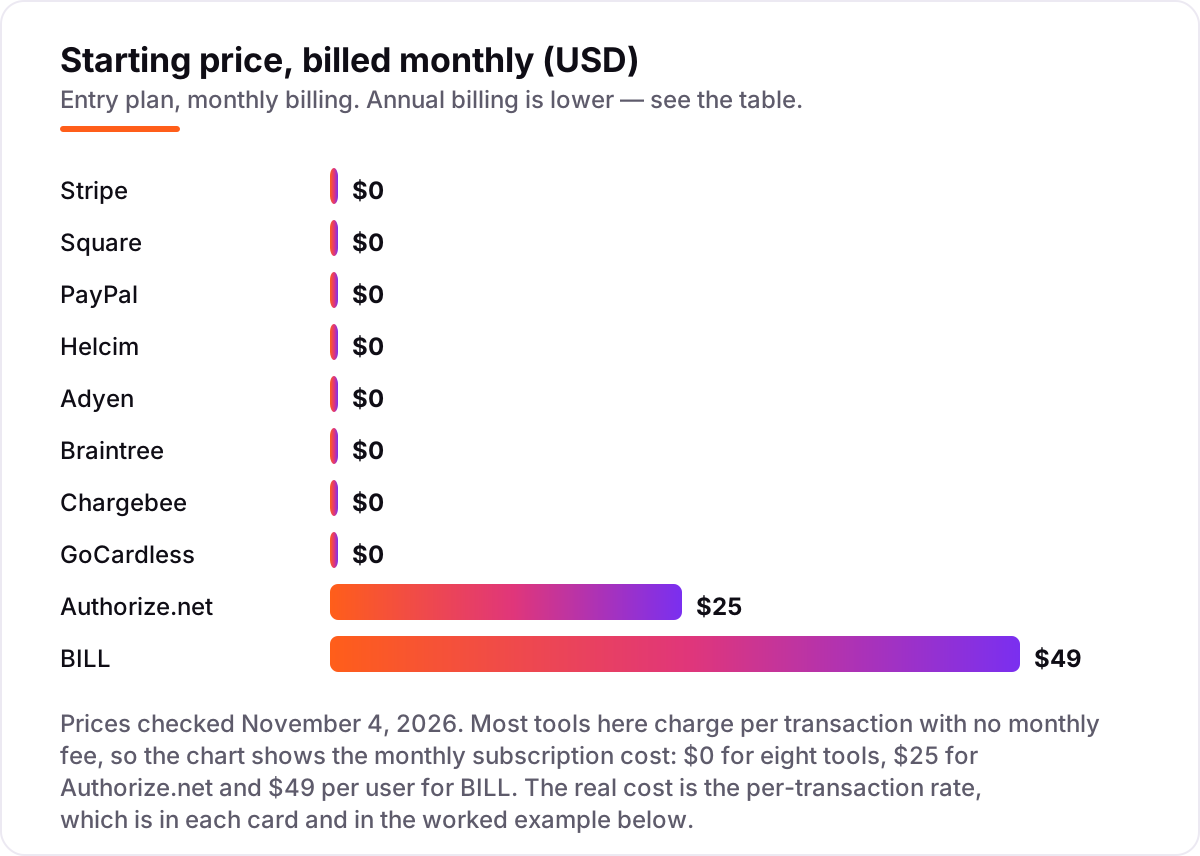
- Stripe is the best fit for most small businesses at $0 a month plus 2.9% + 30¢ per card payment; Square follows for in-person sales at 2.6% + 15¢, and PayPal at 2.99% + 49¢ for buyers who expect the PayPal button.
- Eight of the ten tools charge no monthly fee at all — the real cost is the per-transaction rate, which runs from 0.5% + 5¢ on GoCardless bank debit to 3.49% + 49¢ on PayPal Checkout.
- The single most important buying factor is the fixed fee on your average sale: 49¢ on a $10 sale adds nearly 5%, while the same 49¢ on a $100 sale adds under 0.5%.
- Authorize.net is the only tool here with a monthly fee for card acceptance ($25), and BILL is the only one priced per user ($49) — both are built for a different job than taking card payments.
On this page
Quick comparison
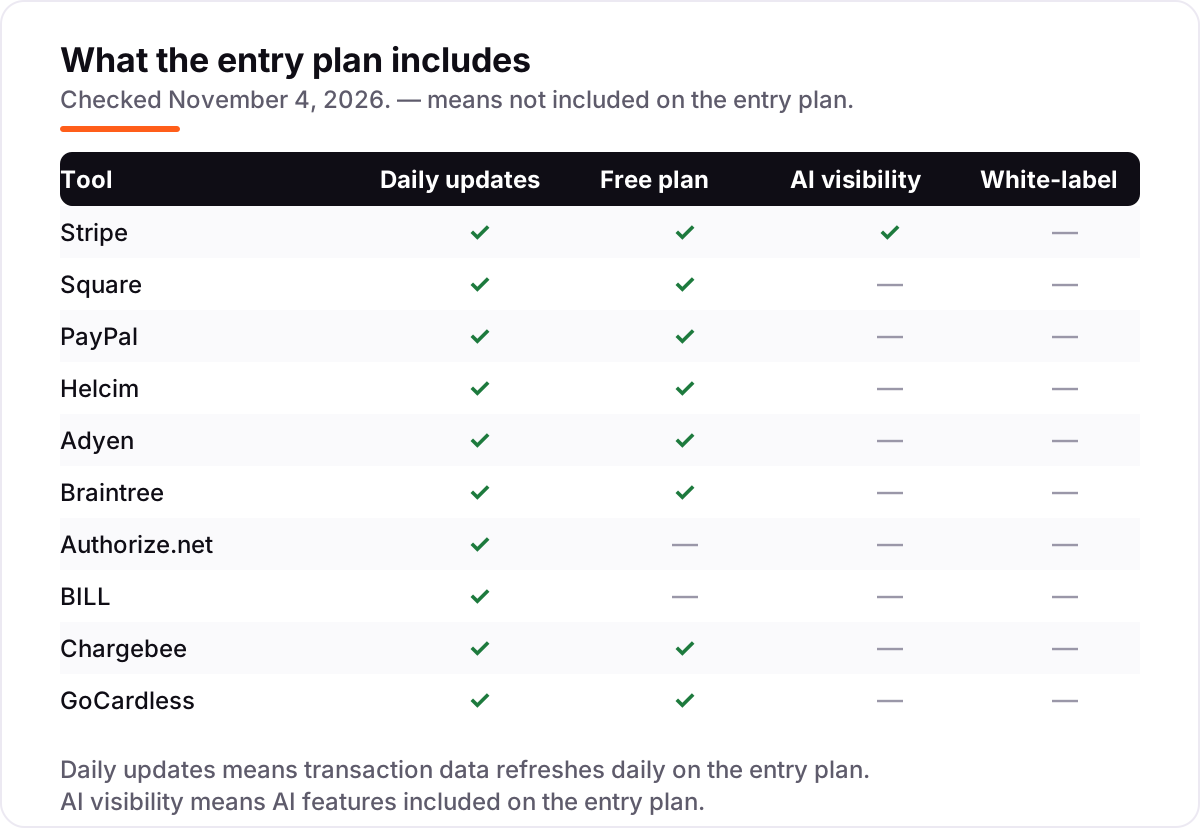
| Tool | Best for | Starting price | Free plan |
|---|---|---|---|
| Stripe | Online businesses that want one integration for cards, wallets, invoices and subscriptions | $0/mo | Yes (no monthly fee) |
| Square | Shops, market stalls and service businesses that take most payments in person | $0/mo | Yes (Free plan) |
| PayPal | Sellers whose buyers already have PayPal and expect the PayPal button at checkout | $0/mo | Yes (no monthly fee) |
| Helcim | Small businesses that want the lowest card cost with no monthly fee and no contract | $0/mo | Yes (no monthly fee) |
| Adyen | Larger businesses selling online and in person across several countries and currencies | $0/mo | Yes (no monthly fee) |
| Braintree | Developer-led teams that want cards, PayPal, Venmo and wallets through one integration | $0/mo | Yes (no monthly fee) |
| Authorize.net | Businesses that already have a merchant account and need a proven payment gateway | $25/mo | No ($25/mo) |
| BILL | Small finance teams that pay vendors and chase invoices every week | $49/user/mo | No (free trial) |
| Chargebee | Subscription businesses that need trials, proration and dunning without building billing | $0/mo | Yes (Starter free) |
| GoCardless | Businesses that collect repeat payments by bank debit and want the lowest per-payment cost | $0/mo | Yes (no monthly fee) |
Make one of these tools?
We re-check this list every quarter. Send a correction, request a review, or ask about a clearly labeled sponsored spot.
Request a listingThe best payment software for small business

Stripe
Best for: Online businesses that want one integration for cards, wallets, invoices and subscriptions
Stripe is the default choice for a reason: it is the payment platform most online businesses already know, and it charges nothing until you take a payment. The standard plan costs 2.9% plus 30¢ per successful domestic card charge, with no setup fee, no monthly fee and no hidden fees, and the same integration covers payment links, invoicing, subscriptions and in-person payments through Terminal at 2.7% plus 5¢.
The trade-off is that the headline rate is only part of the bill. Stripe Billing costs 0.7% of billing volume on pay-as-you-go or from $620 a month on an annual subscription, Tax starts at $90 a month, and Radar for Fraud Teams is a separate charge. Buy Stripe when you sell online and want one platform that grows with you; buy Square when most sales happen face to face.
What we like
- No setup or monthly fees — the standard plan is pure pay-as-you-go at 2.9% + 30¢ per domestic card payment
- One integration covers cards, Apple Pay and Google Pay, payment links, invoicing and subscriptions
- In-person payments run 2.7% + 5¢ through Terminal, and ACH direct debit costs 0.8% capped at $5
- Basic Radar fraud screening is included with Payments, and disputes cost a flat $15 each
Watch out for
- Every add-on bills separately — Billing, Tax and Radar for Fraud Teams are each priced on top of the 2.9% + 30¢ processing rate
- Refunds do not return the original processing fee, so a refunded sale still costs 2.9% + 30¢
- International cards add 1.5% and currency conversion adds 1%, so cross-border sales cost noticeably more

Square
Best for: Shops, market stalls and service businesses that take most payments in person
Square is the in-person specialist: the Free plan gives a shop a POS app, an online store, invoicing, bookings and an item library for $0 a month, and you only pay when you take a payment. In-person cards cost 2.6% plus 15¢, the lowest flat in-person rate here, and Tap to Pay turns a phone into a card terminal with no extra hardware to buy or rent.
The catch is the online rate. Square overhauled its plans in October 2025, and the Free plan now charges 3.3% plus 30¢ online — the highest online rate in this list — while Plus at $49 a month per location brings it down to 2.9% plus 30¢. Pick Square when the counter is where the money changes hands; pick Stripe when the website is.
What we like
- The Free plan includes the POS app, online store, invoicing, estimates, bookings and an item library at $0 a month
- The lowest in-person flat rate here: 2.6% + 15¢ for tap, dip or swipe on the Free plan
- Tap to Pay works on a phone with no extra hardware, and card readers are bought outright, not rented
- Plus at $49 a month per location cuts the online rate to 2.9% + 30¢ and the in-person rate to 2.5% + 15¢
Watch out for
- The Free plan's online rate of 3.3% + 30¢ is the highest online rate in this list
- Plus and Premium are priced per location ($49 and $149 a month), so a second location doubles the subscription
- Manually keyed and card-on-file payments cost 3.5% + 15¢ on every plan, with no discount on Plus or Premium

PayPal
Best for: Sellers whose buyers already have PayPal and expect the PayPal button at checkout
PayPal earns its place on recognition alone: buyers who already have a PayPal account can pay without reaching for a card, and that familiarity lifts conversion for sellers on marketplaces, invoices and international sales. A standard business account costs nothing a month, standard card payments run 2.99% plus 49¢, and Venmo, Pay Later, QR codes and invoicing are all included.
The price of that recognition is the rate. PayPal Checkout — the familiar branded button — costs 3.49% plus 49¢, half a point more than the standard card rate, and the 49¢ fixed fee is the highest in this list. Account holds are the other complaint reviewers raise most. Choose PayPal when your buyers expect the button; choose Stripe when they do not care whose name is on the checkout.
What we like
- The most recognized checkout button here — buyers who already have PayPal pay without typing card details
- Standard card payments cost 2.99% + 49¢, and Pay by Bank (ACH) on invoices costs 1% capped at $10
- Venmo, Pay Later, QR code payments and invoicing are all included in the standard business account
- No monthly fee on a standard business account, and seller protection covers eligible transactions
Watch out for
- PayPal Checkout at 3.49% + 49¢ is the most expensive standard online rate here — half a point above the standard card rate
- The 49¢ fixed fee is the highest here, so it bites hardest on small tickets: nearly 5% on a $10 sale
- Account holds and limitations can freeze access to funds, and reviewers report slow, hard-to-reach support when that happens

Helcim
Best for: Small businesses that want the lowest card cost with no monthly fee and no contract
Helcim is the cheapest way to take a card in this list for most small businesses, because it passes the card networks' wholesale interchange cost through and adds a published margin on top instead of a flat rate. There is no monthly fee, no setup fee and no contract, and the POS app, virtual terminal, invoicing, online checkout and recurring payments are all included at $0 a month.
The published averages — 1.79% plus 8¢ in person and 2.31% plus 25¢ online — are averages, not promises: your actual rate depends on which cards your customers use, and one reviewer reported paying well above the advertised average. The margin also drops automatically as volume grows. Pick Helcim when cost per sale matters most and you can live with a rate that moves; pick Stripe when you want one fixed number.
What we like
- No monthly, setup, PCI, statement or cancellation fees — every tool is included at $0 a month
- Transparent interchange-plus pricing with published margins: interchange + 0.40% + 8¢ in person, + 0.50% + 25¢ online, under $50,000 a month
- The margin drops automatically as volume grows, by up to 70%, with no negotiation or plan change
- ACH and bank payments cost 0.5% + 25¢ capped at $6, and deposits land next business morning
Watch out for
- Published rates are averages, not guarantees — the actual rate depends on your card mix, and one reviewer reported paying well above the advertised average
- Onboarding can ask for financial statements, which is heavier than the sign-up on Stripe or Square
- Recurring payments add 0.4% per transaction on top of the interchange-plus rate

Adyen
Best for: Larger businesses selling online and in person across several countries and currencies
Adyen is the enterprise option in this list, built for businesses that sell online and in person across several countries and want one acquiring setup for all of it. Pricing is interchange++: the card networks' interchange and scheme fees pass through at cost, plus a $0.13 processing fee and a 0.60% markup on US Visa and Mastercard, with no setup, monthly, integration or closure fees.
The trade-off is access. There is no self-serve sign-up — pricing and onboarding run through the sales team — the published rates are indicative and negotiated per business, and a minimum monthly invoice applies. Choose Adyen when you sell in several countries and need one platform for every channel; choose Stripe or Helcim when you want to start today without a sales call.
What we like
- Interchange++ pricing passes the card networks' costs through at cost, plus a $0.13 processing fee and a 0.60% markup on US Visa and Mastercard
- No setup, monthly, integration or closure fees of any kind
- One integration covers online, in-person and marketplace payments with flexible payout timing
- Local payment methods and multi-currency settlement are built in, with no conversion forced through one currency
Watch out for
- A minimum monthly invoice applies, so low-volume months still cost the floor amount
- No self-serve sign-up — pricing and onboarding run through the sales team
- Published rates are indicative and negotiated per business, so the final rate is not fixed in advance

Braintree
Best for: Developer-led teams that want cards, PayPal, Venmo and wallets through one integration
Braintree is PayPal's developer-first gateway, and its pitch is breadth: one integration takes cards, PayPal, Venmo, Apple Pay, Google Pay and Samsung Pay, plus ACH direct debit at 0.75% capped at $5. There is no monthly fee, no setup fee and no minimum processing volume on the standard plan, and established businesses can negotiate interchange-plus or custom flat rates.
Read the current pricing page before you compare, because the rate changed. Braintree's own page now lists 2.89% plus 29¢ for standard card transactions — the 2.59% plus 49¢ figure in older articles is retired. Venmo costs 3.49% plus 49¢, and chargeback protection is a paid add-on. Pick Braintree when your checkout must offer PayPal and Venmo alongside cards; pick Stripe when you want the wider add-on marketplace.
What we like
- One integration accepts cards, PayPal, Venmo, Apple Pay, Google Pay and Samsung Pay
- No monthly, setup or minimum-processing fees on the standard plan
- ACH direct debit costs 0.75% capped at $5, the joint-cheapest bank-debit rate here alongside GoCardless
- Interchange-plus and custom flat rates are available for established businesses with volume
Watch out for
- The standard card rate is now 2.89% + 29¢ on the vendor's own pricing page — older articles still quote the retired 2.59% + 49¢ rate
- Venmo costs 3.49% + 49¢, well above the standard card rate
- Chargeback protection is a paid add-on from 0.4% per transaction, and custom interchange-plus pricing is negotiated, not published

Authorize.net
Best for: Businesses that already have a merchant account and need a proven payment gateway
Authorize.net is the veteran here: a payment gateway that has run since 1996, now owned by Visa, and the only tool in this list that is a gateway rather than a processor. All-in-One bundles the gateway and a merchant account for $25 a month plus 2.9% plus 30¢ per transaction, with no setup fee and no early-termination fee, and card chargebacks carry a $0 fee on the card plans.
The Gateway Only plan is the one to understand: $25 a month plus 10¢ per transaction and a 10¢ daily batch fee, with your own merchant account provider billing its processing fees separately. That split is the point — you keep the bank relationship you already have. Choose Authorize.net when you already hold a merchant account; choose Stripe or Square when you want gateway and processing in one bill.
What we like
- Works with the merchant account you already have — Gateway Only is $25 a month plus 10¢ per transaction and a 10¢ daily batch fee
- All-in-One bundles the gateway and merchant account for $25 a month plus 2.9% + 30¢, with no setup or early-termination fee
- Card chargebacks carry a $0 fee on the card plans, and eCheck chargebacks cost $25
- Recurring billing, virtual terminal, eCheck processing and digital invoicing are included, from a Visa-owned gateway running since 1996
Watch out for
- The $25 monthly fee applies even in a month when you take no payments at all
- Gateway Only excludes processing — your merchant account provider bills its own fees separately
- There is no in-person rate of its own: it is a gateway, not a processor, so card-present sales need separate hardware and pricing

BILL is the only tool here built for paying people rather than taking card payments: it automates accounts payable and receivable, from bill entry and approval workflows to invoicing and payment reminders. Essentials costs $49 per user a month, and paying a vendor by ACH costs $0.59, by mailed check $1.99, and by virtual card nothing at all.
The seat price is not the whole cost. Essentials syncs with QuickBooks Online and Xero by manual CSV import and export only — automatic two-way sync starts at Team for $65 per user a month — and every payment carries its own fee on top of the seats. BILL Spend & Expense, by contrast, is $0 per user a month. Pick BILL when paying vendors and chasing invoices is a weekly job; pick Stripe or Square when taking payments is.
What we like
- Automates the whole pay-and-get-paid loop: bill entry, approval workflows, invoicing and payment reminders in one place
- ACH payments cost $0.59, mailed checks $1.99, and virtual-card payments are free
- BILL Spend & Expense is $0 per user a month, with corporate cards, budgets and expense tracking included
- API access and six standard user roles are included on Essentials, not held for higher tiers
Watch out for
- Essentials syncs with accounting software by manual CSV import and export only — automatic two-way sync starts at Team, $65 per user a month
- Per-payment fees sit on top of the seats: ACH $0.59, a mailed check $1.99, an international USD wire $19.99
- No free plan — only a free trial in most cases — and the AI bill-coding agent is not included on Essentials

Chargebee
Best for: Subscription businesses that need trials, proration and dunning without building billing
Chargebee does not take payments — it manages the subscriptions behind them. The Starter plan is free for your first $250,000 of cumulative billing and handles trials, proration, plan changes, coupons and dunning, then connects to Stripe, PayPal or Razorpay so the gateway you already use does the actual charging. Performance costs $599 a month and covers up to $100,000 of billing a month.
The cliff is the thing to plan for: once cumulative billing passes $250,000, the next tier is $599 a month, and a 0.75% overage applies on billing above the plan limit even on Performance. Chargebee also does not take on tax liability, so filings stay with your team. Pick Chargebee when subscriptions are the business; pick Stripe Billing when you already live on Stripe.
What we like
- The Starter plan is free for your first $250,000 of cumulative billing, with no annual commitment
- Handles the whole subscription lifecycle: trials, proration, plan changes, coupons and dunning
- Performance at $599 a month covers up to $100,000 of billing a month with advanced invoicing and quotes
- Connects to Stripe, PayPal and Razorpay, so it layers subscription billing on the gateway you already use
Watch out for
- The price cliff is steep: Starter is free until $250,000 of cumulative billing, then the next tier is $599 a month
- A 0.75% overage applies on billing above the plan limit, even on the $599 Performance plan
- Chargebee does not process payments itself, so gateway fees to Stripe or PayPal apply on top, and it does not take on tax liability

GoCardless
Best for: Businesses that collect repeat payments by bank debit and want the lowest per-payment cost
GoCardless is the odd one out here on purpose: it collects bank debit, not cards. In the US that means ACH at 0.5% plus 5¢ per payment, capped at $5 — the cheapest per-payment cost in this list — with no setup cost, no monthly fee and no contract on the Standard plan. It also collects from 30+ countries at the real exchange rate, powered by Wise, and connects to more than 350 tools including Xero and QuickBooks.
The limit is scope: GoCardless takes no cards, no wallets and no in-person payments, so it sits alongside a card processor, not replacing one. Your name on bank statements is a paid add-on, and the higher tiers cost more per payment, not less, for faster payouts and fraud tools. Pick GoCardless for bank-debit collection; pair it with Stripe or Square for cards.
What we like
- The cheapest per-payment cost here for repeat billing: US ACH at 0.5% + 5¢, capped at $5 a payment
- No setup or monthly costs on the Standard plan, and no long-term contract
- Collects bank debit from 30+ countries at the real exchange rate, powered by Wise
- More than 350 integrations, including Xero and QuickBooks, so collections reconcile with your books
Watch out for
- Bank debit only — no cards, wallets or in-person payments, so it cannot be your only payment method
- Your business name on customer bank statements is a paid add-on, not included on Standard
- Rates rise with the plan tier: Advanced is 0.75% + 5¢ and Pro is 0.9% + 5¢ in the US, for faster payouts and fraud tools
The best payment software for small business owners does two jobs: it takes the customer's money without friction, and it charges a fair, predictable price for doing so. We ranked the ten tools below by fit for the most common buyer — a US small business taking card and bank payments online and in person — starting with the pay-as-you-go processors and ending with the subscription and bank-debit specialists, and every rate was checked on the vendor's own pricing page on November 4, 2026.
How to choose the best payment software for small business
- Match the tool to how you actually get paid. A shop that takes cards at a counter needs Square or Helcim; an online store needs Stripe or Braintree; a business that bills the same clients every month needs GoCardless or Chargebee.
- Do the math on your average sale, not the headline rate. The fixed fee is what separates the tools: on a $50 sale Stripe costs $1.75, PayPal costs $1.98 and Braintree costs $1.74, but on a $10 sale the same fees work out to 3.5%, 3.97% and 3.47%.
- Check the checkout your buyers already trust. If your customers expect a PayPal button, PayPal earns its higher rate; if they do not care whose name is on the checkout, Stripe or Helcim costs less per sale.
- Ask what sits on top of the rate. Chargebee needs a gateway on top, BILL charges per payment on top of its seats, and Stripe's add-ons — Billing, Tax and Radar for Fraud Teams — each bill separately.
- Check how fast the money reaches your bank. Helcim deposits next business morning, while other tools settle over one to two business days, and instant payouts usually cost extra.
- Try it with a real sale before you commit. Eight of the ten tools cost nothing a month, so run one genuine week of sales through your shortlist and compare the actual fees taken, not the advertised rates.
Payment software is one system in your stack, not the whole stack. If the business also needs to bill clients and track what it is owed, our guide to invoicing software for small business covers the billing side. And before you publish new pages for the services you sell, run your titles through the free SERP snippet preview tool — it shows exactly how the title and description will look in Google.
Whatever you shortlist, test it with real money before you switch. The no-monthly-fee tools in this list let you take a few real payments and read the actual fees off the statement, and that week tells you more than any rate card can. Check two things in the trial: that payouts land when the vendor says they will, and that the dashboard shows the fee on every transaction without hiding it in a monthly summary.
Payment software for small business pricing: what you will actually pay
Take a small business that takes $10,000 a month in card payments across 200 sales of $50 each. On list rates, the processing bill is $350 a month on Stripe (2.9% plus 30¢ a sale), $347 on Braintree (2.89% plus 29¢), $375 on Authorize.net All-in-One ($25 plus 2.9% plus 30¢), $390 on Square Free online (3.3% plus 30¢), $397 on PayPal by standard card (2.99% plus 49¢) and $447 on PayPal Checkout (3.49% plus 49¢). In person the numbers fall: Square Free charges $290 (2.6% plus 15¢), and Helcim's published averages work out to $195 in person (1.79% plus 8¢) and $281 online (2.31% plus 25¢) — averages, not guarantees, since the real rate follows your card mix.
Over a year, that is $2,340 on Helcim in person at its published average, $3,480 on Square Free in person, $4,164 on Braintree, $4,200 on Stripe, $4,500 on Authorize.net All-in-One, $4,680 on Square Free online and $4,764 on PayPal by standard card. The same $10,000 a month and the same 200 sales cost $2,340 a year at the cheap end and $4,764 at the dear end — a $2,424 gap that comes entirely from the rate and the fixed fee, not from features.
Two tools in this list do not fit the card-payment math at all. BILL is for paying vendors, not taking cards: a three-person team on Essentials pays $147 a month in seats, and paying 40 vendor bills by ACH adds $23.60, for $170.60 a month before any card fees. Chargebee is for subscriptions, not processing: Starter costs $0 on $10,000 a month of billing, but the gateway fees to Stripe or PayPal apply on top, and the next tier is $599 a month once cumulative billing passes $250,000. GoCardless sits in the same corner for bank debit: the same 200 payments of $50 cost $60 a month at 0.5% plus 5¢, capped at $5 a payment — the cheapest per-payment cost here, for businesses whose customers will pay from a bank account.
Before you pay for a monthly plan, check the break-even. Square Plus costs $49 a month per location and cuts the online rate from 3.3% to 2.9% — a 0.4% saving — so it only pays for itself once online volume passes $12,250 a month. In person the saving is 0.1%, so Plus needs $49,000 a month of in-person volume to break even. At the $10,000 a month in our example, Plus costs more than Free on both channels: $399 a month online and $329 in person, against $390 and $290 on Free. If you sell subscriptions rather than one-off sales, the billing side has its own math — see our guide to billing software for small business.
Know the difference: payment software vs a payment gateway
The confusion in this category is between three things that sound alike: payment software, a payment gateway and a merchant account. A payment gateway moves card data securely from your checkout to the bank — that is all Authorize.net Gateway Only does. A merchant account is the bank account that holds the money between the sale and the settlement. Payment software like Stripe, Square and PayPal bundles all three — gateway, merchant account and the tools to use them — into one sign-up, which is why they charge no monthly fee and you can start the same day.
That split explains Authorize.net's $25 a month. Gateway Only is a gateway alone: you bring your own merchant account from a bank or merchant services provider, and that provider bills its own processing fees separately. All-in-One bundles both pieces for $25 a month plus 2.9% plus 30¢. If you already have a merchant account you are happy with, Gateway Only keeps it; if you do not, a bundled processor is simpler and usually cheaper at small volumes.
There is a second, quieter confusion: payment software is not accounting software. Payment tools move money in; accounting tools record it. Square and BILL blur the line — Square includes an item library and reporting, BILL automates the books around payments — but none of the ten tools here replaces a ledger. If you need the books kept as well as the payments taken, pair your payment tool with accounting software and let the two sync.
Quick comparison: tool type by need
| Buyer | Best pick | Why |
|---|---|---|
| Online store starting out | Stripe | $0 a month, 2.9% + 30¢, one integration for cards, wallets, invoices and subscriptions |
| Shop or market stall taking cards in person | Square | Free plan, 2.6% + 15¢ in person, POS and online store included |
| Buyers who expect a PayPal button | PayPal | The checkout button customers recognize, 2.99% + 49¢ on standard cards |
| Lowest card cost, no monthly fee | Helcim | Interchange-plus with every tool included at $0 a month |
| Selling in many countries | Adyen | Interchange++ pricing, $0.13 + 0.60% markup on US Visa and Mastercard |
| Developer-led checkout with PayPal and Venmo | Braintree | Cards, PayPal, Venmo and wallets in one integration, 2.89% + 29¢ |
| Already have a merchant account | Authorize.net | Gateway Only is $25 a month plus 10¢ a transaction |
| Paying vendors and suppliers | BILL | AP and AR automation from $49 per user a month |
| Recurring subscriptions | Chargebee | Starter is free to $250,000 of cumulative billing |
| Repeat bank-debit collection | GoCardless | US ACH at 0.5% + 5¢, capped at $5 a payment |
Mistakes to avoid
- Comparing only the percentage and ignoring the fixed fee. The percentage looks the same across tools, but 49¢ on a $10 sale is nearly 5% while 30¢ is 3% — on small tickets the fixed fee decides the cheapest tool, not the rate.
- Paying for the branded checkout without noticing the higher rate. PayPal Checkout costs 3.49% plus 49¢ while PayPal's standard card rate is 2.99% plus 49¢ — the button your buyers love costs half a point more on every sale.
- Buying a monthly plan before the volume justifies it. Square Plus needs $12,250 a month of online volume, or $49,000 in person, to break even — below that, the Free plan is cheaper on both channels.
- Treating an average rate as a guaranteed rate. Helcim's and Adyen's rates are averages and indicative prices that move with your card mix, and Braintree's published rate changed in 2026 — always read the vendor's current pricing page, not an old article.
- Forgetting the second layer of cost. Chargebee needs a gateway on top, BILL charges per payment on top of its seats, and GoCardless takes no cards at all — price the whole stack, not one tool in it.
How we chose
We checked each vendor's own pricing page on November 4, 2026 and recorded the starting price exactly as shown, including the per-transaction rates that are the real cost in this category, and we ranked the tools by fit for the most common buyer — a US small business taking card and bank payments online and in person — not by brand size. Two rates changed since older articles were written: Braintree's standard card rate is now 2.89% plus 29¢ on its own pricing page, replacing the retired 2.59% plus 49¢, and Square's Free online rate is 3.3% plus 30¢ since its October 2025 plan overhaul, not the 2.9% older guides still quote. This list carries G2 ratings for four tools — Stripe, Square, PayPal and Helcim — because those were the review pages that loaded on November 4, 2026; the other six carry no rating rather than a stale or estimated one. No vendor paid for a place in this list, and none of the links here are affiliate links.
What to do next
Start with the no-monthly-fee tool that matches how you get paid and run one real week of sales through it. Check that payouts land when promised, that the fee on every transaction is visible in the dashboard, and that the rate on your average sale — not the headline rate — beats the alternatives. If the payments are sorted but new customers are not finding you, our monthly SEO service handles the visibility side — or compare options in our guide to the best mobile payment app for small business. Once your tools are in place, find out what's holding your rankings back.
Your stack only works if people find you
SerpAstra fixes what keeps your site off page one and makes it easy for AI assistants to recommend.
Get a free audit→Sources we checked (15)
- Stripe pricing — stripe.com/pricing (checked November 4, 2026)
- Square pricing — squareup.com/us/en/pricing (checked November 4, 2026)
- PayPal merchant fees — paypal.com/us/business/paypal-business-fees (checked November 4, 2026)
- Helcim pricing — helcim.com/pricing (checked November 4, 2026)
- Adyen pricing — adyen.com/pricing (checked November 4, 2026)
- Braintree pricing — braintreepayments.com/pricing (checked November 4, 2026)
- Authorize.net pricing — authorize.net/sign-up/pricing.html (checked November 4, 2026)
- BILL pricing — bill.com/pricing (checked November 4, 2026)
- Chargebee pricing — chargebee.com/pricing (checked November 4, 2026)
- GoCardless pricing — gocardless.com/pricing (checked November 4, 2026)
- GoCardless US ACH pricing — gocardless.com/solutions/ach-learn-more (checked November 4, 2026)
- Stripe Billing on G2 — g2.com/products/stripe/reviews (checked November 4, 2026)
- Square Point of Sale on G2 — g2.com/products/square/reviews (checked November 4, 2026)
- PayPal Payments on G2 — g2.com/products/paypal/reviews (checked November 4, 2026)
- Helcim on G2 — g2.com/products/helcim/reviews (checked November 4, 2026)
Shamim
Founder of SerpAstra
A full-stack SEO and digital marketer who spends most days on Local SEO for dental practices, AI search visibility and lead generation.
Frequently asked questions
What is the best payment software for small business?
Stripe is the best fit for most small businesses: $0 a month, 2.9% + 30¢ per card payment, and one integration for cards, wallets, invoices and subscriptions. Square is better for in-person sales at 2.6% + 15¢, and PayPal is better when buyers expect the PayPal button at checkout.
How much does payment software cost per month?
Eight of the ten tools here charge no monthly fee at all — you pay only per transaction. On $10,000 a month across 200 sales, the processing bill runs about $290 to $447 depending on the tool. Only Authorize.net ($25 a month) and BILL ($49 per user a month) charge a monthly subscription.
What is the cheapest way to take card payments?
Helcim's interchange-plus pricing gives the lowest card cost for most small businesses, averaging 1.79% + 8¢ in person and 2.31% + 25¢ online — but those are averages, not guarantees. For repeat billing, GoCardless bank debit at 0.5% + 5¢ is cheaper still, though it takes no cards.
What is the difference between Stripe and Square?
Stripe is an online-first platform built for developers, with one integration for cards, wallets, invoices and subscriptions at 2.9% + 30¢. Square is a POS-first system for shops and market stalls, with a free plan and the lowest in-person rate at 2.6% + 15¢, but a higher online rate of 3.3% + 30¢.
Do I need a merchant account to take card payments?
No, not with most tools here. Stripe, Square, PayPal, Braintree, Helcim and Adyen bundle the merchant account into their service, so you sign up and start charging. You only need your own merchant account with a gateway-only product such as Authorize.net Gateway Only.
Can I accept payments without a monthly fee?
Yes. Eight of the ten tools in this list charge no monthly fee — Stripe, Square, PayPal, Helcim, Adyen, Braintree, Chargebee and GoCardless all work on a pay-as-you-go basis. Only Authorize.net at $25 a month and BILL at $49 per user a month charge a monthly subscription.
Does payment software include invoicing?
Mostly, yes. Stripe, Square, PayPal, Helcim and BILL all include invoicing in their entry plans, and Chargebee adds subscription billing and dunning. GoCardless collects bank debit but does not invoice, and Authorize.net includes digital invoicing alongside its gateway. Check the plan before you buy.
Free SEO and AI visibility audit
Find out what is holding your rankings back
Send us your site. Within 2 business days you get a written audit, an AI visibility check and a short fix list ranked by impact. Free, with no contract attached.
Request my free audit→Related guides
 Accounting, Tax & Finance11 Best Billing Software for Small Business in 2026, Compared11 best billing software for small business picks compared on price, free plans and payment fees, with real starting prices checked November 2, 2026.Read guide →
 Accounting, Tax & Finance11 Best Invoicing Software for Small Business in 2026, Compared11 best invoicing software for small business compared on price, free plans and payment fees. Prices checked on vendor pricing pages, November 2, 2026.Read guide →
 Accounting, Tax & Finance8 Best Mobile Payment Apps for Small Business in 20268 best mobile payment app for small business options compared on in-person fees, hardware and free plans — real prices checked November 2, 2026.Read guide →