
11 Best Project Management Software for Real Estate Development in 2026, Compared
Compare the 11 best project management software for real estate development on price, free plans and field tools, with every price checked November 8, 2026.
 Shamim Mia, Founder, SerpAstraLast verified November 8, 202614 min read
We compare pricing pages, documentation and public reviews. We never accept payment for rankings.

Key takeaways
- Procore leads for large developments but is sold by custom quote; the cheapest field-first pick is Fieldwire, free to start with Pro at $39/user/month billed annually, and the cheapest general tool is monday.com at $9/seat/month billed annually.
- The single most important buying factor is whether the tool handles money and drawings, not just tasks: budgets, change orders, RFIs and drawing versions decide the real cost, not the per-seat price.
- Three tools publish no price at all — Procore, Buildertrend and Autodesk Forma Build — so budget them by quote, and expect five-figure annual contracts on large projects.
- Free plans exist on Fieldwire, monday.com, Asana, ClickUp and Wrike, but only Fieldwire's free tier is built for a jobsite; the general tools cap free use at two users.
On this page
Quick comparison
| Tool | Best for | Starting price | Free plan |
|---|---|---|---|
| Procore | Large developers running multi-phase, multi-trade projects from preconstruction to closeout | Custom quote | No |
| Buildertrend | Residential developers and home builders who want scheduling, estimating, job costing and client communication in one place | Custom quote | No |
| Autodesk Forma Build | Developers already working in the Autodesk ecosystem where BIM models drive the job | Custom quote | No |
| Fieldwire | Field teams living on drawings, tasks and punch lists, on mobile and offline | $39/user/mo (annual) | Yes (free Basic) |
| JobTread | Small to midsize developers who want transparent pricing and every feature on one plan | $199/mo | No |
| Buildxact | Residential developers who sell on accurate estimates and track costs against them | $199/mo | Yes (free Go) |
| monday.com | Development teams that want visual boards, automations and dashboards without construction-specific depth | $9/seat/mo (annual) | Yes (free, 2 users) |
| Asana | Cross-functional development teams running structured projects with portfolios and goals | $10.99/user/mo (annual) | Yes (free, 2 users) |
| Smartsheet | Teams moving project plans off spreadsheets who want Gantt, dependencies and a critical path fast | $9/member/mo (annual) | No (30-day trial) |
| ClickUp | Small development teams that want docs, chat, whiteboards and time tracking in one workspace | $9/user/mo (annual) | Yes (free) |
| Wrike | Development teams that need structured workflows, approvals and resource planning across many projects | $10/user/mo (annual) | Yes (free) |
Make one of these tools?
We re-check this list every quarter. Send a correction, request a review, or ask about a clearly labeled sponsored spot.
Request a listingThe best project management software for real estate development

Procore
Best for: Large developers running multi-phase, multi-trade projects from preconstruction to closeout
Procore is the platform large developers default to when a project has many phases, trades and documents. It holds the whole record in one place — preconstruction estimates, drawings, RFIs, submittals, daily logs, budgets, change orders and closeout — so office, site and investors share the same numbers. Pricing is a custom annual contract based on construction volume, with unlimited users included.
The trade-off is the buying process and the rollout. There is no list price to budget against, and the quote depends on volume and the modules you choose, so small developers often find the entry point out of reach. Implementation takes planning and training. Buy Procore when the portfolio is large enough that one missed change order costs more than the software; buy Buildertrend or JobTread when the work is residential and the budget needs a number.
What we like
- End-to-end platform covering preconstruction, project management, financials and closeout
- Unlimited users on every contract, so the whole project team works in one record
- Deep financial tools including budgets, change orders, draw schedules and job costing
- Largest integration and support network in construction software
Watch out for
- Quote-only pricing based on annual construction volume, so a small developer cannot budget from a list price
- Rollout takes real effort, with implementation and training to plan for
- Overkill for a small crew that only needs scheduling and client updates

Buildertrend
Best for: Residential developers and home builders who want scheduling, estimating, job costing and client communication in one place
Buildertrend is the all-in-one pick for residential development: it takes a job from the first lead through estimating, scheduling, daily logs, change orders, selections, payments and warranty, with a client portal that keeps buyers informed without a daily phone call. Every plan includes unlimited users and unlimited projects, so the whole team and every subcontractor can work in the same system without per-seat math.
The catch is the price. Buildertrend stopped publishing prices in early 2025 and now quotes every customer on builder type and annual construction volume, so you cannot budget from a list. Third-party reports put the last published tiers around $339 to $1,099 a month, but only the quote is authoritative. Buy Buildertrend when you build homes and want one system for the whole job; buy JobTread when you want a published price.
What we like
- CRM-to-financials in one system, built for residential construction
- Strong client portal that cuts the daily status-call load for buyers and investors
- Guided onboarding with a manager who configures the system around your jobs
- Unlimited users and projects, with no per-seat fees
Watch out for
- No published pricing since early 2025, so you negotiate without a list price to anchor on
- Long-term users report steady price increases at renewal
- Feature breadth can overwhelm a small team at first

Autodesk Forma Build
Best for: Developers already working in the Autodesk ecosystem where BIM models drive the job
Autodesk Forma Build is the former Autodesk Build, renamed when Autodesk Construction Cloud became Autodesk Forma in March 2026. It is the BIM-first choice: the model, the drawings, the RFIs and the field work all live in one environment, so a change in the model reaches the crew without a reissued drawing set. It is proven on the largest commercial and infrastructure work, where model coordination is the job.
The price is a quote, not a list: Autodesk sells Forma in bundles and shows no static per-user figure on its pricing page, so the number comes from a sales conversation or the online store. Per-user licensing also means a big field team pays for every seat. Buy Forma Build when BIM drives your projects and your team already works in Revit; buy Procore when you want the broader financial suite.
What we like
- Deep BIM and design integration, tying the model to the jobsite
- Model coordination, document management and field tools share one environment
- Proven at massive scale on large commercial and infrastructure work
- More than 400 integrations across the Autodesk ecosystem
Watch out for
- Pricing requires a sales conversation, with quote-based bundles to choose between
- Complex to administer, and heavy for small residential work
- Per-user licensing costs add up fast on large field teams

Fieldwire
Best for: Field teams living on drawings, tasks and punch lists, on mobile and offline
Fieldwire is the field-first tool in this list, built around the plan sheet. The crew opens the current drawing on a phone, drops a pin where the work is, snaps a photo and assigns it to the subcontractor — and it all works offline, syncing when the signal returns. The free Basic plan covers 5 users and 3 projects, so a small team can run a real job free.
Pro costs $39 per user a month billed annually, or $54 month to month, and adds reports, sheet compare and project templates. The limits are scope and seats: there is no estimating or job costing, so Fieldwire pairs with an office system, and every field user is a paid seat. RFIs, submittals and budgets wait for Business Plus at $89. Buy Fieldwire when the jobsite is where the work happens.
What we like
- Excellent mobile and offline experience, built for the jobsite
- Genuinely useful free tier covering 5 users and 3 projects
- Automatic drawing versioning, so the crew always works from the current sheet
- Tasks, markups and punch lists pinned to locations on the plan
Watch out for
- Per-seat pricing punishes large crews: every invited user is a paid seat
- No estimating, job costing or invoicing, so it sits next to another system
- RFIs, submittals and budgets wait for Business Plus at $89/user/month

JobTread
Best for: Small to midsize developers who want transparent pricing and every feature on one plan
JobTread is the transparent pick in a market full of quote-only pricing. One plan, every feature, $199 a month billed monthly or $159 billed annually, with the first internal user included and extra internal users at $20 a month. Estimates flow into budgets, purchase orders, bills and invoices, so the job's margin is visible at every stage, and subcontractors, vendors and clients use the portals free.
The trade-offs are modest. There is no free trial, only a 30-day money-back guarantee on monthly plans, and the per-user charge means a large office team adds up — though the rate steps down above 10 users. Field tools and reporting are lighter than Procore or Fieldwire. Buy JobTread when you manage by budget and want the price printed on the page; buy Buildertrend when the client portal matters more.
What we like
- Published pricing with no quote games: $199 a month, or $159 billed annually
- Every feature on one plan, with unlimited jobs and portal users
- Estimating, job costing, scheduling, change orders and invoicing in one login
- Subcontractors, vendors and clients use the portals free
Watch out for
- No free trial, only a 30-day money-back guarantee on monthly plans
- Every extra internal user costs $20 a month, so a big office team adds up
- Field collaboration and reporting are lighter than the enterprise platforms

Buildxact
Best for: Residential developers who sell on accurate estimates and track costs against them
Buildxact grew up as an estimating tool, and that DNA still defines it. You upload plans, complete digital takeoffs, generate estimates with live dealer material pricing, and the same estimate flows into schedules, purchase orders, cost tracking and invoices. Foundation costs $199 a month, or $169 billed annually, with unlimited users — so the price does not grow when the team does.
The catch is that real job management sits a tier up: scheduling and the Onsite mobile app start on Pro at $399 a month, so Foundation is an estimating tool first and a project platform second. The Blu AI tools are partly paid add-ons on the lower plans. Buy Buildxact when accurate estimates win the work; buy JobTread when job costing is the priority.
What we like
- Digital takeoffs with live dealer pricing flow straight into estimates
- Flat monthly price with unlimited users, so the whole team costs the same
- Estimates carry into schedules, purchase orders, cost tracking and invoices
- 14-day free trial and a free Go plan to test the estimating first
Watch out for
- Real job management and scheduling start on Pro at $399/month, not Foundation
- The free Go plan covers estimating only, with no job management or mobile app
- Blu AI add-ons cost $99–$149 a month each on the lower plans

monday.com
Best for: Development teams that want visual boards, automations and dashboards without construction-specific depth
monday.com is the general-purpose pick for development teams that want visual boards rather than construction depth. It tracks phases, milestones, budgets and timelines on boards anyone can read, with dashboards that show every project at once. Basic costs $9 a seat a month billed annually, or $12 month to month, with a 3-seat minimum — and since May 2026 every paid plan includes a monthly AI credit allowance.
The catch is that Basic has no automations or integrations, so most teams end up on Standard at $12 a seat a month billed annually. Seat buckets also inflate the bill: a 4-person team buys 5 seats and a 6-person team buys 10. Buy monday.com when the team needs a tool everyone will actually open; buy a construction-native tool when you need RFIs, drawings and job costing.
What we like
- The most visual boards here, so non-technical staff actually adopt it
- Monthly AI credit allowance included on every paid plan since May 2026
- Unlimited free viewers, so investors and buyers can watch progress without a seat
- Strong templates for project tracking, budgets and timelines
Watch out for
- Basic has no automations or integrations, so most teams need Standard at $12/seat/month
- A 3-seat minimum means a solo developer still pays for three seats
- Seat buckets force a 4-person team to buy 5 seats, and a 6-person team to buy 10

Asana
Best for: Cross-functional development teams running structured projects with portfolios and goals
Asana is the structured general-purpose pick: tasks inside projects that roll up into portfolios and goals, with timeline and Gantt views, dashboards, forms and custom fields from the Starter plan. Starter costs $10.99 per user a month billed annually, or $13.49 month to month, and includes unlimited automations, unlimited free guests and AI Studio Basic with 50,000 AI credits per account a month.
The limits are the tier jumps. Portfolios, workload and native time tracking wait for Advanced at $24.99 per user a month, and timesheets and budgets cost an extra $5.99 per user a month on top of that. The free Personal plan caps at 2 users, so a real team starts on Starter. Buy Asana when the work is cross-functional and structured; buy Smartsheet when the team thinks in spreadsheets.
What we like
- Timeline and Gantt views, dashboards, forms and custom fields from Starter
- Unlimited automations and unlimited free guests on the entry paid plan
- AI Studio Basic included on Starter, with 50,000 AI credits per account a month
- The cleanest task model here, with one task able to live in several projects
Watch out for
- The free Personal plan now caps at 2 users, so almost any real team starts on Starter
- Portfolios, workload and native time tracking wait for Advanced at $24.99/user/month
- Timesheets and budgets cost an extra $5.99/user/month on top of the plan

Smartsheet
Best for: Teams moving project plans off spreadsheets who want Gantt, dependencies and a critical path fast
Smartsheet is the least intimidating on-ramp to serious scheduling. Anyone who can use a spreadsheet can build a plan with dependencies, a critical path and a Gantt view in an afternoon, and the 30-day trial needs no credit card. Pro costs $9 per member a month billed annually, or $12 month to month, and only members are paid seats — unlimited contributors can view, comment and submit forms free.
The cap to watch is the 10-member limit on Pro: an 11-person team jumps to Business at $19 per member a month, more than double the price. There is no free plan for new sign-ups, and premium add-ons like Resource Management and Control Center are priced separately. Buy Smartsheet when the team lives in spreadsheets; buy monday.com when it needs a more visual board.
What we like
- Anyone who can use a spreadsheet can build a plan with dependencies and a critical path
- Only members are paid seats — unlimited contributors view, comment and submit forms free
- 250 automation runs a month and dashboards on the entry plan
- Strong reporting across sheets, so one dashboard can track every project
Watch out for
- Pro is capped at 10 members, so an 11-person team jumps to Business at $19/member/month
- No free plan for new sign-ups since August 2024 — only a 30-day trial
- Premium add-ons like Resource Management and Control Center are priced separately

ClickUp
Best for: Small development teams that want docs, chat, whiteboards and time tracking in one workspace
ClickUp packs the most features into the lowest entry price here. Core costs $9 per user a month billed annually, or $12 month to month, and includes docs, chat, whiteboards, native time tracking, Gantt charts, custom fields and 1,000 automation actions a month. The Free Forever plan covers unlimited members, so a small team can start at $0.
The catches are the plan churn and the add-ons. ClickUp is rolling out new plans, so the pricing page may show Core or the older Unlimited tier at $7, and ClickUp Brain AI is a paid add-on rather than part of Core. The free plan's 60 MB storage cap pushes file-heavy teams to paid quickly. Buy ClickUp when one workspace must do everything; buy Asana when the team wants a cleaner, more focused tool.
What we like
- The most features per dollar here: docs, chat, whiteboards and native time tracking on Core
- Free Forever plan covers unlimited members, so a small team can start at $0
- 1,000 automation actions a month on Core, with Gantt charts and custom fields
- No seat caps forcing tier jumps — Core fits teams of any size
Watch out for
- ClickUp is rolling out new plans, so the page may show Core or the older Unlimited tier
- ClickUp Brain AI is a paid add-on, not included on Core
- The free plan caps storage at 60 MB, so file-heavy teams upgrade fast

Wrike
Best for: Development teams that need structured workflows, approvals and resource planning across many projects
Wrike suits development teams that need structure across many projects at once: structured workflows, approvals, proofing and resource planning, with reporting that tracks dozens of projects from one dashboard. Team costs $10 per user a month billed annually, for 2 to 15 users, and includes 50 automation actions per seat a month plus integrations — but no monthly-billing rate is published, so annual billing is the only listed option.
The cap is the thing to price first. A 16-person team jumps to Business at $25 per user a month, two and a half times the Team price, and time tracking, workload charts and approvals wait for Business too. The free plan covers unlimited users with 2 GB of storage. Buy Wrike when approvals and structure matter most; buy monday.com when the team needs something lighter to adopt.
What we like
- Structured workflows with approvals and proofing built for multi-project teams
- Strong reporting and dashboards for tracking dozens of projects at once
- Enterprise-grade security and admin controls from the entry paid plan
- 50 automation actions per seat a month on Team, with integrations included
Watch out for
- Team caps at 15 users, so a 16-person team jumps to Business at $25/user/month
- No monthly-billing rate is published for Team — annual billing is the only listed option
- Time tracking, workload charts and approvals wait for Business, not Team
The best project management software for real estate development does more than track tasks: it holds the budget, the schedule, the drawings and the change orders in one record, so the office, the site and the investors all work from the same numbers. We ranked the eleven tools below by fit for the most common buyer — a developer running several projects at once — starting with the construction-native platforms and ending with the general tools, and every price was checked on the vendor's own pricing page on November 8, 2026.
How to choose the best project management software for real estate development
- Count the money first, not the seats. Construction-native tools price by project or volume, while general tools price per seat. A $9 seat that cannot hold a budget is more expensive than a $199 flat plan that can.
- Check the drawing workflow. If the crew works from plans, you need drawing versioning, markups and punch lists pinned to locations — Fieldwire and the construction suites have them, and the general tools do not.
- Decide who needs a login. Procore, Buildertrend and Buildxact charge no per-seat fee for the wider team, while Fieldwire, monday.com, Asana and the other per-seat tools charge for every person who needs full access.
- Match the tool to the project type. Residential developers get the most from Buildertrend, JobTread and Buildxact; large commercial work needs Procore or Autodesk Forma Build; small teams can run on monday.com, Asana or ClickUp.
- Ask about the quote before you commit. Three tools here publish no price, so get a written quote early — the number depends on volume, modules and contract length, and it can move a lot at renewal.
Real estate development is a local business, so the software is only half the job — the projects also need to be found. Our local SEO service covers how a development firm shows up on Google Maps and in AI answers when buyers and investors search. And before you publish new project pages, run your titles through the free SERP snippet preview tool — it shows exactly how the title and description will look in Google.
Whatever you shortlist, try it with real project data before you pay. The free plans and trials in this list are long enough to run one genuine phase — your schedule, your drawings, your budget — and that phase tells you more than any review can. Check two things in the trial: that the field team can use it from a phone with no signal, and that the budget report matches what your accountant expects. If either fails, the tool will fail on a live job too.
Real estate development project management pricing: what you will actually pay
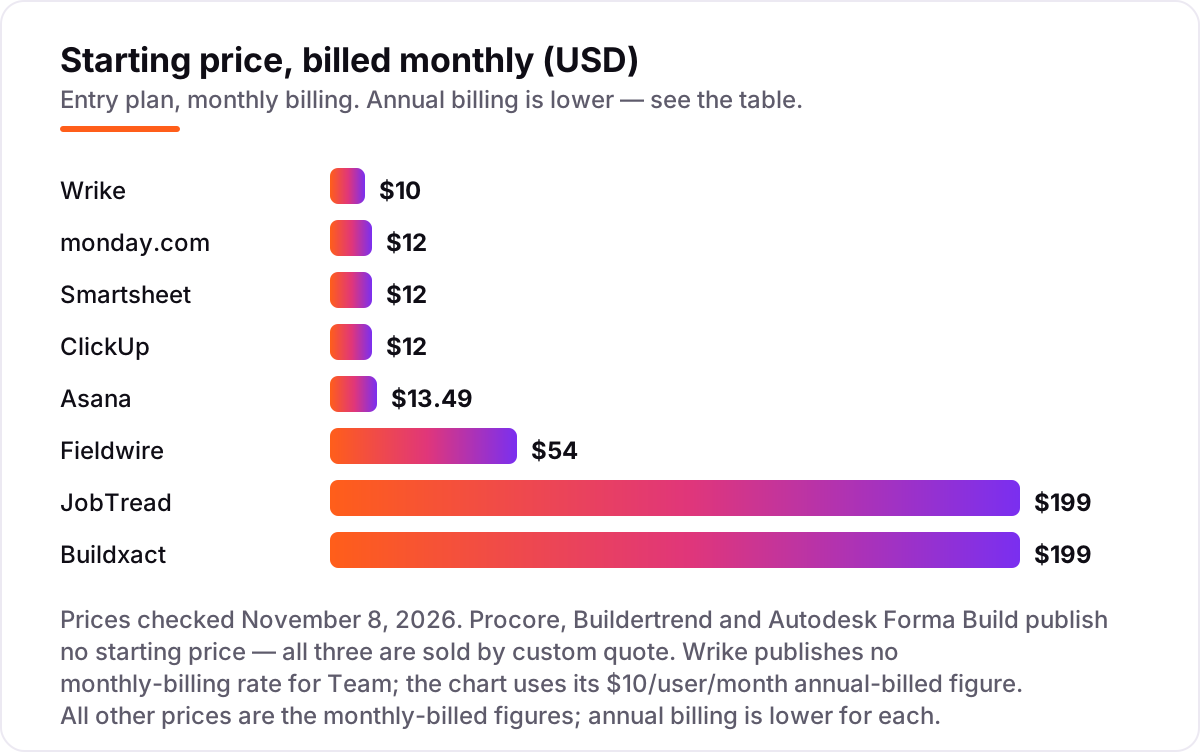
Take a 10-person team on a mid-size development: 5 people in the office and 5 in the field. On list prices billed monthly, the subscription costs $120 a month on monday.com Basic (10 seats at $12), $120 on ClickUp Core, $120 on Smartsheet Pro, $134.90 on Asana Starter, $100 on Wrike Team, $199 on JobTread, $199 on Buildxact Foundation, and $270 on Fieldwire Pro for the 5 field seats alone (5 at $54).
Two of those numbers need adjusting before they are real. First, monday.com sells seats in buckets, so a 10-person team fits its 10-seat bucket, but a 6-person team is pushed to 10 seats too — price your actual headcount, not the headline rate. Second, Smartsheet Pro caps at 10 members, so an 11th hire jumps the whole team to Business at $19 a member a month, or $190 a month for 10 people.
Over a year on annual billing, the same 10-person team pays $1,080 on monday.com Basic, ClickUp Core or Smartsheet Pro, $1,200 on Wrike Team, $1,318.80 on Asana Starter, $1,908 on JobTread, $2,028 on Buildxact Foundation, and $2,340 on Fieldwire Pro for the 5 field seats. The cheapest honest combination is often a split: a general tool for the office plus Fieldwire for the field. Five office seats on monday.com Basic cost $540 a year, plus five field seats on Fieldwire Pro at $2,340 a year, for $2,880 combined — against $1,908 for JobTread alone, which covers both but with lighter field tools. For a closer look at the money side, see our guide to accounting software for real estate developers.
Annual billing cuts the bill on every tool here that publishes two rates: monday.com Basic drops from $12 to $9 a seat, Asana Starter from $13.49 to $10.99, Smartsheet Pro from $12 to $9, ClickUp Core from $12 to $9, Fieldwire Pro from $54 to $39, JobTread from $199 to $159 and Buildxact Foundation from $199 to $169. Wrike publishes no monthly rate for Team, so annual billing is the only listed option. The three quote-only tools — Procore, Buildertrend and Autodesk Forma Build — are the ones where the real cost is a negotiation, not a number on a page.
Know the difference: development software vs general project management tools
The confusion in this category is between a tool that manages a development and a tool that manages tasks. A general tool — monday.com, Asana, Smartsheet, ClickUp, Wrike — tracks tasks, dates and people very well. It does not hold a budget, a change order, an RFI, a drawing version or a job cost. A development tool — Procore, Buildertrend, Autodesk Forma Build, JobTread, Buildxact, Fieldwire — ties those records to the same project, so a change order updates the budget and a revised drawing reaches the crew.
There is a second, quieter confusion: flat pricing versus per-seat pricing. Procore, Buildertrend, JobTread and Buildxact charge by project, volume or flat plan, so inviting the whole team costs nothing extra. Fieldwire and the general tools charge per seat, so every field worker, investor or client who needs full access adds to the bill. On a 20-person project the difference can be thousands of dollars a year, and it is the first thing to model before comparing headline prices.
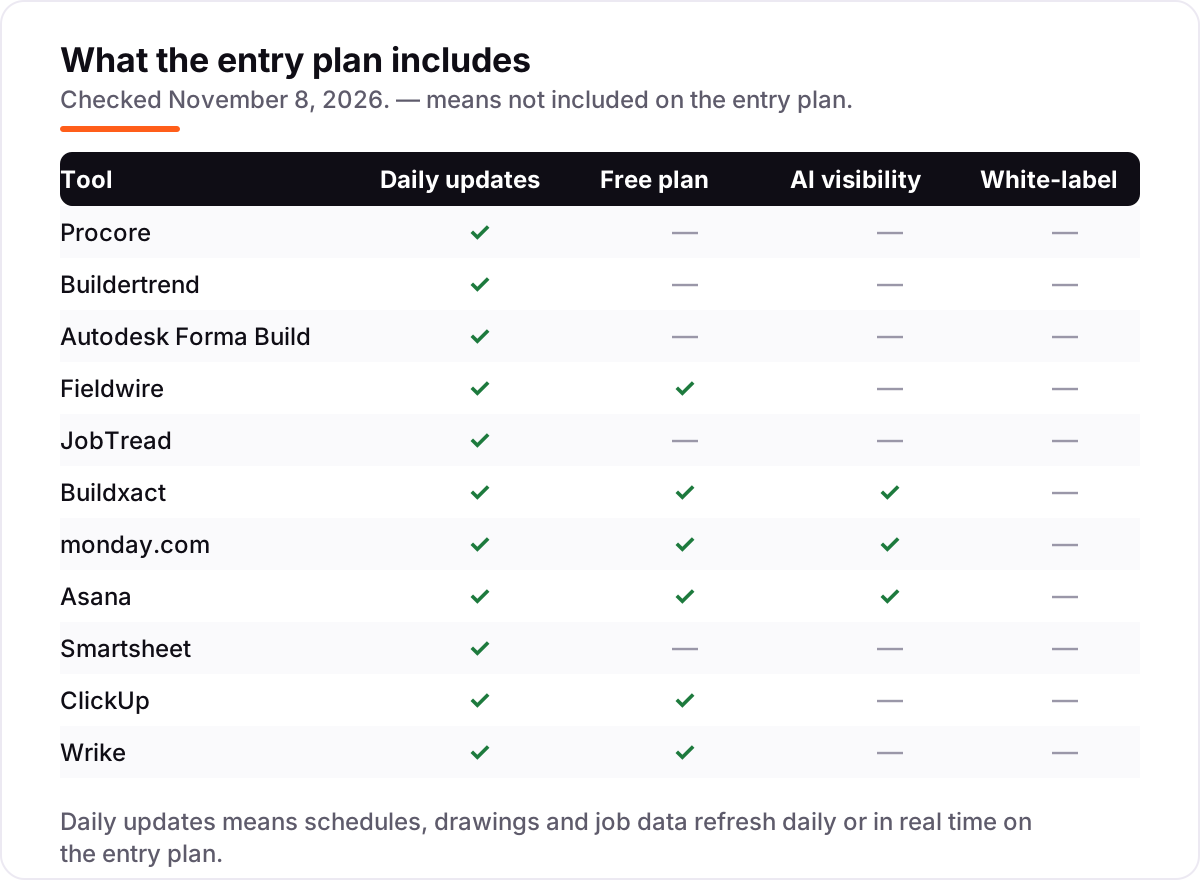
A third distinction worth knowing is the free plan versus the free trial. Fieldwire, monday.com, Asana, ClickUp and Wrike all offer a free plan, but only Fieldwire's is built for a jobsite — the general tools cap free use at two users, or cap storage so tightly that a real project outgrows it in weeks. JobTread and Smartsheet offer no free plan at all, only a trial or a money-back guarantee. Price the tool you will be on in month six, not the one you sign up for on day one.
Quick comparison: tool type by need
| Buyer | Best pick | Why |
|---|---|---|
| Large developer, many projects | Procore | The full record from preconstruction to closeout, priced by volume, unlimited users |
| Residential developer or home builder | Buildertrend | All-in-one for residential work with a client portal, quote-based pricing |
| BIM-driven commercial work | Autodesk Forma Build | The model, drawings and field work in one environment, quote-based |
| Field team on drawings and punch lists | Fieldwire | Free to start, Pro is $39/user/month billed annually, works offline |
| Small developer that manages by budget | JobTread | One plan, every feature, $199/month with the price printed on the page |
| Team that wants a general tool | monday.com | Visual boards from $9/seat/month billed annually, free for 2 users |
Mistakes to avoid
- Budgeting on the per-seat price. A $9 seat that cannot hold a budget, a change order or a drawing version is more expensive than a $199 flat plan that can. Price the job, not the seat.
- Buying a quote-only tool without a written quote. Procore, Buildertrend and Autodesk Forma Build publish no price, and the number depends on volume and modules. Get it in writing before the team is trained on the tool.
- Ignoring the seat cap that bites first. Smartsheet Pro stops at 10 members, Wrike Team stops at 15 users, and monday.com sells in buckets — a single hire can double the bill overnight.
- Giving the field a desktop tool. If the crew cannot open the current drawing on a phone with no signal, they will work from a printed set and the system will go stale. Fieldwire exists for this exact reason.
- Forgetting the second project. Flat-priced tools cover every project in the plan, but per-seat tools charge the same seats again only if the team grows — check whether the quote covers the whole portfolio or one project at a time.
How we chose
We checked each vendor's own pricing page on November 8, 2026 and recorded the starting price exactly as shown, including the annual-billing figure where the page lists one, and we ranked the tools by fit for the most common buyer — a developer running several projects at once — not by brand size. Procore, Buildertrend and Autodesk Forma Build publish no starting price, so they are listed as custom quote; the third-party reports that put Buildertrend's last published tiers around $339 to $1,099 a month are not vendor-verified and are not used as prices here. Ratings come from G2 pages checked the same day, except JobTread, whose G2 pages showed conflicting review counts (97 and 118) on November 8, 2026, so its rating is omitted rather than guessed. Autodesk renamed Autodesk Build to Forma Build in March 2026, and G2 now lists the product as Autodesk Forma. No vendor paid for a place in this list, and none of the links here are affiliate links.
What to do next
Start with the free plan or trial of your top pick and run one real phase of a live project through it. Check that the field team can use it offline, that the budget report matches your accountant's numbers, and that the client portal answers the questions buyers actually ask. If the tools are sorted but new buyers and investors are not finding your projects, our monthly SEO service handles the visibility side — or compare options in our guide to digital tools for construction management. Once your tools are in place, find out what's holding your rankings back.
Your stack only works if people find you
SerpAstra fixes what keeps your site off page one and makes it easy for AI assistants to recommend.
Get a free audit→Sources we checked (21)
- Procore pricing — procore.com/pricing (checked November 8, 2026)
- Buildertrend pricing — buildertrend.com/pricing (checked November 8, 2026)
- Autodesk Forma Build pricing — construction.autodesk.com/pricing (checked November 8, 2026)
- Fieldwire pricing — fieldwire.com/pricing (checked November 8, 2026)
- JobTread pricing — jobtread.com/pricing (checked November 8, 2026)
- Buildxact pricing — buildxact.com/pricing (checked November 8, 2026)
- monday.com pricing — monday.com/pricing (checked November 8, 2026)
- Asana pricing — asana.com/pricing (checked November 8, 2026)
- Smartsheet pricing — smartsheet.com/pricing (checked November 8, 2026)
- ClickUp pricing — clickup.com/pricing (checked November 8, 2026)
- Wrike pricing — wrike.com/price (checked November 8, 2026)
- Procore reviews — g2.com/products/procore/reviews (checked November 8, 2026)
- Buildertrend reviews — g2.com/products/buildertrend/reviews (checked November 8, 2026)
- Autodesk Forma reviews — g2.com/products/autodesk-forma-formerly-autodesk-construction-cloud/reviews (checked November 8, 2026)
- Fieldwire reviews — g2.com/products/fieldwire/reviews (checked November 8, 2026)
- Buildxact reviews — g2.com/products/buildxact/reviews (checked November 8, 2026)
- monday.com reviews — g2.com/products/monday-com/reviews (checked November 8, 2026)
- Asana reviews — g2.com/products/asana/reviews (checked November 8, 2026)
- Smartsheet reviews — g2.com/products/smartsheet/reviews (checked November 8, 2026)
- ClickUp reviews — g2.com/products/clickup/reviews (checked November 8, 2026)
- Wrike reviews — g2.com/products/wrike/reviews (checked November 8, 2026)
Shamim
Founder of SerpAstra
A full-stack SEO and digital marketer who spends most days on Local SEO for dental practices, AI search visibility and lead generation.
Frequently asked questions
What is the best project management software for real estate development?
Procore is the best fit for large developments: the full project record from preconstruction to closeout, with unlimited users, priced by annual construction volume. For residential work, Buildertrend is the strongest all-in-one. For small teams, JobTread gives the best value with a published price, from $199 a month.
How much does project management software for real estate development cost?
Entry prices run from $0 to $199 a month. Fieldwire, monday.com, Asana, ClickUp and Wrike all have free plans, and the first paid plans cost $9–$12 per user a month. Procore, Buildertrend and Autodesk Forma Build publish no price and are sold by custom quote, which usually means five-figure annual contracts.
Is there free project management software for real estate development?
Yes, with limits. Fieldwire Basic is free for 5 users and 3 projects and is built for the jobsite. ClickUp and Wrike have free plans with unlimited users, while monday.com and Asana cap free use at 2 users. None of the construction-native suites — Procore, Buildertrend, JobTread or Buildxact — offers a full free plan.
Do I need construction software, or will a general tool like monday.com or Asana work?
A general tool works when the job is mostly tasks, dates and people: tracking phases, milestones and approvals across a small team. It falls short when you need budgets, change orders, RFIs, drawing versions and job costing tied to the same record. Most developers pair a general tool for the office with Fieldwire for the site.
What is the difference between Procore and Buildertrend?
Procore is built for large, complex commercial work with deep financial tools and unlimited users, priced by annual construction volume. Buildertrend is built for residential builders and remodelers, with a client portal, selections and warranty tracking. Both are quote-only in 2026, so the right choice depends on project size and type, not price.
Can I switch project management software mid-project?
Yes, but plan the move between phases, not in the middle of one. Export schedules, budgets, open RFIs, punch lists and the document register from the old tool, then import them and reconcile the budget before going live. Switching mid-phase means running two systems through the most error-prone weeks of the job.
Does project management software include estimating and job costing?
Usually only in the construction-native tools. JobTread, Buildxact and Buildertrend include estimating and job costing, and Procore and Autodesk Forma Build cover them in their financial modules. General tools like monday.com, Asana, Smartsheet, ClickUp and Wrike track tasks and dates only, so estimating needs a separate tool.
Free SEO and AI visibility audit
Find out what is holding your rankings back
Send us your site. Within 2 business days you get a written audit, an AI visibility check and a short fix list ranked by impact. Free, with no contract attached.
Request my free audit→Related guides
 Local Business & Vertical Software7 Best Accounting Software for Real Estate Developers in 2026, ComparedCompare the 7 best accounting software for real estate developers on job costing, multi-entity reporting and price, with every price checked November 7, 2026.Read guide →
 Local Business & Vertical Software10 Best Digital Tools for Construction Management in 2026, ComparedCompare the 10 best digital tools for construction management on price, field tools, job costing and AI features, with every price checked November 7, 2026.Read guide →
 Local Business & Vertical Software9 Best CAD Software for Construction in 2026, ComparedCompare the 9 best cad software for construction tools on price, DWG and BIM support, and free plans, with every price checked November 7, 2026.Read guide →