
9 Best Real Estate Development Software in 2026, Compared
Compare the 9 best real estate development software tools on price, feasibility, budgets and draws, with every price checked November 8, 2026.
 Shamim Mia, Founder, SerpAstraLast verified November 8, 202613 min read
We compare pricing pages, documentation and public reviews. We never accept payment for rankings.

Key takeaways
- Northspyre is the best fit for most development teams, with TestFit at $75/month for feasibility, JobTread at $199/month for estimating and job costing, and Rabbet from $375/month per project for draw management.
- Five of the nine tools publish no starting price — budget for a sales conversation and a five-figure annual contract on Northspyre, Procore, Buildertrend, Dealpath and Juniper Square.
- The single most important buying factor is which job you are buying for: feasibility, deal pipeline, budgets and draws, or construction execution — no one tool covers all four well.
- Only Fieldwire has a free plan, TestFit is the cheapest paid entry at $75/month, and Rabbet's $15,000 minimum annual contract is the cost that surprises buyers most.
On this page
Quick comparison
| Tool | Best for | Starting price | Free plan |
|---|---|---|---|
| Northspyre | Development teams that want one system for budgets, draws, lender reporting and forecasting across a whole portfolio | Custom quote | No |
| TestFit | Developers and architects who need to test whether a site pencils before spending on full design | $75/mo | No |
| Procore | Large developers and general contractors running complex commercial projects with many stakeholders | Custom quote | No |
| Buildertrend | Residential builders and small developers who want scheduling, selections and client communication in one subscription | Custom quote | No |
| Rabbet Development | Owner-developers who need lender-ready draw packages and a live view of cost at completion | $375/mo per project | No (pre-dev free) |
| Dealpath | Investment teams tracking acquisitions, dispositions and debt deals from sourcing to close | Custom quote | No |
| Juniper Square | Fund sponsors raising capital who want investor relations and fund administration in one platform | Custom quote | No |
| JobTread | Small to mid-size builders who want estimating, job costing and invoicing at one published price | $199/mo | No |
| Fieldwire | Field teams that need plans, punch lists and daily reports on a phone, with a genuinely free starting tier | $39/user/mo | Yes (free Basic) |
Make one of these tools?
We re-check this list every quarter. Send a correction, request a review, or ask about a clearly labeled sponsored spot.
Request a listingThe best real estate development software

Northspyre
Best for: Development teams that want one system for budgets, draws, lender reporting and forecasting across a whole portfolio
Northspyre is built for the developer's side of the table, not the contractor's. Budgets, commitments, change orders, draw requests and forecasting live in one system, and the reporting is designed for the people who fund the project: lenders and equity partners. Instead of stitching spreadsheets together at draw time, the team works from one set of numbers that everyone can see.
The catch is the sales process. There is no published price, no free trial and no self-serve signup, so budgeting starts with a demo and a quote, and implementation takes weeks. The platform is also built for firms running multiple projects, so a one-project developer pays for scale it will not use. Buy Northspyre when draws and lender reporting are the bottleneck.
What we like
- Purpose-built for the developer side: budgets, commitments, change orders, draw requests and forecasting in one place
- Draw packages are built to be lender-ready, which cuts the rework that usually delays funding
- AI Budget Optimizer and portfolio analytics flag cost exposure early, before it becomes a project problem
- Supports more than $200 billion in projects, so the workflows are proven on large institutional portfolios
Watch out for
- Quote-only pricing with no published starting figure, so budgeting starts with a sales conversation
- Built for professional development firms, so a one-project shop will find it more platform than it needs
- Implementation takes weeks and needs clean budget data to work well

TestFit
Best for: Developers and architects who need to test whether a site pencils before spending on full design
TestFit answers the first question on every deal: does this site pencil? Feed it a parcel and it generates 2D and 3D massing, unit mixes and parking counts in minutes, with a yield estimator that updates as you change the scheme. Urban Planner costs $75 a month with unlimited users, so the whole deal team can test options together before anyone pays an architect.
Know what the $75 buys. Generative design — the feature that iterates schemes for you — sits in Site Solver from $15,000 a year, and the parking automation that most developers want is Parking Solver at $195 a month. The add-ons are priced separately too. Buy TestFit when feasibility speed is the bottleneck; buy Northspyre when the deal is won and the budget needs managing.
What we like
- The only tool here with a published price under $100 a month: Urban Planner at $75 a month
- Turns a parcel into 2D and 3D massing, unit mixes and parking counts in minutes, not days
- Unlimited users on every plan, so the whole deal team can test schemes together
- Optional Pro Forma add-on syncs a live pro forma to the design as it changes
Watch out for
- Generative design sits in Site Solver from $15,000 a year, not in the $75 entry plan
- Parking Solver at $195 a month is a separate step up from Urban Planner
- Add-ons add up fast: Site Intelligence $150, Pro Forma $170 and MCP Connection $100 a month each

Procore
Best for: Large developers and general contractors running complex commercial projects with many stakeholders
Procore is the execution engine for big, complex builds. RFIs, submittals, budgets, daily logs, quality and safety all run in one system, and the annual licence covers unlimited users, so the field crew, the office and the owner all work from the same drawings and the same numbers. It carries the strongest review record in this list: 4.6 out of 5 across more than 4,600 G2 reviews.
The price is the problem for smaller firms. There is no published figure — the annual contract is quoted on your annual construction volume — and reported costs run from about $375 a month to more than $20,000 a year for larger firms. Setup takes time and the financial tools have a learning curve. Buy Procore when the project is big enough; buy JobTread or Fieldwire when it is not.
What we like
- The deepest construction platform here: RFIs, submittals, budgets, daily logs and financials in one system
- Strongest review record in this list at 4.6 out of 5 across more than 4,600 G2 reviews
- Unlimited users on the annual licence, so field and office teams share one source of truth
- Procore Helix AI agents handle document search, RFI drafting and submittal review
Watch out for
- Quote-only annual contract priced on annual construction volume, so small firms cannot budget from a list price
- The breadth that makes it powerful also means a long setup and a real learning curve
- Financial tools draw criticism from reviewers for being harder to use than the field tools

Buildertrend
Best for: Residential builders and small developers who want scheduling, selections and client communication in one subscription
Buildertrend is the residential builder's all-in-one: scheduling, daily logs, estimating, selections, warranty and a branded client portal in a single subscription, with unlimited users and unlimited projects on every plan. The selections module is the standout — homeowners pick finishes in the portal instead of over email — and estimates, change orders and purchase orders all connect to the same schedule and budget.
The price is no longer public. Buildertrend stopped publishing tier prices in early 2025 and now quotes each builder on annual construction volume; the last published tiers ran roughly $339 to $1,099 a month. Long-time customers also report sharp increases at renewal, so get the renewal terms in writing. Buy Buildertrend for residential volume; buy JobTread when you want a published price.
What we like
- All-in-one for residential work: scheduling, daily logs, estimating, selections, warranty and client portal
- Unlimited users and unlimited projects on every plan, with no per-seat fees
- Branded client portal keeps homeowners informed without constant phone calls
- Estimating, change orders and purchase orders connect straight to the schedule and budget
Watch out for
- No published prices since early 2025: every customer gets a custom quote based on annual construction volume
- Long-time customers report sharp renewal increases after the first term
- Reviewers flag a steep learning curve and a mobile app that can be unreliable

Rabbet Development
Best for: Owner-developers who need lender-ready draw packages and a live view of cost at completion
Rabbet Development is the financial control room for a development: budgets, anticipated costs, draw schedules and funding sources in one system, with an anticipated cost report that rebuilds itself from live data. Invoices arrive in a central inbox, the AI document router codes each one to the right budget line, and the draw package — cover sheet, draw summary, supporting documents — assembles itself in the format your lender requires.
Watch the minimum, not the monthly figure. Lite is $375 a month per project billed annually, but every contract carries a $15,000 minimum annual commitment, so a single small project costs $15,000 a year, not $4,500. Cash-flow projections also wait for Premium at $840 a month per project. Buy Rabbet when slow draws are costing you funding days; buy Northspyre when you need the wider portfolio platform.
What we like
- Draw packages assemble themselves from approved invoices, lien waivers and AIA pay applications
- AI document router reads every invoice on arrival and codes it to the right budget line
- Anticipated cost report rebuilds automatically from live budget, commitment and change-order data
- Pre-development projects are unlimited and always free, including soft-cost draw workflows
Watch out for
- Priced per project, and the $15,000 minimum annual contract puts it out of reach for a single small project
- Lite at $375 a month per project covers document management and draw preparation only; cash-flow projections need Premium
- No free trial, so evaluation runs through a sales demo

Dealpath
Best for: Investment teams tracking acquisitions, dispositions and debt deals from sourcing to close
Dealpath is the command center for a real estate investment team: sourcing, underwriting, diligence and closing in one pipeline, with a data model built around deals rather than contacts. AI Extract reads an offering memorandum and pulls the structured data into the pipeline in minutes, and Dealpath Connect pipes curated listings from major brokerages straight into buy-side pipelines.
This is an institutional tool with institutional terms. Pricing is quote-only with a five-user minimum, implementation typically runs 6 to 8 weeks, and there is no free trial — evaluation runs through a demo. The review base is also small at 10 G2 reviews. Buy Dealpath when the pipeline is the business; buy TestFit when the question is still whether the site works.
What we like
- Purpose-built for real estate deal flow, not a generic CRM with a real estate label
- AI Extract reads offering memoranda and broker flyers and pulls structured data into the pipeline
- Dealpath Connect pipes curated listings from major brokerages straight into buy-side pipelines
- Used by institutional firms including Blackstone and AEW, so the workflows match how big deal teams work
Watch out for
- Quote-only pricing with a five-user minimum, so small deal teams pay for seats they may not need
- Implementation typically takes 6 to 8 weeks before the team is fully live
- Reviewers want more flexible reporting exports and deeper accounting integrations

Juniper Square
Best for: Fund sponsors raising capital who want investor relations and fund administration in one platform
Juniper Square is where a fund sponsor manages the money side of development: a branded investor portal, capital calls, distributions, document sharing and reporting, with an embedded fund administration team handling bookkeeping and compliance alongside the software. It is the highest-rated tool in this list at 4.7 out of 5 on G2, and reviewers praise the support team most.
The price is the hurdle. Juniper Square publishes nothing — third parties report a starting point around $18,000 a year, which the company does not confirm — and there is no free trial, so the first number you see comes from a sales conversation. Onboarding a large investor list also takes time. Buy Juniper Square when you are raising and reporting to investors; buy Rabbet when the money is already committed and the draws need managing.
What we like
- Highest-rated tool here at 4.7 out of 5 on G2, with 106 reviews
- Branded investor portal, capital-call processing and document distribution in one place
- Embedded fund administration team handles bookkeeping, reporting and compliance alongside the software
- Strong support scores: reviewers single out responsive customer service
Watch out for
- No published pricing: third parties report a starting point around $18,000 a year, which Juniper Square does not confirm
- No free trial and no free plan, and billing can start during implementation
- Reviewers flag limited accounting integrations and a long onboarding for large investor lists

JobTread
Best for: Small to mid-size builders who want estimating, job costing and invoicing at one published price
JobTread is the transparent-price pick in a category full of quote-only sales. One plan, every feature included — estimates, on-screen takeoff, budgets, scheduling, job costing, invoicing and payments — for $199 a month with the first internal user included, plus $20 a month per extra user. Annual billing takes 20% off, and customers, vendors, subcontractors and photo-only field crew are always free.
The trade-off is the trial: there is none. JobTread assigns every customer a success manager instead, and offers a 30-day money-back guarantee on monthly plans. Per-user pricing also adds up if every field worker needs a full login. Buy JobTread when you want to know the price before the demo; buy Buildertrend when selections and the client portal matter more than the price list.
What we like
- Highest review score in this list at 4.9 out of 5 on G2, from 118 reviews
- One plan with every feature included: estimates, takeoff, budgets, scheduling, invoicing and payments
- Published pricing with no contract: $199 a month for the first user, $20 a month per extra user
- Customers, vendors, subcontractors and photo-only field crew use the system free
Watch out for
- No free trial: evaluation means paying for the first month, softened only by a 30-day money-back guarantee
- Per-user pricing adds up when field staff need full logins, though photo-only crew users are free
- Built for residential builders, so it is not a fit for service dispatch work

Fieldwire
Best for: Field teams that need plans, punch lists and daily reports on a phone, with a genuinely free starting tier
Fieldwire is the field-first tool in this list, built for the phone in a site worker's hand rather than the desk in the office. Plans, punch lists, tasks, photos and checklists all work offline and sync when the connection returns, and the Basic plan is genuinely free for 5 users, 3 projects and 100 sheets. Pro costs $39 a user a month billed annually and adds reports, sheet compare and unlimited projects.
The limits sit at the top of the ladder. RFIs, submittals, change orders and budget tracking all wait for Business Plus at $89 a user a month, and every field seat is a paid seat, so a big crew gets expensive where Procore or Buildertrend charge flat. Buy Fieldwire when the field team needs plans today; buy Procore when the office needs the full financial picture too.
What we like
- The only free plan here: Basic covers 5 users, 3 projects and 100 sheets at $0
- Plans stay available offline on site, with markups, photos and punch lists syncing later
- Pro at $39 a user a month adds reports, sheet compare and unlimited projects and sheets
- Easiest field tool here to adopt: reviewers praise the short learning curve most
Watch out for
- RFIs, submittals, change orders and budget tracking wait for Business Plus at $89 a user a month
- Per-user pricing means a large field crew pays for every seat, unlike the flat-rate tools here
- Reviewers report slow performance switching between projects and limited customization
The best real estate development software does four different jobs, and the first mistake is buying one tool for all of them. This list covers nine tools that span feasibility, deal pipeline, budgets and draws, and construction execution, ranked by fit for the most common buyer: a development team running several projects at once. Every price was checked on the vendor's own pricing page on November 8, 2026, and five of the nine tools publish no price at all — they quote by project, volume or fund size.
How to choose the best real estate development software
- Name the job first. Feasibility is TestFit, deal pipeline is Dealpath, budgets and draws are Northspyre and Rabbet, capital is Juniper Square, and execution is Procore, Buildertrend, JobTread or Fieldwire. A tool bought for the wrong job is the most expensive mistake in this list.
- Count the pricing basis, not just the price. Rabbet charges per project, Fieldwire and JobTread per user, Procore and Buildertrend on annual construction volume, and Juniper Square on fund size. The same team can pay $900 a year or $15,000 a year depending on which basis applies.
- Check the minimum contract. Rabbet's $15,000 minimum annual contract and Juniper Square's reported $18,000-a-year starting point matter more than their monthly figures. Annual contracts are the norm here, and implementation typically runs 4 to 8 weeks.
- Ask who else touches the numbers. Lenders need draw packages they accept without rework, investors need portal reporting, and accountants need a sync to QuickBooks Online or Yardi. Pick the tool your lender and your accountant already accept.
- Try the free tier where one exists. Only Fieldwire has a free plan, so for the other eight the demo is the trial. Bring one real project to the demo — a real budget, a real draw — and judge the tool on that, not on the vendor's sample portfolio.
Real estate development is a local business, so the software only pays off if people can find the project. Our local SEO service covers how development firms show up on Google Maps and in AI answers for their market. And before you publish new project pages, run your titles through the free SERP snippet preview tool — it shows exactly how the title and description will look in Google.
Whatever you shortlist, demo it with real data before you sign an annual contract. The quote-only tools in this list will not give you a number until sales has seen your project count, your volume and your team size, so go into that conversation knowing your numbers: how many active projects, how many users, how many draws a year. That is the only way to compare a $75-a-month feasibility tool against a custom quote fairly.
Real estate development software pricing: what you will actually pay
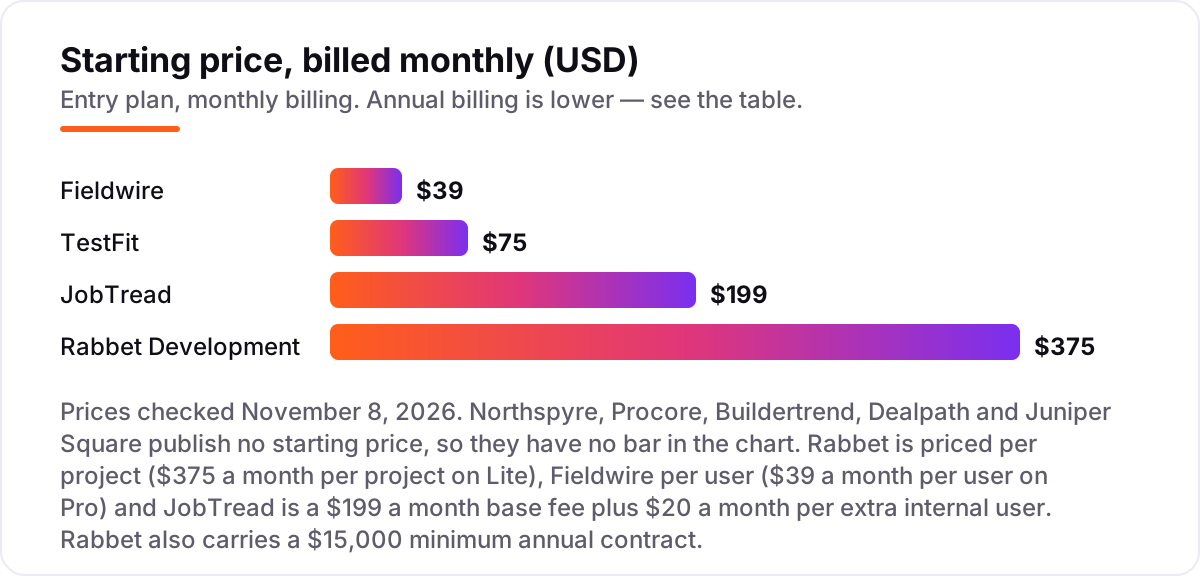
Take a five-person development team running two active projects. On list prices, the subscription costs $75 a month on TestFit Urban Planner, $195 a month on Fieldwire Pro for five users at $39 each, $279 a month on JobTread — a $199 base fee plus four extra users at $20 each — and $750 a month on Rabbet Lite at $375 per project for two projects.
Two of those numbers need adjusting before they are real. Fieldwire's $39 is the annual-billing figure; billed monthly it is $54 a user, so five users cost $270 a month. Rabbet's $750 a month is $9,000 a year, but Rabbet's $15,000 minimum annual contract applies, so the real Rabbet bill is $15,000 a year, or $1,250 a month — nearly double the per-project maths.
Over a year, that is $900 on TestFit, $2,340 on Fieldwire Pro billed annually, $2,676 on JobTread billed annually ($159 base plus four users at $16), $3,348 on JobTread billed monthly, and $15,000 on Rabbet at the contract minimum. The same five people and the same two projects cost $900 a year at the cheap end and $15,000 at the dear end — and the five quote-only tools sit outside this maths entirely, with annual contracts that third parties report starting around $18,000 a year for Juniper Square. If the firm also needs its books kept straight, the accounting side is covered in our guide to the best accounting software for real estate developers.
Annual billing cuts the bill on the priced tools: JobTread drops from $279 to $223 a month, Fieldwire from $54 to $39 a user, and TestFit's Urban Planner is monthly-only at $75. One more cost to check before you commit: a second project is a second Rabbet fee, a second Procore module discussion, and more Fieldwire seats — price the second project before you commit to a tool for the first.
Know the difference: development software vs construction software
The confusion in this category is between managing the money and managing the build. Development software — Northspyre, Rabbet, Dealpath, Juniper Square — tracks feasibility, budgets, draws, lender reporting and investor relations. Construction software — Procore, Buildertrend, JobTread, Fieldwire — tracks schedules, RFIs, submittals, daily logs and field work. Most development teams need one of each, and the expensive mistake is buying a construction tool and expecting it to produce a lender-ready draw package.
There is a second, quieter confusion: a per-project price is not a per-user price. Rabbet's $375 a month is per project, so two projects cost $750, while Fieldwire's $39 is per user, so five users cost $195. Procore and Buildertrend charge neither way — they quote on annual construction volume — so a team that grows its volume can see the price rise even if headcount stays flat.
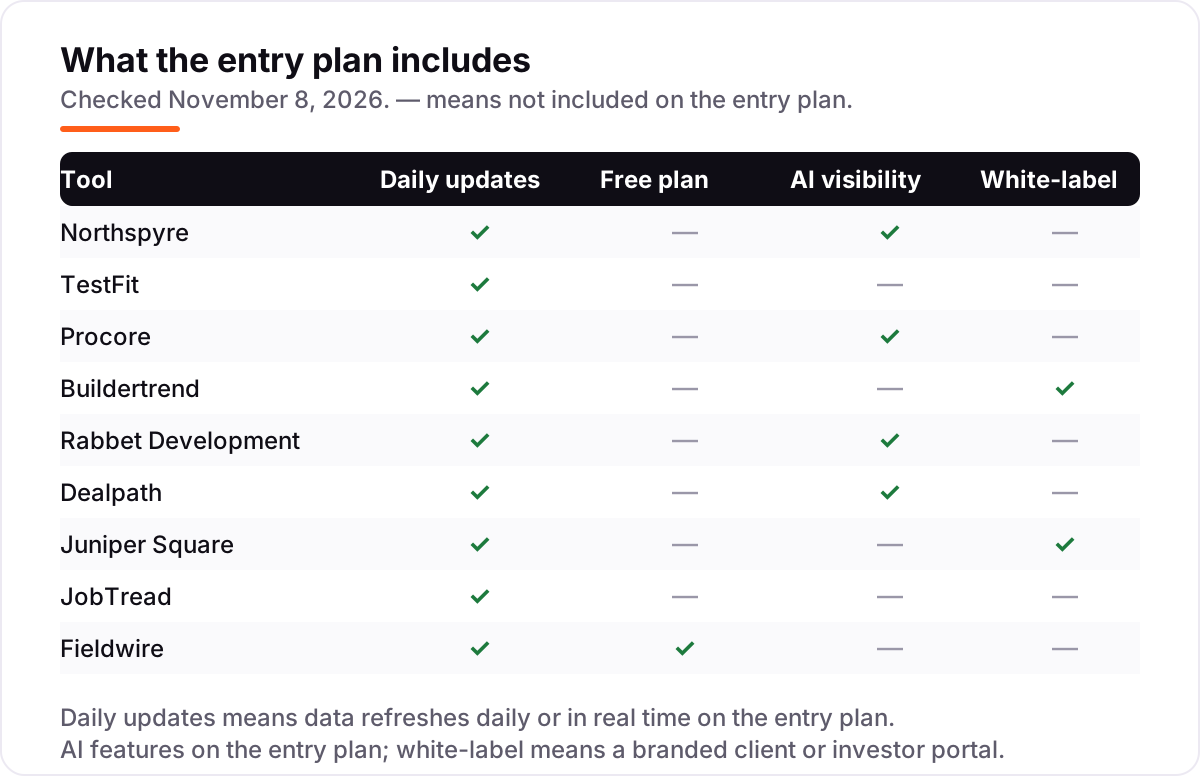
A third distinction worth knowing is a free plan versus a free trial. Only Fieldwire has a free plan here, and it covers 5 users and 3 projects. Everything else is a paid subscription or a custom quote, and several tools — JobTread, Northspyre, Rabbet — offer no free trial at all, only a demo or, in JobTread's case, a 30-day money-back guarantee. Judge the quote-only tools on a demo with your real project data, not on a trial you will never get.
Quick comparison: tool type by need
| Buyer | Best pick | Why |
|---|---|---|
| Development team managing budgets and draws | Northspyre | Budgets, draws and lender reporting in one system, priced by quote |
| Testing whether a site pencils | TestFit | Feasibility in minutes from $75/month, unlimited users |
| Large commercial execution | Procore | Deepest construction platform, 4.6/5 on G2, priced by volume |
| Residential builder | Buildertrend | Scheduling, selections and client portal, unlimited users, priced by quote |
| Lender-ready draw packages | Rabbet Development | Draws assemble themselves, from $375/month per project |
| Deal pipeline and acquisitions | Dealpath | Purpose-built deal flow with AI memo extraction, priced by quote |
| Raising capital from investors | Juniper Square | Investor portal plus fund administration, 4.7/5 on G2 |
| Published price, all features | JobTread | One plan, every feature, from $199/month, 4.9/5 on G2 |
| Field team on a budget | Fieldwire | Free Basic plan, Pro is $39/user/month billed annually |
Mistakes to avoid
- Buying one tool for all four jobs. Feasibility, deal pipeline, budgets and field execution are different jobs. A single tool that claims all four usually does one well and the rest badly.
- Budgeting on the monthly figure when a minimum applies. Rabbet's $375 a month per project is $15,000 a year once the minimum contract applies. Always ask for the minimum annual commitment before comparing monthly prices.
- Comparing a per-project price with a per-user price. Rabbet charges per project, Fieldwire per user, Procore and Buildertrend on volume. Convert every quote to the same basis — your team, your project count — before comparing.
- Skipping the lender check. A draw package your lender rejects costs weeks. Ask your lender whether they accept Northspyre or Rabbet draw packages before you buy either.
- Signing an annual contract after a sample-portfolio demo. Demo with one real project — a real budget, a real draw, a real investor report — and confirm the renewal price and the implementation timeline in writing first.
How we chose
We checked each vendor's own pricing page on November 8, 2026 and recorded the starting price exactly as shown, including the annual-billing figure where the page lists one. Five tools publish no starting price — Northspyre, Procore, Buildertrend, Dealpath and Juniper Square — and we list them as custom quote rather than repeating third-party estimates, except where we clearly label a reported figure. Ratings come from G2 review pages checked the same day. We ranked the tools by fit for the most common buyer — a development team running several projects at once — not by brand size. No vendor paid for a place in this list, and none of the links here are affiliate links.
What to do next
Start with the cheapest test that answers your real question: run one site through TestFit's Urban Planner, or set up one project on Fieldwire's free Basic plan, and judge the tool on real data. For the quote-only tools, book demos with the same project in hand so the quotes are comparable, and get the minimum annual commitment and the renewal terms in writing. If the tools are sorted but new projects are not finding you, our monthly SEO service handles the visibility side — or compare providers in our guide to digital tools for construction management. Once your tools are in place, find out what's holding your rankings back.
Your stack only works if people find you
SerpAstra fixes what keeps your site off page one and makes it easy for AI assistants to recommend.
Get a free audit→Sources we checked (18)
- Northspyre pricing — northspyre.com (checked November 8, 2026)
- TestFit pricing — testfit.io/pricing (checked November 8, 2026)
- Procore pricing — procore.com/pricing (checked November 8, 2026)
- Buildertrend pricing — buildertrend.com/pricing (checked November 8, 2026)
- Rabbet Development pricing — rabbet.com/developers/pricing (checked November 8, 2026)
- Dealpath plans — dealpath.com/plans (checked November 8, 2026)
- Juniper Square — junipersquare.com (checked November 8, 2026)
- JobTread pricing — jobtread.com/pricing (checked November 8, 2026)
- Fieldwire pricing — fieldwire.com/pricing (checked November 8, 2026)
- Northspyre on G2 — g2.com/products/northspyre/reviews (checked November 8, 2026)
- TestFit on G2 — g2.com/products/testfit/reviews (checked November 8, 2026)
- Procore on G2 — g2.com/products/procore/reviews (checked November 8, 2026)
- Buildertrend on G2 — g2.com/products/buildertrend/reviews (checked November 8, 2026)
- Rabbet Development on G2 — g2.com/products/rabbet-development/reviews (checked November 8, 2026)
- Dealpath on G2 — g2.com/products/dealpath/reviews (checked November 8, 2026)
- Juniper Square on G2 — g2.com/products/juniper-square/reviews (checked November 8, 2026)
- JobTread on G2 — g2.com/products/jobtread/reviews (checked November 8, 2026)
- Fieldwire on G2 — g2.com/products/fieldwire-by-hilti/reviews (checked November 8, 2026)
Shamim
Founder of SerpAstra
A full-stack SEO and digital marketer who spends most days on Local SEO for dental practices, AI search visibility and lead generation.
Frequently asked questions
What is the best real estate development software?
Northspyre is the best fit for most development teams, because it covers budgets, draws and lender reporting in one system. TestFit is the best starting point for feasibility at $75 a month, and Procore is the best choice for large commercial execution. The right pick depends on which job you are buying for.
How much does real estate development software cost?
Published prices run from $39 a user a month for Fieldwire Pro to $375 a month per project for Rabbet Lite, with TestFit at $75 a month and JobTread at $199 a month. Five of the nine tools publish no price and quote annually, so expect five-figure contracts on Northspyre, Procore, Buildertrend, Dealpath and Juniper Square.
Is there free real estate development software?
Only one tool here has a free plan: Fieldwire Basic is free for 5 users, 3 projects and 100 sheets. Rabbet offers free pre-development projects, but no full free plan. TestFit, JobTread, Northspyre, Procore, Buildertrend, Dealpath and Juniper Square all require a paid subscription.
What is the difference between development software and construction software?
Development software manages the money and the deal: feasibility, budgets, draws, lender reporting and investor relations, which is Northspyre, Rabbet, Dealpath and Juniper Square. Construction software manages the build: schedules, RFIs, submittals and field work, which is Procore, Buildertrend, JobTread and Fieldwire.
Do I need separate tools for feasibility and construction?
Most teams do. TestFit answers whether a site pencils before design starts, while Procore or JobTread run the build once the deal is won. Northspyre and Rabbet sit in between, tracking the budget and the draws. One tool rarely covers feasibility, deals, budgets and field work well.
Can I switch real estate development software later?
Yes, but plan the move between projects, not during one. Export budgets, commitments, draw history and project documents first, then rebuild the active budget in the new tool and reconcile it against the old one before going live. Annual contracts and implementation times of 6 to 8 weeks make mid-project switches costly.
Does real estate development software include accounting?
No, not as a full ledger. These tools track project budgets, commitments and draws, then sync with accounting software: Rabbet integrates with QuickBooks Online and Yardi, Northspyre reports feed your accounting, and JobTread connects to QuickBooks Online. Keep the ledger in your accounting tool and the project money here.
Free SEO and AI visibility audit
Find out what is holding your rankings back
Send us your site. Within 2 business days you get a written audit, an AI visibility check and a short fix list ranked by impact. Free, with no contract attached.
Request my free audit→Related guides
 Local Business & Vertical Software7 Best Accounting Software for Real Estate Developers in 2026, ComparedCompare the 7 best accounting software for real estate developers on job costing, multi-entity reporting and price, with every price checked November 7, 2026.Read guide →
 Local Business & Vertical Software10 Best Digital Tools for Construction Management in 2026, ComparedCompare the 10 best digital tools for construction management on price, field tools, job costing and AI features, with every price checked November 7, 2026.Read guide →
 Local Business & Vertical Software9 Best CAD Software for Construction in 2026, ComparedCompare the 9 best cad software for construction tools on price, DWG and BIM support, and free plans, with every price checked November 7, 2026.Read guide →