
8 Best Road Trip Apps in 2026: Free and Paid Apps Ranked
Compare the 8 best road trip apps on price, offline maps, live traffic and trip planning, with every price checked on the vendor's site on November 4, 2026.
 Shamim Mia, Founder, SerpAstraLast verified November 4, 202612 min read
We compare pricing pages, documentation and public reviews. We never accept payment for rankings.

Key takeaways
- Google Maps is the best free navigator, Waze the best for live traffic, and Roadtrippers the best planner at $11.99/month; GasBuddy Premium costs $9.99/month and Sygic Premium+ $4.99/month.
- Five of the eight apps are free for the core job — navigation and planning cost nothing until you pay for offline maps, live traffic or unlimited stops.
- The single most important buying factor is offline access: if your route crosses dead zones, pick an app with downloadable maps before you leave.
- TripIt Pro ($49/year) and Wanderlog Pro ($39.99/year) sell annual plans only, so there is no monthly price to compare.
On this page
Quick comparison
| Tool | Best for | Starting price | Free plan |
|---|---|---|---|
| Google Maps | Drivers who want the most reliable free navigation with live traffic, offline maps and places data in one app | Free | Yes (free) |
| Waze | Drivers who want the fastest live warnings about traffic, police, hazards and speed cameras from other drivers | Free | Yes (free) |
| Roadtrippers | Road trippers who plan routes around attractions, campgrounds and scenic stops and want RV-safe routing | $11.99/mo | Yes (free plan) |
| GasBuddy | Drivers who want the cheapest pump nearby and a fuel card that cuts the per-gallon price on long drives | $9.99/mo | Yes (free app) |
| Wanderlog | Travelers who plan day by day on a map and want group editing, budgets and offline access on the road | $39.99/yr | Yes (free plan) |
| TripIt | Travelers who book flights, hotels and rental cars and want every confirmation turned into one itinerary | $49/yr | Yes (free plan) |
| Sygic | Drivers who cross dead zones and want full offline maps with live traffic when signal returns | $4.99/mo | Yes (free plan) |
| HERE WeGo | Drivers who want a free offline navigator with no account, no ads and no subscription to manage | Free | Yes (free) |
Make one of these tools?
We re-check this list every quarter. Send a correction, request a review, or ask about a clearly labeled sponsored spot.
Request a listingThe best road trip apps

Google Maps
Best for: Drivers who want the most reliable free navigation with live traffic, offline maps and places data in one app
Google Maps is the navigation most drivers already have installed, and for a road trip that counts: free turn-by-turn directions, live traffic and automatic rerouting in almost every country, with business hours, reviews and photos for every stop along the way. You can save places to lists, share your live location with the car, and download offline maps for stretches with weak signal.
The limit is planning. Google Maps handles one destination at a time, so a multi-day trip with twenty stops in order needs a planner such as Roadtrippers or Wanderlog alongside it. Use it as the driver — the app that actually gets you there — and let a planner handle the itinerary. It is the right pick when you want the most reliable free navigation and already live in Google's world.
What we like
- Free turn-by-turn navigation with live traffic and automatic rerouting in almost every country
- Offline maps, saved places and live location sharing included at no cost
- Business hours, reviews and photos for stops along the route, plus toll and fuel-cost estimates
- Works on iOS, Android, web and in the car through Android Auto and Apple CarPlay
Watch out for
- Plans one route at a time, with no multi-day itinerary or ordered multi-stop trip builder
- Offline maps expire and need re-downloading, and they take up noticeable phone storage
- Can route drivers down narrow back roads to save a minute, and battery drain is heavy on long drives

Waze
Best for: Drivers who want the fastest live warnings about traffic, police, hazards and speed cameras from other drivers
Waze is the app to run when traffic is the enemy. Its alerts come from drivers on the road right now, so it spots a crash, a closure or a speed trap minutes before the other apps do, then reroutes you around it and updates your arrival time as conditions change. Planned drives and calendar sync tell you when to leave so you arrive on time.
The trade-off is dependence on signal. Waze has no offline maps, so it goes quiet in dead zones, and it navigates one destination at a time with no itinerary or multi-stop planner. Run it alongside Google Maps on the highway and a planner for the stops. It is the right pick when the drive is mostly city and highway, where its driver reports are densest.
What we like
- The fastest live traffic alerts in this list, reported by drivers on the road right now
- Real-time warnings for police, crashes, hazards, road closures and speed cameras
- Automatic rerouting around jams, with arrival times that adjust as conditions change
- Planned drives and calendar sync remind you when to leave for an on-time arrival
Watch out for
- No offline maps, so it stops working properly in areas with no mobile signal
- No trip planning, itinerary or multi-stop route builder — it navigates one destination at a time
- Crowdsourced reports can be wrong or out of date, and the map is weaker outside cities

Roadtrippers
Best for: Road trippers who plan routes around attractions, campgrounds and scenic stops and want RV-safe routing
Roadtrippers is the planner in this list: it builds the trip, not just the drive. Its database of 7 million points of interest surfaces the roadside attractions, diners and campgrounds you would otherwise miss, and you can order up to 150 stops per trip on Premium, collaborate with travel companions, and book from more than 50,000 campgrounds.
The free plan is a demo in practice — 1 saved trip and 3 stops — so a real road trip needs Basic at $11.99 a month, or $35.99 a year, which is the only sensible way to buy it. RV drivers get routing that avoids low bridges and propane restrictions. Pick it when the stops are the point of the trip, and pair it with Google Maps or Waze for the actual driving.
What we like
- The best stop discovery here: 7 million points of interest, from roadside attractions to campgrounds
- RV-specific routing avoids low bridges and propane restrictions, with 50,000-plus campgrounds to book
- Up to 150 stops per trip on Premium, with trip collaboration and custom map styles
- Autopilot suggests stops along your route based on your interests and other travelers
Watch out for
- Free plan covers only 1 saved trip and 3 stops per trip — a real road trip needs a paid plan
- Live traffic, offline maps and RV GPS sit on the paid tiers, not the free plan
- Monthly billing is steep: Basic costs $11.99 a month against $35.99 a year, so annual billing is the only sensible buy

GasBuddy
Best for: Drivers who want the cheapest pump nearby and a fuel card that cuts the per-gallon price on long drives
GasBuddy answers the one question every road tripper asks at every fill-up: where is the cheapest pump nearby. Its crowdsourced prices are reported by drivers, so you can see the price before you drive there, and the trip cost calculator estimates fuel for the whole route. The free Pay with GasBuddy+ card guarantees a small per-gallon saving wherever Mastercard is accepted.
Premium costs $9.99 a month, or $99 a year, and guarantees 20 cents off per gallon on the first 50 gallons a month, plus 24-hour roadside assistance from Allstate. Do the math first: at 20 cents a gallon, Premium needs about 50 gallons a month to break even. It is the right pick for high-mileage drivers, not for a driver who fills up twice a month.
What we like
- Crowdsourced pump prices show the cheapest station nearby before you drive anywhere
- Free Pay with GasBuddy+ card guarantees a small per-gallon saving at stations that take Mastercard
- Premium guarantees 20 cents off per gallon on the first 50 gallons a month, plus roadside assistance
- Trip cost calculator and outage tracking help plan fuel stops on long routes
Watch out for
- Premium only pays off if you buy close to 50 gallons a month at participating stations
- The Pay with GasBuddy+ card links to a bank account by ACH, which not every driver wants
- Crowdsourced prices can be stale at quiet stations, and Premium is non-refundable

Wanderlog
Best for: Travelers who plan day by day on a map and want group editing, budgets and offline access on the road
Wanderlog is built around a map: add places, sights and restaurants, drag them into days, and see the route make sense, with friends able to edit the same plan live. Budgets are logged against each day, and the free plan covers most of the planning — the itinerary builder, shared editing and a capped AI assistant.
Pro costs $39.99 a year on the web, annual only, and adds the features that matter on the road: offline access to your plans, automatic route optimization and unlimited AI help, plus automatic Gmail import of bookings. Pick it when the trip is planned day by day with other people, and let Google Maps handle the driving once the plan is set.
What we like
- Map-based day-by-day itineraries: drag places into days and watch the route make sense
- Friends edit the same trip live, with shared budgets logged against each day
- Pro adds offline access, automatic route optimization and a full AI trip assistant
- Exports the finished plan to Google Maps, so the navigation you already use takes over
Watch out for
- Offline access, route optimization and Gmail import all sit behind Pro at $39.99 a year
- Web checkout is annual only, and the iOS app lists several different annual prices
- No live flight-disruption help like TripIt Pro, and expense tracking is manual entry only

TripIt
Best for: Travelers who book flights, hotels and rental cars and want every confirmation turned into one itinerary
TripIt organizes the bookings, not the driving. Forward any confirmation email to [email protected] and it builds a single itinerary — flights, hotels, rental cars, trains and events — with maps, calendar sync and sharing for the whole party. The free plan covers the organizing; Pro costs $49 a year and adds the travel-day tools.
Pro is where the value sits for frequent travelers: real-time flight alerts, fare-drop monitoring, a seat tracker, alternate flights when plans break, and airport navigation to the gate. For a drive-only trip with no flights or hotels, TripIt adds little. Pick it when the road trip mixes driving with flights and booked stays.
What we like
- Forward any confirmation email to [email protected] and it builds the itinerary for you
- One place for flights, hotels, rental cars, trains and events, with maps and sharing
- Pro adds real-time flight alerts, fare-drop monitoring, a seat tracker and alternate flights
- Airport navigation, gate reminders and baggage-claim info keep travel days calm
Watch out for
- Pro is annual only at $49 a year, with no monthly plan to try for a single trip
- Real-time flight alerts and fare monitoring — the best Pro features — need the paid plan
- Built for flights and hotels first; it adds little to a drive-only trip with no bookings

Sygic
Best for: Drivers who cross dead zones and want full offline maps with live traffic when signal returns
Sygic is the offline specialist. Download whole-country 3D maps before you leave and it navigates with no signal at all, updating the maps monthly for free. Premium+ costs $4.99 a month, or $19.99 a year, and adds live traffic, speed camera alerts, lane guidance and a dashcam mode, plus Android Auto and Apple CarPlay.
The free plan covers basic offline navigation, which is already more than most rivals offer without a subscription. The catches are the add-ons: Motorbike Mode and other extras are separate purchases, and reviewers report the occasional wrong turn. Pick Sygic when the route crosses mountains, deserts or border areas where the signal dies.
What we like
- Offline 3D maps for whole countries, updated monthly, that work with no signal at all
- Premium+ adds live traffic, speed camera alerts, lane guidance and a dashcam mode
- Voice guidance and speed-limit warnings included, with Android Auto and Apple CarPlay on Premium+
- Trusted by more than 200 million drivers, with maps for over 200 countries
Watch out for
- Live traffic, speed cameras and Android Auto and CarPlay all need Premium+, not the free plan
- Extra features such as Motorbike Mode are separate in-app purchases on top of Premium+
- Reviewers report occasional wrong turns and map-update failures, and the app is heavy on battery

HERE WeGo
Best for: Drivers who want a free offline navigator with no account, no ads and no subscription to manage
HERE WeGo is the simplest deal in this list: a full offline navigator for $0, with no account, no ads and no subscription to manage. Download the map for a whole country or region, and it gives turn-by-turn directions for driving, walking, cycling and public transport, with live traffic and speed-camera warnings included free.
The trade is polish. The interface feels dated next to Google Maps, place data is thinner, and there is no trip planner — it navigates one destination at a time. Some Android users report laggy maps. Pick it as the backup navigator on a phone with no data plan, or as the main app when you refuse to pay for navigation at all.
What we like
- Free offline maps for whole countries and regions, with no account and no ads
- Turn-by-turn navigation for driving, walking, cycling and public transport in one app
- Live traffic and speed-camera warnings included free, with lane guidance
- Works in more than 100 countries, and the maps stay on the phone until you delete them
Watch out for
- The interface feels dated next to Google Maps and Waze, and place data is thinner
- No trip planning, itinerary or multi-stop route builder — it navigates one destination at a time
- Reviewers report laggy maps and occasional instability on some Android phones
The best road trip apps split into two jobs: planning the trip and driving it. No single app does both well, so the smart setup is a pair — a planner for the route and stops, and a navigator for the road itself. We ranked the eight apps below by fit for the most common driver — someone taking a multi-day drive with a mix of highways, small towns and dead zones — and every price was checked on the vendor's own pricing page on November 4, 2026.
How to choose the best road trip apps
- Start with the dead zones. If your route crosses mountains, deserts or rural stretches with no signal, offline maps decide the pick. Sygic, HERE WeGo and Google Maps all download maps; Waze does not.
- Separate planning from driving. Planners such as Roadtrippers and Wanderlog build multi-day routes around stops; navigators such as Google Maps and Waze drive one destination at a time. You need one of each.
- Check the free-plan ceiling. Roadtrippers free covers 1 trip and 3 stops, so a real road trip needs Basic. Wanderlog and TripIt keep more behind their paid tiers, while Google Maps, Waze and HERE WeGo charge nothing at all.
- Match the paid tier to a real need. Pay for Sygic Premium+ for live traffic offline, for Roadtrippers for unlimited stops, or for GasBuddy Premium if you buy close to 50 gallons a month. Do not pay for features the free plan already gives you.
- Mind the car connection. Android Auto and Apple CarPlay matter on a long drive; Sygic puts them on Premium+, while Google Maps and Waze include them free.
A road trip is a small business of its own — fuel, stays and stops all need a budget. If the trip doubles as content for a travel site, our monthly SEO service can help the site get found, and before you publish the trip report, run your titles through the free SERP snippet preview tool to see exactly how they will look in Google.
Whatever you shortlist, test it on a short drive before the big trip. Download the offline maps at home on Wi-Fi, drive one familiar route with each app, and check two things: that the voice directions arrive before the turn, not after it, and that the app still navigates when you switch the phone to airplane mode. A planner that cannot show the route without signal is a planner for the driveway, not the highway.
Road trip apps pricing: what you will actually pay
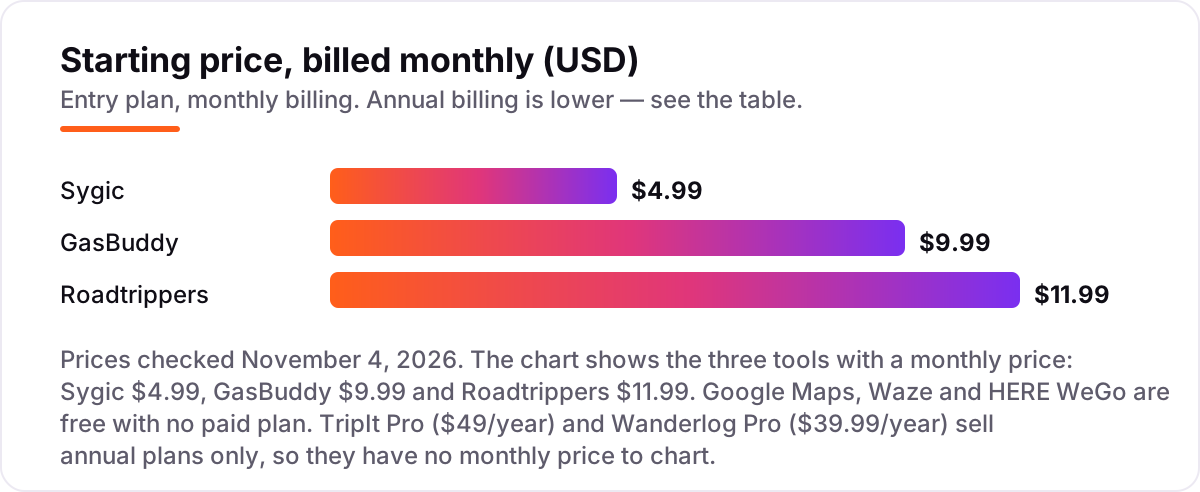
Take a driver who pays for the three monthly-priced upgrades: Sygic Premium+ at $4.99 a month, GasBuddy Premium at $9.99 a month and Roadtrippers Basic at $11.99 a month. Billed monthly, that is $26.97 a month, or $323.64 a year. Billed annually where the option exists, the same three cost $19.99 plus $99 plus $35.99 — $154.98 a year, less than half the monthly-billed total, because Roadtrippers Basic drops from $143.88 a year monthly to $35.99 annual, and GasBuddy Premium drops from $119.88 to $99.
Add the two annual-only plans and the total rises: TripIt Pro at $49 a year and Wanderlog Pro at $39.99 a year bring the everything-included total to $243.97 a year, or about $20 a month. That is the ceiling — every navigation, planning, fuel-saving and booking tool in this list, paid for at once.
The floor is $0. Google Maps, Waze and HERE WeGo charge nothing, and their free plans cover navigation, live traffic, gas prices and offline maps well enough for most trips. A realistic middle is one paid plan: Sygic Premium+ at $19.99 a year for offline maps with live traffic, or Roadtrippers Basic at $35.99 a year for unlimited stops. The most common waste in this category is paying monthly for Roadtrippers when the annual plan costs a quarter as much — if you take even one road trip a year, buy the year.
Know the difference: a trip planner vs a navigator
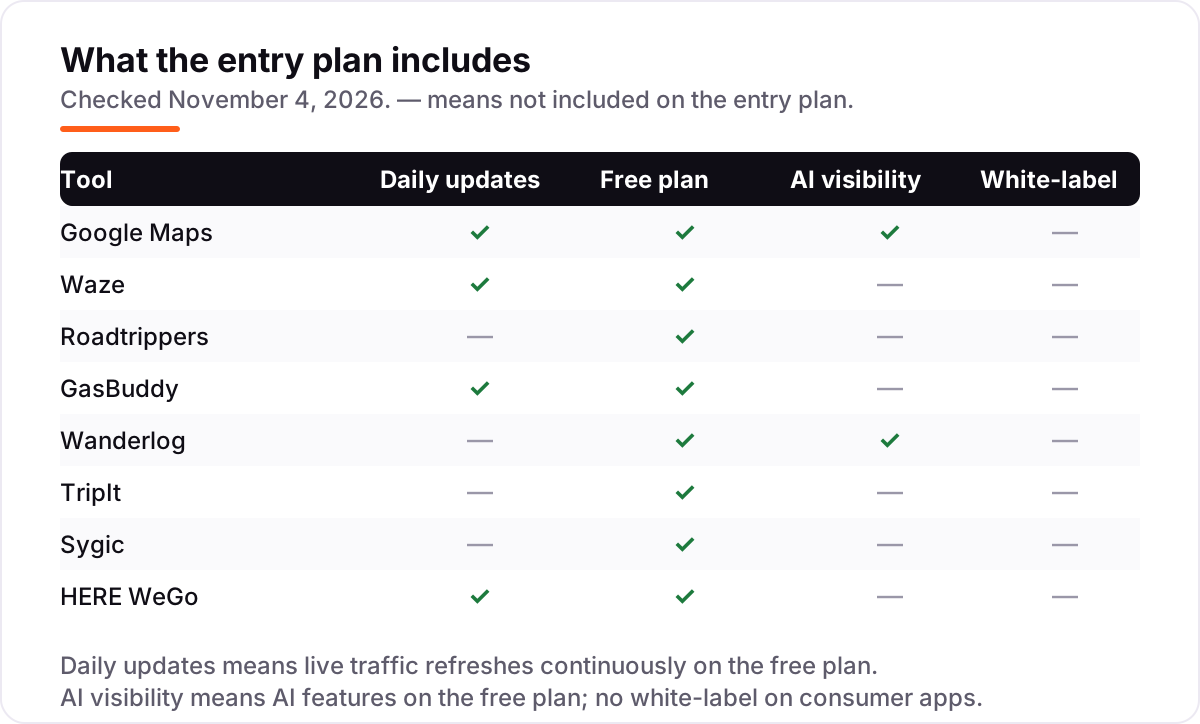
The confusion in this category is between two different jobs. A trip planner builds the route: it orders the stops, tracks the days, holds the bookings and the budget, and exports the plan. Roadtrippers, Wanderlog and TripIt are planners. A navigator drives the route: it gives turn-by-turn directions, watches live traffic, warns about hazards and reroutes around jams. Google Maps, Waze, Sygic and HERE WeGo are navigators.
Buying one when you need the other is the classic mistake. Roadtrippers will not warn you about the crash ten miles ahead, and Waze will not remember that the quirky dinosaur park was stop number six on day two. The apps know this too: Wanderlog exports its plan to Google Maps, and Roadtrippers sells navigation as a paid feature, because the plan and the drive live in different apps.
A second confusion is free versus free-with-a-ceiling. Google Maps, Waze and HERE WeGo are free with no paid plan — the app you download is the whole product. Roadtrippers, Wanderlog, TripIt, Sygic and GasBuddy are free to start, with the features that matter on a road trip — unlimited stops, offline access, live traffic, fuel savings — sitting behind a subscription. Check the ceiling before the trip, not on the highway.
A third distinction is offline maps versus offline plans. Sygic, HERE WeGo and Google Maps download the map itself, so navigation keeps working with no signal. Wanderlog Pro downloads the plan — the itinerary, notes and attachments — but still needs a navigator with its own offline maps to drive. If the route crosses dead zones, the map download is the one that matters.
Quick comparison: tool type by need
| Buyer | Best pick | Why |
|---|---|---|
| Most drivers, free navigation | Google Maps | Reliable free navigation with live traffic and offline maps, $0 |
| Beating traffic and speed traps | Waze | Driver-reported alerts in real time, free with no paid plan |
| Planning routes around stops | Roadtrippers | 7 million points of interest and RV routing, from $11.99/month |
| Saving money on fuel | GasBuddy | Cheapest pump nearby, Premium is $9.99/month |
| Day-by-day itineraries with friends | Wanderlog | Map-based planning with live group editing, Pro is $39.99/year |
| Organizing flights and hotel bookings | TripIt | Every confirmation in one itinerary, Pro is $49/year |
| Driving through dead zones | Sygic | Full-country offline maps, Premium+ from $4.99/month |
| Free offline navigation, no account | HERE WeGo | Downloadable maps with no ads and no subscription, $0 |
Mistakes to avoid
- Paying monthly for Roadtrippers. Basic costs $11.99 a month billed monthly but $35.99 a year — a quarter of the price. Buy the year, or use the free plan for a single short trip.
- Leaving without offline maps. Waze has none, and Google Maps downloads expire. Download the maps at home on Wi-Fi the night before, and test them in airplane mode.
- Buying GasBuddy Premium for a short trip. At $9.99 a month it needs about 50 gallons a month to break even. Two fill-ups will not cover it — the free price map is the better deal.
- Planning in an app that cannot drive. A planner without a navigator leaves you reading a list at 65 mph. Pair every planner with a navigator before you leave.
- Trusting one crowd. Gas prices and hazard reports are only as fresh as the last report. Cross-check the cheapest station on a second app before driving out of your way for it.
How we chose
We checked each vendor's own pricing page on November 4, 2026 and recorded the starting price exactly as shown, including the annual-billing figure where the page lists one, and we ranked the apps by fit for the most common driver — someone taking a multi-day drive with highways, small towns and dead zones — not by brand size. Two prices are not from the vendor's own page and are disclosed as such: Wanderlog Pro at $39.99 a year comes from third-party checks of Wanderlog's own Pro page in October 2026, because the page itself loads no price text, and Sygic Premium+ at $4.99 a month comes from its App Store listing, because Sygic's own Premium+ page lists the subscription without a dollar price. Ratings are shown only where we opened a G2 page today — Google Maps and TripIt Pro — and the other six apps carry no rating rather than a stale or estimated one. No vendor paid for a place in this list, and none of the links here are affiliate links.
What to do next
Start with the free pair: Google Maps for driving and Wanderlog for planning, both free, and take them on a short drive this week. Download the offline maps before you leave, add your stops to the plan, and see whether the voice directions arrive before the turn. If the trip is long, add one paid plan that matches the gap you felt — Sygic for dead zones, Roadtrippers for stops, GasBuddy Premium for fuel. If the trip doubles as content for a travel site, our monthly SEO service can help it get found — or compare providers in our guide to map apps for road closures. Once your tools are in place, find out what's holding your rankings back.
Your stack only works if people find you
SerpAstra fixes what keeps your site off page one and makes it easy for AI assistants to recommend.
Get a free audit→Sources we checked (10)
- Google Maps — maps.google.com (checked November 4, 2026)
- Google Maps reviews — g2.com/products/google-maps/reviews (checked November 4, 2026)
- Waze — waze.com (checked November 4, 2026)
- Roadtrippers Plus pricing — roadtrippers.com/plus (checked November 4, 2026)
- GasBuddy+ Premium pricing — gasbuddy.com/pay/premium (checked November 4, 2026)
- Wanderlog Pro pricing — wanderlog.com/pro (checked November 4, 2026)
- TripIt Pro pricing — tripit.com/web/pro/pricing (checked November 4, 2026)
- TripIt Pro reviews — g2.com/products/tripit/reviews (checked November 4, 2026)
- Sygic Premium+ — sygic.com/what-is/premium-subscription (checked November 4, 2026)
- HERE WeGo — wego.here.com (checked November 4, 2026)
Shamim
Founder of SerpAstra
A full-stack SEO and digital marketer who spends most days on Local SEO for dental practices, AI search visibility and lead generation.
Frequently asked questions
What is the best road trip app?
Google Maps is the best road trip app for most drivers: free navigation, live traffic, offline maps and places data in one app. Waze is better for live traffic alerts, and Roadtrippers is the best planner for routes built around stops. Most drivers need two apps: one to plan, one to drive.
Are road trip apps free?
Mostly, yes. Google Maps, Waze and HERE WeGo are completely free with no paid plan. Roadtrippers, GasBuddy, Wanderlog, TripIt and Sygic all have free plans, with paid upgrades from $4.99 a month to $49 a year. The free plans cover navigation and basic planning.
Which road trip app works offline?
Sygic and HERE WeGo are the best offline picks: both let you download whole-country maps that work with no signal. Google Maps also downloads offline maps, but they expire and need re-downloading. Waze has no offline maps, so it stops working properly in dead zones.
What is the difference between Roadtrippers and Google Maps?
Roadtrippers plans the trip; Google Maps drives it. Roadtrippers builds multi-day routes around attractions, campgrounds and scenic stops, with up to 150 stops per trip. Google Maps navigates one destination at a time with live traffic. Use Roadtrippers to plan the route, then Google Maps to drive it.
How much do road trip apps cost?
From $0 to about $120 a year. The three monthly plans are Sygic Premium+ at $4.99 a month, GasBuddy Premium at $9.99 a month and Roadtrippers Basic at $11.99 a month. TripIt Pro costs $49 a year and Wanderlog Pro $39.99 a year, both annual only.
Do I need a paid plan for a road trip?
Usually not. The free plans cover navigation, live traffic, gas prices and basic planning. Pay only for a specific need: offline maps with live traffic on Sygic, unlimited stops on Roadtrippers, or fuel savings on GasBuddy Premium if you buy close to 50 gallons a month.
Which app finds the cheapest gas on a road trip?
GasBuddy is the best app for finding cheap gas: crowdsourced pump prices show the cheapest station nearby before you drive there. Waze also shows fuel prices along the route, and Google Maps estimates fuel costs for the trip. GasBuddy Premium guarantees 20 cents off per gallon on the first 50 gallons a month.
Free SEO and AI visibility audit
Find out what is holding your rankings back
Send us your site. Within 2 business days you get a written audit, an AI visibility check and a short fix list ranked by impact. Free, with no contract attached.
Request my free audit→Related guides
 Accounting, Tax & Finance12 Best Map Apps for Road Closures in 2026: Free and Paid Apps Ranked12 best map app for road closures picks compared on live closure data, offline maps and price. Most are free — see which app reroutes you fastest.Read guide →
 AI, Data & Analytics10 Best Automation Apps for Small Business in 202610 best automation apps for small business compared on price, free plans and billing units, with starting prices checked on vendor pages, November 2, 2026.Read guide →
 Accounting, Tax & Finance8 Best Mobile Payment Apps for Small Business in 20268 best mobile payment app for small business options compared on in-person fees, hardware and free plans — real prices checked November 2, 2026.Read guide →