
Best SAAS Backup Software for 2026: 11 Options Compared by Use Case
Compare the 11 best saas backup software options for Microsoft 365, Google Workspace and Salesforce, with starting prices checked November 7, 2026.
 Shamim Mia, Founder, SerpAstraLast verified November 7, 202613 min read
We compare pricing pages, documentation and public reviews. We never accept payment for rankings.

Key takeaways
- Veeam Data Cloud publishes the clearest enterprise price at $3.50 per user per month billed annually; CloudAlly costs $3 per user per month, IDrive's Microsoft 365 add-on costs $20 per seat per year, and Hornetsecurity's backup tier costs €7.70 per user per month.
- The single most important buying factor is where your backups live and how precisely they restore: an independent cloud and item-level restore matter more than backup frequency.
- Microsoft 365, Google Workspace and Salesforce protect service uptime, not your data — deleted mailboxes, corrupted files and ransomware-encrypted libraries are your responsibility.
- Per-user pricing is the trap to watch: the cheapest headline rate can become the most expensive bill once headcount, storage and retention are counted.
On this page
Quick comparison
| Tool | Best for | Starting price | Free plan |
|---|---|---|---|
| Veeam Data Cloud | Enterprises standardizing Microsoft 365 backup on the biggest name in data protection | $3.50/mo | No (free trial) |
| CloudAlly | Small teams that want cheap, simple backup for Microsoft 365, Google Workspace or Salesforce | $3/mo | No (free trial) |
| IDrive | Teams already using IDrive for computers and servers that want Microsoft 365 backup as a cheap add-on | $20/yr per seat | Yes (Basic, 10 GB) |
| Keepit | Regulated organizations that need backup data stored in an independent cloud they control | Custom quote | No (free trial) |
| AvePoint | Microsoft 365 shops that want backup plus governance, compliance and AI readiness in one platform | Custom quote | No (free trial) |
| Barracuda Cloud-to-Cloud Backup | Microsoft 365 teams that want easy setup, unlimited retention and reliable backup without managing it | Custom quote | No (free trial) |
| Spanning | Small businesses that want set-and-forget cloud-to-cloud backup with unlimited on-demand restores | Custom quote | No (free trial) |
| Own | Salesforce teams that want backup, recovery and governance from Salesforce itself | Custom quote | No (trial via Salesforce) |
| Acronis Cyber Protect Cloud | MSPs and IT teams that want backup, cybersecurity and disaster recovery in one agent | Custom quote | No (free trial) |
| Hornetsecurity 365 Total Protection | Microsoft 365 teams that want email security, backup and compliance from one European vendor | €7.70/mo | No (free trial) |
| CodeTwo Backup | Teams that want Microsoft 365 backup copies stored on drives they control, not in a vendor cloud | $147/yr | No (free trial) |
Make one of these tools?
We re-check this list every quarter. Send a correction, request a review, or ask about a clearly labeled sponsored spot.
Request a listingThe best SaaS backup software

Veeam Data Cloud
Best for: Enterprises standardizing Microsoft 365 backup on the biggest name in data protection
Veeam Data Cloud is the enterprise standard for Microsoft 365 backup, and it is one of the few enterprise tools here with published pricing. Foundation costs $3.50 per user per month billed annually for 10 to 50 users, dropping to $2.63 at 251 or more users, and covers Exchange, SharePoint, OneDrive and Teams with immutable copies and seven-year default retention. Advanced adds Entra ID protection, and Premium adds disaster recovery with no throttling.
The trade-off is the buying route. There is no self-serve checkout: purchases run through resellers or the Microsoft Marketplace, and the volume tiers mean the headline rate depends on your user count. Choose Veeam Data Cloud when Microsoft 365 is the estate to protect and the brand name matters to your auditors; choose Keepit when data sovereignty is the deciding factor.
What we like
- Published per-user pricing: Foundation from $3.50 per user per month, billed annually
- Fully managed Microsoft 365 backup with immutable copies and seven-year default retention
- Rated 4.5 out of 5 on G2 across 251 reviews, the largest review base for a Microsoft 365 backup here
- Advanced and Premium tiers add Entra ID protection and disaster recovery with no throttling
Watch out for
- Foundation is the cheapest tier and still costs more than the budget tools here once users are counted
- Volume pricing means the headline $3.50 rate only applies to 10-50 users; larger estates pay less per user but more overall
- Buying runs through resellers or the Microsoft Marketplace, not a simple self-serve checkout

CloudAlly
Best for: Small teams that want cheap, simple backup for Microsoft 365, Google Workspace or Salesforce
CloudAlly is the budget pick for teams that want simple cloud-to-cloud backup without an enterprise sales process. Microsoft 365 Exchange backup starts at $3 per user per month, or $30 per user per year billed annually, and the same platform covers Google Workspace, Salesforce, Box and Dropbox, with unlimited retention and granular, item-level restore. More than 30,000 organizations use it.
One warning: CloudAlly's own pricing page returned an error when we checked it on November 7, 2026, so the $3 rate comes from independent pricing directories rather than the vendor's own page. Daily backups are the entry standard, and faster backup frequency costs extra. Pick CloudAlly when price and simplicity beat advanced features; pick IDrive when you need backups three times a day.
What we like
- Low entry price: $3 per user per month for Microsoft 365 Exchange backup
- Covers Microsoft 365, Google Workspace, Salesforce, Box and Dropbox from one platform
- Unlimited retention with granular, item-level restore and point-in-time recovery
- Trusted by more than 30,000 organizations, with backup storage in AWS S3
Watch out for
- Its own pricing page returned an error when checked, so the $3 rate comes from pricing directories, not the vendor
- Daily backups only on the entry plan; three-times-daily backup costs extra
- Support responsiveness has drawn complaints since the Kaseya acquisition, according to reviewers

IDrive
Best for: Teams already using IDrive for computers and servers that want Microsoft 365 backup as a cheap add-on
IDrive is the cheapest way to add Microsoft 365 backup for accounts already protecting computers and servers. Its Cloud Applications add-on costs $20 per seat per year, covering Microsoft 365, Google Workspace, Salesforce, Dropbox and Box, with unlimited storage on the Microsoft 365 plan and a 7-day trial. Google Workspace data backs up three times a day, with point-in-time version restore and granular recovery.
The catch: the $20 is an add-on, not a standalone product — it sits on top of an IDrive plan, so the real bill is the base plan plus $20 per seat per year. For a team already using IDrive for devices, it is the cheapest SaaS backup here by a wide margin. Buy IDrive when you already back up devices with it; buy Veeam Data Cloud when Microsoft 365 backup is the whole purchase.
What we like
- Cheapest Microsoft 365 backup here: $20 per seat per year with unlimited storage
- One add-on covers Microsoft 365, Google Workspace, Salesforce, Dropbox and Box
- Google Workspace data backs up three times a day, with point-in-time version restore
- Backs up computers, servers and NAS boxes too, so one account covers devices and cloud apps
Watch out for
- The $20 rate is an add-on, not a standalone product: it sits on top of an IDrive plan
- SaaS backup is a side product here, not the company's main focus
- Granular recovery and reporting are plainer than the dedicated SaaS backup tools

Keepit
Best for: Regulated organizations that need backup data stored in an independent cloud they control
Keepit is the data-sovereignty pick. Backups live in Keepit's own independent cloud across seven global regions, not on Microsoft, Google or AWS infrastructure, so a compromised SaaS tenant cannot take your backups with it. Copies are immutable and air-gapped, retention runs up to 99 years, and the flat per-user price carries no storage caps, no egress fees and no per-gigabyte charges.
The price is the problem for budgeting: Keepit publishes no starting rate, so every quote is custom and you cannot compare it on a price chart without a sales call. It also has a smaller partner ecosystem than Veeam or AvePoint. Buy Keepit when regulators or customers ask where backups live and who else holds them; buy Veeam Data Cloud when a published price matters more.
What we like
- Backups live in Keepit's own independent cloud, not on Microsoft, Google or AWS infrastructure
- Immutable, air-gapped backups with unlimited retention options up to 99 years
- Flat per-user pricing with no storage caps, no egress fees and no per-gigabyte charges
- Covers 17 or more SaaS apps from one console, including Microsoft 365, Google Workspace and Salesforce
Watch out for
- No published price: every quote is custom, so budgeting means a sales call first
- A newer brand than Veeam or AvePoint, with a smaller partner ecosystem
- Reviewers call it costly once you need the full feature set across many users

AvePoint
Best for: Microsoft 365 shops that want backup plus governance, compliance and AI readiness in one platform
AvePoint is the governance pick. Its Confidence Platform combines cloud backup with data security posture management, governance automation and lifecycle management, so one vendor covers backup, compliance and AI readiness for Microsoft 365, Google Workspace and Salesforce. More than 28,000 customers use it, including large enterprises and government organizations, and granular restore with express recovery is standard.
The platform is broad, so setup takes longer than the single-purpose tools here, and pricing is enterprise quoting only — small teams cannot budget without a sales call. Reviewers also report high initial costs. Buy AvePoint when backup is one part of a governance problem; buy Veeam Data Cloud or Keepit when backup alone is the job.
What we like
- One platform for backup, data security posture management, governance and lifecycle management
- Granular restore and express recovery across Microsoft 365, Google Workspace and Salesforce
- More than 28,000 customers, including large enterprises and government organizations
- AI-ready data governance prepares Microsoft 365 estates for Copilot-era risk
Watch out for
- No published price: enterprise quoting only, so small teams cannot budget without a sales call
- A broad platform, so setup takes longer than the single-purpose backup tools here
- Reviewers report high initial costs and occasional backup completion issues

Barracuda Cloud-to-Cloud Backup
Best for: Microsoft 365 teams that want easy setup, unlimited retention and reliable backup without managing it
Barracuda Cloud-to-Cloud Backup protects Microsoft 365 — Exchange, OneDrive, SharePoint, Teams and Entra ID — with unlimited retention and quick restoration. It connects through an Entra ID app, runs in the background without constant attention, and reviewers praise its ease of setup above all: it is the tool most often cited for simple implementation in this list. PeerSpot ranks it the number 2 SaaS backup solution.
Pricing is the weak spot: Barracuda publishes no starting price, so budgeting means a quote, and some features, like backing up Entra apps, need a paid add-on. Reviewers also note the recovery interface can confuse. Buy Barracuda when Microsoft 365 is the whole estate and easy setup matters most; buy Keepit when backups must live in an independent cloud.
What we like
- Backs up Exchange, OneDrive, SharePoint, Teams and Entra ID from one console
- Unlimited retention with quick, granular restoration of individual items
- Reviewers praise its ease of setup above all, and PeerSpot ranks it the number 2 SaaS backup solution
- Connects through an Entra ID app and runs in the background without constant attention
Watch out for
- No published price: budgeting means a quote, and some features need a paid add-on
- Backing up Entra apps requires an additional paid add-on
- Reviewers note the recovery interface can confuse during restores

Spanning
Best for: Small businesses that want set-and-forget cloud-to-cloud backup with unlimited on-demand restores
Spanning is the set-and-forget pick. It backs up Microsoft 365, Google Workspace and Salesforce automatically every day, with unlimited on-demand backups before risky changes and infinite retention. Restore is granular and point-in-time, so one deleted email or file comes back without restoring a whole mailbox. It protects more than 24,000 organizations and ranks in DCIG's top 5 Microsoft 365 backup tools for 2025-2026.
The limits are scope and pricing transparency. Spanning publishes no price on its own site and sells through partners and the Kaseya channel, and its feature set is lighter than the enterprise suites here. Buy Spanning when straightforward backup that just works is the brief; buy AvePoint when governance matters more.
What we like
- Automated daily backups plus unlimited on-demand backups before risky changes
- Infinite retention with granular, point-in-time restore for Microsoft 365, Google Workspace and Salesforce
- Protects more than 24,000 organizations and ranks in DCIG's top 5 Microsoft 365 backup tools for 2025-2026
- BackupIQ intelligent alerting prioritizes backup risks automatically
Watch out for
- No published price on its own site; it sells through partners and the Kaseya channel
- Lighter on advanced features than the enterprise suites here
- Reporting is thinner than rivals, and reviewers note limited detail in backup reports

Own
Best for: Salesforce teams that want backup, recovery and governance from Salesforce itself
Own is the Salesforce-native pick. Formerly OwnBackup, it is now part of Salesforce itself, protecting mission-critical Salesforce data with backup, recovery, archiving and platform governance. Its deep metadata and record-level restore were built by the team that pioneered Salesforce backup, and seeding tools manage the full data lifecycle from sandbox to production.
The scope is the whole point and the whole limit: Own does nothing for Microsoft 365, Google Workspace or any other SaaS app, and pricing runs through Salesforce sales with no published rate. Buy Own when Salesforce is your system of record; buy IDrive when Salesforce is one app among many.
What we like
- Native Salesforce backup, recovery and archiving, now part of the Salesforce Platform
- Deep metadata and record-level restore built by the team that pioneered Salesforce backup
- Platform governance tools cover compliance and risk for Salesforce administrators
- Seeding and archiving tools manage the full Salesforce data lifecycle
Watch out for
- Salesforce-only: it does nothing for Microsoft 365, Google Workspace or other SaaS apps
- No published price: pricing runs through Salesforce sales
- Narrower app coverage than every other tool in this list

Acronis Cyber Protect Cloud
Best for: MSPs and IT teams that want backup, cybersecurity and disaster recovery in one agent
Acronis Cyber Protect Cloud is the all-in-one pick. One console combines backup, cybersecurity, disaster recovery and endpoint management, with AI-based anti-ransomware protection and malware scanning on restore. Centralized management covers endpoints, servers, virtual machines and Microsoft 365, and reviewers rate it 4.7 out of 5 on G2 across 1,512 reviews — the largest review base in this list.
The breadth has a cost. Per-workload pricing is quoted through partners with no single published starting price, the console has a learning curve, and reviewers note slow performance at peak times. Buy Acronis when one agent for backup and security beats two separate tools; buy a single-purpose backup tool when Microsoft 365 or Salesforce alone needs protecting.
What we like
- Backup, cybersecurity, disaster recovery and endpoint management in a single console
- AI-based anti-ransomware protection with malware scanning on restore
- Rated 4.7 out of 5 on G2 across 1,512 reviews, the largest review base in this list
- Centralized management covers endpoints, servers, virtual machines and Microsoft 365
Watch out for
- No single published starting price: per-workload pricing is quoted through partners
- A broad console with a learning curve, and reviewers note slow performance at peak times
- Pricing feels high compared with the single-purpose backup tools here

Hornetsecurity 365 Total Protection
Best for: Microsoft 365 teams that want email security, backup and compliance from one European vendor
Hornetsecurity 365 Total Protection bundles email security, backup, archiving and security awareness into one Microsoft 365 platform, operated from European data centres. Backup arrives in the Enterprise Backup tier at €7.70 per user per month, covering Exchange, Teams, OneDrive and SharePoint with several backups a day and granular restore. Reviewers praise its reliable spam filtering and easy integration with the Microsoft 365 admin center.
The catch is scope and currency: it protects Microsoft 365 only, with no Google Workspace support, and it is priced in euros, so buyers outside Europe pay the converted rate. The Business tier at €2.75 has no backup at all — backup needs Enterprise Backup. Buy Hornetsecurity when Microsoft 365 security and backup should come from one European vendor; buy CloudAlly when Google Workspace also needs cover.
What we like
- Email security, backup, archiving and security awareness in one Microsoft 365 platform
- Enterprise Backup backs up Exchange, Teams, OneDrive and SharePoint several times a day
- Granular restore with fast recovery, run from European data centres
- Reviewers praise its reliable spam filtering and easy integration with the Microsoft 365 admin center
Watch out for
- Microsoft 365 only: no Google Workspace support at any tier
- Priced in euros, so buyers outside Europe pay the converted rate
- The Business tier has no backup at all; backup needs the Enterprise Backup tier

CodeTwo Backup
Best for: Teams that want Microsoft 365 backup copies stored on drives they control, not in a vendor cloud
CodeTwo Backup is the local-storage pick. Unlike every cloud-to-cloud tool here, it is a desktop application that backs up Microsoft 365 mailboxes, public folders, SharePoint Online, OneDrive and Teams data to your own local drives, with full or incremental backups and granular recovery of individual items at any time. The starting price is $147 per year, listed in pricing directories.
The trade-off is the model itself: you run the software and store the copies, so there is no managed cloud, no off-site redundancy and no protection if your own drives fail alongside the tenant. It also covers Microsoft 365 only. Buy CodeTwo Backup when you want backup copies on drives you control; buy Keepit or Veeam Data Cloud when off-site, managed storage is the point.
What we like
- Backs up Microsoft 365 mailboxes, SharePoint, OneDrive and Teams to your own local drives
- Full or incremental backups with granular recovery of individual items at any time
- One flat yearly price with no per-user metering
- A long-established Microsoft partner with a strong reputation among Exchange administrators
Watch out for
- A desktop application, not a managed cloud service: you run the software and store the copies
- No off-site redundancy: if your own drives fail, the backups go with them
- Microsoft 365 only, with no Google Workspace or Salesforce coverage
The best saas backup software protects the data your business keeps in other companies' clouds — Microsoft 365 mailboxes, Google Workspace drives, Salesforce records, GitHub repositories and Shopify stores. Microsoft, Google and Salesforce protect the uptime of their services, not your data, so a deleted mailbox, a corrupted file or a ransomware-encrypted SharePoint library is your problem to fix. We ranked the eleven tools below by fit for the most common buyer — an IT team protecting Microsoft 365 and a few other SaaS apps — starting with the cheapest transparent prices and ending with the enterprise suites, and every price was checked on November 7, 2026.
How to choose the best saas backup software
- Start with your SaaS footprint. Salesforce-heavy teams need Own; Microsoft 365 and Google Workspace teams can pick from Keepit, Spanning, Veeam Data Cloud, CloudAlly or IDrive; multi-app stacks fit IDrive's Cloud Applications add-ons, which cover Microsoft 365, Google Workspace, Salesforce, Dropbox and Box.
- Ask where the backups live. A copy stored in the same cloud as the original data is no protection when that tenant is compromised — Keepit's independent cloud and CloudAlly's AWS S3 storage answer this directly.
- Check restore granularity, not just backup frequency. Item-level restore for one email, file or record matters more in practice than whether backups run once or three times a day.
- Read the pricing model, not the headline. Per-user rates scale with headcount, IDrive's add-on sits on top of a base plan, and six of the eleven tools here publish no price at all — get the quote before you shortlist.
- Match retention to regulation. One year is the common default; Keepit offers up to 99 years, and Veeam Data Cloud defaults to seven — longer retention costs more storage.
Backup is one system in your stack, not the whole stack. If the business also needs to be found online, our monthly SEO service covers the visibility side, and before you publish new pages, run your titles through the free SERP snippet preview tool. For the wider backup picture, see our guide to online data backup services.
Whatever you shortlist, test a restore during the trial before you pay. Back up a mailbox or a Salesforce object, delete one item, and restore it — the platform that recovers fastest under pressure is the right one. Check two things in the trial: that granular restore works without restoring the whole dataset, and that the retention policy matches what your compliance rules actually require.
SaaS backup software pricing: what you will actually pay
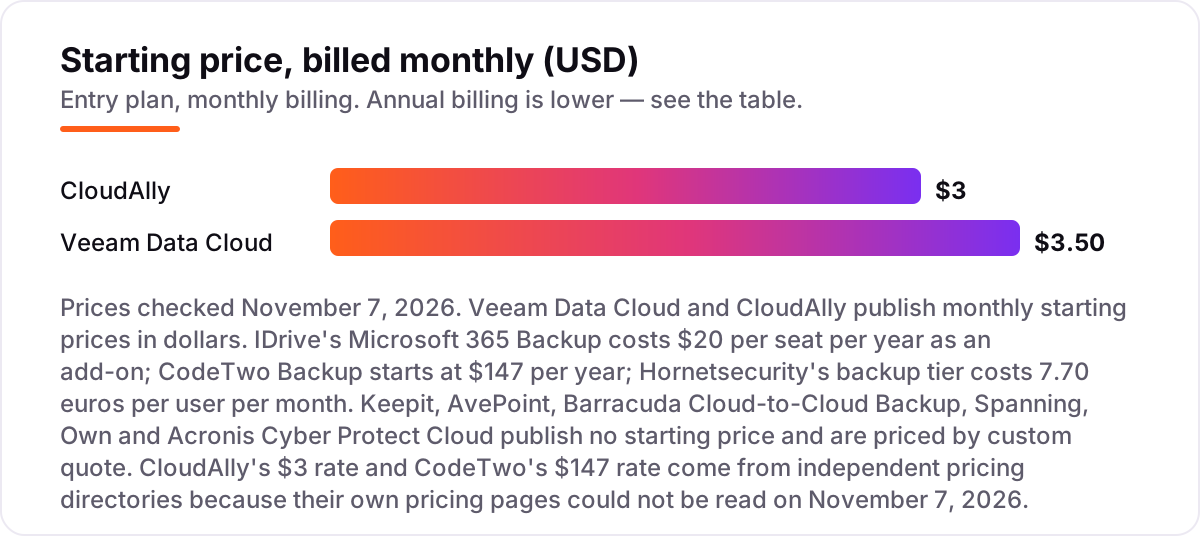
Take a 50-person team protecting Microsoft 365. On published prices, the Microsoft 365 backup costs $1,000 a year on IDrive's add-on at $20 per seat per year, $1,500 a year on CloudAlly billed annually at $30 per user per year, $2,100 a year on Veeam Data Cloud Foundation at $3.50 per user per month billed annually, and €4,620 a year on Hornetsecurity Enterprise Backup at €7.70 per user per month. IDrive is the cheapest of the four, but its $20 is an add-on on top of an IDrive plan, so add the base plan before comparing.
The same 50 people cost $1,000 a year at the cheap end and $2,100 at the dear end among the dollar prices — and the six custom-quote tools sit outside this comparison entirely, which is why a quote belongs in the shortlist before any budget is set. CodeTwo Backup, at $147 a year for the software, is the cheapest headline in the list, but it stores backups on your own drives, so there is no managed cloud storage in that price.
Three costs sit outside every number above. First, the base plan: IDrive's add-on needs an IDrive plan underneath it. Second, retention: longer retention means more stored copies, so a 99-year policy costs more than a one-year policy. Third, the apps themselves: Acronis charges per workload, so protecting endpoints as well as Microsoft 365 adds up. If email backup is the priority rather than the full suite, our guide to email backup software compares the narrower options.
Know the difference: SaaS backup vs native retention
The confusion in this category is between what the SaaS provider keeps and what a backup tool keeps. Microsoft 365, Google Workspace and Salesforce all have native retention: deleted items sit in a recycle bin or trash for a limited window, usually 30 days, and admins can sometimes recover them. That is not a backup. Native retention lives on the same infrastructure as your production data, expires quickly, and offers no point-in-time restore, no immutable copy and no protection against ransomware or a compromised admin account.
A SaaS backup tool keeps an independent copy, usually in a separate cloud, with its own retention policy — one year by default, seven years on Veeam Data Cloud, up to 99 years on Keepit. It restores a single item to a chosen point in time, and the immutable copy cannot be altered or deleted even by ransomware. That independence is the product: if the SaaS tenant is compromised, the backup still exists.
There is a second, quieter confusion: sync is not backup either. A synced folder or a shared drive mirrors deletions and corruption as fast as it mirrors good changes. Only a versioned, independent backup with point-in-time restore protects against the human error and malware cases that cause most SaaS data loss.
Quick comparison: tool type by need
| Buyer | Best pick | Why |
|---|---|---|
| Cheapest Microsoft 365 backup | IDrive | $20 per seat per year add-on, unlimited storage on the Microsoft 365 plan |
| Microsoft 365 enterprise | Veeam Data Cloud | Published pricing from $3.50 per user per month, seven-year default retention |
| Regulated, data-sovereignty buyer | Keepit | Independent cloud, immutable air-gapped backups, flat per-user pricing |
| Small team, simple backup | CloudAlly | $3 per user per month, broad app coverage, unlimited retention |
| Salesforce as system of record | Own | Native Salesforce backup and governance from Salesforce itself |
| Microsoft 365 security plus backup | Hornetsecurity | Email security and backup in one European platform, €7.70 per user per month |
Mistakes to avoid
- Trusting native retention. A 30-day recycle bin is not a backup: it expires, it lives on the same infrastructure, and it cannot restore a single item to a point in time months ago.
- Budgeting on the headline rate. The $3 per-user figure is the entry rate for one workload. Headcount, storage, retention and extra apps all move the real bill — get the quote first.
- Buying on backup frequency alone. Daily versus three-times-daily matters less than restore granularity and retention length; a fast backup you cannot restore precisely is worth little.
- Storing backups in the same cloud. If the SaaS tenant is compromised, backups on the same infrastructure go with it — check where copies live before you buy.
- Skipping the restore test. Every vendor promises fast recovery. Delete one real item in the trial and restore it, and time the result — that test tells you more than any datasheet.
How we chose
We checked each vendor's own pricing page on November 7, 2026 and recorded the starting price exactly as shown, or "Custom quote" where the vendor publishes no price. Three exceptions: CloudAlly's own pricing page returned an error when we tried to open it, so its $3 per user per month rate comes from independent pricing directories; CodeTwo Backup's $147 per year starting price comes from an independent pricing directory; and Hornetsecurity's €7.70 rate comes from the vendor-provided pricing listing on G2. All three are shown as third-party-sourced, not vendor-verified. Ratings come from G2 pages verified by fresh search-index crawls of the exact G2 pages within the last few days; CloudAlly, IDrive, Barracuda, Spanning, Own, Hornetsecurity and CodeTwo carry no rating here because no fresh G2 page could be verified for them, and we would rather show no rating than a stale one. We ranked the tools by fit for the most common buyer — an IT team protecting Microsoft 365 and a few other SaaS apps — not by brand size. No vendor paid for a place in this list, and none of the links here are affiliate links.
What to do next
Start with the free trial of your top pick and run one real restore through it: back up a mailbox or a Salesforce object, delete one item, and restore it. Check that the restore is granular, the retention policy matches your compliance rules, and the backups live in a cloud separate from your production data. If the shortlist is all custom quotes, get at least two in writing before you commit — the gap between quotes in this category is wide. Once your tools are in place, find out what's holding your rankings back.
Your stack only works if people find you
SerpAstra fixes what keeps your site off page one and makes it easy for AI assistants to recommend.
Get a free audit→Sources we checked (15)
- Veeam Data Cloud pricing — veeam.com (checked November 7, 2026)
- CloudAlly pricing — cloudally.com/pricing (pricing page returned an error November 7, 2026; $3 rate from pricing directories)
- IDrive pricing — idrive.com/pricing (checked November 7, 2026)
- Keepit — keepit.com (checked November 7, 2026)
- AvePoint — avepoint.com (checked November 7, 2026)
- Barracuda — barracuda.com (checked November 7, 2026)
- Spanning — spanning.com (checked November 7, 2026)
- Own (Salesforce) — salesforce.com (checked November 7, 2026)
- Acronis — acronis.com (checked November 7, 2026)
- Hornetsecurity pricing — vendor-provided pricing via G2 (checked November 7, 2026)
- CodeTwo Backup pricing — sourceforge.net pricing directory (checked November 7, 2026)
- Veeam Data Cloud G2 reviews — g2.com (checked November 7, 2026)
- Keepit G2 reviews — g2.com (checked November 7, 2026)
- AvePoint G2 reviews — g2.com (checked November 7, 2026)
- Acronis Cyber Protect Cloud G2 reviews — g2.com (checked November 7, 2026)
Shamim
Founder of SerpAstra
A full-stack SEO and digital marketer who spends most days on Local SEO for dental practices, AI search visibility and lead generation.
Frequently asked questions
What is the best SaaS backup software?
Veeam Data Cloud is the best enterprise pick for Microsoft 365, from $3.50 per user per month billed annually. CloudAlly is the best budget pick at $3 per user per month, and IDrive's $20-per-seat yearly add-on is the cheapest of all for teams already using IDrive. Keepit leads for data sovereignty, and Own is the native answer for Salesforce.
How much does SaaS backup software cost?
Published starting prices run from $3 to $3.50 per user per month: CloudAlly from $3 and Veeam Data Cloud from $3.50 billed annually. IDrive's Microsoft 365 add-on costs $20 per seat per year, Hornetsecurity's backup tier costs €7.70 per user per month, and CodeTwo Backup starts at $147 a year. Six of the eleven tools here are priced by custom quote.
Does Microsoft 365 back up my data?
No. Microsoft protects the service's uptime, not your data. Deleted mailboxes, corrupted files and ransomware-encrypted SharePoint libraries are your responsibility under the shared responsibility model. Third-party SaaS backup like Keepit, Spanning, Veeam Data Cloud or Barracuda fills that gap with independent copies.
Can I restore a single deleted email or file?
Yes. Every tool in this list offers granular, item-level restore: recover one email, file or record without restoring an entire mailbox or site. Test this during the trial, because restore speed and search quality vary between vendors, and some tools charge extra for faster recovery.
How often should SaaS backups run?
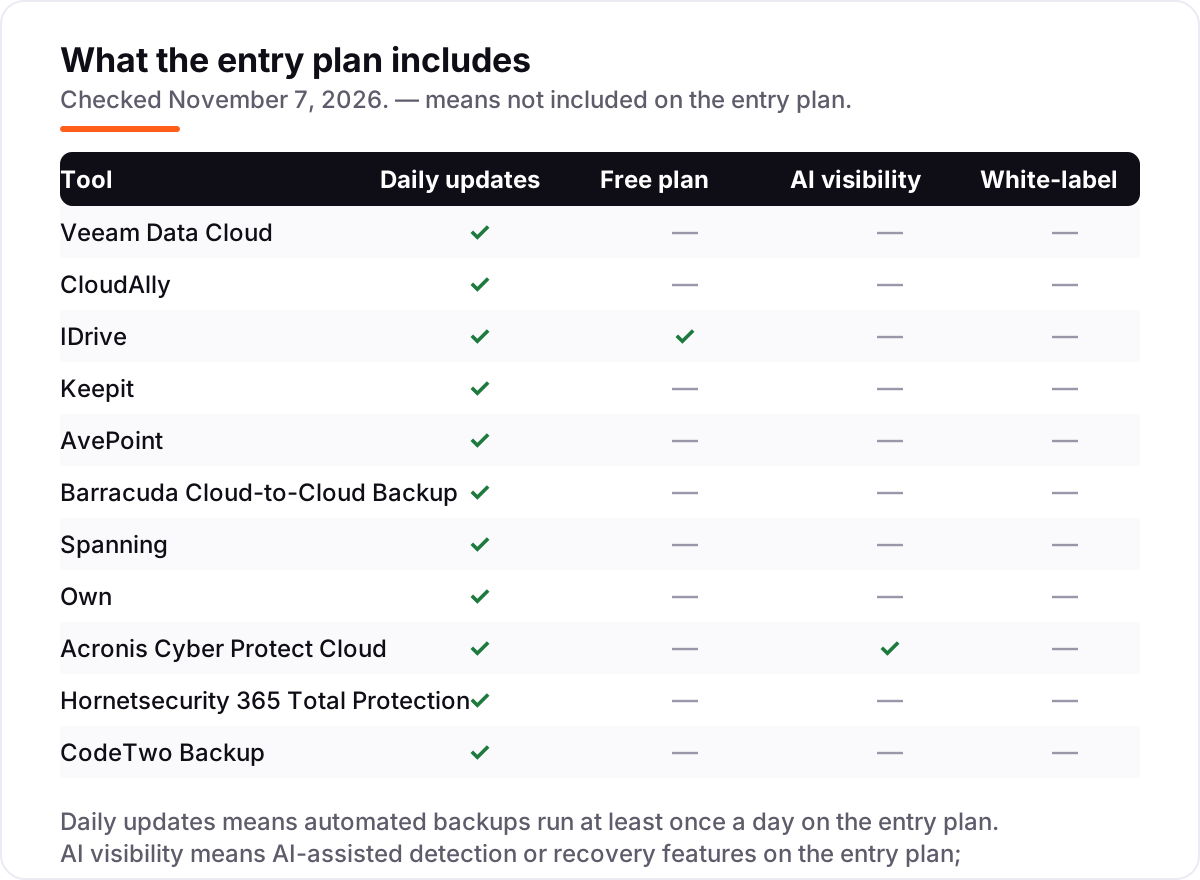
Daily automated backups are the standard, and every tool here backs up at least once a day. IDrive backs up Google Workspace data three times a day, and Spanning adds unlimited on-demand snapshots before risky changes. For high-churn data like Salesforce records, use on-demand runs before bulk edits.
What is immutable backup?
Immutable backup means backed-up data cannot be altered or deleted, even by ransomware or a compromised admin account. Keepit, Veeam Data Cloud and Acronis all use immutability as their ransomware defense. It is the single most important backup feature to check in 2026.
Can I store backups in a different cloud than my SaaS data?
Yes, and you should. Keepit's independent cloud keeps backups separate from the SaaS provider's infrastructure, and Veeam Data Cloud stores copies in its own managed cloud. If the SaaS tenant is compromised, isolated backups remain recoverable. CloudAlly stores copies in AWS S3, separate from Microsoft 365.
Free SEO and AI visibility audit
Find out what is holding your rankings back
Send us your site. Within 2 business days you get a written audit, an AI visibility check and a short fix list ranked by impact. Free, with no contract attached.
Request my free audit→Related guides
 Digital Marketing & Ads11 Best Online Data Backup Services in 2026Compare the 11 best online data backup services on price, storage caps, device limits and encryption, with every price checked November 5, 2026.Read guide →
 Digital Marketing & AdsBest Email Backup Software for 2026: 9 Options Compared by Use CaseCompare the 9 best email backup software options for Microsoft 365 and Google Workspace on price and storage, with every price checked November 5, 2026.Read guide →
 Email, SMS & Social MediaBest Email Security Software for 2026: 11 Options Compared by Use CaseCompare the 11 best email security software options for 2026 on price, phishing defense and BEC protection, with every price checked November 6, 2026.Read guide →