
11 Best SAAS Spend Management Software in 2026, Compared
Compare the 11 best saas spend management software tools on price, free plans, cards and AI features, with every price checked November 4, 2026.
 Shamim Mia, Founder, SerpAstraLast verified November 4, 202615 min read
We compare pricing pages, documentation and public reviews. We never accept payment for rankings.

Key takeaways
- Ramp is the best fit for most SaaS companies at $15/user/month on Plus (free to start); Brex follows at $12/user/month, and BILL Spend & Expense is free at $0/user/month.
- Expensify Collect is the cheapest paid plan at $5/member/month, while Precoro charges a flat $499/month — the highest starting price here by a wide margin.
- The single most important buying factor is how you are charged: per user, per active user, flat platform fee or custom quote — the same 25-person team pays $125 to $499 a month depending on the model.
- Four tools publish no price at all (Coupa, Zip, Spendesk and Mesh Payments) and Pleo prices in pounds, so budget on a quote and check the currency before you compare.
On this page
Quick comparison
| Tool | Best for | Starting price | Free plan |
|---|---|---|---|
| Ramp | SaaS companies that want corporate cards, expense automation and procurement in one free-to-start platform | $15/mo | Yes (Free plan) |
| Brex | Fast-growing companies that want a corporate card with built-in travel booking and spend controls | $12/mo | Yes (Essentials) |
| BILL Spend & Expense | US companies that want free corporate cards and expense control alongside AP automation | $0/mo | Yes (free) |
| Expensify | Companies that want the fastest expense reports with the SmartScan receipt reader | $5/mo | Yes (Submit) |
| Sage Expense Management | Finance teams that want expense automation inside the Sage ecosystem | $11.99/mo | No (trial) |
| Mesh Payments | Global teams that want cardless payments, SaaS spend control and travel in one platform | Custom | Yes (Pro) |
| Pleo | European companies that want smart company cards with built-in FX | £8/mo | No |
| Spendesk | European mid-market companies that want spend, AP and procurement in one package | Custom | No |
| Precoro | Companies that want procurement-led spend control with approval workflows | $499/mo | No (trial) |
| Zip | Large companies that want AI-guided intake-to-procure for every purchase | Custom | No |
| Coupa | Enterprises that want a full spend-management suite across procurement, AP and supply chain | Custom | No |
Make one of these tools?
We re-check this list every quarter. Send a correction, request a review, or ask about a clearly labeled sponsored spot.
Request a listingThe best saas spend management software

Ramp
Best for: SaaS companies that want corporate cards, expense automation and procurement in one free-to-start platform
Ramp is the best fit for most SaaS companies because the free plan is real: unlimited virtual and physical cards, spend programs and accounting automation at $0 a user a month, with real-time data flowing to QuickBooks, Xero and NetSuite. Plus costs $15 a user a month — $12 billed annually — and adds vendor management, advanced controls and procurement as an add-on, with a 30-day free trial.
The catch is the platform fee. Plus adds an unpublished fee based on team size, so the $15 figure is not the whole bill — get the quote before you budget. Ramp is also US-focused, so international teams get thinner coverage than Pleo or Spendesk. Buy Ramp when you want cards and expense automation free now, with room to grow into procurement; buy BILL when $0 forever is the requirement.
What we like
- Free plan includes unlimited virtual and physical cards, spend programs and accounting automation
- Real-time expense data flows to QuickBooks, Xero and NetSuite automatically
- Plus adds vendor management, procurement and advanced controls at $15/user/month
- No setup or annual fees on the free plan
Watch out for
- Plus adds an unquantified platform fee based on team size, so $15/user/month is not the whole bill
- Procurement is an add-on to Plus and Enterprise, not in the base price
- US-focused: international coverage is thinner than Pleo or Spendesk

Brex
Best for: Fast-growing companies that want a corporate card with built-in travel booking and spend controls
Brex is built for companies that move fast: Essentials is free with unlimited cards and no annual fee, and Premium costs $12 a user a month for travel booking, bill pay, budgeting and AI-powered spend controls. Card transactions appear in real time, budgets apply to every card, and custom rules flag out-of-policy spending automatically.
The limits are scale and trials. Premium's $12 a user a month adds up quickly for a large team, and there is no flat-rate option — a 200-person company pays $2,400 a month before anything else. There is also no free trial for Premium, so the only way to test it is to upgrade. Pick Brex when travel booking and real-time controls matter more than the lowest per-user price.
What we like
- Essentials is free with unlimited cards and no annual fee
- Travel booking is built in, so trips and spend live in the same platform
- Real-time spend controls and budgets apply to every card
- AI-powered custom rules automate approvals and flag out-of-policy spend
Watch out for
- Premium's $12/user/month adds up fast for large teams — there is no flat-rate option
- No free trial for Premium; the only way to try it is to upgrade
- Card limits are set by Brex underwriting, so approval and limits vary by company

BILL Spend & Expense
Best for: US companies that want free corporate cards and expense control alongside AP automation
BILL Spend & Expense is the only tool here that is free with no catch: $0 a user a month for virtual and physical cards, budgets, expense management and real-time spend visibility, with credit lines from $1,000 to $5 million subject to approval. It sits inside BILL's wider platform, so the same login covers AP, AR and payments if you add those products.
The trade-off is that the free part is only the spend part. AP and AR are separate paid products — Essentials starts at $49 a user a month — and per-transaction fees apply to ACH payments ($0.59), checks ($1.99) and card payments (2.9%). International coverage is also narrower than Pleo or Spendesk. Choose BILL when the budget is $0 and the company spends in the US.
What we like
- Spend & Expense is free — no subscription or per-user fees
- Credit lines from $1,000 to $5M, subject to approval
- The same login covers AP, AR and payments if you add those products
Watch out for
- AP and AR are separate paid products — Essentials starts at $49/user/month
- Per-transaction fees apply to ACH ($0.59), checks ($1.99) and card payments (2.9%)
- Free spend features are US-focused; international coverage is narrower than Pleo or Spendesk

Expensify
Best for: Companies that want the fastest expense reports with the SmartScan receipt reader
Expensify is the fastest way to turn receipts into reports: SmartScan reads a receipt in seconds, Collect costs a flat $5 a member a month with no annual commitment, and the tool works with your own cards as well as the Expensify Card. Approval workflows, expense reports and accounting sync are all included, with a 30-day free trial.
The price to watch is Control. It costs $9 an active member a month with the Expensify Card — $18 without it — so the bill doubles the moment you leave the card, and advanced controls and support sit on Control, not Collect. Per-active-member billing also means the monthly total moves with how many people file expenses. Pick Expensify when receipt capture speed is the priority.
What we like
- SmartScan reads receipts in seconds — the fastest capture in this list
- Collect is a flat $5/member/month with no annual commitment
- Works with your own cards as well as the Expensify Card
Watch out for
- Control costs $9/active member/month with the Expensify Card — $18 without it — so the price doubles off-card
- Advanced controls and support sit on Control, not Collect
- Per-active-member billing means the monthly bill moves with how many people file expenses

Sage Expense Management
Best for: Finance teams that want expense automation inside the Sage ecosystem
Sage Expense Management is the new name for Fyle, which Sage acquired in July 2025, and it is the natural pick for finance teams already running Sage. Growth costs $11.99 an active user a month billed annually, with a 5-user minimum, and includes unlimited expense reports, real-time card feeds, AI-powered spend insights and approval workflows that sync to the ledger.
Two things to check before you buy. First, $11.99 is the annual-billing rate — no monthly-billed price is published — so the monthly cost is a commitment, not a choice. Second, active-user billing means you pay only for people who file an expense or use a connected card that month, which keeps the bill honest for part-time spenders. The Fyle name still lives on fylehq.com, so the rebrand can confuse.
What we like
- Active-user billing means you only pay for people who file expenses that month
- AI-powered spend insights (Copilot) are on the Growth plan
- Deep Sage accounting integrations — a natural fit if you already run Sage
Watch out for
- $11.99 is the annual-billing rate; no monthly-billed price is published
- Growth needs a 5-user minimum; Business needs a 10-user minimum
- The Fyle name still lives on the fylehq.com domain, so the rebrand can confuse

Mesh Payments
Best for: Global teams that want cardless payments, SaaS spend control and travel in one platform
Mesh Payments is the cardless option: the Pro tier is free and covers virtual cards, expense management, SaaS spend tracking, approvals and ERP sync, with on-demand payments that need no physical card for SaaS vendors. Cashback is available on payments, and G2 reviewers rate it 4.6 out of 5 across 1,065 reviews.
The problem is price transparency. Mesh publishes no prices — Premium and Enterprise are quote-only — and the $13 Premium figure that appears in G2's vendor-supplied pricing does not appear on Mesh's own pricing page, so we list it as custom quote. Cashback also needs $50,000 in monthly spend, out of reach for small teams. Pick Mesh when global, cardless payments matter more than a published price.
What we like
- Free Pro tier covers cards, approvals and SaaS spend tracking
- Cardless and on-demand payments — no physical card needed for SaaS vendors
- Cashback on payments, with a minimum $50,000 monthly spend required
Watch out for
- No published prices — Premium and Enterprise are quote-only
- The $13 Premium figure appears only in G2's vendor-supplied pricing, not on Mesh's own pricing page
- Cashback needs $50,000 in monthly spend, out of reach for small teams

Pleo is the European pick: smart company cards with receipt capture, expense management and accounting sync from £8 a user a month on Start, with Build at £14 and Optimise at £18. FX markup is low — 2.00% on Start, 1.75% on Build and 1.49% on Optimise — and the cards work across the UK, Europe and the US.
The catch is currency and AI. Pleo prices in pounds, and the US page shows the same figures in dollars, which invites confusion when you compare tools — convert before you shortlist. There is no free plan; the free Starter tier was removed, and AI-powered expense review waits for Optimise at £18 a user a month. Choose Pleo when the company spends in euros or pounds and FX fees matter.
What we like
- FX markup is low — 1.49% on Optimise, 1.75% on Build, 2.00% on Start
- Smart cards work across the UK, Europe and the US
- Scale plans cover unlimited users from £249/month
Watch out for
- Priced in pounds — US buyers see the same figures in dollars on the US page, which invites confusion
- No free plan; the free Starter tier was removed
- AI-powered expense review waits for Optimise at £18/user/month

Spendesk
Best for: European mid-market companies that want spend, AP and procurement in one package
Spendesk is the all-in-one option for European mid-market companies: smart cards, expense management, invoice processing, budgets and accounting sync in one platform, with AP, procurement and multi-entity support as add-ons. There are no per-user, per-card or per-login charges — unlimited users — and AI reads invoices and receipts automatically.
The catch is that nothing is published. Every quote is custom, so comparing costs takes a sales call, and the add-ons that make Spendesk complete — AP, procurement, multi-entity — cost extra. There is no free trial to test the platform first. Buy Spendesk when one platform for spend, AP and procurement beats a cheaper card-first tool.
What we like
- No per-user, per-card or per-login charges — unlimited users
- Spend, AP and procurement in one platform, with multi-entity support
- AI reads invoices and receipts automatically
Watch out for
- No published price — every quote is custom, so comparing costs takes a sales call
- AP, procurement and multi-entity features are paid add-ons
- No free trial to test the platform before talking to sales

Precoro
Best for: Companies that want procurement-led spend control with approval workflows
Precoro is the procurement-first pick: Core costs a flat $499 a month billed annually, covering the whole team rather than charging per user, with purchase requests, approvals, purchase orders, budgets and vendor management at the centre. Go-live takes 2–8 weeks, and a free trial lets you test the workflows before you pay.
The flat fee cuts both ways. It is the highest starting price in this list by a wide margin, and a small team pays the same $499 as a 500-person company — so it only makes sense once the team is big enough. There is also no corporate card program on the entry plan; control runs through purchase orders. Pick Precoro when approvals and purchase orders are the job, not cards.
What we like
- Flat $499/month covers the whole team — the bill does not grow with headcount
- Procurement workflows (requests, approvals, POs, budgets) are the core product, not an add-on
- Go-live in 2–8 weeks, with a free trial to test it
Watch out for
- $499/month is the highest starting price in this list by a wide margin
- No corporate card program on the entry plan — control runs through purchase orders
- Small teams pay the same $499 as a 500-person company

Zip
Best for: Large companies that want AI-guided intake-to-procure for every purchase
Zip is the intake-first pick for large companies: AI-guided intake routes every purchase through the right approval path, covering the full procure-to-pay cycle from request to payment, with deep ERP integrations for NetSuite, SAP and Oracle. Every purchase starts in one place, which is the point — no more spending that finance hears about after the fact.
The catch is price and weight. Zip publishes no price — third-party benchmarks range from $26,586 to $88,000 a year — so budget on a quote, and the platform is built for larger companies, which makes it heavy for a small team. There is no free plan or trial to test before a sales conversation. Choose Zip when procurement intake is the bottleneck and the company is big enough to need it.
What we like
- AI-guided intake routes every purchase through the right approval path
- Covers the full procure-to-pay cycle, not just cards or expenses
- Deep ERP integrations with NetSuite, SAP and Oracle
Watch out for
- No published price — third-party benchmarks range from $26,586 to $88,000 a year, so budget on a quote
- Built for larger companies; small teams will find it heavy
- No free plan or trial to test before a sales conversation

Coupa
Best for: Enterprises that want a full spend-management suite across procurement, AP and supply chain
Coupa is the enterprise pick: the most complete suite here, covering procurement, invoicing, expenses, payments and supply chain in one platform, with AI insights powered by $10 trillion in spend intelligence, per the vendor. 55% of the Fortune 500 work with Coupa, per the vendor, and the platform is built for companies where spend is a board-level concern.
The catch is that Coupa is enterprise in every sense. There are no published prices — third-party figures range from $1,500 a user a year to $15–$30 a user a month, none vendor-verified — and implementation takes months, not days, for a full rollout. A small team will find the platform heavy. Buy Coupa when the company is large enough that spend control needs a suite, not a tool.
What we like
- The most complete suite here — procurement, AP, expenses, payments and supply chain in one platform
- 55% of the Fortune 500 work with Coupa, per the vendor
- Spend data from $10 trillion in transactions powers its benchmarks, per the vendor
Watch out for
- No published prices — third-party figures range from $1,500/user/year to $15–$30/user/month, none vendor-verified
- Built for enterprises; the platform is heavy for a small team
- Implementation takes months, not days, for a full rollout
The best saas spend management software gives finance teams one place to issue cards, approve spending and reconcile every dollar — without chasing receipts through email threads. We ranked the eleven tools below by fit for the most common buyer — a SaaS company that wants control over subscriptions, travel and team spending — starting with the free plans and ending with the enterprise suites, and every price was checked on the vendor's own pricing page on November 4, 2026.
How to choose the best saas spend management software
- Count who pays, not just what it costs. Ramp charges per user plus an unpublished platform fee, Expensify charges per active member, Precoro charges a flat $499 a month, and Coupa, Zip, Spendesk and Mesh Payments charge a custom quote. The billing model decides your bill more than the headline price.
- Decide whether you need cards, procurement or both. Ramp, Brex and BILL lead with corporate cards; Precoro, Zip and Coupa lead with purchase orders and approvals; Expensify and Sage Expense Management lead with expense reports. A card-first team buying a procurement suite pays for workflows it never uses.
- Check the free plan's real limits. Ramp's free plan and BILL's free Spend & Expense include cards at $0; Mesh's free Pro tier covers the basics; Pleo, Spendesk, Coupa and Zip have no free plan at all.
- Check the currency. Pleo prices in pounds — £8 a user a month on Start — while the US page shows the same figures in dollars. Compare like with like before you shortlist.
- Think about who else touches the spend. If your accountant already lives in QuickBooks or Xero, pick a tool that syncs to it in real time — every tool in this list does — and ask them to check the coding before you buy.
Spend software is one system in your stack, not the whole stack. If the business also needs to be found online, our monthly SEO service handles the visibility side. And before you publish new pages for the services you sell, run your titles through the free SERP snippet preview tool — it shows exactly how the title and description will look in Google.
Whatever you shortlist, try it with real data before you pay. The free plans and trials in this list are long enough to run one genuine month — your cards, your subscriptions, your expense reports — and that month tells you more than any review can. Check two things in the trial: that card transactions appear in real time without daily fixing, and that your accountant can get in for free. Most tools here give your accountant access at no extra charge, so there is no reason to buy before they have looked at it.
SaaS spend management software pricing: what you will actually pay
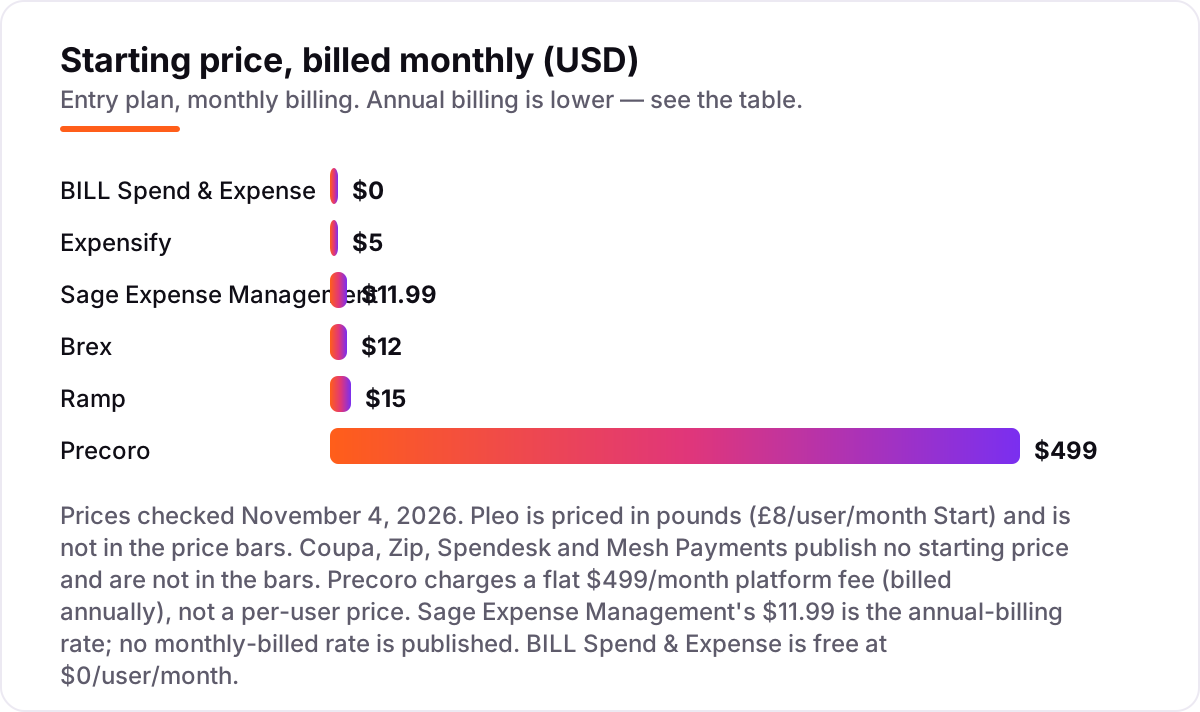
Take a 25-person SaaS company that issues cards to everyone and runs about 200 expense reports a month. On list prices, the subscription costs $0 a month on BILL Spend & Expense, $125 on Expensify Collect, $300 on Brex Premium, about $300 on Sage Expense Management Growth, $375 on Ramp Plus, $499 on Precoro Core, £200 a month on Pleo Start, and a custom quote on Mesh Payments, Coupa, Zip and Spendesk. Three of those numbers need adjusting before they are real: Ramp Plus adds an unpublished platform fee based on team size, Sage's $11.99 is the annual-billing rate, and Pleo's £200 is in pounds, not dollars.
Over a year, that is $0 on BILL, $1,500 on Expensify, $3,600 on Brex, about $3,597 on Sage billed annually, $4,500 on Ramp before the platform fee, and $5,988 on Precoro. The same 25 people cost $0 a year at the cheap end and $5,988 at the dear end — a gap that comes entirely from the billing model, not from features. Sage at 25 active users times $11.99 works out to $299.75 a month, or $3,597 a year billed annually.
Three costs sit outside every number above. First, the card fees and FX: BILL charges $0.59 per ACH payment and 2.9% on card payments, and Pleo adds a 2.00% FX markup on Start. Second, the add-ons: Ramp's procurement is an add-on to Plus, and Spendesk's AP, procurement and multi-entity features are paid add-ons. Third, implementation: Precoro takes 2–8 weeks to go live, and Coupa takes months for a full enterprise rollout. If you run a finance firm rather than a general SaaS company, the visibility tools differ too — see our guide to the best expense management software for small business.
Annual billing cuts the bill on most tools here: Ramp Plus drops from $15 to $12 a user a month, and Sage Growth is only published as an annual rate. Brex Premium publishes a single $12 figure with no billing split, and Expensify Collect is a flat $5 with no annual commitment. One more cost to check before you commit: a second entity is a second subscription on every tool in this list, and multi-entity support is a paid add-on on Spendesk — so a company with two subsidiaries pays more than whatever the chart shows.
Know the difference: card-led platforms vs procurement suites vs expense-only tools
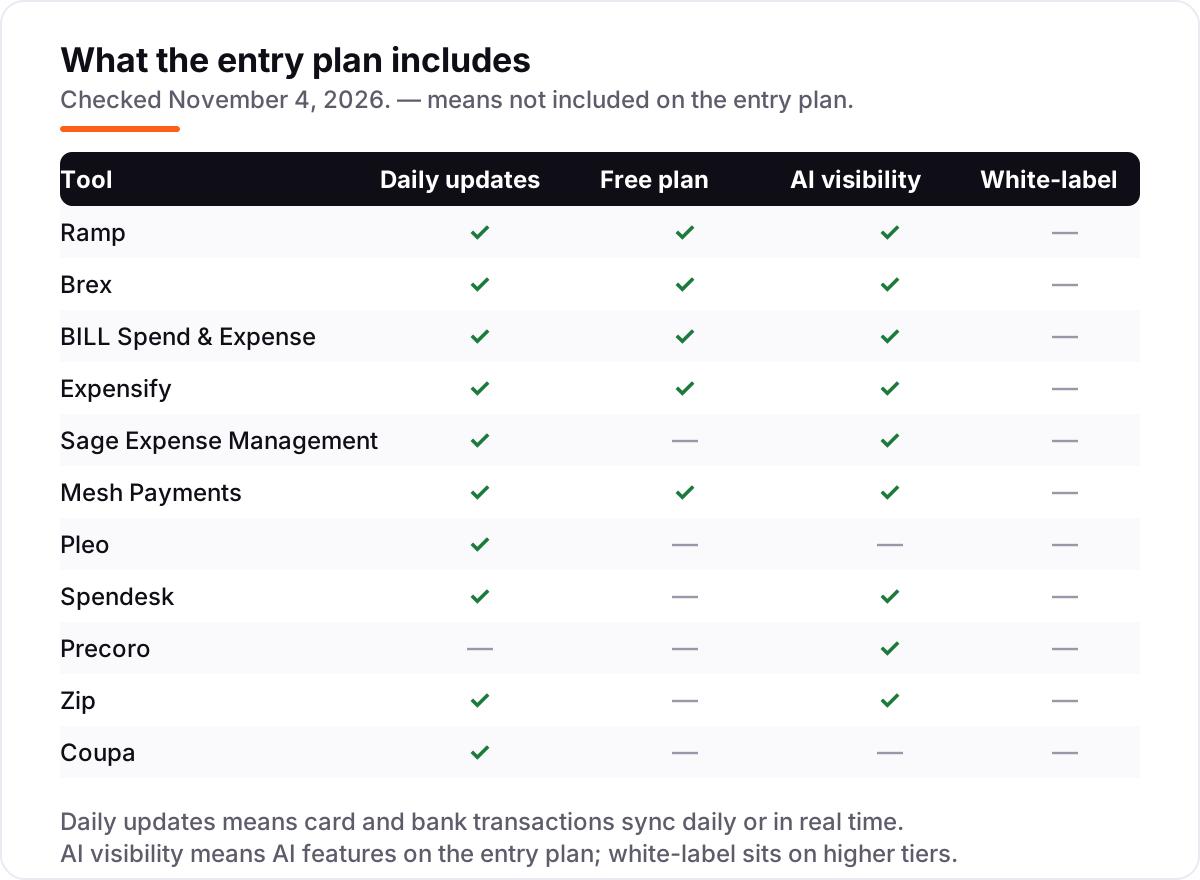
The confusion in this category is between three kinds of tool that all call themselves spend management. Card-led platforms — Ramp, Brex, BILL and Mesh — issue corporate cards and control spend before it happens, with budgets and limits on every card. Procurement suites — Coupa, Zip, Precoro and Spendesk — control spend through purchase requests, approvals and purchase orders, and cards are secondary or absent. Expense-only tools — Expensify and Sage Expense Management — start after the money is spent, turning receipts into reports. The same company can need all three, but the buying decision is which job is the painful one.
A second, quieter confusion is per-user pricing versus flat pricing versus quotes. Per-user tools (Ramp, Brex, Expensify, Pleo, Sage) get more expensive as you hire; flat tools (Precoro at $499 a month) do not; quote tools (Coupa, Zip, Spendesk, Mesh) hide the price entirely. A 25-person team pays $125 a month on Expensify and $499 on Precoro — but a 250-person team pays $1,250 on Expensify and still $499 on Precoro. The cheapest tool at 25 people is not the cheapest at 250.
A third distinction worth knowing is free versus free-to-try. BILL Spend & Expense and Ramp's free plan cost $0 every month; a 30-day trial of Expensify or Ramp Plus costs $0 for a month and then starts billing. If the budget is genuinely $0, only BILL, Ramp Free and Mesh Pro qualify — every other tool here needs a subscription or a quote before the first month ends.
Quick comparison: tool type by need
| Buyer | Best pick | Why |
|---|---|---|
| Solo founder or tiny team on $0 | BILL Spend & Expense | Free cards and expense control at $0/user/month |
| Most SaaS companies | Ramp | Free to start, Plus at $15/user/month with procurement available |
| Team that travels a lot | Brex | Travel booking built in, Premium at $12/user/month |
| Cheapest paid expense reports | Expensify | Collect is $5/member/month with SmartScan |
| European company with FX | Pleo | Smart cards from £8/user/month, FX from 1.49% |
| Procurement-first company | Precoro | Flat $499/month for the whole team, not per user |
Mistakes to avoid
- Budgeting on the per-user price alone. Ramp Plus adds an unpublished platform fee, and Sage's $11.99 is the annual-billing rate. The per-user figure is the start of the bill, not the whole bill.
- Buying a procurement suite for a card problem. If the pain is employees spending on cards without approval, Coupa or Zip will slow the team down with purchase orders. Match the tool to the job — cards first, or procurement first.
- Ignoring the currency. Pleo's £8 a user a month is not $8. A US buyer who compares pounds to dollars without converting will under-budget by about 25%.
- Paying for cards you already have. Expensify works with your own cards, and BILL and Ramp issue theirs free. Do not buy a second card program on top of the one your bank already gave you.
- Skipping the quote tools entirely. Coupa, Zip, Spendesk and Mesh publish no price, which makes them easy to ignore — but for a company spending $50,000 a month or more, a negotiated quote can beat any per-user list price. Get the quote before you decide.
How we chose
We checked each vendor's own pricing page on November 4, 2026 and recorded the starting price exactly as shown, including the annual-billing figure where the page lists one, and we ranked the tools by fit for the most common buyer — a SaaS company controlling subscriptions, travel and team spending — not by brand size. Two prices need a note. Expensify's pricing page renders no figures in a text view, so the $5 Collect and $9 Control figures come from Expensify's own resource-center guides, checked the same day; we did not take them from a third-party directory. Mesh's $13 Premium figure appears only in G2's vendor-supplied pricing — it does not appear on Mesh's own pricing page — so we list Mesh as custom quote. Pleo is priced in pounds on its UK page; the US page shows the same figures in dollars, and we report the pound figures. Coupa, Zip and Spendesk publish no prices at all, so we list them as custom quote and do not repeat third-party figures as fact. Airbase was considered and left out: its pricing page now redirects to Paylocity, so we could not verify a standalone price or a working pricing page. Ratings come from each product's own G2 reviews page opened November 4, 2026; Coupa and Zip carry no rating because no product-specific G2 page with a rating could be opened for them. No vendor paid for a place in this list, and none of the links here are affiliate links.
What to do next
Start with the free plan or trial of your top pick and run one real month of spending through it. Check that card transactions appear in real time, that approvals route to the right people, and that the reports match what your accountant expects before you commit to a year. If the books are sorted but new customers are not finding you, our monthly SEO service handles the visibility side — or compare budgeting tools in our guide to budgeting software for small business. Once your tools are in place, find out what's holding your rankings back.
Your stack only works if people find you
SerpAstra fixes what keeps your site off page one and makes it easy for AI assistants to recommend.
Get a free audit→Sources we checked (21)
- Ramp pricing — ramp.com/pricing (checked November 4, 2026)
- Brex pricing — brex.com/pricing (checked November 4, 2026)
- BILL pricing — bill.com/product/pricing (checked November 4, 2026)
- Expensify pricing — expensify.com/pricing (checked November 4, 2026)
- Expensify pricing guide — use.expensify.com/resource-center/guides/expensify-alternatives (checked November 4, 2026)
- Sage Expense Management pricing — fylehq.com/pricing (checked November 4, 2026)
- Mesh Payments pricing — meshpayments.com/pricing (checked November 4, 2026)
- Pleo pricing — pleo.io/pricing (checked November 4, 2026)
- Spendesk pricing — spendesk.com/pricing (checked November 4, 2026)
- Precoro pricing — precoro.com/pricing (checked November 4, 2026)
- Zip — ziphq.com (no pricing page; custom quote, checked November 4, 2026)
- Coupa pricing — coupa.com/pricing (checked November 4, 2026)
- Ramp reviews — g2.com/products/ramp-financial-ramp/reviews (checked November 4, 2026)
- Brex reviews — g2.com/products/brex/reviews (checked November 4, 2026)
- BILL Spend & Expense reviews — g2.com/products/bill-spend-expense-formerly-divvy/reviews (checked November 4, 2026)
- Expensify reviews — g2.com/products/expensify/reviews (checked November 4, 2026)
- Sage Expense Management reviews — g2.com/products/fyle/reviews (checked November 4, 2026)
- Mesh Payments reviews — g2.com/products/mesh-payments/reviews (checked November 4, 2026)
- Pleo reviews — g2.com/products/pleo/reviews (checked November 4, 2026)
- Spendesk reviews — g2.com/products/spendesk/reviews (checked November 4, 2026)
- Precoro reviews — g2.com/products/precoro/reviews (checked November 4, 2026)
Shamim
Founder of SerpAstra
A full-stack SEO and digital marketer who spends most days on Local SEO for dental practices, AI search visibility and lead generation.
Frequently asked questions
What is the best SaaS spend management software?
Ramp is the best fit for most SaaS companies: free to start, Plus at $15/user/month, with cards, expense automation and procurement in one platform. Brex is the better pick when travel booking matters, at $12/user/month. BILL Spend & Expense is the best free option at $0/user/month.
How much does SaaS spend management software cost?
Entry prices run from $0 to $499 a month. BILL Spend & Expense is free, Expensify Collect costs $5/member/month, Brex Premium $12 and Ramp Plus $15/user/month, while Precoro charges a flat $499/month. Coupa, Zip, Spendesk and Mesh Payments publish no price — budget on a quote.
Is there really free spend management software?
Yes, with limits. BILL Spend & Expense is free with cards, budgets and expense control at $0/user/month. Ramp's free plan includes unlimited cards and accounting automation, and Mesh Payments offers a free Pro tier. None of them include procurement — that sits on paid plans or in the quote-only tools.
What is the difference between spend management and expense management?
Spend management controls money before it leaves — cards, budgets, approvals and purchase orders. Expense management records money after it is spent — receipts, reports and reimbursements. Ramp, Brex and BILL do the first; Expensify and Sage Expense Management do the second; Coupa, Zip, Precoro and Spendesk cover both.
Do I need corporate cards to use spend management software?
No. Expensify and Sage Expense Management work with cards you already have, and Precoro, Zip and Coupa control spending through purchase orders instead of cards. Cards help — they put limits on spending before it happens — but a procurement-led tool can control spend without issuing a single card.
Can I switch spend management software later?
Yes, but plan the move for your year-end. Export your card programs, budgets, vendor lists and transaction history from the old tool, then set up the new one and reconcile the ledger before going live. Switching mid-year means running two systems through tax season, and reissuing cards takes time.
Free SEO and AI visibility audit
Find out what is holding your rankings back
Send us your site. Within 2 business days you get a written audit, an AI visibility check and a short fix list ranked by impact. Free, with no contract attached.
Request my free audit→Related guides
 Accounting, Tax & Finance10 Best Expense Management Software for Small Business in 2026, Compared10 best expense management software for small business options compared on price, cards and receipt automation, with real prices checked November 2, 2026.Read guide →
 Accounting, Tax & Finance10 Best Budgeting Software for Small Business in 2026, ComparedCompare the 10 best budgeting software for small business options on price, budgeting depth and bank sync, with real prices checked November 2, 2026.Read guide →
 SEO & AI Search12 Best Accounting Software for SAAS in 2026, Compared12 best accounting software for saas tools compared with real 2026 prices, from $0 billing layers to full ledgers and ERP, sorted by what your SaaS needs.Read guide →