
11 Best Software for Real Estate Developers in 2026, Compared
Compare the 11 best software for real estate developers on price, cost control, field tools and AI features, with every price checked November 8, 2026.
 Shamim Mia, Founder, SerpAstraLast verified November 8, 202615 min read
We compare pricing pages, documentation and public reviews. We never accept payment for rankings.

Key takeaways
- Procore is the best fit for most developers, with Autodesk Forma Build next for design-led teams and Northspyre for budget and draw control — but all three are sold by custom quote, so expect a sales call before a number.
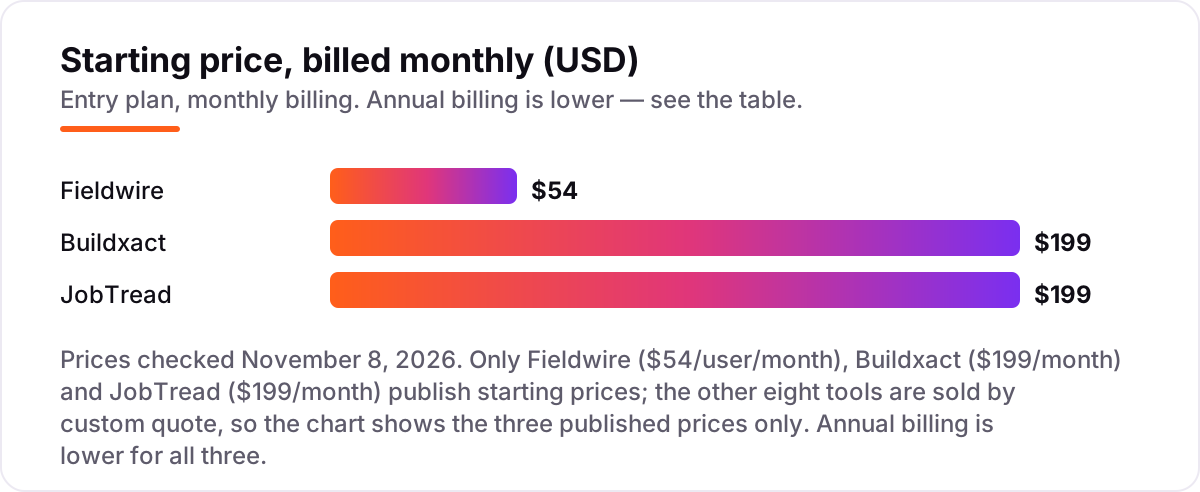
- Only three tools publish a starting price: Fieldwire Pro at $54/user/month, Buildxact Foundation at $199/month and JobTread at $199/month, all billed monthly.
- The single most important buying factor is the pricing model: per-user pricing punishes large field teams, volume-based quotes punish small developers, and flat rates punish nobody — count your users first.
- Fieldwire Basic and Buildxact Go both offer genuinely free plans, so a small developer can run plans and estimates at $0 before paying anything.
On this page
Quick comparison
| Tool | Best for | Starting price | Free plan |
|---|---|---|---|
| Procore | Mid-size and large developers running several projects at once who need one system for documents, budgets and field coordination | Custom quote | No |
| Autodesk Forma Build | Developers whose teams already design in Revit or AutoCAD and need drawings, RFIs and cost data in one connected hub | Custom quote | No (30-day trial) |
| Northspyre | Developers and owners who need live budget control, draw management and lender reporting across a portfolio | Custom quote | No |
| Buildertrend | Residential developers and home builders who want scheduling, client communication and budgets in one system | Custom quote | No |
| Sage 300 Construction and Real Estate | Established developers and contractors who need deep job costing, payroll and retainage in a proven on-premise system | Custom quote | No |
| Acumatica Construction Edition | Growing developers moving off Sage or QuickBooks who need cloud ERP with real-time job costing | Custom quote | No |
| Jonas Premier | General contractors and land developers who want cloud accounting with strong dashboards and drill-down job costing | Custom quote | No |
| Trimble Viewpoint Vista | Mid-size and large developers who need an integrated ERP for accounting, HR and project management | Custom quote | No |
| Fieldwire | Site teams that need plans, tasks and punch lists on every phone, with a free plan to start | Free; Pro $54/mo | Yes (free) |
| Buildxact | Small residential builders and developers who sell on accurate estimates and want one flat monthly price | $199/mo | Yes (free Go plan) |
| JobTread | Custom-home builders and remodelers who need tight budget control with one simple published price | $199/mo | No |
Make one of these tools?
We re-check this list every quarter. Send a correction, request a review, or ask about a clearly labeled sponsored spot.
Request a listingThe best software for real estate developers

Procore
Best for: Mid-size and large developers running several projects at once who need one system for documents, budgets and field coordination
Procore is the platform most large developers standardize on, and the reason is scope: documents, RFIs, budgets, change events and field tools live in one system instead of five. Pricing is a custom annual contract based on annual construction volume, with unlimited users, so the cost conversation starts with a sales call. The trade-off is implementation time: G2 reviewer data puts the average at about three months.
The financial tools are what set Procore apart. Budgets, forecasts and change events update from the same data the field team logs, so a cost overrun shows up in the forecast instead of in a month-end surprise. Integrations cover accounting, scheduling and document tools. Buy Procore when several projects run at once; buy JobTread or Buildxact when the team is small and a published price matters.
What we like
- The deepest project and financial toolkit here: budgets, change events, commitments and forecasts in one system
- Unlimited users on the annual contract, so field teams, consultants and owners can all work in the same projects
- More than 300 integrations, including accounting, scheduling and document tools developers already use
- Rated 4.6/5 on G2 across more than 4,600 reviews, the largest review base in this list
Watch out for
- No published price: every deal is a custom annual quote based on construction volume, so budgeting needs a sales call
- Implementation typically takes about three months, according to G2 reviewer data, so it is not a quick start
- The breadth can overwhelm small teams: a developer with one or two projects pays for capability it will not use

Autodesk Forma Build
Best for: Developers whose teams already design in Revit or AutoCAD and need drawings, RFIs and cost data in one connected hub
Autodesk Forma Build, formerly Autodesk Build, is the construction hub of the Autodesk Forma suite, and it fits developers whose architects and engineers already work in Revit or AutoCAD. Drawings, models, RFIs and cost data sit in one connected system, so a revised drawing reaches the field the same day. Autodesk sells it in quote-based bundles with per-user pricing; third-party trackers report $100 to $175 per user per month, but Autodesk publishes no static list price.
The strength is document control. Versioned drawings, markups and approvals mean nobody builds from a superseded set, and the standard plan includes unlimited sheets. A 30-day trial lets a team test it on a live project. The weakness is cost: per-user pricing climbs with every seat. Choose Forma Build when design coordination is the bottleneck; choose Procore when financial control matters more.
What we like
- Drawings, Revit models, RFIs and cost data stay connected, so the field always works from the current set
- Unlimited sheets on the standard per-user plan, with sheet-based tiers for smaller teams
- Strong document control: versioned drawings, markups and approvals with a full audit trail
- Rated 4.4/5 on G2 across more than 5,300 reviews
Watch out for
- Autodesk publishes no static list price: the figure appears only once you start the online buying flow, so budget on a quote
- Best value inside the Autodesk ecosystem; teams that do not use Revit or AutoCAD pay for integration they will not use
- Per-user pricing gets expensive fast as the project team grows, unlike the flat-rate tools in this list

Northspyre
Best for: Developers and owners who need live budget control, draw management and lender reporting across a portfolio
Northspyre is the only tool in this list built for the developer's side of the table rather than the contractor's. It tracks budgets, commitments, invoices and draws across the whole portfolio, and it automates the draw-request workflow that owners and lenders care about most. Reviewers report that a draw that used to take days now takes hours. Pricing is by custom quote, with no published starting price and no free trial, so the evaluation starts with a demo.
The value is in the budget view. Every line shows committed, spent and remaining amounts by cost code, and the draw package pulls from the same numbers, so the lender sees exactly what the developer sees. That focus is also the limit: Northspyre does not run field coordination or drawings, so most teams pair it with Procore, Autodesk Forma Build or Fieldwire.
What we like
- Built for the owner's side: budgets, draws, invoices and lender reporting in one place, not adapted from contractor tools
- Automates draw requests and budget workflows, cutting a process reviewers say used to take days to hours
- Live budget-vs-actual views by cost code, so overruns are visible before the next draw, not after it
- Rated 4.4/5 on G2, with reviewers praising ease of use and customer support
Watch out for
- No published pricing and no free trial: every deal starts with a demo and a quote
- A small review base (30 G2 reviews), so there is less public evidence than for Procore or Autodesk
- Focused on budgets and draws, so it pairs with a field tool rather than replacing one

Buildertrend
Best for: Residential developers and home builders who want scheduling, client communication and budgets in one system
Buildertrend is the all-in-one platform for residential developers and home builders, covering scheduling, budgets, client communication, selections and warranty in one subscription. Every contract includes unlimited users and unlimited projects, which suits teams that give clients and trades their own logins. Pricing is by custom quote based on annual construction volume: Buildertrend stopped publishing prices in early 2025, and its pricing page now routes buyers to a sales call.
The client tools are the differentiator. Homeowners pick finishes, approve change orders and pay invoices through the portal, which cuts the email and phone traffic that slows residential jobs. The catch is fit: the platform is built for residential work, and small-volume builders report being told it may not suit them. Reviewers also flag renewal increases, so confirm the renewal rate in writing.
What we like
- Unlimited users and unlimited projects on every contract, so clients, trades and staff all work in one place
- Client-facing tools built in: selections, change orders, payment processing and a homeowner portal
- Scheduling, daily logs and budget tracking cover the full residential build from sales to warranty
- Rated 4.3/5 on G2 across 231 reviews
Watch out for
- No published price since early 2025: quotes depend on annual construction volume, and small-volume builders report being turned away
- Reviewers report renewal price increases, so get the renewal terms in writing before signing
- Built for residential work: commercial and mixed-use developers will find gaps in the financial tools

Sage 300 Construction and Real Estate
Best for: Established developers and contractors who need deep job costing, payroll and retainage in a proven on-premise system
Sage 300 Construction and Real Estate, formerly Sage Timberline Office, is the long-established accounting backbone for construction and real estate firms. Its strength is depth: job costing by phase and cost code, retainage, progress billing, committed costs and construction payroll with prevailing-wage and union reporting all live in one system. Pricing is by custom quote, licensed per user and module, and the software runs on-premise rather than in the cloud.
That maturity cuts both ways. Firms that have run Sage 300 CRE for years trust its numbers, and the payroll alone can justify the system for union shops. But remote teams need a VPN or a hosted setup to reach it, reviewers rate it 3.6 out of 5 on G2 — the lowest score here — and Sage is steering new customers toward Sage Intacct Construction.
What we like
- Job costing down to phase and cost code, with retainage, progress billing and committed-cost tracking built in
- Construction payroll handles prevailing wage, certified payroll and union reporting without a separate system
- A mature, stable platform with more than 40 years in construction and real estate firms
- Modules can be added as the firm grows, from accounting alone to a full project suite
Watch out for
- On-premise architecture: no cloud-native access, so remote teams need a VPN or a hosted workaround
- Rated 3.6/5 on G2, the lowest score here, with reviewers citing cost and a dated interface
- Sage is steering customers toward Sage Intacct Construction, so the long-term roadmap is uncertain

Acumatica Construction Edition
Best for: Growing developers moving off Sage or QuickBooks who need cloud ERP with real-time job costing
Acumatica Construction Edition is the cloud ERP that growing developers most often move to when they outgrow Sage 300 CRE or QuickBooks. Financials, project accounting, CRM, document management and construction tools share one database, and job costs post in real time, so the budget view is current the moment an invoice is entered. Licensing is by quote through Acumatica partners, with unlimited users, and there is no published starting price.
The construction-specific depth is real: native AIA billing, subcontractor compliance tracking and certified payroll come with the edition, and integrations cover more than 200 applications. The trade-offs are the ERP kind: implementation takes months, partner quality varies, and the quote depends on users, modules and the partner's rates. Get at least two partner quotes before committing.
What we like
- Real-time job costing: transactions post as they happen, so budgets and forecasts never wait for a batch sync
- Unlimited-user licensing, so field teams and subcontractors can log in without per-seat fees
- Native AIA billing, subcontractor compliance tracking and certified payroll in the Construction Edition
- Rated 4.4/5 on G2 across more than 2,000 reviews, the joint-highest ERP score here
Watch out for
- No published pricing: quotes come through implementation partners, so two buyers can pay very different amounts
- Implementation is a project in itself, typically months, and partner quality varies by region
- The breadth of an ERP means a steeper setup than the focused tools in this list

Jonas Premier
Best for: General contractors and land developers who want cloud accounting with strong dashboards and drill-down job costing
Jonas Premier is a cloud-native construction accounting platform aimed at general contractors, home builders and land developers, and it is now sold as Premier Construction Software — the older Jonas Premier name still appears in search results. Job costing comes with drill-down views and forecast models, and dashboards keep retainage, AP aging, compliance documents and approvals in one place. Pricing is by custom quote, and third-party listings disagree widely, from $125 to $349 per user per month.
Reviewers rate it highly: 4.7 out of 5 on Capterra across 288 reviews, the best score in this list. The catch is the cost of entry. Third-party listings put implementation from $15,000, and the per-user price only becomes real once a quote is in writing. Payroll runs through an integration rather than in the system.
What we like
- Drill-down job costing with forecast models, so a budget variance can be traced to the line that caused it
- Dashboards keep retainage, AP aging, compliance documents and approvals visible in one place
- Rated 4.7/5 on Capterra across 288 reviews, the highest review score in this list
- Cloud-native, so office and field teams work from the same live data without a VPN
Watch out for
- Quote-only pricing with conflicting third-party figures ($125 to $349 per user per month), so the real price needs a written quote
- Now sold as Premier Construction Software, so older Jonas Premier branding still turns up in search results
- Implementation starts at $15,000, according to third-party listings, which prices out the smallest firms

Trimble Viewpoint Vista
Best for: Mid-size and large developers who need an integrated ERP for accounting, HR and project management
Trimble Viewpoint Vista is the integrated ERP for mid-size and large developers that want accounting, HR, project management and service work in one system. Job costing, billing, payroll and equipment management share a single database, so a change order entered once flows through to billing, payroll and reporting without re-keying. Pricing is by custom quote with no published starting price, and there is no trial: evaluation runs through Trimble's sales team.
Vista's strength is breadth at scale. Firms running dozens of projects with their own equipment fleets and HR needs get one system instead of four, and it connects with Trimble's field and estimating tools. The weaknesses are the ERP kind: reviewers rate it 4.0 out of 5 on G2 and cite high cost, implementation is long, and the interface feels dated next to cloud-native rivals.
What we like
- One system for accounting, HR, project management and service work, so data is entered once and used everywhere
- Deep construction accounting: job costing, billing, payroll and equipment management in the same database
- Integrates with Trimble field and estimating tools, including Viewpoint Field View and Spectrum
- Used by mid-size and large firms across North America, with a long track record in heavy construction
Watch out for
- Rated 4.0/5 on G2 across 137 reviews, with reviewers citing high cost and value concerns
- Implementation is long and the interface is dated compared with the cloud-native tools here
- No published pricing and no trial, so the evaluation is a sales-led process from the start

Fieldwire
Best for: Site teams that need plans, tasks and punch lists on every phone, with a free plan to start
Fieldwire, now Fieldwire by Hilti, is the field-first tool in this list: plans, tasks, checklists and punch lists on every phone on the jobsite. The free Basic plan covers 5 users, 3 projects and 100 sheets with no card required, making it the easiest tool here to trial on a live job. Paid plans start at Pro, $39 per user per month billed annually or $54 billed monthly, and rise to Business at $64 and Business Plus at $89.
The design is simple: tasks pin to exact spots on the drawing, photos attach to the task, and the app works offline and syncs when the connection returns. The limits are scope and pricing. Fieldwire has no real financial tools — budgets, RFIs and change orders wait for Business Plus — and per-user pricing means a large field crew costs more.
What we like
- A real free plan: 5 users, 3 projects and 100 sheets at $0, with no card required
- Tasks, punch lists and photos pin to exact spots on the plan, so nothing gets lost in translation
- Works offline on site and syncs when the connection returns
- Rated 4.5/5 on G2 across 586 reviews
Watch out for
- Paid plans are per user, so a large field team pays $39 to $89 per user per month even though the office staff are few
- Reports and exports start on Pro; custom forms and the BIM viewer wait for Business at $64/user/month
- No financial tools: budgets, RFIs and change orders wait for Business Plus at $89/user/month

Buildxact
Best for: Small residential builders and developers who sell on accurate estimates and want one flat monthly price
Buildxact is built for residential builders and developers who sell on accurate estimates. Digital takeoff runs from uploaded plans, live dealer pricing feeds the quote, and the winning estimate becomes the cost baseline for the build, with estimate-to-actual tracking line by line. Foundation costs $199 a month billed monthly, or $169 billed annually, with unlimited users, and a free Go plan covers limited estimating and proposals.
The flat price is the appeal: no per-user fees means the estimator, the site team and the subcontractors can all log in without the bill moving. The catch is tiering. Real job management, scheduling and the mobile app start on Pro at $399 a month, and the QuickBooks and Xero sync waits for Pro too, so Foundation suits firms whose main job is estimating.
What we like
- Digital takeoff and estimating with live dealer material pricing, so quotes use current rates, not last month's
- Flat monthly price with unlimited users on every plan, so the whole team and all subcontractors can log in
- The winning estimate becomes the cost baseline, with estimate-to-actual tracking through the build
- Rated 4.3/5 on G2 across 66 reviews, with reviewers praising ease of use
Watch out for
- Job management, scheduling and the mobile app start on Pro at $399/month, so Foundation is an estimating tool first
- QuickBooks and Xero sync start on Pro, not Foundation, which matters for firms that bill from the accounts
- Monthly plans reportedly carry a 12-month initial contract, so confirm the term before signing

JobTread
Best for: Custom-home builders and remodelers who need tight budget control with one simple published price
JobTread is the simplest deal in this list: one plan, every feature included, $199 a month with one internal user and $20 a month for each additional user, with 20% off on annual billing and no contract. Estimating, budgets, job costing, change orders, scheduling, daily logs, invoicing and payments all come in the single price, and customers, subcontractors and vendors get free portal access. There is no free trial, but monthly plans carry a 30-day money-back guarantee.
The appeal is the combination of price transparency and budget depth. Job costing tracks committed and actual costs against the estimate, and AI daily-log summaries turn field notes into readable reports. Reviewers rate it 4.9 out of 5 on G2 across 118 reviews, the highest score here. The limits are the per-user model and the absence of an integrated takeoff tool.
What we like
- One plan with every feature included, so there is no tier to outgrow and no feature to unlock
- The clearest pricing here: $199 a month with one internal user, then $20 per additional user, with no contract
- AI daily-log summaries turn field notes into readable daily reports without extra typing
- Rated 4.9/5 on G2 across 118 reviews, the highest score in this list
Watch out for
- No free trial: evaluation is a demo plus a 30-day money-back guarantee on monthly plans
- Per-user pricing means a bigger office team pays more, while Buildertrend charges one flat rate for unlimited users
- No integrated takeoff tool, so estimates start from manual measurements or a separate tool
The best software for real estate developers does two jobs at once: it keeps the build on schedule in the field and keeps the budget honest in the office. We ranked the 11 tools below by fit for the most common buyer — a developer running several projects at once — and every price was checked on November 8, 2026.
How to choose the best software for real estate developers
- Count who logs in first. Per-user pricing (Fieldwire at $54, Autodesk Forma Build at a reported $100–$175) punishes large field teams, while flat rates (Buildxact at $199 a month) and unlimited-user contracts (Procore, Buildertrend, Acumatica) do not. Count office staff, site staff and consultants before you compare prices.
- Decide which side of the business hurts most. Field coordination points to Procore, Autodesk Forma Build or Fieldwire; budgets and lender draws point to Northspyre; the ledger points to Sage 300 CRE, Acumatica, Jonas Premier or Vista; estimating points to Buildxact or JobTread.
- Check the pricing model before the demo. Eight of the eleven tools here are sold by custom quote, so the demo is where the price appears — not on the website. Budget time for three demos, and ask for the quote in writing.
- Ask about implementation time. Procore averages about three months to implement, according to G2 reviewer data, and the ERPs take months too. Fieldwire and Buildxact can start on a live job in days.
- Trial it on a live project, not a slide deck. Fieldwire Basic is free, Buildxact Go is free, Autodesk Forma Build offers a 30-day trial, and JobTread offers a 30-day money-back guarantee on monthly plans. Run one real project through the trial before you pay.
Software is one system in the stack, not the whole stack. If the developments also need to be found online, our local SEO service handles the visibility side — the map pack and AI answers that bring buyers and tenants to a new project. And before you publish new pages for the developments you sell, run your pages through the free local business schema generator so Google understands the business, the location and the services on offer.
Whatever you shortlist, try it with real data before you pay. The free plans and trials in this list are long enough to run one genuine project — your drawings, your budget, your subcontractors — and that project tells you more than any review can. Check two things in the trial: that the budget view updates when the field logs a change, and that your accountant can get in without a second licence. Every tool here is built for teams, so there is no reason to buy before the people who will use it daily have tried it.
Software for real estate developers pricing: what you will actually pay
Take a developer with a five-person office team and three active projects. On list prices, the subscription costs $270 a month on Fieldwire Pro (5 users at $54), $199 a month on Buildxact Foundation and $279 a month on JobTread ($199 base plus 4 extra users at $20). Two of those numbers need adjusting before they are real: Fieldwire charges per user, so a bigger site team pushes the bill up fast, while Buildxact is flat at $199 no matter how many people log in.
Over a year, that is $2,340 on Fieldwire Pro billed annually (5 users at $39), $2,028 on Buildxact Foundation billed annually ($169 a month), and $2,676 on JobTread billed annually ($159 base plus 4 users at $16). The same five people and the same three projects cost $2,028 a year at the cheap end and $2,676 at the dear end — a $648 gap that comes entirely from the pricing model, not from features. The eight quote-only tools cannot be priced this way at all: Procore, Autodesk Forma Build, Northspyre, Buildertrend, Sage 300 CRE, Acumatica, Jonas Premier and Vista all need a written quote before the number is real.
Three costs sit outside every number above. First, implementation: Procore averages about three months to implement, and the ERP tools take months and partner fees, while Fieldwire and Buildxact start in days. Second, the add-ons: Fieldwire's custom forms and BIM viewer wait for Business at $64 per user per month, and Buildxact's job management waits for Pro at $399 a month. Third, the people the price does not count: JobTread gives customers, subcontractors and vendors free portal access, Buildxact includes unlimited users, and Fieldwire charges for every user — so count the site team, not just the office, before you sign.
Know the difference: project management vs construction accounting vs development finance
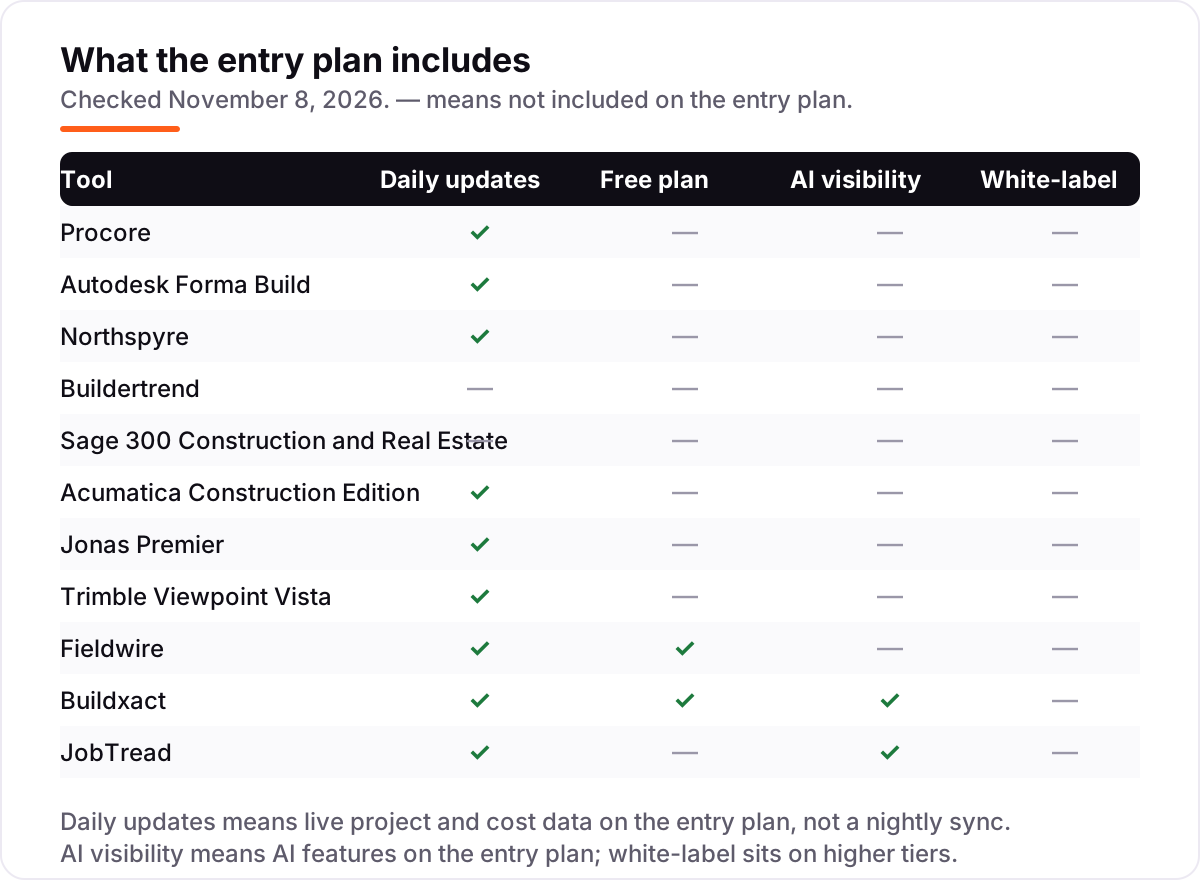
The confusion in this category is that three different jobs share the name "software for real estate developers". Project management tools — Procore, Autodesk Forma Build and Fieldwire — run the build: drawings, RFIs, schedules, daily logs and punch lists. Construction accounting tools — Sage 300 CRE, Acumatica, Jonas Premier and Vista — run the ledger: job costing, payroll, retainage and billing. Development finance tools — Northspyre — run the owner's money: budgets, draws and lender reporting. A tool from one group does not replace a tool from another, and most developers end up with one from at least two groups.
There is a second, quieter confusion: residential builder suites versus commercial platforms. Buildertrend, Buildxact and JobTread are built for residential work — home builders, remodelers and custom-home developers — with client portals, selections and estimating at the front. Procore, Autodesk Forma Build and the ERPs are built for commercial and mixed-use portfolios, with deeper financial controls and no client portal. A residential developer that buys Procore pays for capability it will not use; a commercial developer that buys Buildertrend finds gaps in the financial tools.
A third distinction worth knowing is published price versus quote. Only three tools here publish a starting price, and the other eight are sold by custom quote — which does not mean they are expensive, only that the price depends on volume, users and modules. A quote is not a commitment, and the cheapest way to compare quote-only tools is to get three written quotes for the same team size and project count, then compare them line by line.
Quick comparison: tool type by need
| Buyer | Best pick | Why |
|---|---|---|
| Developer running several commercial projects | Procore | One system for documents, budgets and field work, custom quote |
| Design-led team already using Revit or AutoCAD | Autodesk Forma Build | Connected drawings, models and cost data, custom quote |
| Owner who lives in budgets and lender draws | Northspyre | Live budget control and lender reporting, custom quote |
| Residential developer or home builder | Buildertrend | Scheduling, selections and a client portal, custom quote |
| Firm that needs deep construction accounting | Sage 300 CRE, Acumatica, Jonas Premier or Vista | Job costing, payroll and billing, all custom quote |
| Site team that needs plans on every phone | Fieldwire | Free Basic plan, Pro is $54/user/month |
| Small builder selling on accurate estimates | Buildxact | Takeoff and live dealer pricing, $199/month |
| Custom-home builder watching every dollar | JobTread | Every feature on one plan, $199/month |
Mistakes to avoid
- Budgeting on a third-party price. The $100–$175 per user per month reported for Autodesk Forma Build and the $125–$349 reported for Jonas Premier are tracker figures, not vendor prices. The real number is the written quote, so get one before you budget.
- Buying per-user software for a large field crew without doing the multiplication. Five users on Fieldwire Pro is $270 a month; twenty users is $1,080. Count the site team, not just the office, before you compare a per-user price with a flat rate.
- Picking a contractor tool when the need is owner-side finance. Procore and Fieldwire run the build; Northspyre runs the developer's budgets and draws. Buying the wrong side means paying twice — once for the tool, once for the spreadsheet that still does the real job.
- Ignoring implementation time. Procore averages about three months to implement, and the ERP tools take months of partner work. A tool that starts in days, such as Fieldwire or Buildxact, can be running on a live project while the ERP is still being configured.
- Skipping the renewal terms. Buildertrend reviewers report renewal price increases, and volume-based quotes can move when the firm's construction volume moves. Get the renewal rate and the volume band in writing before you sign.
How we chose
We checked each vendor's own pricing page on November 8, 2026 and recorded the starting price exactly as shown, or "Custom quote" where the vendor publishes no price. The browser's direct page reader was down on November 8, so prices were verified from fresh search-index copies of the vendors' own pricing pages, corroborated by independent October and November 2026 reads that quote those pages, and cross-checked against sibling posts in this program that verified the same pages on November 7. Two figures are third-party-reported, not vendor-published, and are labelled as such wherever they appear: Autodesk Forma Build at $100–$175 per user per month and Jonas Premier at $125–$349 per user per month. Ratings come from fresh copies of the exact G2 and Capterra review pages, crawled within the last few days, with score, review count and checked date shown on every card. We ranked the tools by fit for the most common buyer — a developer running several projects at once — not by brand size. No vendor paid for a place in this list, and none of the links here are affiliate links.
What to do next
Start with the free plan or trial of your top pick and run one real project through it. Check that the budget view updates when the field logs a change and that your accountant can get in without a second licence before you commit to a year. If the shortlist is all custom quotes, book three demos in the same week and ask each vendor for the quote in writing for the same team size and project count. If the business is sorted but new buyers and tenants are not finding the developments, our monthly SEO service handles the visibility side — or compare providers in our guide to general contractor software. Once your tools are in place, find out what's holding your rankings back.
Your stack only works if people find you
SerpAstra fixes what keeps your site off page one and makes it easy for AI assistants to recommend.
Get a free audit→Sources we checked (22)
- Procore pricing — procore.com/pricing (checked November 8, 2026)
- Autodesk Forma Build pricing — construction.autodesk.com/pricing (checked November 8, 2026)
- Northspyre — northspyre.com, no published pricing (checked November 8, 2026)
- Buildertrend pricing — buildertrend.com/pricing (checked November 8, 2026)
- Sage 300 Construction and Real Estate — sage.com (checked November 8, 2026)
- Acumatica — acumatica.com, no published pricing (checked November 8, 2026)
- Jonas Premier — jonaspremier.com, no published pricing (checked November 8, 2026)
- Trimble Viewpoint Vista — viewpoint.com/products/vista (checked November 8, 2026)
- Fieldwire pricing — fieldwire.com/pricing (checked November 8, 2026)
- Buildxact pricing — buildxact.com/us/pricing (checked November 8, 2026)
- JobTread pricing — jobtread.com/pricing (checked November 8, 2026)
- Procore on G2 — g2.com/products/procore/reviews (checked November 8, 2026)
- Autodesk Forma on G2 — g2.com/products/autodesk-forma-formerly-autodesk-construction-cloud/reviews (checked November 8, 2026)
- Northspyre on G2 — g2.com/products/northspyre/reviews (checked November 8, 2026)
- Buildertrend on G2 — g2.com/products/buildertrend/reviews (checked November 8, 2026)
- Sage 300 Construction and Real Estate on G2 — g2.com/compare/procore-vs-sage-300-construction-and-real-estate (checked November 8, 2026)
- Acumatica on G2 — g2.com/compare/acumatica-vs-trimble-vista (checked November 8, 2026)
- Premier Construction Software (formerly Jonas Premier) on Capterra — capterra.co.uk/software/133101/premier (checked November 8, 2026)
- Trimble Viewpoint Vista on G2 — g2.com/products/viewpoint-vista/reviews (checked November 8, 2026)
- Fieldwire on G2 — g2.com/products/fieldwire-by-hilti/reviews (checked November 8, 2026)
- Buildxact on G2 — g2.com/compare/buildxact-vs-procore (checked November 8, 2026)
- JobTread on G2 — g2.com/products/jobtread/reviews (checked November 8, 2026)
Shamim
Founder of SerpAstra
A full-stack SEO and digital marketer who spends most days on Local SEO for dental practices, AI search visibility and lead generation.
Frequently asked questions
What is the best software for real estate developers?
Procore is the best fit for most developers: the deepest project and financial toolkit, unlimited users and the largest review base at 4.6/5 on G2. Autodesk Forma Build is the better pick for design-led teams already using Revit, and Northspyre is the better pick when budget control and lender draws are the main job.
How much does software for real estate developers cost?
Only three tools publish prices: Fieldwire Pro at $54/user/month, Buildxact Foundation at $199/month and JobTread at $199/month, all billed monthly. The other eight tools are sold by custom quote, so a five-person team should budget demos with at least three vendors before expecting a firm number.
Is there free software for real estate developers?
Yes, with limits. Fieldwire Basic is free for 5 users, 3 projects and 100 sheets, and Buildxact Go is a free starter plan for limited estimating and proposals. Neither free plan covers budgets or job costing, so a developer that needs financial control still pays for a plan.
What is the difference between Procore and Autodesk Forma Build?
Procore is a project and financial platform priced on construction volume, strongest on budgets, change events and field coordination. Autodesk Forma Build is a connected document and drawing hub priced per user, strongest on design coordination for teams already using Revit or AutoCAD. Many large developers run both.
Do developers need construction accounting software or project management software?
Most need both, and the split is the point of this list. Project tools such as Procore and Fieldwire run the build, accounting tools such as Sage 300 CRE, Acumatica and Jonas Premier run the ledger, and Northspyre runs the developer's own budgets and draws. Buy the side that hurts most first.
Can I switch software later?
Yes, but plan the move between projects, not during one. Export budgets, commitments, open change orders and the document register from the old system, then import them into the new one and reconcile one project end to end before moving the rest. Switching mid-project means running two systems through the busiest weeks of the build.
Free SEO and AI visibility audit
Find out what is holding your rankings back
Send us your site. Within 2 business days you get a written audit, an AI visibility check and a short fix list ranked by impact. Free, with no contract attached.
Request my free audit→Related guides
 Local Business & Vertical Software12 Best General Contractor Software in 2026, ComparedCompare the 12 best general contractor software tools on price, free plans, estimating and field features, with every price checked November 7, 2026.Read guide →
 Local Business & Vertical Software12 Best Construction Inventory Software Reviews in 2026, ComparedCompare the 12 best construction inventory software reviews on price, free plans, barcode tracking and QuickBooks sync, with prices checked November 7, 2026.Read guide →
 Local Business & Vertical Software7 Best Accounting Software for Real Estate Developers in 2026, ComparedCompare the 7 best accounting software for real estate developers on job costing, multi-entity reporting and price, with every price checked November 7, 2026.Read guide →