
11 Best Software to Edit YouTube Videos in 2026, Compared
Compare the 11 best software to edit youtube videos on price, free plans, AI features and export quality, with every price checked November 6, 2026.
 Shamim Mia, Founder, SerpAstraLast verified November 6, 202614 min read
We compare pricing pages, documentation and public reviews. We never accept payment for rankings.

Key takeaways
- DaVinci Resolve is the best value here at $0, with a complete professional editor free; Final Cut Pro costs $299.99 once, and Adobe Premiere is the professional default at $22.99/month.
- Five of the eleven tools are genuinely free — DaVinci Resolve, Shotcut, Kdenlive, iMovie and CapCut's free tier all export without a watermark on your own footage.
- The single most important buying factor is the limit that forces your next upgrade: export caps, watermarks and metered media hours decide what you actually pay, not the headline price.
- One-time licences beat subscriptions over three years: Premiere costs $827.64 against $299.99 for Final Cut Pro and $295 for DaVinci Resolve Studio.
On this page
Quick comparison
| Tool | Best for | Starting price | Free plan |
|---|---|---|---|
| DaVinci Resolve | YouTubers who want a professional editor free, with Hollywood-grade color tools and no watermark | Free; Studio $295 | Yes (free version) |
| Adobe Premiere | Professional editors and channels where clients, collaborators or an agency workflow are involved | $22.99/mo | No (7-day trial) |
| Final Cut Pro | Mac creators who want the fastest editing experience on Apple hardware | $299.99 once | No (90-day trial) |
| CapCut | Short-form creators editing for Shorts, Reels and TikTok who want templates and fast captions | $19.99/mo | Yes (free plan) |
| Filmora | Beginners who want an easy editor with templates and AI assistance | $19.99/mo | Yes (free, watermarked) |
| Descript | Talking-head, tutorial and commentary channels that want to cut video by editing text | $24/mo | Yes (free plan) |
| PowerDirector | Windows creators who want pro features at a mid-range price | $24.99/mo | Yes (Essential, free) |
| Clipchamp | Windows creators who want quick edits in the browser with nothing to install | $11.99/mo | Yes (free plan) |
| Shotcut | Creators who want a free, open-source desktop editor with no account and no upsell | Free | Yes (free forever) |
| iMovie | Apple users making their first YouTube videos on a Mac, iPhone or iPad | Free | Yes (free with Apple) |
| Kdenlive | Linux creators who want a free, open-source editor with a proper multi-track timeline | Free | Yes (free forever) |
Make one of these tools?
We re-check this list every quarter. Send a correction, request a review, or ask about a clearly labeled sponsored spot.
Request a listingThe best software to edit youtube videos

DaVinci Resolve
Best for: YouTubers who want a professional editor free, with Hollywood-grade color tools and no watermark
DaVinci Resolve is the best deal in video editing: the free version is not a trial or a stripped-down demo, but a complete editor with the best color grading tools in this list, a capable effects page and a full audio suite. YouTube creators get everything that matters, including direct upload presets and a Cut page designed for fast turnaround, and exports carry no watermark.
The $295 Studio upgrade is a payment that adds AI tools like Magic Mask and voice isolation, 10-bit output and above-4K timelines, plus free version updates — it is $236 in a sale running until November 20, 2026. The trade-off is complexity: the pages and panels take longer to learn than CapCut or Filmora, and 4K timelines want a decent GPU. Start here unless you need Adobe's ecosystem or a Mac-only workflow.
What we like
- The free version is a complete professional editor: editing, color, effects and audio with no watermark
- Best color grading in this list, plus a Cut page built for fast YouTube turnaround
- One-time $295 Studio upgrade, never a subscription, with free version updates
- Direct YouTube export presets and a free version that covers most channels fully
Watch out for
- The interface is dense and the learning curve is real — budget a weekend to learn it
- Most AI tools, 10-bit output and above-4K export need the paid Studio upgrade
- 4K timelines want a reasonably powerful computer and GPU

Adobe Premiere
Best for: Professional editors and channels where clients, collaborators or an agency workflow are involved
Adobe renamed Premiere Pro to simply Premiere in early 2026, but the software is the same professional editor that cuts a large share of YouTube's top channels. Its strengths for YouTube work are precision and ecosystem: multicam editing, Lumetri color, Essential Sound audio cleanup, captioning and proxy workflows for 4K footage, plus text-based editing that lets you cut interviews by editing a transcript.
The $22.99-a-month single-app price is an annual plan billed monthly, so it is a twelve-month commitment, and there is no perpetual licence. That is easy to justify when editing pays your bills and harder when you upload twice a month. Solo creators making straightforward videos should look hard at the free options in this list before committing to a subscription that runs forever.
What we like
- The industry-standard timeline with the deepest professional toolset
- Dynamic Link with After Effects and deep Creative Cloud integration
- Text-based editing and Auto Reframe recut horizontal videos for Shorts
- Multicam editing, Lumetri color and Essential Sound audio cleanup included
Watch out for
- Subscription only, so the cost never ends — $275.88 a year at the list price
- Overkill for simple talking-head videos that a free editor handles
- The interface can intimidate first-time editors, and cancelling early can carry a fee

Final Cut Pro
Best for: Mac creators who want the fastest editing experience on Apple hardware
Final Cut Pro is the reason many YouTubers buy Macs. On Apple silicon it is startlingly fast: background rendering, smooth 4K multicam and exports that finish while Premiere is still thinking. The magnetic timeline automatically closes gaps and keeps clips in sync, which makes rough cuts come together quickly once you adapt to its logic.
Apple sells it as a $299.99 one-time purchase that keeps receiving updates, with a 90-day free trial, or bundled in the Apple Creator Studio subscription at $12.99 a month or $129 a year. The lock-in is total: no Windows version exists, and projects do not transfer cleanly to other editors. For Mac-only creators who shoot, edit and upload on a tight schedule, that speed is the whole argument.
What we like
- Blazing performance on Apple silicon with fast background rendering
- Magnetic timeline makes assembling rough cuts unusually quick
- One-time purchase with free updates, or in Apple Creator Studio at $12.99/month
- ProRes and HDR support with excellent multicam handling
Watch out for
- Mac only — no Windows version, and projects do not transfer cleanly to other editors
- The magnetic timeline frustrates editors trained on traditional tracks
- Smaller plug-in and template ecosystem than Premiere

CapCut
Best for: Short-form creators editing for Shorts, Reels and TikTok who want templates and fast captions
CapCut grew up with short-form video, and it shows in every design decision. The template library is unmatched for trends: pick a viral format, drop in your clips and publish. Auto-captions are fast and accurate, the effects library tracks whatever is popular this week, and the mobile app is the best phone editor ever made. For Shorts and cross-posted content, many creators never leave CapCut.
The free tier covers basic editing well, but 2026 brought a tier split: Standard at $9.99 a month removes watermarks on assets, while Pro at $19.99 a month or $179.99 a year adds 4K export, the full AI toolkit and a large cloud library. Check the tiers before subscribing, since this pricing moved recently. For long-form YouTube videos, CapCut's timeline feels limited, but for fast social content it is the default for a reason.
What we like
- The best template and effects library for short-form video
- Fast, accurate auto-captions and trending audio built in
- Works on desktop, mobile and web with cloud sync
- Free tier covers basic editing well, including watermark-free exports
Watch out for
- Trustpilot reviewers report billing and cancellation problems — the 1.2/5 score reflects that, not the editing
- Pricing tiers changed in 2026 and the full Pro plan costs more than it used to
- Long-form timelines feel limited next to Resolve or Premiere

Filmora
Best for: Beginners who want an easy editor with templates and AI assistance
Filmora is the gentlest on-ramp to real video editing. The timeline is traditional enough to teach transferable skills, while templates, drag-and-drop effects and AI assistants do the heavy lifting on polish. Screen recording is built in, which makes it popular with tutorial channels, and direct YouTube upload with a scheduling planner fits a consistent posting routine.
Pricing runs $19.99 a month on the monthly plan, $49.99 a year for the Basic annual plan, or a $79.99 perpetual licence for the current version. The free version lets you use everything but stamps a watermark on exports, so treat it as a trial. Power users eventually hit the ceiling: color grading and audio mixing are basic, and the full stock library is a separate add-on.
What we like
- Friendly interface that beginners learn in an afternoon
- Huge library of templates, effects and stock assets
- Built-in screen recording, popular with tutorial channels
- Direct YouTube upload with a scheduling planner
Watch out for
- Free exports are watermarked, so the free tier is evaluation only
- Basic has no AI credits — AI tools run on credits bought separately
- Color and audio tools are shallow next to Resolve, and some assets cost extra

Descript
Best for: Talking-head, tutorial and commentary channels that want to cut video by editing text
Descript reimagines editing for anyone who talks to a camera. Upload your footage, get a transcript, and edit by deleting sentences: remove an um and it vanishes from the video. For tutorial and commentary channels, this cuts editing time dramatically compared with scrubbing a timeline. Studio Sound rescues mediocre microphone audio, and the AI assistant can turn a long video into shareable clips.
The free plan includes one media hour a month and 720p exports, enough to test the workflow. Hobbyist at $16 a month billed annually ($24 month-to-month) adds 1080p watermark-free export, while Creator at $24 a month billed annually ($35 month-to-month) adds 4K and more AI credits. The metered model means heavy uploaders should watch their hours. Descript will not replace Premiere for cinematic work, but for talking-head YouTube it is the fastest path to upload.
What we like
- Edit video by editing a transcript, which makes cutting interviews radically fast
- Studio Sound cleans up bad microphone audio with one click
- Great for repurposing long videos into shareable clips
- Underlord AI co-editor and filler-word removal save hours on talking-head edits
Watch out for
- Usage is metered by media hours and AI credits — heavy uploaders should watch their hours
- Not a traditional timeline editor, so cinematic editing feels constrained
- 4K export requires the Creator plan at $24/month billed annually

PowerDirector
Best for: Windows creators who want pro features at a mid-range price
PowerDirector is the Windows mid-range pick: a full-featured editor with multicam, motion tracking, 360-degree editing and 4K export, plus a large stock library and guided templates that speed up YouTube turnaround. The 365 subscription adds 100 AI credits a month and 50 GB of cloud storage, and the interface is easy enough that a new creator can finish a first video the same evening.
The annual plan is the only sensible way to buy it: $59.99 a year against $24.99 a month, which annualises to $299.88. A perpetual licence of the current edition costs $139.99 once, which pays for itself against the subscription in under two and a half years. The free Essential edition lets you learn the layout, but its exports carry a watermark, so budget for the annual plan from the start.
What we like
- Strong all-round toolset: multicam, motion tracking, 360-degree and 4K editing
- 1,200 AI credits a year and a large stock library on the 365 plan
- Perpetual licence at $139.99 for editors who prefer to buy once
- Easy to learn, with guided templates for fast YouTube turnaround
Watch out for
- Monthly billing is a poor deal — $24.99 a month against $59.99 for the whole year
- Windows-first: the Mac subscription is separate and costs $24.99 a month
- Reviewers note occasional crashes on intensive projects

Clipchamp
Best for: Windows creators who want quick edits in the browser with nothing to install
Clipchamp is Microsoft's browser-based editor, built into Windows 11, and its free tier is unusually generous: watermark-free 1080p exports on your own media, with auto-captions, text-to-speech and noise suppression free on every tier. For a creator who edits short videos between other jobs, the fact that nothing needs installing — open the browser, cut, export — is the whole appeal.
Premium costs $11.99 a month, or $119.99 a year, and unlocks 4K export, the full premium stock library, a brand kit and content backup. Check your Microsoft 365 subscription first: Personal at $99.99 a year and Family at $129.99 a year both include the same premium features, so many Windows creators already own Premium without knowing it.
What we like
- Nothing to install — it runs in the browser and comes with Windows 11
- Free tier exports watermark-free at 1080p, which is rare
- Auto-captions, text-to-speech and noise suppression are free on every tier
- Premium features are included free with Microsoft 365 Personal or Family
Watch out for
- Free exports stop at 1080p — 4K needs Premium or a Microsoft 365 subscription
- Browser-based editing feels slower than a desktop app on long timelines
- Premium stock library and brand kit sit behind the paywall

Shotcut
Best for: Creators who want a free, open-source desktop editor with no account and no upsell
Shotcut is the workhorse nobody talks about. It is free, open source and cross-platform, built on the MLT framework, and it edits natively, which means no transcoding wait before you can start cutting. Format support is broad thanks to FFmpeg, the timeline handles 4K, and there is no account, no watermark and no premium tier trying to sell you anything.
What you give up is hand-holding. The interface is functional rather than friendly, and you will not find CapCut-style trending templates. Filters, transitions and color tools are all present but expect you to know what you want. In exchange you get software whose deal with you cannot be revised next quarter, which in this category is rarer than it should be.
What we like
- Completely free with no upsell, no account and no watermark
- Wide format support through FFmpeg, with native editing and no transcoding wait
- Multi-track timeline with filters, keyframes and 4K support
- Runs on Windows, Mac and Linux from the same free download
Watch out for
- The interface is plain and takes an evening to learn
- No templates, AI tools or guided wizards — it expects you to know what you want
- Stability on very large projects gets mixed reports
iMovie
Best for: Apple users making their first YouTube videos on a Mac, iPhone or iPad
iMovie is the starting point for most Apple creators, and for a first YouTube video it is genuinely enough. It is free on every Mac, iPhone and iPad, and the workflow could hardly be simpler: drag clips in, trim them, add a title and a theme, and share straight to YouTube in 4K. The trailers and themes make a first video look far more polished than the effort suggests.
The ceiling arrives quickly. There is no multicam, no keyframing and no advanced color grading, and no paid upgrade path inside the app — when you outgrow it, you move to Final Cut Pro or DaVinci Resolve and start over. That is fine: iMovie costs nothing, teaches the basics of cutting and pacing, and the skills transfer. Start here if you own Apple hardware and have never edited before.
What we like
- Free on every Mac, iPhone and iPad — nothing to buy or install
- The simplest editor here: drag, drop, trim and publish in minutes
- Clean templates, trailers and themes that make first videos look polished
- Shares straight to YouTube in 4K from the phone or the Mac
Watch out for
- No Windows version and no paid upgrade path inside the app
- Limited to basic editing — no multicam, keyframes or advanced color tools
- Projects outgrow it fast once a channel starts posting weekly

Kdenlive
Best for: Linux creators who want a free, open-source editor with a proper multi-track timeline
Kdenlive is the free open-source editor Linux creators reach for first. It is a non-linear editor built on the same MLT framework as Shotcut, with a proper multi-track timeline, effects, transitions and keyframing, and it exports directly to YouTube. There is no watermark, no export cap and no account — the deal is simple, and it cannot change next quarter.
The Linux version is the polished one: Windows and Mac builds exist but trail it, and stability reports are mixed, so save often on long projects. There are no AI tools, templates or stock libraries to lean on. Pick Kdenlive when you edit on Linux and want a real timeline for $0, or when Shotcut's plain interface does not suit you and you want a more customizable workspace.
What we like
- Completely free and open source, with no watermark or export caps
- Proper multi-track timeline with effects, transitions and keyframes
- Exports directly to YouTube and handles most formats through FFmpeg
- Customizable interface that grows with the editor using it
Watch out for
- Windows and Mac builds exist but are less polished than the Linux version
- Stability reports are mixed — save often on long projects
- No AI tools, templates or built-in stock library
The best software to edit youtube videos does not make a video go viral — pacing, audio clarity and a good hook do. What the software decides is how much of your week disappears into the edit. We ranked the eleven tools below by fit for the most common buyer — a solo YouTuber editing their own videos — starting with the free professional options, then the paid subscriptions, and ending with the free open-source editors, and every price was checked on the vendor's own pricing page on November 6, 2026.
How to choose the best software to edit youtube videos
- Start with your computer. Final Cut Pro and iMovie only run on Apple hardware, PowerDirector is Windows-first, and Kdenlive is at its best on Linux. DaVinci Resolve, Premiere, CapCut, Filmora, Descript, Clipchamp and Shotcut run on Windows and Mac.
- Count the exports, not the features. The limit that decides your bill is the export cap, the watermark or the metered media hours — Descript's Hobbyist plan allows 10 media hours a month, and Filmora's free tier watermarks every export.
- Check the free tier before you pay. DaVinci Resolve, Shotcut, Kdenlive and iMovie export watermark-free at $0, and CapCut and Clipchamp do the same at 1080p, so most new channels never need a paid plan.
- Match the editor to the video type. Talking-head and tutorial channels save the most time with Descript or CapCut, cinematic vlogs belong in DaVinci Resolve, and client work belongs in Premiere.
- Think in three years, not one month. A $22.99-a-month subscription costs $827.64 over three years, while Final Cut Pro costs $299.99 once and DaVinci Resolve Studio $295 once.
Good titles matter as much as good cuts: a video that ranks needs a title people click, so before you publish, run your title through the free title tag checker to see how it will read in search. And if the channel also needs to be found on Google, not just on YouTube, our monthly SEO service handles the visibility side — the editing tools here make the video, search brings the viewers.
Whatever you shortlist, try it with real footage before you pay. The free plans and trials in this list are long enough to cut one genuine video — your clips, your audio, your export — and that video tells you more than any review can. Check two things in the trial: that exports come out clean at the resolution you publish, and that the timeline feels fast on your computer, not just on a reviewer's.
YouTube video editing software pricing: what you will actually pay
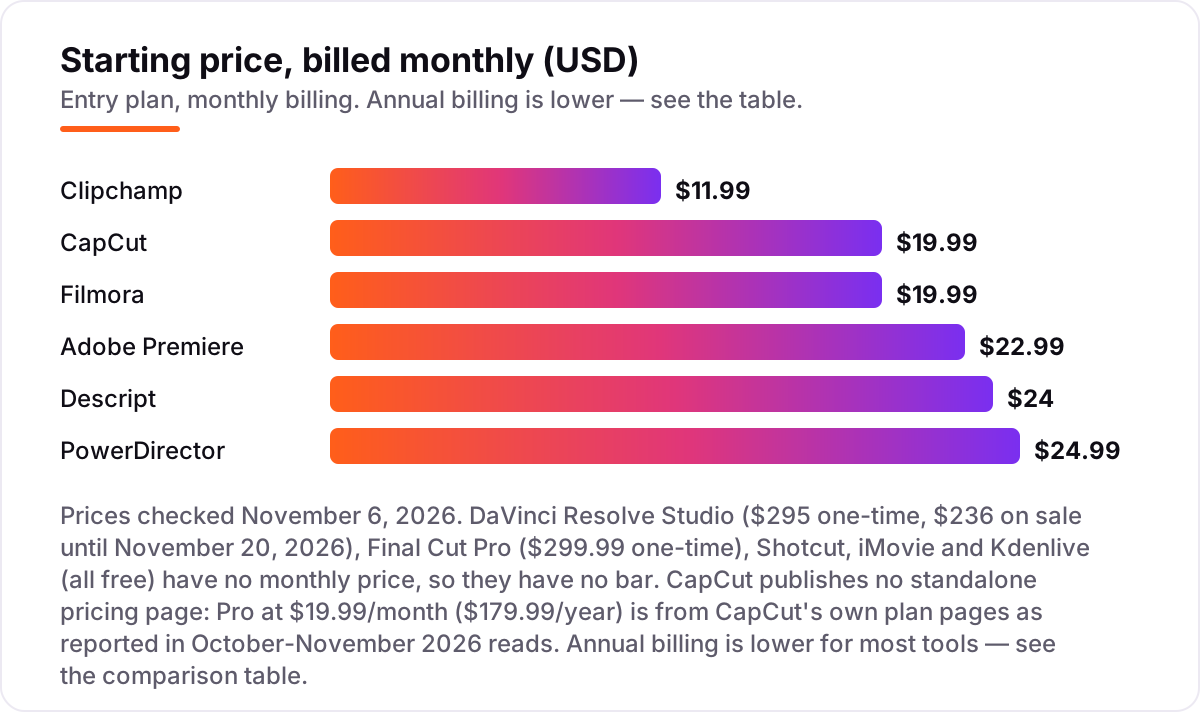
Take a creator who uploads two videos a week for a year. On list prices, the free route costs $0: DaVinci Resolve, Shotcut, Kdenlive or iMovie all export watermark-free, and CapCut and Clipchamp do the same at 1080p without paying. The cheapest paid annual plans are Filmora Basic at $49.99 a year and PowerDirector 365 at $59.99 a year, then Clipchamp Premium at $119.99, CapCut Pro at $179.99, Descript Hobbyist at $192 and Adobe Premiere at $275.88.
Three numbers need adjusting before they are real. First, the monthly-billing trap: PowerDirector 365 costs $24.99 a month, which annualises to $299.88 — five times the $59.99 annual price — so never pay it monthly. Second, the one-time licences: Final Cut Pro at $299.99 once and DaVinci Resolve Studio at $295 once (currently $236 in a sale until November 20, 2026) cost less over three years than a single year of Premiere at $275.88. Third, the metered plans: Descript Hobbyist allows 10 media hours a month, so a creator uploading two long videos a week can hit the cap and need Creator at $288 a year.
Over three years, that is $0 on the free editors, $149.97 on Filmora Basic, $179.97 on PowerDirector 365, $359.97 on Clipchamp Premium, $539.97 on CapCut Pro, $576 on Descript Hobbyist, $299.99 on Final Cut Pro, $295 on DaVinci Resolve Studio and $827.64 on Adobe Premiere. The same two videos a week cost $0 at the cheap end and $827.64 at the dear end — a gap that comes entirely from billing choices and upgrade limits, not from features. If you run a channel as a business rather than a hobby, the visibility tools differ too — see our guide to the best YouTube SEO tools.
Know the difference: subscription vs one-time purchase
The confusion in this category is between renting and owning. A subscription like Premiere at $22.99 a month or CapCut Pro at $19.99 a month keeps working only while you keep paying, and the price can rise at renewal — CapCut's tiers changed in 2026 and Pro costs more than it used to. A one-time purchase like Final Cut Pro at $299.99 or DaVinci Resolve Studio at $295 keeps working after a single payment, with free updates so far, and the cost never rises.
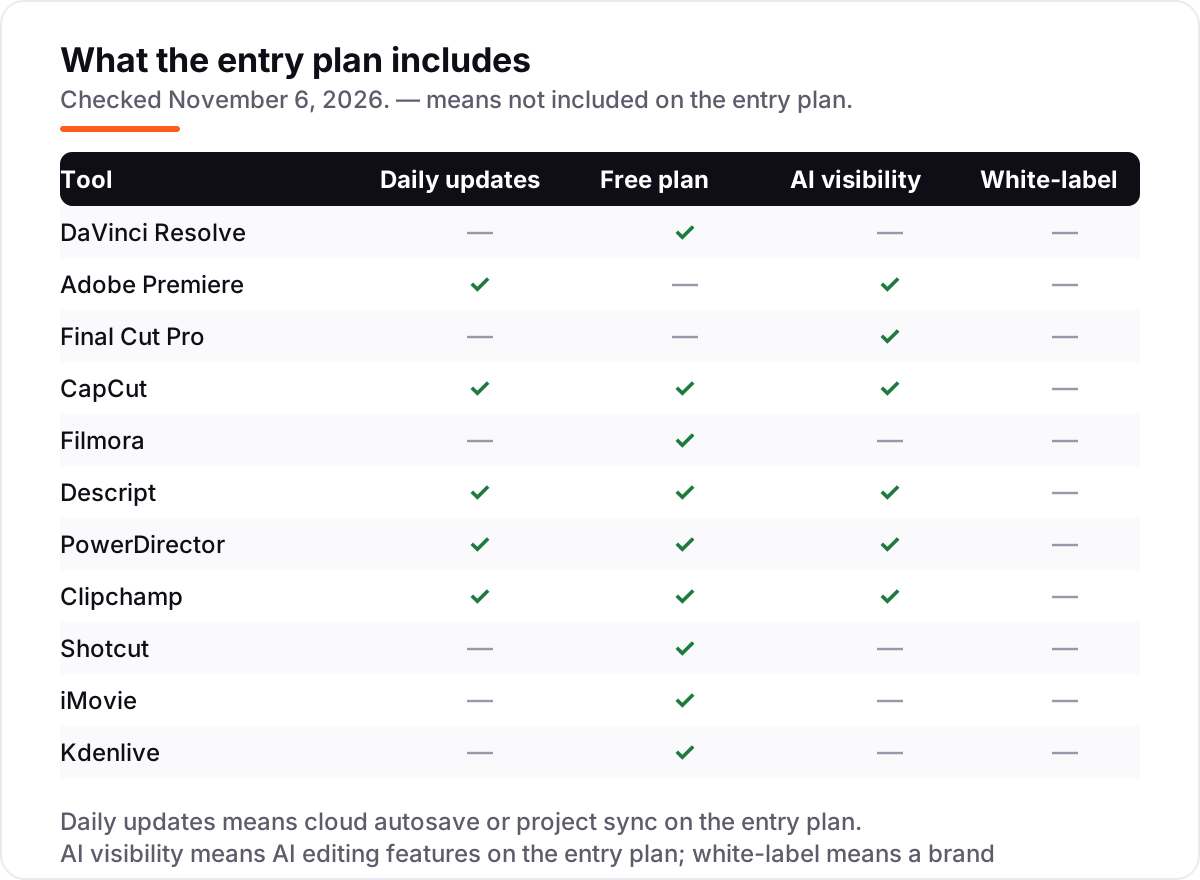
There is a second, quieter confusion: a free plan is not the same as a free trial. DaVinci Resolve, Shotcut, Kdenlive and iMovie are free forever — no trial clock, no watermark, no export cap. Premiere and Final Cut Pro offer trials of 7 and 90 days, after which the software stops unless you pay. Filmora, CapCut, Descript, PowerDirector and Clipchamp sit in between: a free plan that keeps working, with a watermark, an export cap or locked features pushing you toward the paid tier.
A third distinction worth knowing is the monthly price versus the annual price. Filmora's $19.99-a-month figure is the monthly plan; the Basic annual plan is $49.99 a year, about $4.17 a month. PowerDirector's $24.99-a-month figure is the same trap in reverse: the annual plan is $59.99 a year. Always read the annual figure before comparing two monthly prices, because the gap between monthly and annual billing is where most of the money in this list hides.
Quick comparison: tool type by need
| Buyer | Best pick | Why |
|---|---|---|
| Most YouTubers, any budget | DaVinci Resolve | Complete professional editor free, no watermark, Studio is $295 once |
| Professional and client work | Adobe Premiere | The industry standard, from $22.99/month |
| Mac-only creator | Final Cut Pro | Fastest on Apple silicon, $299.99 once, 90-day trial |
| Short-form and Shorts | CapCut | Templates and auto-captions, free tier, Pro is $19.99/month |
| Beginner on a budget | Filmora | Easiest to learn, Basic is $49.99/year |
| Talking-head and tutorials | Descript | Edit by editing the transcript, Hobbyist is $24/month |
Mistakes to avoid
- Budgeting on the monthly price. PowerDirector 365 costs $24.99 a month but $59.99 a year, and Filmora's $19.99 a month is $49.99 a year on the annual plan. The annual figure is the real price, so compare tools on that number.
- Buying a subscription when a free editor does the job. DaVinci Resolve, Shotcut, Kdenlive and iMovie export watermark-free at $0. Pay only when a specific limit bites — 4K export, a watermark, or hours lost to a slow workflow.
- Ignoring the meter. Descript charges by media hours and AI credits, and CapCut's Pro value depends on its 1,200 monthly AI credits. A heavy month costs more than the subscription alone.
- Paying for 4K you do not publish. Clipchamp's free tier stops at 1080p and CapCut's Standard tier does the same. If your audience watches on phones at 1080p, do not pay for a 4K export you never use.
- Choosing by brand instead of by video type. Premiere is the wrong buy for a talking-head channel that Descript would cut in half the time, and CapCut is the wrong buy for a cinematic vlog that needs Resolve's color tools.
How we chose
We checked each vendor's own pricing page on November 6, 2026 and recorded the starting price exactly as shown, including the annual-billing figure where the page lists one, and we ranked the tools by fit for the most common buyer — a solo YouTuber editing their own videos — not by brand size. Two prices carry a caveat: CapCut publishes no standalone pricing page, so Pro at $19.99 a month ($179.99 a year) comes from CapCut's own plan pages as reported in October–November 2026 reads, and DaVinci Resolve Studio's $236 figure is a sale price running until November 20, 2026 against a $295 list price. This list carries review ratings for nine tools; iMovie has no rating because the freshest copy of its G2 page was 13 days old, and Kdenlive has no G2 listing, so we show no rating for them rather than a stale or estimated one. No vendor paid for a place in this list, and none of the links here are affiliate links.
What to do next
Start with the free version of your top pick and cut one real video through it. Check that exports come out clean at the resolution you publish and that the timeline feels fast on your computer before you commit to a year. If the editing is sorted but new viewers are not finding the channel, our monthly SEO service handles the visibility side — or compare tools in our guide to AI tools for creating YouTube videos. Once your tools are in place, find out what's holding your rankings back.
Your stack only works if people find you
SerpAstra fixes what keeps your site off page one and makes it easy for AI assistants to recommend.
Get a free audit→Sources we checked (20)
- DaVinci Resolve pricing — blackmagicdesign.com/products/davinciresolve (checked November 6, 2026)
- Adobe Premiere pricing — adobe.com/products/premierepro (checked November 6, 2026)
- Final Cut Pro pricing — apple.com/final-cut-pro (checked November 6, 2026)
- CapCut pricing — capcut.com/pricing (checked November 6, 2026)
- Filmora pricing — filmora.wondershare.com/shop/buy/buy-video-editor (checked November 6, 2026)
- Descript pricing — descript.com/pricing (checked November 6, 2026)
- PowerDirector pricing — cyberlink.com/products/powerdirector (checked November 6, 2026)
- Clipchamp pricing — clipchamp.com/en/pricing (checked November 6, 2026)
- Shotcut — shotcut.org (checked November 6, 2026)
- iMovie — apple.com/imovie (checked November 6, 2026)
- Kdenlive — kdenlive.org (checked November 6, 2026)
- Adobe Premiere Pro reviews — g2.com/products/adobe-premiere-pro/reviews (checked November 6, 2026)
- DaVinci Resolve reviews — g2.com/products/davinci-resolve/reviews (checked November 6, 2026)
- Final Cut Pro reviews — g2.com/products/finalcut-pro/reviews (checked November 6, 2026)
- CapCut reviews — trustpilot.com/review/www.capcut.com (checked November 6, 2026)
- Wondershare Filmora reviews — g2.com/products/wondershare-filmora/reviews (checked November 6, 2026)
- Descript reviews — g2.com/products/descript/reviews (checked November 6, 2026)
- PowerDirector reviews — g2.com/products/powerdirector/reviews (checked November 6, 2026)
- Clipchamp reviews — g2.com/products/clipchamp/reviews (checked November 6, 2026)
- Shotcut reviews — g2.com/products/shotcut/reviews (checked November 6, 2026)
Shamim
Founder of SerpAstra
A full-stack SEO and digital marketer who spends most days on Local SEO for dental practices, AI search visibility and lead generation.
Frequently asked questions
What is the best software to edit YouTube videos?
DaVinci Resolve is the best fit for most YouTubers: a complete professional editor free, with no watermark and the best color tools here. Adobe Premiere is the better pick for client work and team editing, while Final Cut Pro suits Mac-only creators who want the fastest renders.
Can I edit YouTube videos for free?
Yes. DaVinci Resolve, Shotcut, Kdenlive and iMovie are all free with no watermark on your own footage, and CapCut and Clipchamp have free tiers that export watermark-free at 1080p. Filmora's free tier watermarks exports, so treat it as a trial rather than a free plan.
How much does YouTube video editing software cost?
From $0 to $22.99 a month. The cheapest paid annual plans are Filmora Basic at $49.99 a year and PowerDirector 365 at $59.99 a year. Adobe Premiere costs $275.88 a year, while Final Cut Pro and DaVinci Resolve Studio are one-time purchases at $299.99 and $295.
Is DaVinci Resolve really free for YouTube?
Yes, the free version is a complete editor with 4K export and no watermark — not a trial. The $295 Studio upgrade adds AI tools, 10-bit output and above-4K timelines, and is currently $236 in a sale running until November 20, 2026. Most YouTubers never need it.
What is the difference between Premiere and Final Cut Pro?
Premiere is a $22.99-a-month subscription that runs on Windows and Mac and is the industry standard for client work. Final Cut Pro is a $299.99 one-time purchase for Mac only, with the fastest rendering on Apple silicon. Over three years Premiere costs $827.64 against $299.99 for Final Cut Pro.
Do I need a paid editor to grow on YouTube?
No. The editor does not make videos go viral — pacing, audio clarity and a good hook do. A free editor like DaVinci Resolve or Shotcut handles everything a growing channel needs. Pay when a specific limit bites: 4K export, a watermark, or hours lost to a slow workflow.
Can I switch video editors later?
Yes, but plan the move between videos, not mid-project. Export finished videos first, then rebuild your templates, presets and keyboard shortcuts in the new editor. Project files do not transfer between editors, so expect to lose in-progress timelines when you switch.
Free SEO and AI visibility audit
Find out what is holding your rankings back
Send us your site. Within 2 business days you get a written audit, an AI visibility check and a short fix list ranked by impact. Free, with no contract attached.
Request my free audit→Related guides
 Design, Video & Creative10 Best Video Editing Software for Small Business in 2026, ComparedCompare the 10 best video editing software for small business tools on price, free plans and AI features, with prices checked November 4, 2026.Read guide →
 SEO & AI Search7 Best YouTube SEO Tools in 2026 (Free and Paid, Compared)7 best YouTube SEO tools compared on price, keyword research and rank tracking, from free to $29 per month. Prices checked November 2, 2026.Read guide →
 Digital Marketing & Ads10 Best AI Tools for Creating YouTube Videos in 2026, ComparedCompare the 10 best ai tools for creating youtube videos in 2026 on price, free plans and AI features, with every price checked November 5, 2026.Read guide →