
9 Best Spaced Repetition Apps in 2026: Free and Paid Apps Ranked
Compare the 9 best spaced repetition apps on price, free plans and scheduling, with every price checked November 4, 2026 — from Anki to $24.99/month Memrise.
 Shamim Mia, Founder, SerpAstraLast verified November 4, 202614 min read
We compare pricing pages, documentation and public reviews. We never accept payment for rankings.

Key takeaways
- Anki is free and the strongest scheduler here; Quizlet Plus starts at $7.99/month and Memrise Pro at $24.99/month, the dearest in this list.
- The single most important buying factor is whether you want ready-made content or a blank tool: courses and certified decks cost money, the scheduling itself is free.
- Two apps cost nothing at all — Anki on desktop, Android and the web, and Cram — while Mochi Pro is the cheapest paid plan at $5/month billed yearly.
- Watch the billing: monthly rates run up to 2.5 times the annual rate on Quizlet, Brainscape and Memrise, so a year of study is far cheaper paid yearly.
On this page
Quick comparison
| Tool | Best for | Starting price | Free plan |
|---|---|---|---|
| Anki | Students and professionals who want the most powerful free scheduler and will build their own decks | Free | Yes (free) |
| Quizlet | Students who want the biggest shared deck library and the easiest way to start | $7.99/mo | Yes (free plan) |
| Memrise | Language learners who want native-speaker video and vocabulary in context | $24.99/mo | Yes (free plan) |
| Brainscape | Exam candidates who want expert-made certified decks with confidence-based review | $19.99/mo | Yes (Basic free) |
| RemNote | Note-takers who want flashcards built straight from lecture notes and PDFs | $10/mo | Yes (free plan) |
| Mochi | Learners who want a clean local-first app with Markdown notes and offline study | $5/mo | Yes (free plan) |
| SuperMemo | Language learners who want ready-made courses built on the original spaced-repetition method | $9.90/mo | Yes (free plan) |
| WaniKani | Japanese learners who want a fixed path through 2,000 kanji with mnemonics | $9/mo | Yes (levels 1–3) |
| Cram | Students who want a free flashcard library with no account and no paywall | Free | Yes (free) |
Make one of these tools?
We re-check this list every quarter. Send a correction, request a review, or ask about a clearly labeled sponsored spot.
Request a listingThe best spaced repetition apps

Anki
Best for: Students and professionals who want the most powerful free scheduler and will build their own decks
Anki is the reference implementation of spaced repetition: free, open source, and used by medical students, language learners and exam candidates who need to remember thousands of facts for years. It schedules each card with FSRS, which adapts intervals to your memory, and it handles decks of 100,000 cards without slowing down. Shared decks on AnkiWeb cover medicine, law, history and dozens of languages, so you rarely start blank.
The trade-off is the learning curve. The interface looks like software from another decade, and the settings take a weekend to tune. There is no course, no content and no hand-holding: you build the deck or find one, then trust the schedule. The iPhone app costs $24.99 once, and that sale funds the free desktop app and sync. Choose Anki when you want the strongest scheduler and full control.
What we like
- Free and open source on Windows, Mac, Linux, Android and the web, with no card or deck limits
- FSRS scheduling adapts intervals to your memory, and the shared-deck library covers medicine, law and languages
- Add-ons extend it with image occlusion, extra stats and bulk import
- Free AnkiWeb sync keeps desktop, Android and the web in step
Watch out for
- The interface looks dated and the settings take a weekend to learn
- You build or find your own decks; there is no ready-made course or content
- AnkiMobile for iPhone and iPad costs $24.99 once, the only paid piece

Quizlet
Best for: Students who want the biggest shared deck library and the easiest way to start
Quizlet is the easiest way into spaced repetition, and the biggest: its shared library holds sets for almost every textbook, exam and language course, so most learners find a ready-made deck in minutes. Learn mode spaces reviews automatically, and Test, Match and Write turn the same deck into a quiz, a race and a writing drill. The free plan covers creating and studying cards, which is enough to judge it properly.
Plus costs $7.99 a month, or $35.99 a year, and adds Magic Notes, AI practice tests, offline access and an ad-free experience. The catch is the caps: Plus still limits practice tests and textbook solutions to 3 a month, and removing them needs Plus Unlimited at $44.99 a year. Choose Quizlet for the largest library and the least setup; choose Anki for unlimited everything, free.
What we like
- Largest shared deck library here, with sets for almost every textbook and exam
- Learn, Test, Match and Write modes make the same deck feel like four different tools
- Magic Notes turns notes into flashcards, with AI practice tests on Plus
- The free plan covers creating and studying flashcards, so you can try it properly before paying
Watch out for
- Plus still caps practice tests and textbook solutions at 3 a month; unlimited needs Plus Unlimited at $44.99/year
- The free plan shows ads and caps daily Learn rounds
- Shared decks vary in quality, and popular sets can contain errors

Memrise
Best for: Language learners who want native-speaker video and vocabulary in context
Memrise teaches vocabulary through videos of real native speakers using phrases in everyday situations, which trains your ear as well as your memory. Goal-based tracks set a daily target, and the spaced-repetition engine brings words back just as they start to fade. Pro adds unlimited AI conversation practice, offline mode and the full video library across 28 languages.
Pro costs $24.99 a month, or $61.99 a year, and Memrise publishes no pricing page: the price shows in the app or at checkout, so check it in your own account before paying. It teaches vocabulary, not grammar, so it works best paired with a course or tutor for full fluency. Choose Memrise when listening and speaking practice matter as much as the words themselves.
What we like
- Thousands of videos of native speakers using phrases in real situations
- AI conversation practice gives speaking reps without a tutor
- Goal-based tracks and daily reminders keep a streak going
- 28 languages, with the free plan covering the basics
Watch out for
- No pricing page: the $24.99/month price shows only in the app or at checkout
- Teaches vocabulary, not grammar, so it needs a second resource for full fluency
- Monthly billing is steep; the annual plan at $61.99 a year is the sensible buy

Brainscape
Best for: Exam candidates who want expert-made certified decks with confidence-based review
Brainscape is built around confidence-based repetition: after each card you rate how well you knew it, from 1 to 5, and the schedule adjusts from that single tap. Its certified classes are written by experts for specific exams — the bar, medical boards, nursing, real estate licensing — so the content is the product, not an afterthought. The free Basic plan covers unlimited typed flashcards of your own.
Pro costs $19.99 a month, or $95.99 a year, and unlocks the certified library, unlimited AI flashcard creation, offline study and media cards. The free plan caps you at 100 cards per class and locks the certified decks. Choose Brainscape when you are studying for a named exam and want expert-made content; choose Quizlet when you want the widest free library.
What we like
- Certified classes built by experts for exams like the bar, medical boards and real estate licensing
- Confidence-based repetition asks how well you knew each card and schedules from that
- Basic plan is genuinely usable: unlimited own typed flashcards with spaced repetition
- AI flashcard creation on the free plan covers hundreds of cards
Watch out for
- Monthly billing at $19.99 is the dearest here; the annual plan drops it to $95.99 a year
- The free plan caps you at 100 cards per class and locks certified content
- Making your own image and sound cards needs Pro

RemNote
Best for: Note-takers who want flashcards built straight from lecture notes and PDFs
RemNote removes the transcription step: your notes and your flashcards are the same document, so marking a line as a card while you take lecture notes builds the deck for free. Image occlusion turns diagrams and slides into cards in seconds, and the exam scheduler plans reviews around a test date. The free plan includes unlimited notes and flashcards with 250 AI credits a month.
Pro costs $10 a month, or $8 a month billed yearly at $96 a year, and lifts the caps on annotated PDFs, image occlusion and exams. The heavier AI features — flashcards from PDFs, the lecture recorder and AI grading — sit on Pro with AI at $18 a month billed yearly. Choose RemNote when you take heavy notes and want the deck to build itself.
What we like
- Notes and flashcards are one document, so writing lectures builds the deck for free
- Image occlusion turns diagrams and slides into cards in seconds
- Free plan includes unlimited notes and flashcards, with 250 AI credits a month
- FSRS and SM-2 scheduling with detailed retention stats
Watch out for
- The free plan caps annotated PDFs at 3 and image-occlusion cards at 5
- The AI features that matter sit on Pro with AI at $18 a month billed yearly
- The interface rewards power users and can feel busy for casual study

Mochi
Best for: Learners who want a clean local-first app with Markdown notes and offline study
Mochi is the modern, quiet alternative to Anki: a local-first app where your cards live on your device, work fully offline, and sync only if you pay for Pro. Notes are written in Markdown with backlinks, so a deck can grow into a linked knowledge base instead of a pile of cards. It imports Anki decks with their review history and schedules with FSRS, the same modern algorithm Anki uses.
The free plan is genuinely complete for one device: unlimited cards, no ads and no account needed. Pro costs $5 a month billed yearly and adds cloud sync, full history and priority support. The gap is content: there is no shared deck library, so you build every deck yourself. Choose Mochi when you want Anki's scheduling in a cleaner app and mostly study on one device.
What we like
- Local-first storage: your cards live on your device and work fully offline
- Markdown notes with backlinks turn a deck into a linked knowledge base
- Imports Anki decks with review history and schedules with FSRS
- Free plan has unlimited cards, no ads and no account needed
Watch out for
- Syncing between phone and computer needs Pro at $5 a month billed yearly
- No shared deck library like Quizlet or AnkiWeb
- Smaller community, so fewer tutorials and templates than Anki

SuperMemo
Best for: Language learners who want ready-made courses built on the original spaced-repetition method
SuperMemo invented spaced repetition: its SM algorithm has been refined since the 1980s, and this is the app that sells it as ready-made language courses. Pick a language, pick a course, and the schedule runs itself — there is nothing to build, no deck to find, no settings to tune. Courses cover 25 languages, and the free plan lets you study up to 20 cards a day.
Premium costs $9.90 a month through the app stores, with a 14-day free trial. The vendor's own site lists Premium at 35.99 PLN a month, so the dollar price depends on where you buy it. The trade-off is flexibility: courses are fixed paths, and you cannot build custom decks the way Anki allows. Choose SuperMemo when you want a course, not a tool.
What we like
- The SM algorithm that gave the method its name, refined over decades
- Ready-made courses in 25 languages, so there is nothing to build
- Free plan lets you study up to 20 cards a day before paying
- 14-day free trial on Premium
Watch out for
- The site prices Premium in zloty (35.99 PLN/month); the dollar price shows in the app stores
- Courses are fixed paths, so you cannot build custom decks the way Anki allows
- The interface and course style feel older than the newer apps here

WaniKani
Best for: Japanese learners who want a fixed path through 2,000 kanji with mnemonics
WaniKani solves exactly one problem: the roughly 2,000 kanji between a beginner and reading Japanese. It teaches radicals first, then the kanji built from them, then vocabulary that uses those kanji, with a mnemonic for every reading and meaning. Levels stay locked until spaced repetition proves mastery, which stops the common habit of racing ahead and forgetting everything.
The first 3 levels are free, enough to learn about 100 kanji and test the method. After that it costs $9 a month, $89 a year, or $299 once for lifetime access. It teaches no grammar, listening or speaking, so it must pair with another resource. Choose WaniKani when kanji is the bottleneck; choose Anki when you want the same scheduling for any subject.
What we like
- Teaches radicals first, then kanji, then vocabulary, in a locked order that prevents skipping ahead
- Mnemonics for every reading and meaning make abstract characters stick
- First 3 levels are free, enough to test the method properly
- Active community and user scripts extend it with extra stats and reviews
Watch out for
- Japanese only: no use for any other subject or language
- No grammar, listening or speaking, so it must pair with another resource
- Strict typing: a typo counts as a wrong answer and drops the item down the ladder

Cram
Best for: Students who want a free flashcard library with no account and no paywall
Cram is the simplest deal in this list: a free flashcard app with a shared library of over 75 million cards and no paid tier at all. You can create unlimited decks, study in Card mode or Memorize mode, and browse student and teacher sets for school and university subjects, all without an account or a subscription. The mobile apps sync with your Cram.com account for free.
There is no course, no guided path and no AI: Cram is decks and study modes, nothing more. The interface looks older than the modern apps here, and shared decks vary in quality with no expert review. But the price is unbeatable, and for a student who just needs flashcards that work, that is the whole argument. Choose Cram when the budget is zero and the library matters more than polish.
What we like
- Entirely free: no subscription, no premium tier, no card limits
- Shared library of over 75 million flashcards across school and university subjects
- Memorize mode drills cards with spaced repetition until you know them
- Works on the web and mobile with account sync
Watch out for
- No ready-made courses or guided paths, just decks and study modes
- The interface and apps look older than the modern apps here
- Shared decks vary in quality and there is no expert review
The best spaced repetition apps all do the same simple job: they show you a card just before you would forget it, then stretch the gap a little further each time you get it right. That timing is what turns an evening of cramming into knowledge that is still there in six months. We ranked the nine apps below by fit for the most common buyer — a student or self-learner who wants to remember a lot, for a long time, without paying more than the habit is worth — and every price was checked on the vendor's own page on November 4, 2026.
How to choose the best spaced repetition apps
- Start with the subject, not the app. A language learner needs courses and audio; a medical student needs image occlusion and huge decks; an exam candidate needs certified content. The subject decides the shortlist.
- Check the free plan first. Anki, Cram and Mochi are free for real daily study, and every paid app here has a free tier. If the free plan covers your first month, there is no reason to pay on day one.
- Count the cost of the library. The scheduling is free almost everywhere; what you pay for is content. Certified decks, language courses and AI features are the real price of a paid plan.
- Test the scheduler on real cards. Make 20 cards on your actual subject and review them for a week. A scheduler that feels wrong on day three will not feel better on day thirty.
- Mind the phone. You will do most reviews on a phone, in gaps between other things. Check offline mode and sync before you commit: Mochi syncs only on Pro, and Anki charges $24.99 once for its iPhone app.
- Decide whether you want a course or a tool. SuperMemo, Memrise and WaniKani are courses with a fixed path; Anki, Quizlet, RemNote, Mochi and Cram are tools you fill yourself. Courses are faster to start and harder to bend.
Spaced repetition is one habit in a study routine, not the whole routine. If you are learning a language, pair your app with a course — our guide to the best AI Spanish learning app covers the language side. And if you publish study notes or a course of your own, run your titles through the free SERP snippet preview tool — it shows exactly how the title and description will look in Google.
Whatever you shortlist, try it with a real deck before you pay. The free plans and trials in this list are long enough to run one genuine week — your cards, your subject, your phone — and that week tells you more than any review can. Check two things in the trial: that reviews fit into the gaps in your day, and that the app still feels worth opening on day seven. Every app here lets you start free, so there is no reason to buy before you have done that week.
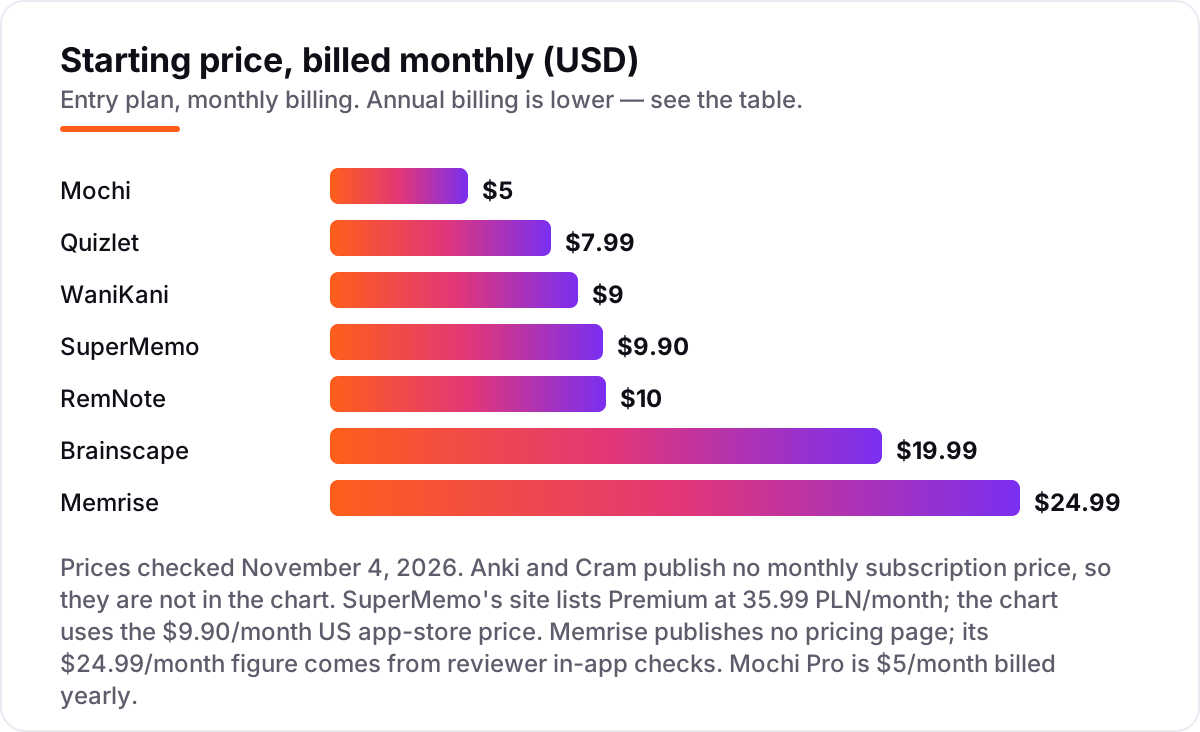
Spaced repetition apps pricing: what you will actually pay
Take a learner who studies 30 minutes a day, every day, for a year. On list prices, that year costs $0 on Anki or Cram, $35.99 on Quizlet Plus, $60 on Mochi Pro, $61.99 on Memrise Pro, $89 on WaniKani, $95.99 on Brainscape Pro and $96 on RemNote Pro. SuperMemo Premium is $9.90 a month on monthly billing, which comes to $118.80 over a year. The spread from $0 to $118.80 buys content and convenience, not a better memory: the scheduling math is free in Anki and Mochi, and the paid apps charge for ready-made courses, certified decks and AI features.
Two of those numbers need adjusting before they are real. First, Anki on an iPhone adds a one-time $24.99 for AnkiMobile, so the first year on iOS is $24.99, not $0 — still the cheapest paid route here. Second, monthly billing punishes the indecisive: Quizlet Plus at $7.99 a month costs $95.88 over a year against $35.99 paid yearly, Brainscape Pro at $19.99 a month costs $239.88 against $95.99 yearly, and Memrise Pro at $24.99 a month costs $299.88 against $61.99 yearly. If you will use the app for more than five months, pay yearly.
Three costs sit outside every number above. First, the higher tiers: Quizlet Plus Unlimited is $44.99 a year, RemNote Pro with AI is $216 a year, and WaniKani lifetime is $299 once. Second, the device: a second phone or tablet costs nothing extra on any app here, since every subscription covers all your devices. Third, the content: a learner who buys a ready-made deck pack or a textbook companion on top of the app pays for that separately. If you are picking a language app rather than a general study app, see our guide to the best AI Spanish learning app for the language-specific side.
Annual billing cuts the bill on most apps here: Quizlet Plus drops from $95.88 to $35.99 a year, Brainscape Pro from $239.88 to $95.99, Memrise Pro from $299.88 to $61.99, and RemNote Pro from $120 to $96. Anki and Cram have no subscription at all, so there is nothing to discount. One more cost to check before you commit: a family plan. Quizlet sells a family plan that shares premium access across several students on one annual bill, and Memrise sells one for up to six users — if two people in the house study, price the family plan before you buy two single subscriptions.
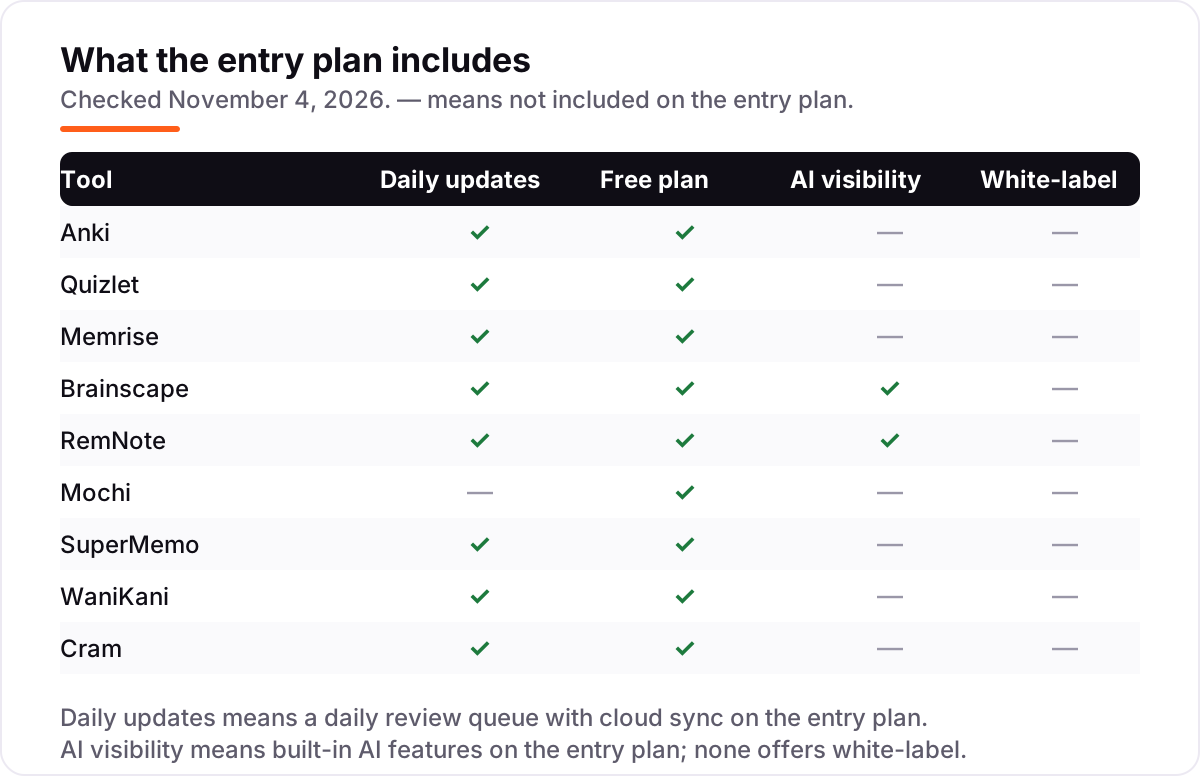
Know the difference: spaced repetition vs rereading
The confusion in this category is between flashcards and spaced repetition. Flashcards are just cards: a question on one side, an answer on the other. Spaced repetition is the schedule that decides when each card comes back. An app can sell you flashcards without any scheduling at all, and a pile of cards reviewed in order is not spaced repetition — it is rereading with extra steps, and it works about as well as rereading, which is to say not very well.
There is a second, quieter confusion: the algorithm is not the product. SM-2, FSRS and confidence-based scheduling all do the same job with slightly different maths, and the differences between them matter far less than whether you actually open the app every day. A learner who reviews 20 cards a day in the plainest app here will remember more than a learner who buys the cleverest scheduler and opens it twice a week. The habit is the product; the app is the container.
A third distinction worth knowing is a course versus a tool. SuperMemo, Memrise and WaniKani are courses: they choose what you learn and in what order, and the scheduling runs inside that path. Anki, Quizlet, RemNote, Mochi and Cram are tools: they schedule whatever you put in, and you choose the content. Courses are faster to start and harder to bend; tools take a week to set up and then fit any subject. Pick the shape first, then the app.
Quick comparison: tool type by need
| Buyer | Best pick | Why |
|---|---|---|
| Learner on a zero budget | Anki | Free on desktop, Android and web, with the strongest scheduler and no card limits |
| Student who wants the easiest start | Quizlet | The biggest shared library and the friendliest study modes, Plus is $7.99/month |
| Language learner | Memrise | Native-speaker video and AI conversation practice, Pro is $24.99/month |
| Exam candidate | Brainscape | Expert-made certified decks with confidence-based review, Pro is $19.99/month |
| Note-taker with heavy lectures | RemNote | Flashcards grow out of your notes, Pro is $10/month |
| Japanese learner | WaniKani | A fixed 60-level path through 2,000 kanji with mnemonics, $9/month |
Mistakes to avoid
- Paying monthly for a year-long habit. Monthly billing costs up to 2.5 times the annual rate on Quizlet, Brainscape and Memrise. If you will study for more than five months, pay yearly from the start.
- Buying content you will never open. Certified decks and language courses only help if the subject matches your exam or your language. A general app with a deck you built yourself beats a course for a language you are not learning.
- Making too many cards on day one. A deck of 500 new cards creates a review queue that buries you by week two. Start with 20 new cards a day and let the schedule grow with you.
- Choosing the app before the subject. The best scheduler in the world does not help if it has no content for your exam. Check the library for your subject before you check the price.
- Ignoring the phone. Most reviews happen on a phone, in gaps between other things. If the app needs a desktop to make cards or has no offline mode, the habit dies in the first week.
How we chose
We checked each vendor's own pricing page on November 4, 2026 and recorded the starting price exactly as shown, including the annual-billing figure where the page lists one, and we ranked the apps by fit for the most common buyer — a student or self-learner who wants to remember a lot for a long time — not by brand size. Two prices could not be read off a vendor page: Memrise publishes no pricing page, so its $24.99 a month comes from reviewer checks of the in-app price, and SuperMemo's site lists Premium in zloty, so the $9.90 a month is the US app-store price. Mochi's homepage shows its Pro price behind a billing toggle, so the $5 a month billed yearly is the figure independent reviewers recorded from the same page in October 2026. Ratings come from G2 and Capterra pages opened on November 4, 2026; SuperMemo, Mochi, Cram, WaniKani and RemNote have no usable G2 or Capterra page, so they show no rating rather than a stale or estimated one. No vendor paid for a place in this list, and none of the links here are affiliate links.
What to do next
Start with the free plan of your top pick and run one real week of reviews through it. Make 20 cards on your actual subject, review them daily, and check on day seven whether the habit fits your day. If the free plan covers your study, stay on it — the paid plans in this list buy content and convenience, not a better memory. If you run a tutoring business or a course site and want students to find you, our monthly SEO service handles the visibility side. Once your tools are in place, find out what's holding your rankings back.
Your stack only works if people find you
SerpAstra fixes what keeps your site off page one and makes it easy for AI assistants to recommend.
Get a free audit→Sources we checked (12)
- Anki — apps.ankiweb.net (checked November 4, 2026)
- Quizlet Plus pricing — quizlet.com/upgrade (checked November 4, 2026)
- Memrise pricing, in-app prices reported — learn.kotoenglish.com/blog/memrise-review (checked November 4, 2026)
- Brainscape pricing — brainscape.com/pricing (checked November 4, 2026)
- RemNote pricing — remnote.com/pricing (checked November 4, 2026)
- Mochi pricing — mochi.cards (checked November 4, 2026)
- SuperMemo Premium subscription — supermemo.com/en/premium-subscription (checked November 4, 2026)
- WaniKani Premium membership — knowledge.wanikani.com (checked November 4, 2026)
- Cram — cram.com (checked November 4, 2026)
- Anki reviews — g2.com/products/anki/reviews (checked November 4, 2026)
- Quizlet and Brainscape ratings — g2.com/compare/course-hero-vs-quizlet (checked November 4, 2026)
- Memrise reviews — capterra.com.au/software/1016769/memrise (checked November 4, 2026)
Shamim
Founder of SerpAstra
A full-stack SEO and digital marketer who spends most days on Local SEO for dental practices, AI search visibility and lead generation.
Frequently asked questions
What is the best spaced repetition app?
Anki is the best fit for most learners: free, open source, with the strongest scheduler and the largest shared-deck library. Quizlet is the easier start if you want ready-made decks and friendly study modes. Memrise is the better pick for languages, and Brainscape for exam prep with expert-made decks.
Is Anki really free?
Yes, except on iPhone. Anki is free and open source on Windows, Mac, Linux and Android, and the AnkiWeb sync service is free. The only paid piece is AnkiMobile for iPhone and iPad, a one-time $24.99 purchase. There is no subscription, no premium tier and no card limit anywhere in Anki.
How much do spaced repetition apps cost?
From $0 to $24.99 a month. Anki and Cram are free, Mochi Pro is $5 a month billed yearly, Quizlet Plus is $7.99 a month, and Memrise Pro is the dearest at $24.99 a month. Paying yearly cuts the bill sharply: Quizlet drops to $35.99 a year and Brainscape to $95.99 a year.
What is the difference between spaced repetition and normal flashcards?
Normal flashcards show cards in the order you made them, or shuffled. Spaced repetition schedules each card by how well you know it: a card you get right waits days or weeks before it returns, while a card you miss comes back within minutes. That timing is the whole method, and it is what makes the difference between cramming and remembering.
Can I use a spaced repetition app to learn a language?
Yes, and it is one of the best uses for them. Memrise and SuperMemo are built for languages, with native-speaker video and ready-made courses. WaniKani covers Japanese kanji only. Anki and Quizlet work for any language, but you build or find the deck yourself, so they suit learners who already have a word list.
Anki vs Quizlet: which should I choose?
Choose Anki if you want the strongest scheduler, unlimited cards and zero cost, and you are willing to spend a weekend learning the settings. Choose Quizlet if you want the biggest ready-made deck library, the friendliest study modes and the least setup. Many learners use both: Quizlet to find a deck, Anki to keep it for years.
Do I need to pay for a spaced repetition app?
No. The scheduling itself is free in Anki, Cram and Mochi, and the free plans on Quizlet, Brainscape and RemNote cover real daily study. Pay only for ready-made content — certified exam decks, language courses, AI features — or for syncing across devices. Start free, and pay only when a free limit actually blocks you.
Free SEO and AI visibility audit
Find out what is holding your rankings back
Send us your site. Within 2 business days you get a written audit, an AI visibility check and a short fix list ranked by impact. Free, with no contract attached.
Request my free audit→Related guides
 AI, Data & Analytics7 Best AI Spanish Learning Apps in 2026: Free and Paid Apps RankedThe 7 best ai spanish learning apps of 2026, ranked with real prices, free plans and AI conversation features — pick the app that fits how you actually study.Read guide →
 SEO & AI Search10 Best Platforms for SEO for Education in 2026, ComparedThe best platform for seo for education, compared: 10 picks with 2026 prices, free plans and SEO controls. WordPress, Finalsite and HubSpot, ranked for schools.Read guide →
 AI, Data & AnalyticsBest Chatbot Apps (2026): 8 Apps Worth DownloadingThe 8 best chatbot apps compared on price, AI quality and free plans. Real starting prices checked November 2, 2026, sorted by who each app fits best.Read guide →