
Best Spreadsheet Software for 2026: 10 Options Compared by Use Case
Best spreadsheet software for 2026: 10 options compared by use case, with real starting prices — from free Google Sheets to Excel, Smartsheet and Airtable.
 Shamim Mia, Founder, SerpAstraLast verified November 10, 202611 min read
We compare pricing pages, documentation and public reviews. We never accept payment for rankings.

Key takeaways
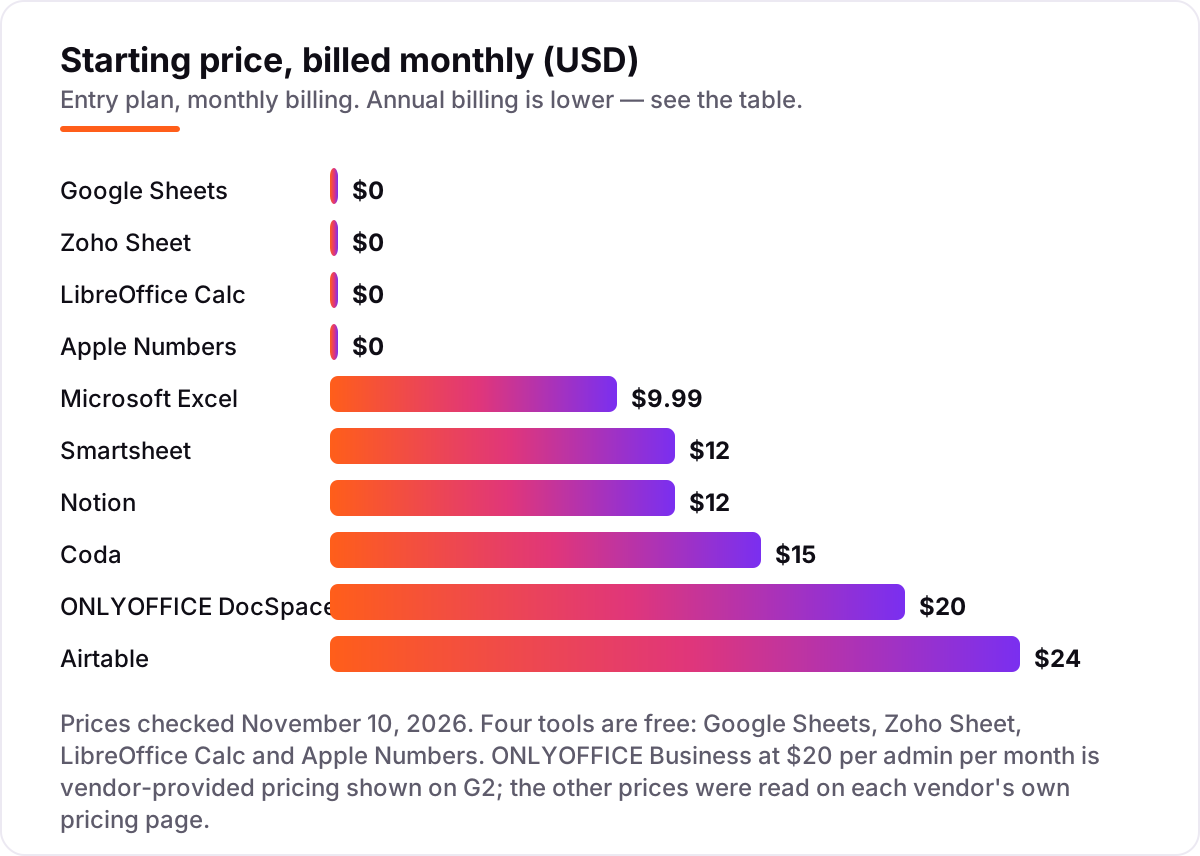
- Google Sheets is the best spreadsheet software for most teams at $0; Microsoft Excel is the power pick at $9.99 a month, and Smartsheet leads the paid work tools at $12 per member a month.
- Four of the ten tools are completely free, so most buyers can start without paying anything — the paid tools earn their price with automations, linked records and project views.
- The single most important buying factor is how you share: free cloud tools win for real-time collaboration, while desktop tools win for heavy files and offline work.
- Every price below was checked on the vendor's own pricing page on November 10, 2026, except ONLYOFFICE, whose Business price is vendor-provided pricing shown on G2.
On this page
Quick comparison
| Tool | Best for | Starting price | Free plan |
|---|---|---|---|
| Google Sheets | Small teams that share one working spreadsheet and want real-time collaboration for free | $0 | Yes (free) |
| Microsoft Excel | One person or team that needs the deepest formulas, largest grids and full Excel file compatibility | $9.99/mo | Yes (free web) |
| Smartsheet | Small teams that run projects, budgets and intake in a spreadsheet grid with automations | $12/user/mo | No (30-day trial) |
| Airtable | Small teams that outgrow flat spreadsheets and need linked records, views and automations | $24/user/mo | Yes (1,000 records) |
| Zoho Sheet | Budget-conscious teams already in Zoho that want a capable free spreadsheet with CRM links | $0 | Yes (free) |
| LibreOffice Calc | One person on Windows, Mac or Linux who wants a full desktop spreadsheet with no subscription | $0 | Yes (free) |
| Apple Numbers | Mac, iPad or iPhone owners who want beautiful, presentation-ready sheets for free | $0 | Yes (free) |
| Coda | Small teams that want docs, tables, buttons and automations in one living document | $15/Doc Maker/mo | Yes (free) |
| Notion | Small teams that track work in databases and want tables, docs and wikis in one workspace | $12/user/mo | Yes (free) |
| ONLYOFFICE DocSpace | Privacy-focused teams that want Microsoft-compatible sheets they can self-host | $20/admin/mo | Yes (free Startup) |
Make one of these tools?
We re-check this list every quarter. Send a correction, request a review, or ask about a clearly labeled sponsored spot.
Request a listingThe best spreadsheet software

Google Sheets
Best for: Small teams that share one working spreadsheet and want real-time collaboration for free
Google Sheets is the best spreadsheet software for most teams because it removes the two usual barriers: price and sharing. Anyone with a Google account can open a sheet, invite the team, and watch edits land live with comments and version history. The free tier covers pivot tables, charts and automation through Apps Script, and files open and save in Excel format, so mixed teams never hit a conversion wall.
The limits show up at scale. Very large files and heavy models run slower than in Excel, offline mode is thinner than a desktop app, and the newest Gemini helpers sit behind a paid Workspace plan. For day-to-day budgets, trackers, lists and shared reports, none of that matters much. Start here, and pay only when a specific limit bites.
What we like
- Free for anyone with a Google account, with real-time co-editing and comments built in
- Up to 10 million cells per spreadsheet, with pivot tables, charts and Apps Script automation
- Opens and saves Excel files directly, so sharing with Excel users needs no conversion step
Watch out for
- Slows down on very large files; Excel handles heavy models and big datasets better
- No desktop app with full offline power — offline mode is limited compared with Excel
- Some Gemini in Sheets features need a paid Google Workspace plan

Microsoft Excel
Best for: One person or team that needs the deepest formulas, largest grids and full Excel file compatibility
Microsoft Excel is still the reference spreadsheet. Its grid holds 1,048,576 rows by 16,384 columns, its formula library covers modelling work the cloud tools cannot match, and its file format is the standard every other tool aims at. For financial models, heavy analysis and files that must open perfectly anywhere, Excel is the safe choice, and the $9.99 a month Personal plan adds Copilot and 1 TB of OneDrive.
The price is the honest trade-off. The free web version is useful but capped at 5 GB of OneDrive, and real-time co-authoring feels less smooth than Google Sheets. If your work is mostly shared lists and light budgets, Sheets does it for free. If your work is models, forecasts and large datasets, Excel earns its subscription.
What we like
- The largest grid here: 1,048,576 rows by 16,384 columns, with the deepest formula and modelling library
- The file format every other tool measures itself against, so compatibility problems are rare
- Copilot in Excel and 1 TB of OneDrive storage included with Microsoft 365 Personal
Watch out for
- The full desktop app needs a paid Microsoft 365 subscription; the free web version caps OneDrive at 5 GB
- Real-time co-authoring still lags Google Sheets on ease and speed
- Performance can lag with very large files or complex formulas, per G2 reviewers

Smartsheet
Best for: Small teams that run projects, budgets and intake in a spreadsheet grid with automations
Smartsheet is the pick when a spreadsheet stops being a file and starts being the way work gets done. The grid looks familiar, but Gantt, board and calendar views sit on top, forms feed rows straight in, and automations chase approvals and send alerts. Unlimited Contributors can view, comment and attach files free, so only the people who build sheets need paid seats.
The catch is the bill. There is no free plan for new signups, only a 30-day trial, and per-member pricing climbs quickly as the team grows. Business starts at $19 per member a month billed annually with a 3-member minimum. Buy Smartsheet when the grid runs projects, not when you only need to add up numbers.
What we like
- A familiar grid with Gantt, board and calendar views layered on top, plus forms and dashboards
- Unlimited free Contributors can view, comment and attach files without a paid seat
- 250 automation runs a month on Pro, with alerts, approvals and update requests built in
Watch out for
- No free plan for new signups — only a 30-day trial, and Pro is for new customers only
- Per-member pricing adds up fast; Business needs at least 3 members and costs $19 each billed annually
- Formulas and cross-sheet references have a steep learning curve, per reviewers

Airtable
Best for: Small teams that outgrow flat spreadsheets and need linked records, views and automations
Airtable is the step up when a flat grid cannot hold your data anymore. Records link to each other, so a client, their orders and their invoices stay connected instead of living in three separate sheets. Team adds 50,000 records per base, 25,000 automation runs a month and 20 GB of attachments, with kanban, calendar and gallery views on top.
Watch the seat count. Every editor is billed, and on Team even commenters count as billable seats, so a chatty stakeholder list inflates the invoice. The free plan is a genuine trial but caps at 1,000 records per base. Choose Airtable when your data has relationships; stick with Sheets when it is just rows and columns.
What we like
- Linked records, kanban, calendar and gallery views turn a grid into a small app
- 50,000 records per base and 25,000 automation runs a month on Team, with 20 GB of attachments
- 15,000 AI credits per paid user a month on Team for AI fields and summaries
Watch out for
- You pay for every editor — and on Team, commenters are billable too, so the seat count climbs
- The free plan caps at 1,000 records per base, which small teams hit quickly
- Two-way sync and the admin panel need Business at $45 per user a month billed annually

Zoho Sheet
Best for: Budget-conscious teams already in Zoho that want a capable free spreadsheet with CRM links
Zoho Sheet is the quiet bargain in this list: a full spreadsheet with pivot tables, charts and real-time collaboration that costs nothing on its own. Zia, Zoho's AI assistant, suggests insights and clean-up inside the sheet, and the native links to Zoho CRM and Zoho Analytics mean sales numbers flow in without manual exports.
The trade-off is the ecosystem. If you ever need the paid tier, you buy the whole Workplace suite — email, chat, files and video — not Sheet alone, at $4 per user a month billed monthly. And the template and add-on library is thinner than Google's or Microsoft's. For a Zoho team on a budget, though, free is hard to argue with.
What we like
- Free standalone spreadsheet with pivot tables, charts and real-time collaboration
- Zia, Zoho's AI assistant, offers insights and data clean-up suggestions inside sheets
- Connects natively to Zoho CRM and Zoho Analytics, so sales data flows in without exports
Watch out for
- The paid route is the whole Zoho Workplace suite, not Sheet alone, so you buy email and chat too
- Smaller template and add-on library than Google Sheets or Excel
- Advanced analysis features trail Excel for heavy modelling work

LibreOffice Calc
Best for: One person on Windows, Mac or Linux who wants a full desktop spreadsheet with no subscription
LibreOffice Calc is the free desktop answer to Excel. It costs nothing, needs no account, shows no ads, and runs on Windows, Mac and Linux — including older machines the cloud tools leave behind. It handles CSV files well, opens Excel and ODS formats, and covers pivot tables, charts and macros for everyday analysis work.
What it cannot do is collaborate. There is no built-in cloud sync or real-time co-editing, so sharing means sending files back and forth, and complex Excel files can lose formatting on the round trip. If you work alone on your own machine, Calc is all you need. If your team edits together, pick a cloud tool.
What we like
- Completely free and open-source, with no account, ads or subscription of any kind
- Handles CSV files efficiently and opens Excel, ODS and many other formats
- Runs on Windows, Mac and Linux, including older machines the cloud tools ignore
Watch out for
- No built-in cloud sync or real-time co-editing — sharing means sending files around
- Excel compatibility is good but not perfect; complex Excel files can lose formatting
- Interface feels dated next to the cloud tools, and support is community-based

Apple Numbers
Best for: Mac, iPad or iPhone owners who want beautiful, presentation-ready sheets for free
Apple Numbers is the prettiest spreadsheet in this list, and it is free on every Mac, iPad and iPhone. Its canvas layout lets you place tables, charts and images anywhere on the sheet, so a budget or a class schedule can look like a designed page rather than a grid. iCloud sync and real-time collaboration are included, so Apple households share easily.
The limits are real. There are no pivot tables, the formula library is thinner than Excel's, and complex Excel files often need clean-up after import. Numbers is the right pick for personal budgets, school work and visual reports inside the Apple world — and the wrong pick for heavy analysis or mixed-device teams.
What we like
- Free on every Mac, iPad and iPhone, with iCloud sync and real-time collaboration
- Canvas-style layout lets you place tables, charts and images anywhere on the sheet
- The cleanest, most visual sheets in this list — dashboards look presentation-ready with little effort
Watch out for
- Apple devices only for the full experience, with a web version that is more limited
- No pivot tables and a thinner formula library than Excel, so heavy analysis work struggles
- Weakest file compatibility here — complex Excel files often need clean-up after import

Coda
Best for: Small teams that want docs, tables, buttons and automations in one living document
Coda turns a document into a small app. Tables inside the doc behave like a database, with formulas, lookups, buttons and automations, so a project plan can assign tasks, update status and notify owners without leaving the page. Only Doc Makers are billed — editors and viewers are free — so a small team can have many readers and few payers.
Two honest warnings. Coda became Superhuman Docs in July 2026, so the name on the bill and the pricing page changed even though the product is the same. And the learning curve is steep: building with tables and buttons takes practice. Buy it when your docs need to do work, not when you only need a grid.
What we like
- Tables behave like a database: formulas, lookups, buttons and automations live inside the doc
- Only Doc Makers are billed — editors and viewers collaborate free on every plan
- Docs AI is included for Doc Makers on Pro, with Grammarly and Go bundled in
Watch out for
- Now sold as Superhuman Docs after the July 2026 rebrand, so the name on the bill changed
- Steep learning curve — building with tables, buttons and formulas takes real practice
- Only Doc Makers are billed, but the step to Business ($33 per Doc Maker billed annually) is large

Notion
Best for: Small teams that track work in databases and want tables, docs and wikis in one workspace
Notion is the workspace pick for teams that live in tables. Its databases carry subtasks, dependencies, custom properties and charts, and they sit beside docs, wikis and calendars in one place. Plus adds unlimited pages and blocks, 30-day page history and 5 GB uploads, and the template library means most trackers start from a ready-made setup.
Remember what it is not: a spreadsheet. Heavy formulas and financial modelling belong in Excel or Sheets, and every member needs a paid seat on Plus. But if your team tracks projects, content or clients in tables and wants the notes beside the numbers, Notion is the cheapest way to keep it all together.
What we like
- Databases with subtasks, dependencies, custom properties, charts and automations in one workspace
- Unlimited pages and blocks on Plus, with 30-day page history and 5 GB file uploads
- Hundreds of templates and a large community, so most trackers start from a ready-made setup
Watch out for
- Tables are databases, not a true grid — heavy formula and modelling work belongs in Excel or Sheets
- Per-member pricing: every member needs a paid seat on Plus, and guests are capped at 10
- AI features beyond a limited trial need Business ($20 per member a month billed annually)

ONLYOFFICE DocSpace
Best for: Privacy-focused teams that want Microsoft-compatible sheets they can self-host
ONLYOFFICE DocSpace is the pick for teams that care where their files live. Its spreadsheet editor handles Microsoft formats well, with real-time co-editing inside rooms you control, and the open-source community edition lets a technical team self-host the whole thing. On the cloud Business plan you pay only for admins — editors and guests are free.
The caveats are scale and proof. The G2 rating rests on just 12 reviews, the template and integration library is smaller than Google's or Microsoft's, and the self-hosted Enterprise edition starts at $6,550. Choose DocSpace when privacy and control matter more than a big template gallery.
What we like
- Strong Microsoft format compatibility, with real-time co-editing in rooms you control
- You pay only for admins on Business — editors and guests collaborate free
- Open-source community edition available for teams that want to self-host everything
Watch out for
- Only 12 reviews on G2, so the rating rests on a very small sample
- The $20 Business price is per admin, and the self-hosted Enterprise edition starts at $6,550
- Smaller template and integration library than Google Sheets or Excel
The best spreadsheet software for 2026 depends on one question: who else touches the file? If the answer is your whole team, the free cloud tools win. If the answer is just you and a heavy model, a desktop tool wins. This list of 10 options is sorted by use case, from the free default most teams should start with to the paid tools that earn their price — with real starting prices checked on November 10, 2026.
Quick comparison: tool type by need
| Buyer | Best pick | Why |
|---|---|---|
| Small team sharing one workbook | Google Sheets | Free, live co-editing, opens Excel files |
| Heavy models and large files | Microsoft Excel | Biggest grid and deepest formulas, $9.99 a month |
| Projects run in a grid | Smartsheet | Gantt views, forms and automations from $12 a member a month |
| Linked records, not flat rows | Airtable | Database views and automations from $24 a user a month |
| Free desktop, no account | LibreOffice Calc | Full spreadsheet, open-source, $0 forever |
| Apple household or classroom | Apple Numbers | Free on Apple devices, beautiful visual sheets |
| Docs that act like apps | Coda or Notion | Tables with buttons and automations, $12–$15 a maker or member a month |
| Privacy and self-hosting | ONLYOFFICE DocSpace | Microsoft-compatible sheets you control, $20 an admin a month |
How to choose the best spreadsheet software
- Count the editors first. One person alone can use any tool here, including the free desktop ones. A team that edits together needs a cloud tool with real-time co-editing — Sheets, Excel online, Smartsheet, Airtable or Zoho Sheet.
- Check the file size. Sheets caps a file at 10 million cells and slows down well before that; Excel's grid holds 1,048,576 rows. If your files are large, test them in the free tier before paying.
- Decide flat grid or linked data. Budgets and lists are flat grids. Client records, orders and inventory have relationships — that is Airtable, Coda or Notion territory, not a plain spreadsheet.
- Mind the seat math. Most paid tools charge per user, per member or per Doc Maker, so a 5-person team pays five times the headline price. The pricing section below works out a real 5-person bill.
- Test the Excel round trip. If you share files with Excel users, open your most complex file in the new tool and save it back. Macros, Power Query and heavy pivot tables are where compatibility breaks.
- Try the free tier with real work. Every tool in this list has a free plan or a free trial. Run your actual budget or tracker for a week before entering a card number.
Spreadsheet software pricing: what you will actually pay
Take a 5-person team that needs a shared tracker, using annual billing where the vendor lists it. Google Sheets costs $0, and Zoho Sheet costs $0 too. Microsoft 365 Family covers up to 6 people for $12.99 a month billed monthly, or $129.99 a year — one subscription for the whole team. Smartsheet Pro at $9 per member a month billed annually comes to $45 a month for five members. Notion Plus at $10 per member a month billed annually comes to $50 a month. Coda Pro bills only its Doc Makers, so two makers at $12 a month billed annually is $24 a month while the other three edit free. Airtable Team is the priciest here: five editors at $20 a user a month billed annually is $100 a month, and commenters are billable on Team too.
The lesson is that the headline price is never the bill. Count every seat that edits — and on Airtable, every seat that comments — then multiply. A tool that looks cheap at $9 a head costs $45 a month for five people, and a free tool that covers the whole team costs nothing at all. If your budget is tight, start free and upgrade only when a limit blocks real work; our monthly SEO service starts the same way, with a free look at what is actually holding a site back before any spending.
Know the difference: spreadsheets, databases and work-management grids
The biggest buyer confusion in this category is the blurry line between a spreadsheet, a database and a work-management tool — and vendors blur it on purpose. A spreadsheet is a flat grid: rows, columns and formulas, built for calculation. Excel, Google Sheets, LibreOffice Calc, Apple Numbers and Zoho Sheet are spreadsheets in this true sense, and they are the right tools for budgets, models and lists.
A database links tables together: a client connects to their orders, which connect to invoices. Airtable, Coda and Notion store data this way, even though they show it in a grid. They are better when your data has relationships, and worse when you need heavy formulas — none of them matches Excel for modelling.
Work-management grids sit on top of the spreadsheet shape and add project features: Gantt charts, Kanban boards, forms, approvals and automations. Smartsheet is the clearest example here, and Airtable and Coda borrow from the same playbook. They cost more per seat because they replace a project tool as well as a spreadsheet.
Pick by the job, not the label. If the work is calculation, buy a spreadsheet. If the work is connected records, buy a database tool. If the work is running a project, buy a work-management grid. Before you publish the pages your new tracker will feed, run your titles through the free SERP snippet preview tool — it shows exactly how the title and description will look in Google.
How we chose
We checked each vendor's own pricing page on November 10, 2026 and recorded the starting price exactly as shown, including the annual-billing figure where the page lists one. Two figures need a note: the monthly-billing rates for Airtable, Coda and Notion appear on the vendors' pricing pages, which load their prices through scripts, so we confirmed them against fresh search-index copies of those same vendor pages plus independent reads from October and November 2026. ONLYOFFICE Business at $20 per admin per month is vendor-provided pricing shown on its G2 page, since the vendor's own pricing page did not expose a stable figure in today's checks. Ratings come from G2, checked November 10, 2026; Google Sheets is rated on G2 as part of Google Workspace, and Coda as Superhuman Docs after its July 2026 rebrand. We ranked the tools by fit for the most common buyer — a small team sharing everyday spreadsheets — not by brand size. No vendor paid for a place in this list, and none of the links here are affiliate links.
What to do next
Start with the free tier that matches your sharing pattern: Google Sheets for a team, LibreOffice Calc for solo desktop work, Apple Numbers if you live on Apple devices. Run your real budget or tracker in it for a week, test your most complex Excel file in it, and count the seats before you pay for anything. If the free tier covers you, stay there — four tools in this list never ask for a card. Once your tools are in place, find out what's holding your rankings back.
Your stack only works if people find you
SerpAstra fixes what keeps your site off page one and makes it easy for AI assistants to recommend.
Get a free audit→Sources we checked (20)
- Microsoft 365 pricing — microsoft.com (checked November 10, 2026)
- Microsoft Excel on G2 — 4.7/5, 3,189 reviews (checked November 10, 2026)
- Google Sheets — sheets.google.com (checked November 10, 2026)
- Google Workspace on G2 — 4.6/5, 48,298 reviews (checked November 10, 2026)
- Smartsheet pricing — smartsheet.com/pricing (checked November 10, 2026)
- Smartsheet on G2 — 4.4/5, 22,707 reviews (checked November 10, 2026)
- Airtable pricing — airtable.com/pricing (checked November 10, 2026)
- Airtable on G2 — 4.6/5, 3,287 reviews (checked November 10, 2026)
- Zoho Workplace pricing — zoho.com/workplace/pricing.html (checked November 10, 2026)
- Zoho Sheet on G2 — 4.4/5, 163 reviews (checked November 10, 2026)
- LibreOffice download — libreoffice.org (checked November 10, 2026)
- LibreOffice Calc on G2 — 4.3/5, 30 reviews (checked November 10, 2026)
- Apple Numbers — apple.com/numbers (checked November 10, 2026)
- Apple Numbers on G2 — 4.2/5, 220 reviews (checked November 10, 2026)
- Superhuman Docs (Coda) pricing — superhuman.com/plans/docs (checked November 10, 2026)
- Superhuman Docs on G2 — 4.6/5, 495 reviews (checked November 10, 2026)
- Notion pricing — notion.com/pricing (checked November 10, 2026)
- Notion on G2 — 4.6/5, 13,972 reviews (checked November 10, 2026)
- ONLYOFFICE DocSpace on G2 — 4.7/5, 12 reviews; Business $20/admin/month vendor-provided pricing (checked November 10, 2026)
- ONLYOFFICE DocSpace — onlyoffice.com/docspace.aspx (checked November 10, 2026)
Shamim
Founder of SerpAstra
A full-stack SEO and digital marketer who spends most days on Local SEO for dental practices, AI search visibility and lead generation.
Frequently asked questions
What is the best spreadsheet software in 2026?
Google Sheets is the best spreadsheet software for most people: free, real-time collaboration and Excel compatibility for $0. Microsoft Excel is the power pick at $9.99 a month for heavy models and large files. Teams that run projects in a grid should look at Smartsheet, and teams that need linked records should look at Airtable.
Is there a free spreadsheet software that is actually good?
Yes — four tools in this list are free. Google Sheets is the best free option for teams, LibreOffice Calc is the best free desktop spreadsheet, Apple Numbers is free on Apple devices, and Zoho Sheet is free with AI help. All four handle everyday budgets, lists and reports without a paid plan.
Is Google Sheets better than Excel?
For sharing and collaboration, yes — Sheets is free, live co-editing is smoother, and anyone with a Google account can join. For heavy work, Excel wins: a bigger grid, deeper formulas and better handling of large files. Most teams use both — Sheets for shared trackers, Excel for models and analysis.
How much does spreadsheet software cost?
From $0 to $24 a user a month at the entry level. Google Sheets, Zoho Sheet, LibreOffice Calc and Apple Numbers are free. Excel starts at $9.99 a month, Notion Plus at $12, Smartsheet Pro at $12 per member, Coda Pro at $15 per Doc Maker and Airtable Team at $24 per user — all billed monthly.
What is the difference between a spreadsheet and a database?
A spreadsheet is a flat grid of rows and columns — great for calculations, lists and budgets. A database links tables together, so a client, their orders and their invoices stay connected. Airtable, Coda and Notion sit in between: they look like spreadsheets but store data like databases.
Can I switch from Excel to Google Sheets?
Yes, and it is the easiest switch in this list. Sheets opens Excel files directly, keeps most formulas working, and saves back to Excel format. Very complex files with macros, Power Query or heavy pivot tables may lose features, so test your most complicated file in Sheets before moving everything over.
Which spreadsheet software works offline?
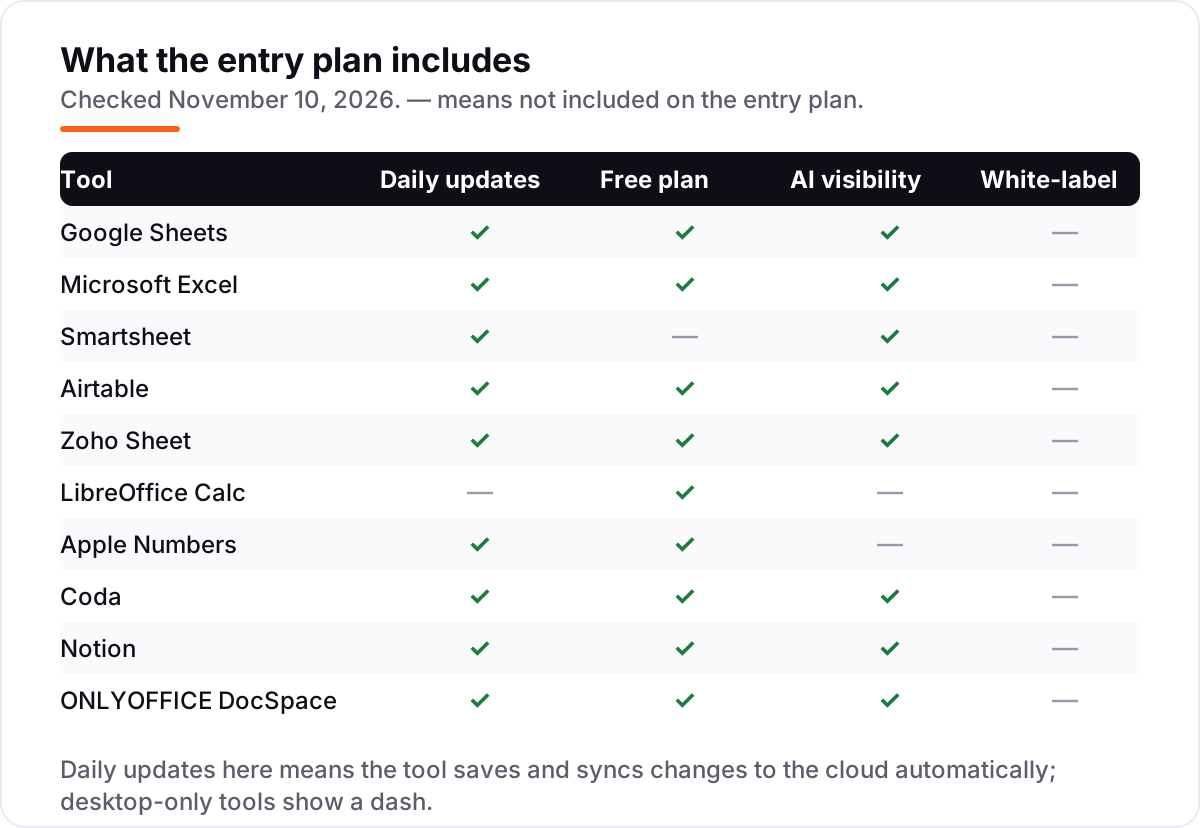
Microsoft Excel, LibreOffice Calc and Apple Numbers are the strongest offline tools because they are desktop apps first. Google Sheets has a limited offline mode in Chrome. Smartsheet, Airtable, Coda and Notion are cloud-first and need a connection for full use.
Free SEO and AI visibility audit
Find out what is holding your rankings back
Send us your site. Within 2 business days you get a written audit, an AI visibility check and a short fix list ranked by impact. Free, with no contract attached.
Request my free audit→Related guides
 Digital Marketing & Ads12 Best Project Management Software for Marketing Teams in 2026, ComparedCompare the 12 best project management software for marketing teams on price, proofing, timelines and client seats, with prices checked November 5, 2026.Read guide →
 AI, Data & Analytics10 Best AI Automation Tools for Small Business in 2026, Compared10 best ai automation tools for small business compared on price, free plans and AI features, with real starting prices checked November 2, 2026.Read guide →
 Consumer Apps10 Best Small Business Apps for 2026, Tested on Features and PriceCompare the 10 best small business apps for 2026 on price, free plans and AI features, with every price checked on the vendor's own page on November 4, 2026.Read guide →