
10 Best Subscription and SAAS Accounting Software in 2026, Compared
Compare the 10 best subscription and saas accounting software tools on price, recurring billing, revenue recognition and MRR metrics, checked November 4, 2026.
 Shamim Mia, Founder, SerpAstraLast verified November 4, 202614 min read
We compare pricing pages, documentation and public reviews. We never accept payment for rankings.

Key takeaways
- QuickBooks Online is the best fit for most small subscription businesses at $38/month; Xero follows at $27/month with unlimited users, and Zoho Books at $20/month with a real free plan underneath.
- Chargebee runs the billing at 0.80% of billing volume, while Baremetrics and ChartMogul report MRR and churn from $75 and $69/month — the ledger, the billing and the metrics are three separate jobs.
- The single most important buying factor is revenue recognition: only Sage Intacct and NetSuite build ASC 606 in, and QuickBooks Online holds it for Advanced at $340/month.
- Three tools publish no starting price — Chargebee charges by volume, and Sage Intacct and NetSuite are quote-only — so budget for the whole stack, not one subscription.
On this page
Quick comparison
| Tool | Best for | Starting price | Free plan |
|---|---|---|---|
| QuickBooks Online | Small subscription businesses that want the ledger most US accountants already know, with recurring invoicing on every paid plan | $38/mo | Yes (Free plan) |
| Xero | Subscription teams that want unlimited users on every plan and clean bank reconciliation without per-seat fees | $27/mo | No (30-day trial) |
| Zoho Books | Small subscription businesses that want a genuinely free ledger now and revenue recognition on the Premium plan | $15/mo (annual) | Yes (free plan) |
| FreshBooks | Subscription service businesses that bill clients on a schedule and want invoicing to lead | $23/mo | No (30-day trial) |
| Wave | Solo founders who want real double-entry accounting free, with no invoice or revenue caps | Free; Pro $19/mo | Yes (free) |
| Chargebee | SaaS companies that need billing logic separate from their payment processor, with revenue recognition alongside | 0.80% of volume | No (pay-as-you-go) |
| Baremetrics | SaaS founders who want MRR, churn and LTV from their Stripe or Chargebee data without building spreadsheets | $75/mo | Yes (free to $180K ARR) |
| ChartMogul | SaaS teams that want subscription analytics plus a built-in CRM, free until $10K MRR | $69/mo | Yes (free to $10K MRR) |
| Sage Intacct | Scaling SaaS companies that need ASC 606 revenue recognition, multi-entity books and dimensional reporting | Custom quote | No |
| NetSuite | Larger SaaS companies that want accounting, CRM, inventory and revenue recognition in one ERP | Custom quote | No |
Make one of these tools?
We re-check this list every quarter. Send a correction, request a review, or ask about a clearly labeled sponsored spot.
Request a listingThe best subscription and SaaS accounting software

QuickBooks Online
Best for: Small subscription businesses that want the ledger most US accountants already know, with recurring invoicing on every paid plan
QuickBooks Online is the default ledger for a small subscription business: it records the money, sends recurring invoices and reconciles the bank in one subscription. Simple Start costs $38 a month for one user; Essentials is $85 for three, Plus is $140 for five, and Advanced is $340 for 25. Chargebee, Stripe and Baremetrics all sync to it.
The gap to watch is revenue recognition, which only arrives on Advanced. A SaaS business that needs ASC 606 schedules before it can afford $340 a month will need a separate tool or an upgrade, and a second person on the books means Essentials at $85. Buy QuickBooks Online when you want the standard ledger your accountant already knows; buy Xero when per-seat pricing is the deal-breaker, and Sage Intacct when revenue recognition becomes the job.
What we like
- The ledger most US accountants already know, so finding help at tax time is easy
- Recurring invoices and automated bank feeds included on Simple Start, not held for a higher tier
- Intuit Intelligence AI features included from the entry plan
- More than 800 integrations, including Chargebee, Stripe and Baremetrics, cover billing and metrics
Watch out for
- Revenue recognition waits for Advanced at $340/month, so growing SaaS firms outgrow the cheap plans
- Hard user caps force upgrades: a second user means Essentials at $85/month, and payroll is a paid add-on
- Price rises most years — Essentials, Plus and Advanced all went up again for renewals from August 1, 2026
Xero
Best for: Subscription teams that want unlimited users on every plan and clean bank reconciliation without per-seat fees
Xero's pitch is simple: one flat price per plan and as many users as you like. Early costs $27 a month and covers quotes, 20 invoices and 5 bills a month, with bank reconciliation and receipt capture included. Growing costs $59, removes the caps and adds automated reconciliation; Established costs $97 and adds multi-currency, projects and expense claims. Recurring invoices run on every plan.
The limits to watch are the ones on Early: most subscription businesses pass 20 invoices a month, so the starting price is often Growing at $59. There is no revenue recognition and no MRR reporting built in, so churn and expansion need a metrics tool like Baremetrics or ChartMogul. Payroll runs through Gusto at $36 a month plus $6 per person. Choose Xero when several people touch the books and you refuse to pay per seat.
What we like
- Unlimited users on every plan, including Early at $27/month — no per-seat fees at any tier
- Bank reconciliation and Hubdoc receipt capture included from the entry plan
- More than 1,000 app integrations, including Stripe, Chargebee and Baremetrics
- Single flat price per plan with no annual-billing maze — the monthly price is the price
Watch out for
- Early caps at 20 invoices and 5 bills a month — most active subscription businesses need Growing at $59/month
- No revenue recognition or subscription metrics built in; MRR and churn need an add-on like Baremetrics
- No native US payroll; payroll comes through Gusto at $36/month plus $6 per person paid

Zoho Books
Best for: Small subscription businesses that want a genuinely free ledger now and revenue recognition on the Premium plan
Zoho Books is the value pick because the free plan is a real ledger, not a demo: full double-entry accounting, recurring invoices and bank reconciliation at $0 while annual revenue stays under $50,000. Standard costs $20 a month for 3 users and 5,000 invoices a year, Professional costs $50 and adds multi-currency and inventory, and Premium costs $70 and adds basic revenue recognition — the cheapest ASC 606 step in this list.
The catches are the ceilings. The free plan stops at 1,000 invoices a year, extra users cost $3 a month each, and advanced revenue recognition waits for Elite. There is no payroll module on any plan — payroll is a separate Zoho product. Choose Zoho Books when the budget matters most and you already live in the Zoho ecosystem, or when the free plan covers your first year.
What we like
- A real free plan: full double-entry accounting and recurring invoices at $0 while revenue stays under $50,000 a year
- Cheapest paid step up here — Standard is $20/month for 3 users and 5,000 invoices a year
- Premium at $70/month adds basic revenue recognition, the cheapest ASC 606 step in this list
- Zoho Subscriptions and Zoho CRM connect for billing and customer records without third-party tools
Watch out for
- Free plan stops at 1,000 invoices a year and only while annual revenue stays under $50,000
- Multi-currency waits for Professional at $50/month, and full revenue recognition waits for Premium at $70/month
- No payroll module on any plan, and accountants recommend it less often than QuickBooks Online or Xero

FreshBooks
Best for: Subscription service businesses that bill clients on a schedule and want invoicing to lead
FreshBooks is built for service businesses that bill on a schedule: automated recurring invoices, estimates, expenses and time tracking sit at the front, and the accounting sits behind them. Lite costs $23 a month and covers 5 billable clients; Plus costs $43 for 50 clients and adds double-entry reports, bank reconciliation and accountant access; Premium costs $70 and removes the client cap entirely.
The client cap is the thing that decides your bill. A sixth client moves you from Lite to Plus, and every extra team member costs $11 a month on top of the plan. There is no revenue recognition and no MRR or churn reporting, so a SaaS business that needs either will pair FreshBooks with a metrics tool. Pick FreshBooks when recurring invoicing and time billing are the job.
What we like
- Automated recurring invoices on every plan, with estimates, late fees and payment reminders built in
- Time tracking and expense tracking built in, so billable hours flow straight onto invoices
- Plus adds double-entry reports, bank reconciliation and free accountant access for $43/month
- Clean, simple invoices clients can pay from, with card, bank transfer and buy-now-pay-later options
Watch out for
- Lite covers only 5 billable clients — a sixth client forces Plus at $43/month
- Every extra team member costs $11/month on top of the plan price
- No revenue recognition and no subscription metrics — MRR and churn need a separate tool

Wave
Best for: Solo founders who want real double-entry accounting free, with no invoice or revenue caps
Wave is the only tool here whose free plan has no revenue cap and no invoice cap: Starter costs $0 and includes unlimited estimates, invoices, bills and bookkeeping records, with real double-entry accounting underneath and recurring invoices included. Pro costs $19 a month, or $190 a year, and adds automatic bank imports, receipt scanning, multi-user access and payment reminders.
The free plan's weakness is manual work. Starter has no automatic bank feed, so every transaction is typed in or uploaded by hand, and that gets old fast past fifty transactions a month. There is no revenue recognition, no inventory tracking and no multi-currency invoicing at any price, and Wave serves the US and Canada only. Start on Wave when the business is small and the budget is $0; upgrade to Pro the month manual entry starts costing you evenings.
What we like
- The only genuinely free full ledger here: unlimited invoices, bills and bookkeeping records at $0 with no revenue cap
- Pro is a single $19/month upgrade that adds automatic bank imports, receipt scanning and unlimited users
- Recurring invoices included, so a small subscription business can bill on a schedule for nothing
- Simple enough for an owner with no accounting background to run the books alone
Watch out for
- Automatic bank imports, receipt scanning and extra users all need Pro at $19/month — Starter means manual entry
- No revenue recognition, no inventory tracking and no multi-currency invoicing at any price
- US and Canada only, and support on the free plan is limited to help articles and community answers

Chargebee
Best for: SaaS companies that need billing logic separate from their payment processor, with revenue recognition alongside
Chargebee is the billing layer between your product and your payment processor: it runs the subscription logic — plans, trials, coupons, proration, usage billing and dunning — and sends the charges to Stripe, Braintree or one of 40+ other gateways. Flow is the only self-serve plan: pay-as-you-go at 0.80% of monthly billing value with no platform fee, or $99 a month plus 0.65% on a monthly commitment.
Chargebee is not a ledger and not a payment processor, so it pairs with one of the accounting tools in this list — it syncs to QuickBooks Online, Xero, NetSuite and Sage Intacct. Revenue recognition, CPQ and retention tools are separate products with separate prices. Choose Chargebee when billing logic has to outlive your payment processor, or when usage-based pricing is the product.
What we like
- Pay-as-you-go Flow is 0.80% of monthly billing value with no platform fee, or $99/month + 0.65%
- Works with 40+ payment gateways, so billing logic survives a switch from Stripe to another processor
- Revenue recognition (RevRec), CPQ and retention tools sit on the same subscription record
- Smart dunning, proration, trials, coupons and usage billing in the one plan
Watch out for
- The fee grows with revenue, so a fast-growing company pays far more than on a flat-fee tool
- Revenue recognition, CPQ and retention tools are separate products with separate prices
- Chargebee moves no money itself — gateway processing fees sit on top of the Flow percentage

Baremetrics
Best for: SaaS founders who want MRR, churn and LTV from their Stripe or Chargebee data without building spreadsheets
Baremetrics turns billing data into the numbers a SaaS founder actually manages: MRR, churn, LTV, trial conversion and cohorts, calculated automatically from Stripe, Chargebee, Recurly or Braintree. Launch starts at $75 a month billed monthly, or $49 billed annually, for businesses up to $360K in tracked ARR, and it is free up to $180K ARR. Setup is a connection, not a project.
The price is the catch: it scales with tracked ARR, so Launch becomes Growth at $255 a month once you pass $360K ARR, and the Recover and Cancellation Insights add-ons cost $129 a month each. Baremetrics sends no invoices and keeps no ledger, so it is a layer on top of billing and accounting, not a replacement. Buy it when the board asks for churn and LTV and the spreadsheet answers stop being trustworthy.
What we like
- 28+ subscription metrics — MRR, churn, LTV, trials and cohorts — calculated automatically from billing data
- Free up to $180K ARR, so an early SaaS business gets real metrics before paying anything
- Connects to Stripe, Chargebee, Recurly, Braintree and app stores in about 30 minutes
- Payment Recovery and Cancellation Insights add-ons fight failed payments and churn in the same dashboard
Watch out for
- Price scales with tracked ARR — Launch rises from $75 to $255 a month once you pass $360K ARR
- Payment Recovery and Cancellation Insights cost $129/month each on top of the plan
- Analytics only — it sends no invoices and keeps no ledger, so it pairs with a billing tool and an accounting tool

ChartMogul
Best for: SaaS teams that want subscription analytics plus a built-in CRM, free until $10K MRR
ChartMogul is subscription analytics with a CRM built in: MRR, ARR, churn, LTV, cohort retention and revenue forecasts, calculated from your billing data. The free plan covers companies up to $10K MRR with core analytics, segmentation and a CRM seat. Starter starts at $69 a month billed monthly, or $57 billed annually, for up to 3 team members and one billing source.
The trade-offs are the limits that force upgrades. Starter allows one billing source, so a second billing system means Pro at $119 a month, and data warehouse exports wait for Pro too. There is no dunning or payment recovery, so failed payments need a separate tool. Pick ChartMogul over Baremetrics when the free plan covers your stage and you want the CRM next to the metrics.
What we like
- Free plan covers companies up to $10K MRR with core analytics, segmentation and a CRM seat
- Built-in CRM on every plan, with opportunities, tasks and email sequences next to the revenue numbers
- Industry benchmarks show how churn and growth compare with SaaS companies at your stage
- Data warehouse exports on Pro push clean metrics to Snowflake, BigQuery, Redshift, S3 and Azure
Watch out for
- Price scales with tracked ARR, so the bill climbs automatically as revenue grows
- Starter allows one billing source and 3 team members — a second billing system forces Pro at $119/month
- Data warehouse exports and two-way CRM sync wait for Pro, and there is no dunning or payment recovery

Sage Intacct
Best for: Scaling SaaS companies that need ASC 606 revenue recognition, multi-entity books and dimensional reporting
Sage Intacct is the step up when a SaaS business outgrows a small-business ledger: a dimensional general ledger, automated ASC 606 revenue recognition, multi-entity consolidation and real-time reporting in one system. Pricing is by quote, built around users, entities and modules, and G2 lists an average implementation of 4 months. It is built for finance teams of roughly 20 or more people, not for a solo founder.
The cost is the whole conversation: no published price, implementation and training quoted separately, and add-on modules that add to the bill. The reporting is powerful but takes real setup — dimensions and custom reports need care to configure well. Choose Sage Intacct when revenue recognition, multi-entity books or audit-ready controls are the requirement, and budget for the implementation as well as the subscription.
What we like
- Automated ASC 606 and IFRS 15 revenue recognition built in, not bolted on
- Dimensional reporting tags transactions by department, project or entity without bloating the chart of accounts
- Multi-entity consolidation and real-time financials for SaaS companies with subsidiaries
- 121 integrations including Salesforce, BILL and ADP keep finance, payroll and CRM in sync
Watch out for
- No published price — every quote is tailored, so budgeting needs a sales conversation first
- Implementation commonly takes months — G2 lists an average of 4 months — and usually needs a consultant
- Custom reports and dimensions take real setup time, and add-on modules add to the bill

NetSuite
Best for: Larger SaaS companies that want accounting, CRM, inventory and revenue recognition in one ERP
NetSuite puts the whole SaaS back office on one database: general ledger, Advanced Revenue Management for ASC 606 schedules, CRM, inventory and ecommerce, with multi-entity and multi-currency books for companies selling globally. Oracle publishes no price list — every deployment is quoted on users, modules and transaction volume — and G2 reports implementation commonly takes 6 to 12 months.
That scope is both the point and the price. A small team will find the implementation heavy and the per-user, per-module pricing steep, and most deployments need an implementation partner. But a SaaS company that has outgrown a ledger plus a billing tool plus a CRM stops paying for three systems and three integrations. Choose NetSuite when one system of record matters more than a quick setup.
What we like
- One database for accounting, CRM, inventory and ecommerce, so the subscription, the invoice and the ledger never drift apart
- Advanced Revenue Management handles multi-element arrangements and ASC 606 schedules
- Multi-entity, multi-currency and multi-subsidiary books for SaaS companies selling globally
- SuiteAnalytics and saved searches give real-time reporting across every subsidiary
Watch out for
- No published price list — Oracle quotes every deployment, so two similar companies can pay very different amounts
- Implementation commonly takes 6–12 months, per G2, and usually needs an implementation partner
- Per-user and per-module pricing climbs steeply, and the interface has a real learning curve
The best subscription and saas accounting software does three jobs at once: it bills customers on a schedule, recognizes that revenue correctly, and tells you whether the business is actually growing. A plain ledger only does the first part of the job. We ranked the ten tools below by fit for the most common buyer — a subscription or SaaS business that needs recurring billing, a real ledger and honest MRR numbers — starting with the cheap ledgers, then the billing and metrics layers, and ending with the systems that scale past $1 million in ARR. Every price was checked on the vendor's own pricing page on November 4, 2026.
How to choose the best subscription and saas accounting software
- Separate billing, ledger and recognition. A subscription business needs three jobs done: charging customers on a schedule, keeping the ledger, and recognizing revenue as the service is delivered. Few tools do all three — most do one well and connect to the rest.
- Count your subscribers, not just your users. The caps that bite first are invoice caps, client caps and billing-volume percentages. Xero Early stops at 20 invoices a month, FreshBooks Lite at 5 billable clients, and Chargebee's fee grows with every dollar billed.
- Check revenue recognition early. If you bill annually, you need ASC 606 schedules eventually. QuickBooks Online holds revenue recognition for Advanced at $340/month, Zoho Books Premium adds a basic version at $70/month, and Sage Intacct and NetSuite build it in.
- Ask where MRR comes from. A ledger reports cash and profit; it does not report MRR, churn or LTV. If the board asks for those numbers, budget for Baremetrics or ChartMogul alongside the ledger.
- Price the whole stack. The subscription is rarely the whole bill: billing takes a percentage, the gateway takes 2.9% + 30¢ a card charge, and metrics scale with ARR. Add the three together before comparing tools.
- Think about who else touches the books. If your accountant already lives in QuickBooks Online, picking anything else means paying them to learn a new system — ask before you buy.
Accounting is one system in your stack, not the whole stack. If billing is the bigger problem, our guide to SaaS billing software compares the billing-only tools in depth. And before you publish new pages for the services you sell, run your titles through the free SERP snippet preview tool — it shows exactly how the title and description will look in Google.
Whatever you shortlist, try it with real data before you pay. The free plans and trials in this list are long enough to run one genuine month — your subscribers, your billing run, your bank feed — and that month tells you more than any review can. Check two things in the trial: that the billing run reconciles to the ledger without daily fixing, and that your accountant can get in for free. Every ledger here gives your accountant access at no extra charge, so there is no reason to buy before they have looked at it.
Subscription and SaaS accounting software pricing: what you will actually pay
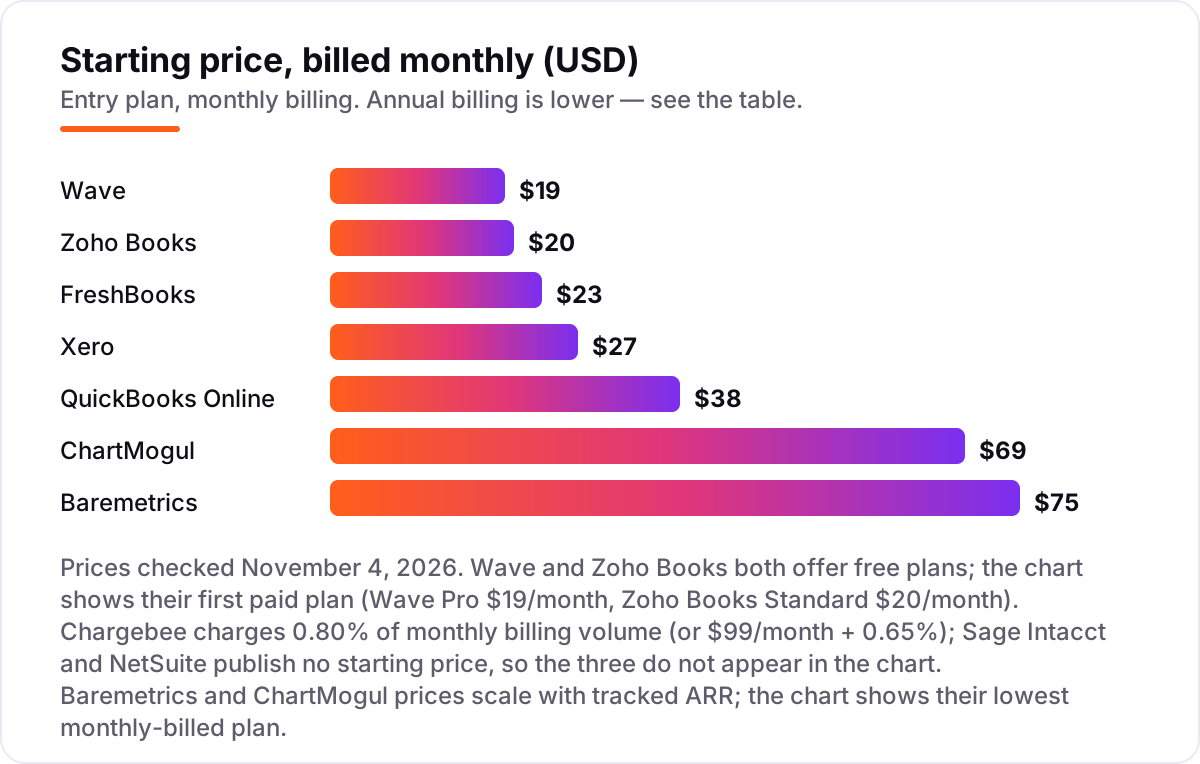
Take a SaaS business billing $20,000 a month — $240,000 a year — with three people on the books and about 200 subscribers. On list prices, the ledger costs $19 a month on Wave Pro, $20 on Zoho Books Standard, $43 on FreshBooks Plus, $59 on Xero Growing and $85 on QuickBooks Online Essentials. Two of those numbers need adjusting before they are real: FreshBooks Plus covers one user, so two extra team members at $11 each bring it to $65 a month, and Zoho Books Standard billed annually is $15 a month, not $20.
Over a year, that is $180 on Zoho Books Standard billed annually, $190 on Wave Pro billed annually, $708 on Xero Growing, $780 on FreshBooks Plus with two extra seats, and $1,020 on QuickBooks Online Essentials. The same three people and the same $20,000 of monthly billing cost $180 a year at the cheap end and $1,020 at the dear end — an $840 gap that comes entirely from user caps and billing choices, not from features.
Then the layers on top. Chargebee Flow at 0.80% of billing volume costs $160 a month on $20,000 of billing, or $1,920 a year — and the gateway still takes its cut, about $580 a month in card fees at 2.9% before the 30-cent per-charge fee. Baremetrics Launch costs $75 a month billed monthly, or $49 billed annually, because $240,000 of ARR sits inside its Launch band; ChartMogul Starter costs $69 a month, or $57 billed annually. A full stack of Xero Growing ($708 a year) plus Chargebee Flow ($1,920) plus Baremetrics on annual billing ($588) comes to $3,216 a year — and Sage Intacct or NetSuite would replace all three with a single quote, which is exactly why their price is a conversation, not a number.
Know the difference: subscription billing vs subscription accounting
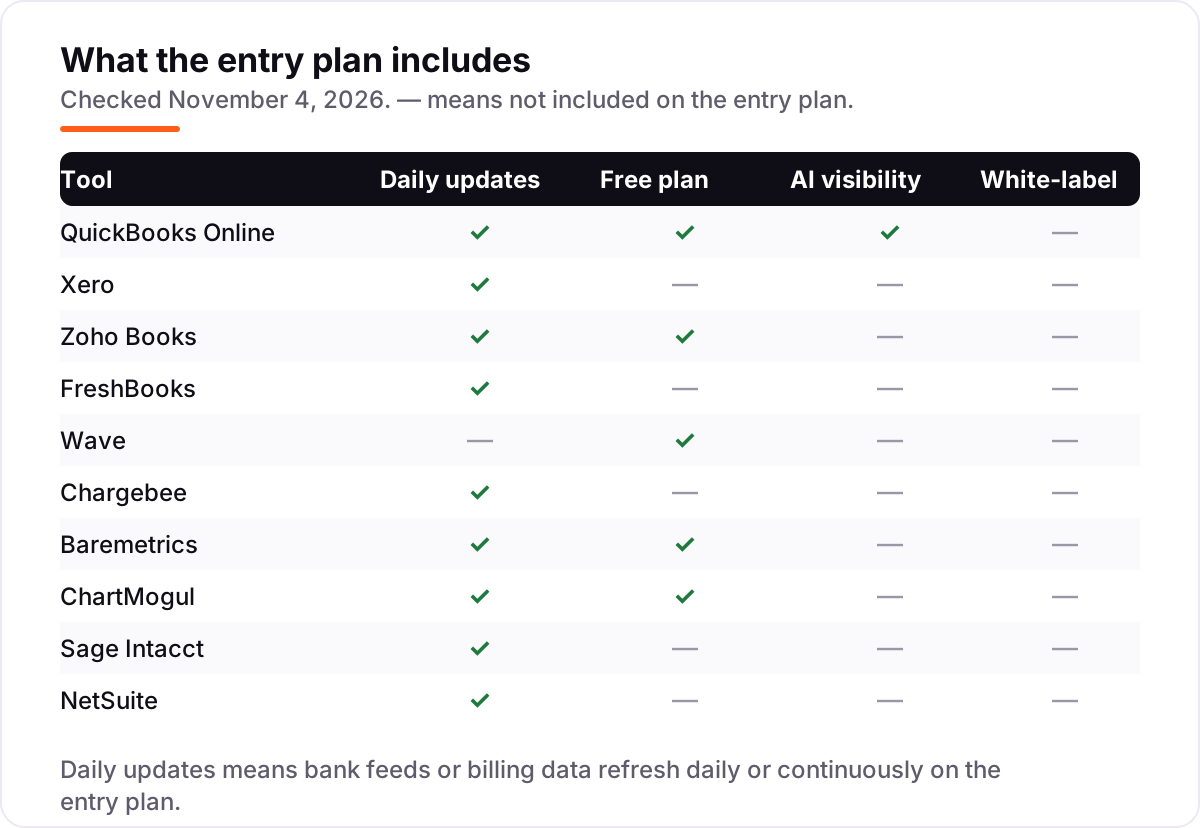
The confusion in this category is between collecting money and accounting for it. Subscription billing runs the subscription: plans, trials, proration, dunning and the charge itself. Subscription accounting records the money: the ledger, the bank reconciliation and the revenue recognized as the service is delivered. Chargebee and Stripe Billing are billing tools; QuickBooks Online and Xero are accounting tools; Baremetrics and ChartMogul are neither — they report on the numbers the other two produce.
That split matters because cash and revenue are different numbers. A customer who pays $1,200 for a year on January 1 has paid $1,200 in cash, but the business has only earned $100 of revenue in January — the other $1,100 is deferred revenue, owed as service. Recognizing the whole $1,200 in January overstates the month and understates the next eleven. That schedule is what ASC 606 governs, and it is why revenue recognition is a separate feature worth paying for once annual billing starts.
A third distinction worth knowing is MRR versus recognized revenue. MRR is a billing number: the monthly value of active subscriptions. Recognized revenue is an accounting number: the value of service actually delivered. The two disagree whenever annual plans, trials, discounts or refunds are involved, which is most of the time. If a tool reports only one of them, it is telling half the story.
Quick comparison: tool type by need
| Buyer | Best pick | Why |
|---|---|---|
| Solo founder on a budget | Wave | Free Starter plan, unlimited invoices, Pro is $19/month when you want bank feeds |
| Small subscription business | QuickBooks Online | The standard ledger accountants know, from $38/month |
| Team that hates per-seat pricing | Xero | Unlimited users on every plan, Growing is $59/month |
| Service business billing on a schedule | FreshBooks | Recurring invoices first, Lite is $23/month for 5 clients |
| Best value with a free plan | Zoho Books | Free under $50,000 revenue, Standard is $20/month, revenue recognition on Premium |
| Billing separate from the processor | Chargebee | Flow is 0.80% of billing volume, with no platform fee |
| SaaS metrics without spreadsheets | Baremetrics | MRR, churn and LTV from $75/month, free to $180K ARR |
| Metrics plus a CRM | ChartMogul | Free to $10K MRR, Starter is $69/month |
| Scaling past $1M ARR | Sage Intacct | ASC 606 revenue recognition and multi-entity books, custom quote |
| Whole back office in one ERP | NetSuite | Ledger, CRM and billing on one database, custom quote |
Mistakes to avoid
- Buying a billing tool and thinking the accounting is done. Chargebee runs subscriptions well and keeps no ledger. The invoices still need to land in QuickBooks Online, Xero or Zoho Books, and the revenue still needs recognizing.
- Recognizing all the cash as revenue. Annual prepayments are deferred revenue until the service is delivered. Booking the full amount in the month it arrives overstates the month and creates a nasty correction at year-end.
- Budgeting on the percentage at low volume. Chargebee at 0.80% looks cheap on $5,000 of monthly billing ($40 a month) and costs $800 a month at $100,000. Re-price the percentage at the volume you expect in twelve months, not the volume you have today.
- Buying on the free plan, then finding the bank feed costs extra. Wave Starter is free, but automatic bank imports need Pro at $19 a month. If you process more than fifty transactions a month, count Pro in the price from day one.
- Forgetting the metrics layer. A ledger will not tell you churn, LTV or expansion revenue. If the board asks for those numbers and nobody owns them, the answer becomes a spreadsheet that nobody trusts — budget for Baremetrics or ChartMogul from the start.
How we chose
We checked each vendor's own pricing page on November 4, 2026 and recorded the starting price exactly as shown, including the annual-billing figure where the page lists one, and we ranked the tools by fit for the most common buyer — a subscription or SaaS business that needs recurring billing, a real ledger and honest MRR numbers — not by brand size. Chargebee charges by billing volume and Sage Intacct and NetSuite are quote-only, so the three publish no starting price and do not appear in the price chart; Baremetrics and ChartMogul prices scale with tracked ARR, so the chart shows their lowest monthly-billed plan. Review ratings come from G2 pages checked November 4, 2026; Baremetrics and ChartMogul carry no rating because their G2 pages could not be opened that day. No vendor paid for a place in this list, and none of the links here are affiliate links.
What to do next
Start with the free plan or trial of your top pick and run one real billing cycle through it. Check that the billing run reconciles to the ledger, the MRR number matches what you billed, and the reports match what your accountant expects before you commit to a year. If the books are sorted but new customers are not finding you, our monthly SEO service handles the visibility side — or compare the billing-only tools in our guide to SaaS billing software. Once your tools are in place, find out what's holding your rankings back.
Your stack only works if people find you
SerpAstra fixes what keeps your site off page one and makes it easy for AI assistants to recommend.
Get a free audit→Sources we checked (18)
- QuickBooks Online pricing — quickbooks.intuit.com/pricing (checked November 4, 2026)
- Xero pricing — xero.com/us/pricing-plans (checked November 4, 2026)
- Zoho Books pricing — zoho.com/us/books/pricing (checked November 4, 2026)
- FreshBooks pricing — freshbooks.com/pricing (checked November 4, 2026)
- Wave pricing — waveapps.com/pricing (checked November 4, 2026)
- Chargebee pricing — chargebee.com/pricing (checked November 4, 2026)
- Baremetrics pricing — baremetrics.com/pricing (checked November 4, 2026)
- ChartMogul pricing — chartmogul.com/pricing (checked November 4, 2026)
- Sage Intacct — sage.com/en-us/intacct (checked November 4, 2026)
- NetSuite pricing — netsuite.com/portal/products/pricing.shtml (checked November 4, 2026)
- QuickBooks Online on G2 — g2.com/products/quickbooks-online/reviews (checked November 4, 2026)
- Xero on G2 — g2.com/products/xero/reviews (checked November 4, 2026)
- Zoho Books on G2 — g2.com/products/zoho-books/reviews (checked November 4, 2026)
- FreshBooks on G2 — g2.com/products/freshbooks/reviews (checked November 4, 2026)
- Wave on G2 — g2.com/products/wave/reviews (checked November 4, 2026)
- Chargebee on G2 — g2.com/products/chargebee/reviews (checked November 4, 2026)
- Sage Intacct on G2 — g2.com/products/sage-intacct/reviews (checked November 4, 2026)
- NetSuite on G2 — g2.com/products/netsuite/reviews (checked November 4, 2026)
Shamim
Founder of SerpAstra
A full-stack SEO and digital marketer who spends most days on Local SEO for dental practices, AI search visibility and lead generation.
Frequently asked questions
What is the best subscription and SaaS accounting software?
QuickBooks Online is the best fit for most small subscription businesses: the ledger most accountants know, recurring invoices from $38/month, and syncs to Chargebee, Stripe and Baremetrics. Xero is the better pick when several people touch the books, since every plan includes unlimited users. Wave is the best free option, and Sage Intacct is the pick once ASC 606 revenue recognition becomes the job.
How much does subscription and SaaS accounting software cost?
Entry prices run from $0 to $75 a month. Wave and Zoho Books both have free plans, and the first paid ledgers cost $19–$38 a month. Billing and metrics are priced differently: Chargebee takes 0.80% of billing volume, and Baremetrics and ChartMogul start at $75 and $69 a month. Sage Intacct and NetSuite are quote-only, so budget for a sales conversation, not a list price.
What is the difference between subscription billing and subscription accounting?
Billing collects the money: it runs plans, trials, proration and dunning, and charges the customer's card. Accounting records the money: it keeps the ledger, reconciles the bank and recognizes revenue as the service is delivered. A billing tool shows cash in; the ledger shows revenue earned. Most SaaS companies need both, connected, so the two never drift apart.
Do I need revenue recognition (ASC 606) for my SaaS business?
If you bill annually and deliver the service over twelve months, yes — the accounting rules say you recognize revenue month by month as you deliver, not all at once when the cash arrives. QuickBooks Online only offers it on Advanced at $340/month, Zoho Books Premium adds a basic version at $70/month, and Sage Intacct and NetSuite build it in. Small monthly-billed businesses can usually start without it.
Is there really free subscription accounting software?
Yes, with limits. Wave Starter is free with unlimited invoices and no revenue cap, but bank feeds need the $19/month Pro plan. Zoho Books is free while annual revenue stays under $50,000, capped at 1,000 invoices a year. Baremetrics is free up to $180K ARR and ChartMogul is free to $10K MRR. All four are real tools, not trials.
Can I use QuickBooks Online or Xero for a SaaS business?
Yes, for the ledger half of the job. Both handle recurring invoices, bank reconciliation and reporting, and both sync to Stripe, Chargebee and Baremetrics. Neither recognizes revenue under ASC 606 on its entry plan or reports MRR and churn, so pair either one with a billing tool and a metrics tool once subscriptions become the business.
When should a SaaS company move to Sage Intacct or NetSuite?
Move when the ledger becomes the constraint: multi-entity books, ASC 606 schedules an auditor will sign off, or reporting that a small-business tool cannot produce. That usually happens past $1 million in ARR or with several subsidiaries. Before that, a ledger plus Chargebee plus Baremetrics or ChartMogul covers the same jobs for far less money and setup time.
Free SEO and AI visibility audit
Find out what is holding your rankings back
Send us your site. Within 2 business days you get a written audit, an AI visibility check and a short fix list ranked by impact. Free, with no contract attached.
Request my free audit→Related guides
 Accounting, Tax & FinanceBest SAAS Billing Software for 2026: 10 Options Compared by Use CaseCompare the 10 best saas billing software options for 2026 by use case, with real prices checked November 4, 2026 — from Stripe Billing to Billsby.Read guide →
 SEO & AI Search12 Best Accounting Software for SAAS in 2026, Compared12 best accounting software for saas tools compared with real 2026 prices, from $0 billing layers to full ledgers and ERP, sorted by what your SaaS needs.Read guide →
 Accounting, Tax & Finance11 Best Growth Stage SAAS Accounting Software in 2026, Compared11 best growth stage saas accounting software options compared on price, revenue recognition and multi-entity support. Prices checked November 2, 2026.Read guide →