
Best Temporary Email Services for 2026: 7 Providers Ranked by Value
Compare the 7 best temporary email services for 2026 on price, inbox life, privacy and attachments, with every price checked November 6, 2026.
 Shamim Mia, Founder, SerpAstraLast verified November 6, 202612 min read
We compare pricing pages, documentation and public reviews. We never accept payment for rankings.

Key takeaways
- Temp Mail is the best fit for most people at $0, with Premium at $7.99/month; Guerrilla Mail follows as the most full-featured free option, and 10 Minute Mail is the fastest for a single code.
- Five of the seven services cost nothing at all — the only paid plans here are Temp Mail Premium ($7.99/month), Mailinator Business ($99/month) and TrashMail Plus (€1.99/month).
- The single most important buying factor is inbox lifetime: a ten-minute address suits one code, while trials that send mail over days need Temp Mail, Mohmal or TrashMail forwarding.
- Never use temp email for banking, password recovery or any account you must keep — an expired address means lost access, and public inboxes are readable by anyone.
On this page
Quick comparison
| Tool | Best for | Starting price | Free plan |
|---|---|---|---|
| Temp Mail | People who want an instant disposable address on any device, with apps and the most domain choices | Free; Premium $7.99/mo | Yes (free plan) |
| Guerrilla Mail | People who need to send mail as well as receive it, with attachments, from a disposable address | Free | Yes (free) |
| 10 Minute Mail | Anyone who needs one confirmation code fast and wants the address to destroy itself | Free | Yes (free) |
| Mailinator | Developers and QA testers who need public inboxes, a free private domain, and API access | Free; Business $99/mo | Yes (free) |
| TrashMail | People who want disposable addresses that forward to a real inbox inside an encrypted mailbox | Free; Plus €1.99/mo | Yes (free plan) |
| Mohmal | Arabic-speaking users who want a longer-lived disposable inbox with a memorable address | Free | Yes (free) |
| EmailOnDeck | Privacy-minded users who want the simplest possible two-click disposable inbox | Free | Yes (free) |
Make one of these tools?
We re-check this list every quarter. Send a correction, request a review, or ask about a clearly labeled sponsored spot.
Request a listingThe best temporary email services

Temp Mail
Best for: People who want an instant disposable address on any device, with apps and the most domain choices
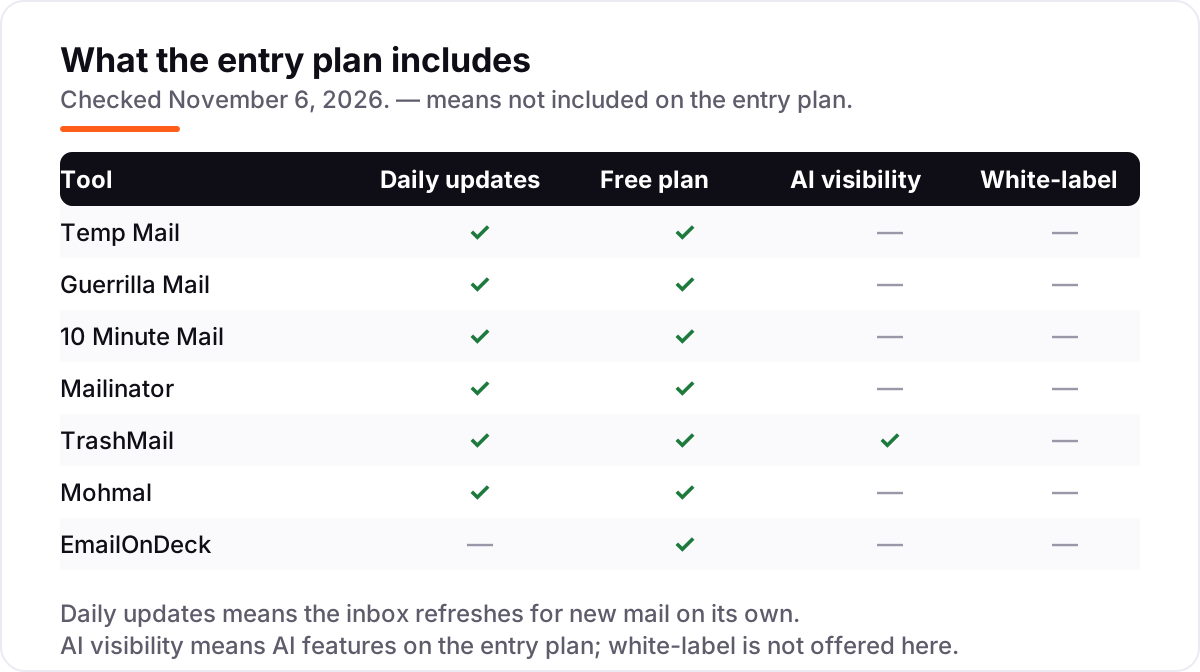
Temp Mail is the easiest service in this list: open the site or the app and an address is ready instantly, with no signup and no setup. The free tier covers the basics — a working address, several domains to choose from, and an inbox that lasts about two hours — and the apps keep the current address visible, refresh the inbox on their own, and copy codes with one tap.
Premium costs $7.99 a month, or $58.99 a year, and adds custom domains, an ad-free inbox and longer retention. The catch is that those prices are published in the app terms rather than on a pricing page, so check the purchase screen before you pay. Pick Temp Mail for the least friction on any device; pick Guerrilla Mail when you need to send mail or receive attachments.
What we like
- Instant address with no signup on the web, iOS and Android apps
- The widest choice of domains here, which helps when one domain is blocked
- Premium is cheap at $7.99 a month and adds custom domains and no ads
- One-tap code copying in the apps makes phone verification fast
Watch out for
- Free inboxes last about 2 hours, so slow replies can vanish before you read them
- Ads on the free tier crowd the inbox on the web version
- Premium prices live in the app terms and store listings, not on a pricing page

Guerrilla Mail
Best for: People who need to send mail as well as receive it, with attachments, from a disposable address
Guerrilla Mail is the most full-featured disposable inbox here, and it is completely free: there is no paid tier, no account and no personal data asked for. You get a custom address name, several domains to pick from, and the only send-and-receive inbox in this list, with attachments up to 150 MB — enough for signups that send PDF receipts or verification files.
Sessions last about an hour by default and can be extended, and a scrambled-address option helps when a site blocks the standard domains. The trade-offs are a dated interface and the most-blocked domains in this list, since Guerrilla Mail has been around since 2006. Choose it when attachments or sending matter; choose Temp Mail when you want the same job done on a phone.
What we like
- The only tool here that sends mail as well as receiving it
- Attachments up to 150 MB, the largest in this list
- Custom address names and several domains, including scrambled-address options
- No account, no personal data, and no paid tier at all
Watch out for
- Sessions last about an hour by default, so long signups need extensions
- The interface looks dated next to Temp Mail and 10 Minute Mail
- Its well-known domains sit on many block lists, so some sites reject them

10 Minute Mail
Best for: Anyone who needs one confirmation code fast and wants the address to destroy itself
10 Minute Mail gives you an address that lives for ten minutes, extendable in ten-minute steps, which is ideal for a single confirmation code. The short life is a privacy feature: nothing lingers, the address vanishes on its own, and there is no account, no personal data and no paid plan on the web service.
That brevity breaks multi-step signups that send several emails over time, and there is no attachment support and no sending from the address. History disappears after expiry, so codes must be used promptly and the tab must stay open until the code arrives. Use it for one-code verifications where speed and auto-expiry matter most; use Temp Mail or Mohmal when the signup takes longer than ten minutes.
What we like
- The fastest setup here: an address appears the moment the page loads
- Auto-expiry is a privacy feature — nothing lingers to clean up
- Extendable in 10-minute steps as often as needed
- No ads in the inbox and no personal data asked for
Watch out for
- Ten minutes is too short for multi-step signups that send mail over hours
- No attachments focus and no sending from the address
- Everything is deleted on expiry, so a late code is gone for good

Mailinator
Best for: Developers and QA testers who need public inboxes, a free private domain, and API access
Mailinator works differently from the rest of this list: any address at its domains instantly becomes a readable public inbox, with no signup and no setup. Developers and testers use it to check signup flows and email delivery without creating accounts, and the free Verified Pro plan adds a private domain and API access for a single user.
The catch is total publicity: anyone who enters the same address reads the same mail, so Mailinator must never be used for personal or account-related mail. Paid plans start at $99 a month, or $79 billed annually, and add private domains, webhooks, routing rules and SMS testing for QA teams. Pick it for testing; pick Temp Mail or Guerrilla Mail for personal throwaway signups.
What we like
- Any address at its domains works instantly with no signup at all
- Verified Pro is free and adds a private domain plus API access
- The only tool here built for QA teams, with webhooks, routing rules and SMS testing on paid plans
- Paid plans scale to 300,000 emails a month for large test suites
Watch out for
- Public inboxes are readable by anyone, so never use them for personal mail
- The first paid plan is $99 a month, far above the rest of this list
- Free public inboxes store mail only briefly and cannot send

TrashMail
Best for: People who want disposable addresses that forward to a real inbox inside an encrypted mailbox
TrashMail is the oldest service here — the original disposable-address service, running since 2002 — but its site is now Aionda Mail, an encrypted mailbox with disposable addresses built in. The free plan includes up to 25 disposable addresses in an encrypted, zero-knowledge mailbox, and Plus costs €1.99 a month for 10,000 addresses, unlimited forwarding and custom domains.
Forwarding is the difference: mail sent to a TrashMail address reaches your real inbox until the address expires, which suits trials that send several messages over days. The trade-off is setup — you create an account, which the instant services never ask for — and forwarding needs your real address, so it is less anonymous than a pure temp inbox. Choose it when you want disposable addresses that still reach you.
What we like
- Forwarding addresses disguise your real email while mail still reaches you
- Up to 10,000 disposable addresses and custom domains on Plus
- The only encrypted, zero-knowledge mailbox here, with a free AI assistant to try
- Plus is cheap at €1.99 a month, with a free plan underneath it
Watch out for
- The classic TrashMail site is now Aionda Mail, a full mailbox, not a one-click inbox
- Forwarding needs your real address, so it is less anonymous than pure temp inboxes
- You create an account, which the instant services in this list never ask for

Mohmal
Best for: Arabic-speaking users who want a longer-lived disposable inbox with a memorable address
Mohmal offers disposable inboxes with longer lifetimes than ten-minute services, plus Arabic and English interfaces that serve users in the Middle East and beyond. Addresses last 45 minutes and can be extended, you can choose a memorable name instead of a random string, and the service rotates its domains so a blocked domain is replaced with a fresh one.
The domain set is smaller than Temp Mail or Guerrilla Mail, the feature list is shorter, and the site is occasionally unavailable. Inboxes also have no password, so anyone who knows the address can read the mail — use Mohmal for low-stakes signups only. Pick it when you want a longer-lived free inbox with Arabic language support and a name you can remember.
What we like
- Addresses last 45 minutes and can be extended, longer than 10 Minute Mail
- Arabic and English interfaces, the first Arabic temp-mail service
- Choose a memorable address name instead of a random string
- Rotating domains help when a site has blocked the last one
Watch out for
- Inboxes have no password, so anyone who knows the address can read the mail
- A smaller domain set than Temp Mail or Guerrilla Mail
- Fewer features overall and the site is occasionally unavailable

EmailOnDeck
Best for: Privacy-minded users who want the simplest possible two-click disposable inbox
EmailOnDeck keeps disposable mail simple: generate an address, read mail in two steps, and move on, with no signup and no app to install. Its minimal design loads fast on any device, and the service is completely free for the basic inbox, which suits quick verifications and trial signups from any browser.
Features are basic — no attachments, no sending and no custom domains — and the inbox lifetime is short, so slow senders can beat the clock. A Pro tier with API access exists for developers, but its price is not published on the vendor site and it is paid in Bitcoin or Ethereum only. Pick EmailOnDeck when you want the simplest possible disposable inbox and nothing else.
What we like
- The simplest flow here: generate an address and read mail in two steps
- No registration, no personal data, and no app to install
- Pro tier takes Bitcoin or Ethereum, which suits privacy-focused users
- Minimal design loads fast on any device
Watch out for
- Basic features only — no attachments, no sending, no custom domains
- Inbox lifetime is short and the interface offers little beyond reading mail
- Pro pricing is not published on the vendor site and is paid in crypto only
The best temporary email services give you a throwaway address for signups, downloads and trials, so your real inbox stays free of marketing mail and your address stays out of breach databases. We ranked the seven services below by fit for the most common buyer — someone who needs a working address in seconds, not a new mailbox to manage — starting with the easiest all-rounders and ending with the simplest one-trick inboxes, and every price was checked on the vendor's own page on November 6, 2026.
How to choose the best temporary email services
- Match the lifetime to the job. A ten-minute address suits a single confirmation code; a trial that sends mail over days needs Temp Mail, Mohmal or TrashMail forwarding.
- Check what the inbox can receive. Guerrilla Mail handles attachments up to 150 MB; most others block them, which breaks signups that send PDF receipts.
- Decide how private the inbox must be. Mailinator public inboxes and Mohmal addresses are readable by anyone who guesses them; Temp Mail and Guerrilla Mail keep addresses unlisted.
- Watch for domain blocks. Many sites reject known disposable domains, so a service with several domains, like Temp Mail or Guerrilla Mail, gives you a second try.
- Know whether you need to send. Only Guerrilla Mail in this list sends mail from the disposable address; the rest are receive-only.
Temporary email is one small part of staying findable and safe online. If the business behind the signup also needs to be found, our monthly SEO service handles the visibility side, and before you publish the pages those signups land on, run your titles through the free SERP snippet preview tool — it shows exactly how the title and description will look in Google.
Whatever you shortlist, test it with a throwaway signup before you rely on it. Send yourself a test message, check that the code arrives and the link opens, and confirm the address survives long enough for the slowest sender. That two-minute test tells you more than any review can.
Temporary email services pricing: what you will actually pay
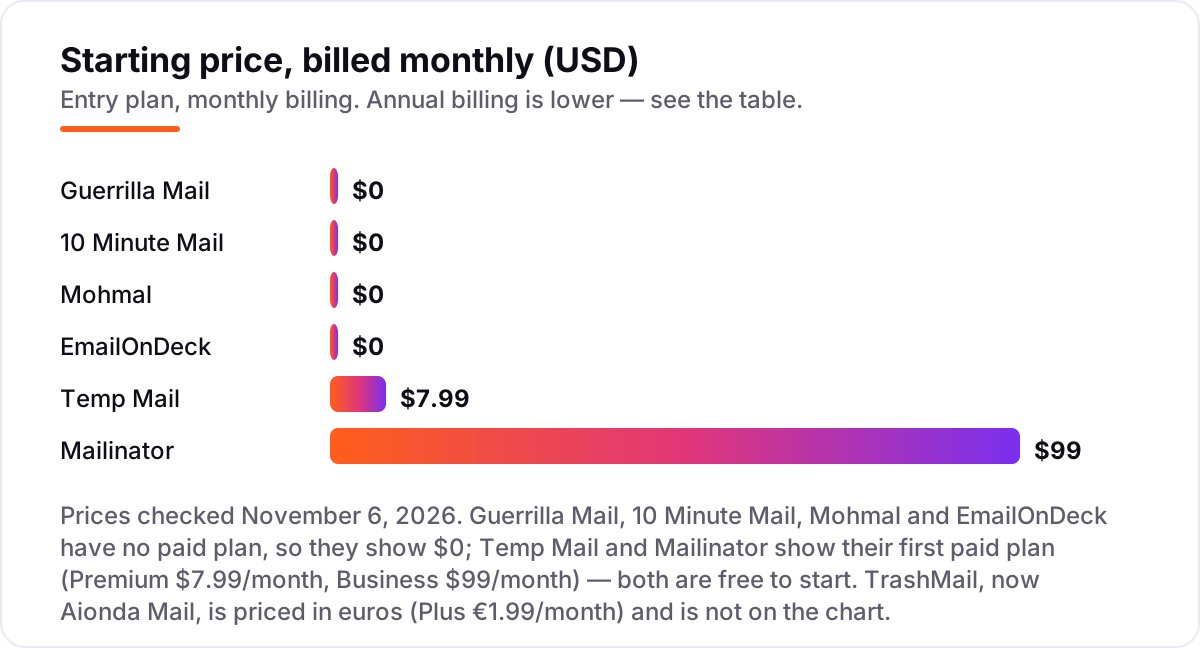
Take a person who signs up for about 20 trials and downloads a month. On the free plans, that costs $0 on five of the seven services here — Guerrilla Mail, 10 Minute Mail, Mohmal and EmailOnDeck have no paid plan at all, and Mailinator's Public plan and free Verified Pro cover testing and personal use. The only money in this list changes hands when you want more: Temp Mail Premium at $7.99 a month, Mailinator Business at $99 a month, and TrashMail Plus at €1.99 a month.
Over a year, Temp Mail Premium costs $95.88 on monthly billing or $58.99 on the yearly plan, a saving of $36.89 for paying up front. Mailinator Business costs $1,188 on monthly billing or $948 billed annually, a saving of $240. TrashMail Plus costs €23.88 on monthly billing, or €18.49 on the annual offer shown on its homepage. For most people the honest annual total is $0: the free plans cover the whole job, and the paid tiers only matter when you need custom domains, longer retention or a private domain for testing.
So what should you actually pay? For personal use, $0: the free plans cover confirmation codes, downloads and trial signups, and none of them asks for a card. Pay the $7.99 for Temp Mail Premium only when you need custom domains or an ad-free inbox every day, and pay Mailinator Business only when a QA team needs private domains, webhooks and volume — a single tester gets the same tools free on Verified Pro.
One more cost to check before you commit: the address itself. A disposable address that expires mid-trial can lock you out of the account it created, and recovering that account costs far more than any subscription here. If the trial matters, use TrashMail forwarding or an alias from your real provider instead, so the mail still reaches you after the disposable address is gone.
Know the difference: temporary email vs email aliases
The confusion in this category is between an address that expires and an address that forwards. Temporary email gives you a fully disposable address that lives for minutes or hours, then deletes itself with everything in it. An email alias — Apple Hide My Email, Gmail plus-addressing, or a forwarding service like the one in our guide to email alias services — gives you an address that forwards to your real inbox and can be disabled one by one, without expiring.
The rule is simple: aliases suit accounts you keep, temp email suits throwaway signups you may abandon. If you will ever need a password reset, a receipt or a renewal notice from that service, use an alias or your real address. If the signup exists only to get past a form — a download, a one-off trial, a forum account — a temp address is the right tool, because there is nothing to lose when it expires.
There is also a difference between a temporary address and a second real mailbox. A second mailbox from Gmail or Outlook still belongs to you, still needs a password, and still collects mail forever — it just keeps the spam in a separate place. A temp address deletes itself, which is stronger privacy but weaker recovery. Use the second mailbox for newsletters you might want later; use temp mail for forms you never want to hear from again.
There is a second, quieter confusion: public inboxes are not private inboxes. Mailinator public inboxes and Mohmal addresses can be read by anyone who knows the address, which makes them fine for testing and useless for anything personal. Temp Mail, Guerrilla Mail and TrashMail keep addresses unlisted, so only you see the mail. The word "temporary" describes how long the address lives, not who can read it — check the privacy side separately before you sign up for anything that matters.
Quick comparison: tool type by need
| Buyer | Best pick | Why |
|---|---|---|
| One confirmation code, right now | 10 Minute Mail | Address in seconds, gone in 10 minutes, free |
| Everyday throwaway signups | Temp Mail | Instant on any device, Premium $7.99/month when you want more |
| Signups that send attachments | Guerrilla Mail | Sends and receives, attachments up to 150 MB, free |
| Testing signup flows | Mailinator | Public inboxes instantly, free Verified Pro private domain |
| Addresses that forward to your inbox | TrashMail | Disposable addresses inside an encrypted mailbox, Plus €1.99/month |
| Longer-lived free inbox | Mohmal | 45-minute addresses you can extend, Arabic and English |
Mistakes to avoid
- Using temp email for accounts you must recover. Banking, password resets and shopping orders need an address that still exists next month. An expired address means lost access.
- Using a public inbox for anything personal. Mailinator public inboxes and Mohmal addresses are readable by anyone who guesses the address. Keep personal mail on private inboxes only.
- Picking a ten-minute address for a multi-step signup. If the service sends several emails over hours, the address will be gone before the last one arrives — use Temp Mail, Mohmal or TrashMail instead.
- Assuming the address will be accepted. Many sites block known disposable domains. Keep a second service ready, or switch domains on Temp Mail or Guerrilla Mail before giving up.
- Paying before trying the free plan. Five of the seven services here are free with no paid plan, and the other two are free to start. The paid tiers only add domains, retention and privacy — test the free tier first.
How we chose
We checked each vendor's own pricing page on November 6, 2026 and recorded the starting price exactly as shown, and we ranked the services by fit for the most common buyer — someone who needs a working disposable address in seconds — not by brand size. Five of the seven services are free with no paid plan, so the chart shows $0 for them and the first paid plan for Temp Mail and Mailinator. Two prices need a note: Temp Mail publishes its Premium prices ($7.99 a month, $58.99 a year) in its own app terms rather than on a pricing page, and EmailOnDeck does not publish a price for its Pro tier at all, so we show $0 and quote no figure for it. TrashMail's site now opens as Aionda Mail, an encrypted mailbox with disposable addresses built in, and its Plus price is €1.99 a month. This list carries no review ratings because the G2 review pages did not load when we tried to open them on November 6, 2026, and we would rather show no rating than a stale or estimated one. No vendor paid for a place in this list, and none of the links here are affiliate links.
What to do next
Start with Temp Mail for everyday signups and keep 10 Minute Mail open for single codes — both are free, and that pair covers most of what a disposable address is for. If you test signup flows for work, add Mailinator's free Verified Pro plan for a private domain and API access. For the alias side of the same problem, our guide to disposable email services compares the wider field. Once your tools are in place, find out what's holding your rankings back.
Your stack only works if people find you
SerpAstra fixes what keeps your site off page one and makes it easy for AI assistants to recommend.
Get a free audit→Sources we checked (7)
- Temp Mail terms (Premium prices) — temp-mail.org/terms-of-service-app (checked November 6, 2026)
- Guerrilla Mail — guerrillamail.com (checked November 6, 2026)
- 10 Minute Mail — 10minutemail.com (checked November 6, 2026)
- Mailinator pricing — mailinator.com/pricing (checked November 6, 2026)
- TrashMail (Aionda Mail) — trashmail.com (checked November 6, 2026)
- Mohmal — mohmal.com (checked November 6, 2026)
- EmailOnDeck — emailondeck.com (checked November 6, 2026)
Shamim
Founder of SerpAstra
A full-stack SEO and digital marketer who spends most days on Local SEO for dental practices, AI search visibility and lead generation.
Frequently asked questions
Is temporary email safe?
For low-stakes signups, yes, with care. Use private inboxes, not public ones, for anything semi-personal, and never use temp email for banking, password recovery or accounts you need to keep. The main risk is losing access when the address expires, so treat every temp address as disposable by design.
Can I receive confirmation codes with temp email?
Yes, most services receive codes and links normally. Some sites block disposable domains, and some services delay mail by a minute or two, so wait and refresh before requesting another code. If a site rejects your address, try a different service or a different domain from the same service, since block lists vary.
How long do temporary email addresses last?
It varies widely. 10 Minute Mail lasts ten minutes unless extended, Guerrilla Mail sessions last about an hour with extensions, Mohmal lasts 45 minutes and can be extended, and Temp Mail free inboxes last about two hours. Mailinator public inboxes are short-lived, while TrashMail forwarding lasts until the address expires.
Are public inboxes private?
No. Mailinator-style public inboxes are readable by anyone who enters the address, so anyone can read your mail there. Mohmal inboxes have no password either. Use public inboxes only for testing and truly public content, never for personal mail, and use Temp Mail or Guerrilla Mail when the mail should stay unlisted.
What is the difference between temp email and email aliases?
Temp email gives a fully disposable address that expires, while aliases forward to your real inbox and can be disabled one by one. Aliases, such as Apple Hide My Email or Gmail plus-addressing, suit accounts you keep, while temp email suits throwaway signups you may abandon. For a closer look at the alias side, see our guide to email alias services.
Can I send email from a temporary address?
Only Guerrilla Mail in this list sends mail from a disposable address, with attachments up to 150 MB. The other six services are receive-only: they catch confirmation codes and links but cannot reply. If you need to send, use Guerrilla Mail, or use a forwarding service such as TrashMail, which routes replies through your real inbox.
Why do some sites reject my temporary email address?
Many sites keep block lists of known disposable domains, and the best-known services are the most blocked. Guerrilla Mail and Temp Mail both offer several domains, so switching domains sometimes passes a filter that blocked the main one. If every domain fails, an email alias from your real provider is the middle path that sites rarely block.
Free SEO and AI visibility audit
Find out what is holding your rankings back
Send us your site. Within 2 business days you get a written audit, an AI visibility check and a short fix list ranked by impact. Free, with no contract attached.
Request my free audit→Related guides
 Digital Marketing & AdsBest Disposable Email Services for 2026: 11 Providers Ranked by ValueCompare the best disposable email services on price, retention and privacy, with every price checked November 5, 2026. Most are free; three sell paid plans.Read guide →
 Digital Marketing & Ads10 Best Email Alias Services in 2026: Prices, Pros and Cons ComparedCompare the 10 best email alias service options on price, free plans, custom domains and reply support, with every price checked November 5, 2026.Read guide →
 Digital Marketing & Ads7 Best Email Deliverability Services in 2026Compare the 7 best email deliverability services on real prices, inbox testing, warmup and monitoring, with every price checked November 5, 2026.Read guide →