
12 Best Time Tracking Software for Small Business in 2026, Compared
The 12 best time tracking software for small business compared on price, free plans and billing features, with real starting prices checked November 10, 2026.
 Shamim Mia, Founder, SerpAstraLast verified November 10, 202611 min read
We compare pricing pages, documentation and public reviews. We never accept payment for rankings.

Key takeaways
- Clockify is the cheapest way in: free for up to 5 users and paid plans from $3.99 per user per month billed annually. Toggl Track ($9) has the simplest timer, and Harvest ($9) turns tracked time straight into invoices.
- The single most important buying factor is whether the tool fits how your team actually records time — a timer nobody starts produces no data, whatever the price.
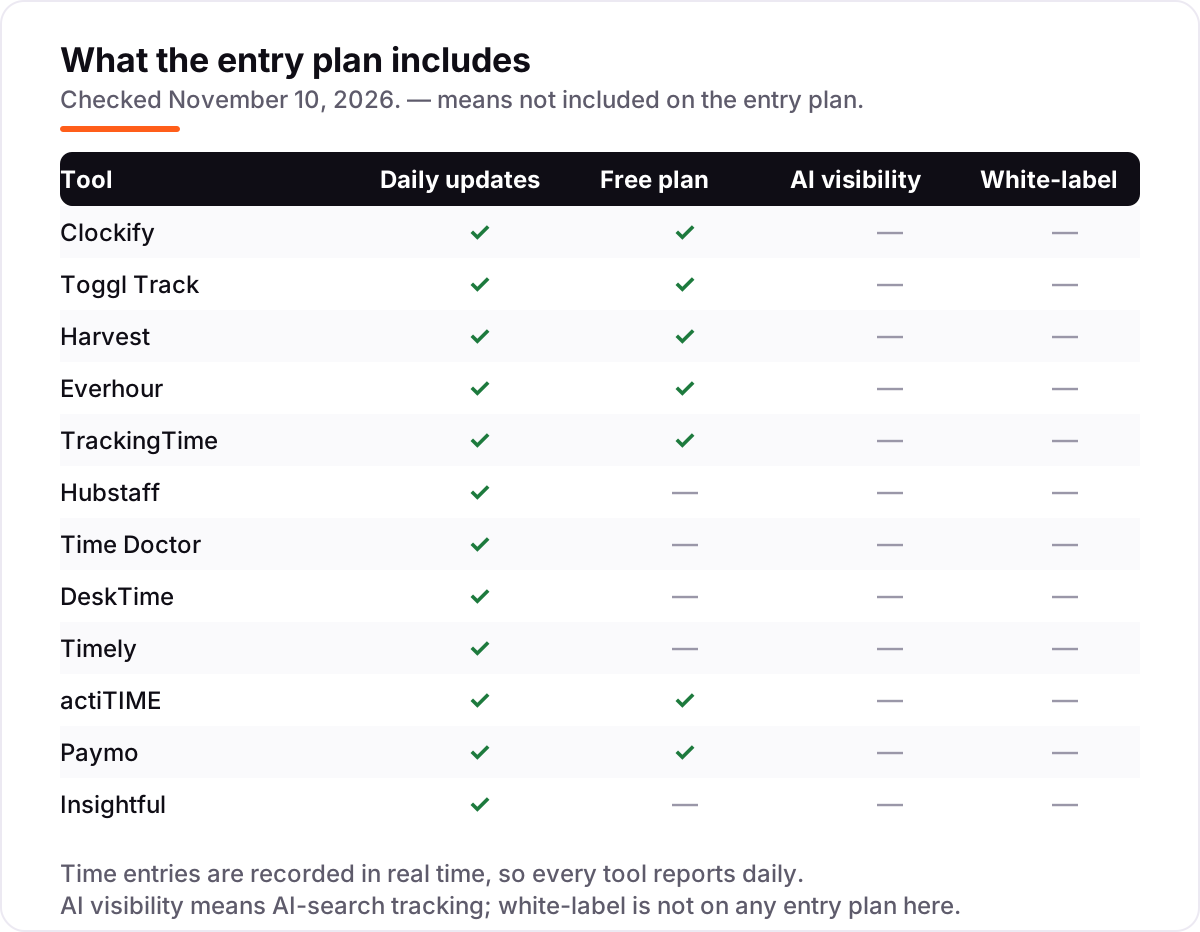
- Free plans cover small teams at Clockify, Toggl Track, Everhour, TrackingTime, actiTIME and Paymo; Hubstaff, Time Doctor, DeskTime, Timely and Insightful are trial-only.
- Every price below was checked on the vendor's own pricing page on November 10, 2026. Ratings are G2, checked November 10, 2026; three tools show no rating because no fresh G2 copy was available.
On this page
Quick comparison
| Tool | Best for | Starting price | Free plan |
|---|---|---|---|
| Clockify | Budget-conscious small teams that want a free start and the cheapest paid seats | $3.99/mo (annual) | Yes (5 users) |
| Toggl Track | Small knowledge-work teams that want the simplest timer their staff will actually use | $9/mo (annual) | Yes (3 users) |
| Harvest | Small consultancies and agencies that bill clients by the hour and need invoicing | $9/mo (annual) | Yes (1 seat) |
| Everhour | Small teams that run projects in Asana, Trello or Jira and want time inside those boards | $5/mo (annual) | Yes (5 users) |
| TrackingTime | Small teams that want task management, time tracking and invoicing in one tool | $4.50/mo (annual) | Yes |
| Hubstaff | Remote teams whose managers need screenshots and activity levels as proof of work | $4.99/mo (annual) | No (14-day trial) |
| Time Doctor | Distributed teams that need to validate hours before payroll | $6.67/mo (annual) | No (14-day trial) |
| DeskTime | Office and hybrid teams that want automatic tracking with no timers to remember | $6.42/mo (annual) | No (14-day trial) |
| Timely | Agencies whose staff forget to start timers and need AI-drafted timesheets | $9/mo (annual) | No (14-day trial) |
| actiTIME | Small firms that need hours tied to project costs, budgets and profitability | $6/mo (annual) | Yes (3 users) |
| Paymo | Small creative studios that want projects, time tracking and invoicing in one app | $5.90/mo (intro) | Yes (1 user) |
| Insightful | Managers who want app and website visibility across a remote team | $8/mo (annual) | No (7-day trial) |
Make one of these tools?
We re-check this list every quarter. Send a correction, request a review, or ask about a clearly labeled sponsored spot.
Request a listingThe best time tracking software for small business
Clockify
Best for: Budget-conscious small teams that want a free start and the cheapest paid seats
Clockify is the cheapest way into proper time tracking, and the free plan is the reason it leads this list. Up to 5 users get unlimited time tracking, projects, tasks, timesheets and reports without paying anything, and the paid Basic plan starts at $3.99 per user per month billed annually. That is less than half the price of Toggl Track's Starter plan for the same headcount, and the gap grows with every seat you add.
The trade-off is depth. Invoicing, timesheet approvals and time off wait for Standard at $5.49 billed annually, while screenshots, GPS and scheduling need Pro at $7.99. Some reviewers also report unreliable mobile syncing, so test the phone app with your real team before committing. For a small business that wants honest hours at the lowest price, though, Clockify is the default starting point.
What we like
- Free plan covers up to 5 users with unlimited time tracking, projects, tasks and timesheets
- Cheapest paid seats in this list: Basic from $3.99 per user per month billed annually
- Kiosk mode lets staff clock in from a shared tablet, and a calendar view fills timesheets fast
Watch out for
- Invoicing, timesheet approvals and time off need the Standard plan ($5.49 billed annually)
- Some reviewers report unreliable mobile syncing and a cluttered interface
- The free plan keeps only one month of report history
Toggl Track
Best for: Small knowledge-work teams that want the simplest timer their staff will actually use
Toggl Track earns second place because the timer itself is the product: one click starts it, one click stops it, and the entry syncs across the web, desktop apps and mobile. The free plan covers up to 3 users with manual and real-time timers, calendar integrations and simple planning, which is enough for a freelancer or a tiny team. Starter at $9 per user per month billed annually adds billable rates, project estimates and team reports.
What sets Toggl Track apart is what it refuses to do: no screenshots, no keystroke logging, no location tracking and no webcam monitoring, stated plainly on its own pricing page. That matters when staff have to trust the tool. The gaps are invoicing, which Toggl Track does not do, and profitability reports and approvals, which wait for Premium at $16 billed annually.
What we like
- One-click timer on web, desktop and mobile, with idle detection and calendar integrations
- No screenshots, keystroke, location or webcam monitoring, so staff trust it
- Starter adds billable rates, project estimates and team reports from $9 billed annually
Watch out for
- No invoicing: hours still need accounting software or an export step to become a bill
- Billable rates and profitability reports need paid plans; approvals wait for Premium
- The free plan stops at 3 users, so a fourth seat means paying for everyone

Harvest
Best for: Small consultancies and agencies that bill clients by the hour and need invoicing
Harvest is the pick for small businesses that sell hours, because it closes the loop between tracking and getting paid. Track time against a project, and Harvest turns it into a professional invoice with expenses attached, then syncs payments with QuickBooks, Xero and Stripe. Teams at $9 per user per month billed annually covers unlimited seats with team reporting and accounting integrations, and project budget alerts warn you before hours run over.
Read the pricing carefully before you buy. Since the 2026 restructure, the seat price is only the base: extra invoices, projects, clients and tasks can add usage fees that Harvest does not publish per unit, and Forecast scheduling costs $5 per person per month extra. The free plan covers one seat and two projects. For a consultancy invoicing from tracked time, the invoice quality still justifies the price.
What we like
- Shortest path from timer to invoice: tracked time becomes a professional invoice with expenses attached
- Project budget alerts warn when hours approach the cap, before the overrun happens
- Syncs invoices and payments with QuickBooks, Xero and Stripe
Watch out for
- Paid plans add usage fees for extra invoices, projects, clients and tasks, so the seat price is a floor, not the total
- Forecast resource planning costs $5 per person per month extra
- The free plan covers one seat and two projects only, so real teams pay from day one

Everhour
Best for: Small teams that run projects in Asana, Trello or Jira and want time inside those boards
Everhour is built for teams that already live in a project tool. Its browser extension puts timer controls directly inside Asana, Trello, Jira, ClickUp, Monday.com, Basecamp and GitHub, so time gets logged where the work happens. The free plan covers up to 5 users, and Lite at $5 per user per month billed annually adds clients, billable rates, budgets, invoicing and an API.
The catch is scope. Everhour shines as a layer on top of project software and feels thinner on its own, Lite caps at 10 users, and the Team plan at $8.50 billed annually carries a 5-seat minimum. There is no screenshot or activity monitoring either. If your team already runs its work in Asana or Jira, Everhour is the most natural tracker in this list; if it does not, look at Clockify or Toggl Track first.
What we like
- Timer controls sit inside Asana, Trello, Jira, ClickUp, Monday.com, Basecamp and GitHub
- Lite adds billable rates, budgets, invoicing and cost and profit views from $5 billed annually
- Free plan covers up to 5 users with unlimited time tracking, projects and reports
Watch out for
- Built as a layer on project tools, so teams without Asana, Trello or Jira get less value
- Lite caps at 10 users, and the Team plan carries a 5-seat minimum
- No screenshots or activity monitoring for managers who need proof of work
TrackingTime
Best for: Small teams that want task management, time tracking and invoicing in one tool
TrackingTime blends a calendar, a task list and a timesheet into one view, which suits small teams that plan the week visually. Drag work onto the calendar, track time against it, and the same screen shows time off, estimates and project views. The free plan costs nothing, Starter is $4.50 per user per month billed annually, and Pro at $5.75 billed annually adds billing rates, invoicing and calendar sync.
The limits are modest. Approvals, lock rules, billing rates and CSV exports all sit on paid plans, and there is no screenshot or activity monitoring for managers who want proof of work. It also has the smallest review base here, with 235 G2 reviews, so there is less public feedback to lean on. For a small team that wants tasks and time in one cheap tool, TrackingTime is hard to beat.
What we like
- Calendar-based time tracking with tasks, projects and time off in the same view
- Starter from $4.50 per user per month billed annually, with reports and estimates included
- Pro adds billing rates, invoicing and calendar sync from $5.75 billed annually
Watch out for
- Approvals, lock rules, billing rates and CSV exports sit on paid plans, not the free plan
- No screenshots or activity monitoring, so it cannot prove how hours were spent
- Smallest review base in this list, with 235 G2 reviews

Hubstaff
Best for: Remote teams whose managers need screenshots and activity levels as proof of work
Hubstaff is the monitoring option for remote teams that need proof of work, not just hours. Starter at $4.99 per user per month billed annually includes time tracking, activity levels, 500 screenshots a month and client invoicing, which is the lowest monitoring price in this list. With 2,297 G2 reviews behind it, Hubstaff is also the most reviewed monitoring tool here, so its rough edges are documented.
Budget for the add-ons: the headline price is rarely the final one. Tasks, Insights and Locations cost extra per seat, GPS tracking waits for the Team plan, and every plan needs 2 seats, with no free plan behind the trial. If your remote team needs to see what the hours produced, Hubstaff earns its place; if trust is already high, Toggl Track costs less and asks less of staff.
What we like
- Screenshots, activity levels and app and URL tracking from the $4.99 Starter plan billed annually
- Client invoicing is included on Starter, and payroll and payments arrive on higher plans
- One of the largest review bases here, with 2,297 G2 reviews and a 4.4/5 score
Watch out for
- No free plan, and every plan needs at least 2 seats, so a solo user cannot start cheap
- Useful features are paid add-ons: Tasks, Insights and Locations each add to the seat price
- GPS tracking waits for the Team plan, not Starter or Grow

Time Doctor
Best for: Distributed teams that need to validate hours before payroll
Time Doctor is the straightforward monitoring choice for distributed teams: screenshots and offline tracking come with every plan, and Basic starts at $6.67 per user per month billed annually. There is no seat minimum and no confusing add-on maze at the entry level, which makes the first invoice easy to predict. The 14-day trial opens all tiers, so a small team can test the full feature set before paying.
Most teams will not stay on Basic, and that is the honest catch. Web and app tracking, attendance, payroll and integrations all wait for Standard at $11.67 billed annually, and extras such as Benchmarks AI cost $3 per user per month on top. There is no free plan either. Buy Time Doctor when you need to validate hours before payroll; buy Hubstaff when screenshots alone will do.
What we like
- Screenshots and offline tracking included on every plan from $6.67 billed annually
- Standard adds web and app tracking, attendance, payroll and integrations
- Clear per-plan pricing with no seat minimum and a 14-day trial on all tiers
Watch out for
- No free plan, only a 14-day trial, and Basic leaves out integrations and web and app tracking
- Most teams land on Standard ($11.67 billed annually) for payroll and integrations
- Extra features such as Benchmarks AI cost $3 per user per month on top
DeskTime
Best for: Office and hybrid teams that want automatic tracking with no timers to remember
DeskTime removes the timer entirely: install the desktop app and it records apps, websites and documents automatically, then scores the day into productive and unproductive time. Employees can switch on Private Time for breaks and review their own data, which softens the surveillance feel. Pro costs $6.42 per user per month billed annually, and annual billing saves roughly a month a year.
Two things to check before you commit. There is no free plan, only a 14-day trial, and screenshots, API access and shift scheduling all wait for Premium at $9.17 billed annually. Prices also exclude VAT, so European buyers pay more than the headline rate. For office and hybrid teams that want hours captured without anyone remembering to start a timer, DeskTime is the most automatic tool in this list.
What we like
- Fully automatic tracking of apps, websites and documents from the moment work starts
- Productivity scoring with idle detection and a Private Time option for breaks
- Pro from $6.42 per user per month billed annually, with annual billing saving about a month
Watch out for
- No free plan, only a 14-day trial; the old free Lite tier was discontinued
- Screenshots, API access and shift scheduling wait for Premium at $9.17 billed annually
- Prices exclude VAT, so EU buyers pay more than the headline rate

Timely
Best for: Agencies whose staff forget to start timers and need AI-drafted timesheets
Timely is for teams whose timesheets never get filled in, because its Memory tracker records work in the background and AI drafts each person's timesheet for approval. Nobody else sees the raw activity, so the automation does not feel like surveillance, and a manual timer is included for work the tracker misses. Starter costs $9 per user per month billed annually and carries the highest G2 score in this list, 4.8 out of 5.
The Starter plan has a hard ceiling: 5 users and 20 projects, so a sixth person forces the jump to Premium at $16 billed annually. There is no free plan and no invoicing, so billing still needs another tool. For a small agency whose staff forget timers, Timely recovers billable hours that would otherwise vanish; for larger teams, price Premium from the start.
What we like
- Memory tracker records work in the background and AI drafts each timesheet for approval
- Highest G2 score in this list at 4.8/5 from 493 reviews
- Private timelines: nobody else sees the raw activity behind a timesheet
Watch out for
- Starter caps at 5 users and 20 projects, so a sixth person forces Premium at $16 billed annually
- No free plan and no invoicing, so billing still needs another tool
- The most expensive entry route here once a team passes 5 people

actiTIME
Best for: Small firms that need hours tied to project costs, budgets and profitability
actiTIME takes a different approach from the rest of this list: one plan, one price, every feature. Approvals, billing and cost rates, budgets, invoicing, leave management and custom workflows all come with the Online plan at $6 per user per month billed annually, dropping to $5 from 41 users. Free covers up to 3 users; self-hosted costs $120 per user once.
Hours are logged against customers, projects and tasks, with a cost rate on each person and a billing rate on each type of work, so the same entry feeds both an invoice and a margin figure. The trade-offs are a free plan that leaves out estimates and budgets, and no GPS tracking for field teams. For a small firm that prices work by the hour, actiTIME ties time to money more directly than any tool here.
What we like
- One plan with every feature: approvals, billing and cost rates, budgets, invoicing and leave
- Cost and billing rates sit on the same time entries, so margin shows next to hours
- Self-hosted option at $120 per user once for teams that want their data in-house
Watch out for
- The free plan leaves out estimates, budgets, priorities and custom fields
- No GPS tracking or geofencing, so field attendance needs another tool
- One flat feature set means no cheaper tier to drop to if budgets tighten

Paymo
Best for: Small creative studios that want projects, time tracking and invoicing in one app
Paymo is the all-in-one for small creative studios: projects, tasks, time tracking, estimates, expenses and invoicing live in the same app, so a job moves from estimate to invoice without an export step. The free plan gives one user unlimited time tracking and unlimited invoices, and Solo at $5.90 per user per month adds flat-rate and retainer projects with Kanban and calendar views.
Watch the price after month three. Solo is an introductory $5.90 that rises to $9.90, Plus is $10.90 rising to $15.90, and Solo caps at 1 user, 3 clients and 5 projects, so real teams start on Plus. Gantt charts, approvals and scheduling wait for Pro at $16.90. For a studio that wants one app for the whole job, Paymo still undercuts buying the pieces separately.
What we like
- Projects, tasks, time tracking, estimates, expenses and invoicing in one app
- Free plan includes unlimited time tracking and unlimited invoices for one user
- Plus adds project profitability, proofing, recurring invoices and API access
Watch out for
- The $5.90 Solo rate is introductory: after 3 months it rises to $9.90 per user per month
- Solo is limited to 1 user, 3 clients and 5 projects, so teams start on Plus
- Gantt charts, approvals and scheduling wait for the Pro plan at $16.90

Insightful
Best for: Managers who want app and website visibility across a remote team
Insightful, formerly Workpuls, is workforce analytics rather than a simple timer: it shows how work time is actually spent across apps, websites and projects, with screenshots and a real-time overview of the whole team. You pay per monitored device, not for admins or managers who only view the dashboard, and Workforce Analytics starts at $8 per user per month billed annually.
The trial is the shortest here at 7 days, and there is no free plan, so evaluate fast. Monitoring this thorough also needs a clear conversation with staff before rollout, and security and QA add-ons run an extra $0.50 to $4 per seat per month. For a manager who needs visibility into a remote team's working day, Insightful answers questions a timer alone cannot.
What we like
- Real-time overview of apps, websites and capacity across the whole team
- Screenshots and productivity analytics included on the entry Workforce Analytics plan
- You pay per monitored device, not for admins or managers who only view the dashboard
Watch out for
- No free plan, only a 7-day trial, the shortest trial in this list
- Monitoring-heavy by design, so it needs a clear conversation with staff before rollout
- Add-ons for security and QA run an extra $0.50 to $4 per seat per month
This guide compares the best time tracking software for small business on the things that decide the bill: the starting price per user, the free plan, and whether hours turn into invoices. The 12 tools below are ranked by fit for a small team that bills clients or tracks project hours, from the cheapest free start to the deepest monitoring. Every price comes from the vendor's own pricing page, checked November 10, 2026.
Quick comparison: tool type by need
| Buyer | Best pick | Why |
|---|---|---|
| Solo or tiny team, free start | Clockify | Free for up to 5 users; paid from $3.99 billed annually |
| Team that hates timers | Timely | AI drafts timesheets from background tracking; $9 billed annually |
| Consultancy billing hours | Harvest | Invoices straight from tracked time; $9 billed annually |
| Team inside Asana, Trello or Jira | Everhour | Timers inside the boards; $5 billed annually |
| Remote team needing proof of work | Hubstaff or Time Doctor | Screenshots and activity from $4.99 / $6.67 billed annually |
| Small firm tying hours to profit | actiTIME | Costs, budgets and invoicing on one plan; $6 billed annually |
How to choose best time tracking software for small business
- Count the trackers, not the staff. Every tool here charges per user, so a 10-person team pays 10 seats even if only 6 people track time. Check whether managers and viewers need paid seats too.
- Decide timer or automatic. Timers suit teams that switch tasks deliberately; automatic trackers suit teams that forget. DeskTime and Timely capture work without a click, while Toggl Track and Clockify need one.
- Check the billing path. If hours become invoices, Harvest and Paymo do it inside the tool. If hours become payroll, Time Doctor and Hubstaff are the shorter route.
- Ask about monitoring before you buy it. Screenshots and activity levels change how staff feel about the tool. If trust is high, a timer-only tool costs less and asks less.
- Read the second price. Annual billing saves roughly a fifth to a third almost everywhere, and add-ons, usage fees and seat minimums move the real bill. Harvest's usage fees and Hubstaff's add-ons are the two to price first.
Before you publish pages for the services you track time on, check how they will look in search with the free SERP snippet preview tool.
Time tracking software pricing: what you will actually pay
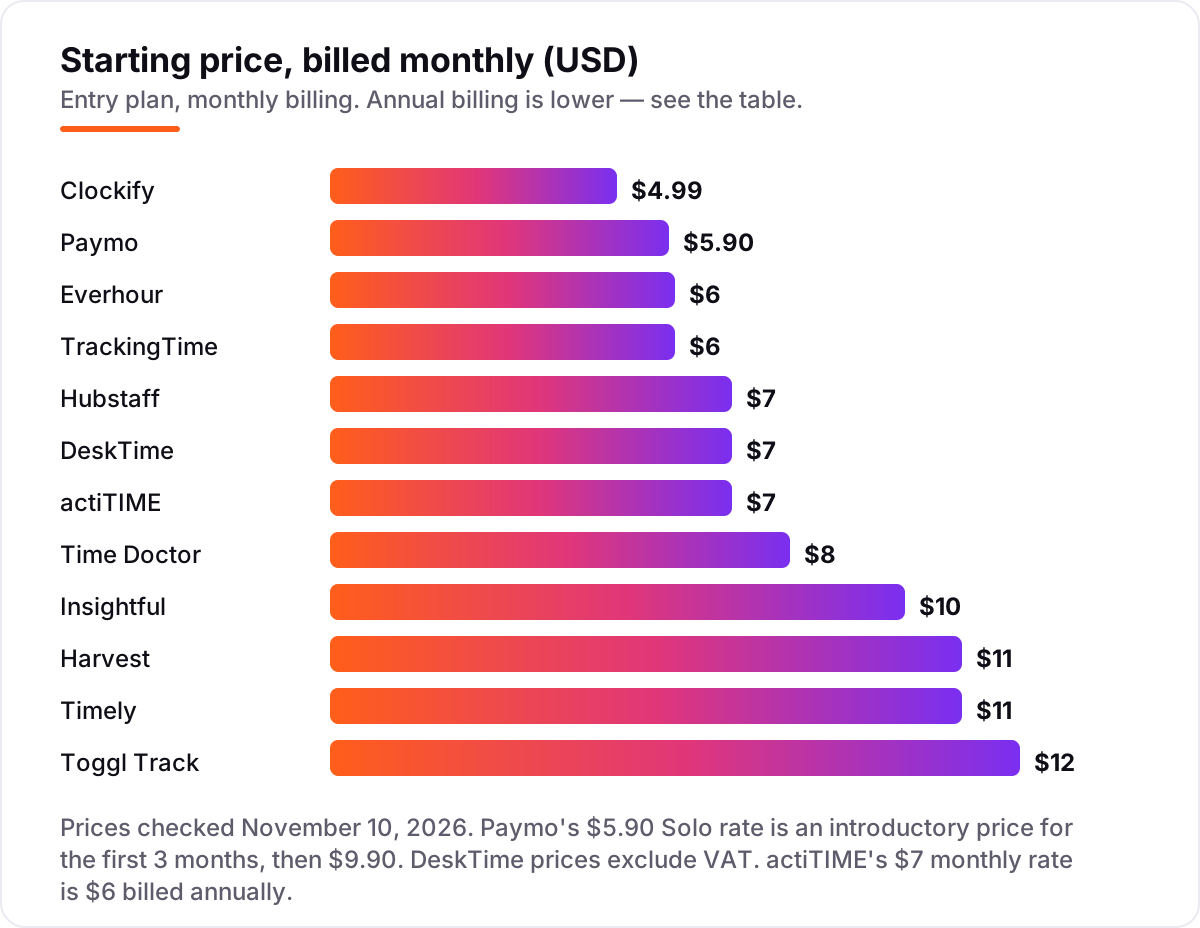
Take a 10-person team on the entry paid plan, billed annually. Clockify Basic costs $39.90 a month, Toggl Track Starter $90, Harvest Teams $90, Everhour Lite $50, TrackingTime Starter $45, Hubstaff Starter $49.90, Time Doctor Basic $66.70, DeskTime Pro $64.20, actiTIME $60, Paymo Plus $109, and Insightful Workforce Analytics $80. Timely Starter caps at 5 users, so a 10-person team pays Premium at $16, or $160 a month. The cheapest and the dearest plans sit $120.10 apart every month, or about $1,441 a year, before add-ons.
Paying month to month instead of annually adds roughly a fifth to a third to most of these bills: Toggl Track Starter is $12 against $9, and Clockify Basic is $4.99 against $3.99. Seat minimums matter too: Hubstaff needs at least 2 seats on every plan, Everhour's Team plan needs 5, and Paymo's Solo plan is a single user only. If invoicing is the reason you track time, compare the dedicated options in our guide to the best invoicing software for small business.
Time tracking vs timekeeping: know the difference
Time tracking and timekeeping sound alike, and vendors use the words interchangeably, but they answer different questions. Time tracking records what the hours were spent on: which client, which project, which task, and whether the work was billable. Timekeeping records when someone worked: clock-in and clock-out times, attendance, breaks and overtime, usually to feed payroll. A consultancy that bills by the hour needs time tracking; a shop that pays by the shift needs timekeeping. The tools in this list are time trackers first: they organise hours by project and client, and several add invoicing on top. If your real problem is attendance and payroll, start with a timekeeping tool instead — our guide to the best time clock app for small business covers that side, and the best payroll software for small business picks up where attendance ends.
How we chose
We checked each vendor's own pricing page and recorded the starting price exactly as shown, including the annual-billing figure where the page lists one. Toggl Track's and Paymo's pages were opened directly on November 10, 2026. For the other ten tools, prices come from fresh search-index copies of each vendor's own pricing page, crawled in late October and early November 2026 and cross-checked against at least two independent reads; Clockify's page returned a rate limit when we tried to open it, and Harvest's page rendered without its price figures in our text fetch, so both rest on multiple dated reads of the vendor page. Ratings are G2, checked November 10, 2026, from fresh copies of the G2 pages; Clockify, Paymo and actiTIME show no rating because no fresh G2 copy was available for them. We ranked by fit for the most common buyer — a small business tracking project or client hours — not by brand size. No vendor paid for a place in this list, and none of the links here are affiliate links.
What to do next
Start with the decision path above: count your trackers, pick timer or automatic, and decide whether hours must become invoices or payroll. Then run a two-week trial of your top pick with real project hours and compare the totals against your invoices. If the numbers match and staff actually use it, you have your tool. If your tracked hours feed client work that also needs to be found, our monthly SEO service keeps that work visible in search. Once your tools are in place, find out what's holding your rankings back.
Your stack only works if people find you
SerpAstra fixes what keeps your site off page one and makes it easy for AI assistants to recommend.
Get a free audit→Sources we checked (21)
- Clockify pricing — clockify.me/pricing (checked November 10, 2026)
- Toggl Track pricing — toggl.com/track/pricing/ (checked November 10, 2026)
- Toggl Track on G2 — 4.6/5, 1,589 reviews (checked November 10, 2026)
- Harvest pricing — getharvest.com/pricing (checked November 10, 2026)
- Harvest on G2 — 4.3/5, 838 reviews (checked November 10, 2026)
- Everhour pricing — vendor blog, Lite $5 billed annually / $6 monthly (checked November 10, 2026)
- Everhour on G2 — 4.7/5, 183 reviews (checked November 10, 2026)
- TrackingTime pricing — trackingtime.co/pricing (checked November 10, 2026)
- TrackingTime on G2 — 4.4/5, 235 reviews (checked November 10, 2026)
- Hubstaff pricing — hubstaff.com/pricing (checked November 10, 2026)
- Hubstaff on G2 — 4.4/5, 2,297 reviews (checked November 10, 2026)
- Time Doctor pricing — timedoctor.com/pricing (checked November 10, 2026)
- Time Doctor on G2 — 4.4/5, 493 reviews (checked November 10, 2026)
- DeskTime pricing — desktime.com/pricing (checked November 10, 2026)
- DeskTime on G2 — 4.5/5, 400 reviews (checked November 10, 2026)
- Timely pricing — timely.com/pricing (checked November 10, 2026)
- Timely on G2 — 4.8/5, 493 reviews (checked November 10, 2026)
- actiTIME pricing — vendor comparison, $6 billed annually / $7 monthly (checked November 10, 2026)
- Paymo pricing — paymoapp.com/pricing/ (checked November 10, 2026)
- Insightful pricing — insightful.io/pricing (checked November 10, 2026)
- Insightful on G2 — 4.6/5, 381 reviews (checked November 10, 2026)
Shamim
Founder of SerpAstra
A full-stack SEO and digital marketer who spends most days on Local SEO for dental practices, AI search visibility and lead generation.
Frequently asked questions
How much does time tracking software cost for a small business?
Entry paid plans run from $3.99 to $12 per user per month billed annually, and a 10-person team pays roughly $40 to $160 a month depending on the tool. Free plans cover small teams at Clockify, Toggl Track, Everhour, TrackingTime, actiTIME and Paymo. Add-ons, usage fees and seat minimums move the real bill, so price those before you commit.
Is there a free time tracking software for small business?
Yes, with limits. Clockify is free for up to 5 users, Toggl Track and Everhour for up to 5, actiTIME for up to 3, Paymo for 1 user, and Harvest for 1 seat and 2 projects. Free plans cover timers, timesheets and basic reports, but billable rates, approvals and invoicing usually need a paid plan. They work well for a tiny team; growing teams outgrow them fast.
What is the difference between time tracking and timekeeping software?
Time tracking records what hours were spent on: clients, projects, tasks and billable work. Timekeeping records when someone worked: clock-in and clock-out times, attendance, breaks and overtime for payroll. A consultancy billing by the hour needs time tracking; a business paying by the shift needs timekeeping. Several tools here blur the line, but their core job is project hours.
Do I need screenshots or activity monitoring?
Only if you need proof of work. Hubstaff, Time Doctor, DeskTime and Insightful take screenshots and track app and website use, which suits remote and distributed teams. Toggl Track, Clockify, Harvest and Timely record hours without monitoring, which staff accept more easily. Tell your team what is tracked before you switch monitoring on, and check local rules first.
Can time tracking software create invoices?
Some of it can. Harvest turns tracked time into invoices with expenses attached, Paymo and Everhour include invoicing on paid plans, and TrackingTime adds it on Pro. Toggl Track, Timely and Clockify's Basic plan do not invoice, so hours need an export to accounting software. If invoicing is the reason you track time, pick a tool that does it natively.
How do I get my team to actually track time?
Pick the tool that asks the least of them. A one-click timer such as Toggl Track, or an automatic tracker such as DeskTime or Timely, beats a form nobody opens. Start with a two-week trial on real work, show the team what the reports are for, and keep approvals light. If tracking still fails, the problem is usually the workflow, not the software.
Which time tracking tool is best for billing clients?
Harvest, because its invoices are the product: tracked time becomes a client-ready invoice with expenses attached, and payments sync with QuickBooks, Xero and Stripe. Paymo is the cheaper all-in-one for small studios, and Everhour suits teams billing from inside Asana or Jira. Watch Harvest's usage fees, which sit on top of the $9 seat price.
Free SEO and AI visibility audit
Find out what is holding your rankings back
Send us your site. Within 2 business days you get a written audit, an AI visibility check and a short fix list ranked by impact. Free, with no contract attached.
Request my free audit→Related guides
 HR & Recruiting9 Best Time Clock Apps for Small Business in 2026Compare the 9 best time clock app for small business picks on price, GPS punches, scheduling and free plans, with every price checked November 6, 2026.Read guide →
 Accounting, Tax & Finance10 Best Payroll Software for Small Business in 2026, ComparedCompare the 10 best payroll software for small business on base price, tax filing and free trials, with every price checked November 4, 2026.Read guide →
 Accounting, Tax & Finance11 Best Invoicing Software for Small Business in 2026, Compared11 best invoicing software for small business compared on price, free plans and payment fees. Prices checked on vendor pricing pages, November 2, 2026.Read guide →