
7 Best Timekeeping Software for Small Business in 2026, Compared
The 7 best timekeeping software for small business compared on price, GPS clock-in and payroll sync. Real November 2026 prices, free plans flagged.
 Shamim Mia, Founder, SerpAstraLast verified November 10, 202613 min read
We compare pricing pages, documentation and public reviews. We never accept payment for rankings.

Key takeaways
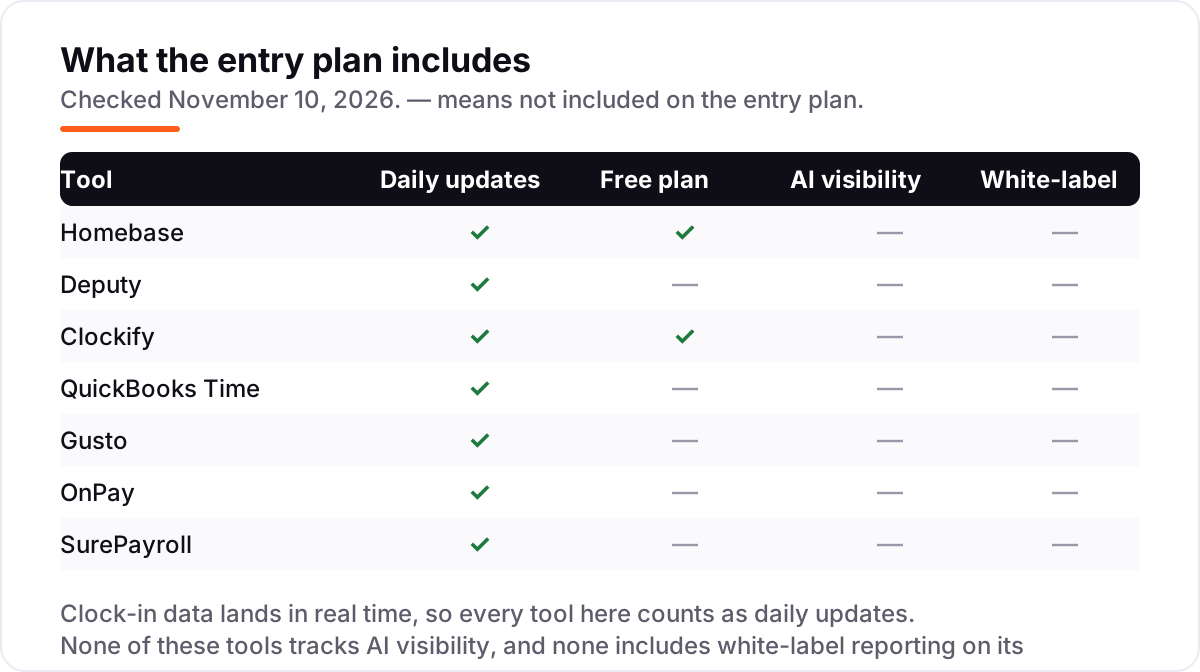
- Homebase is the best free start: a free time clock for one location and up to 10 staff, with paid Essentials at $30/month per location.
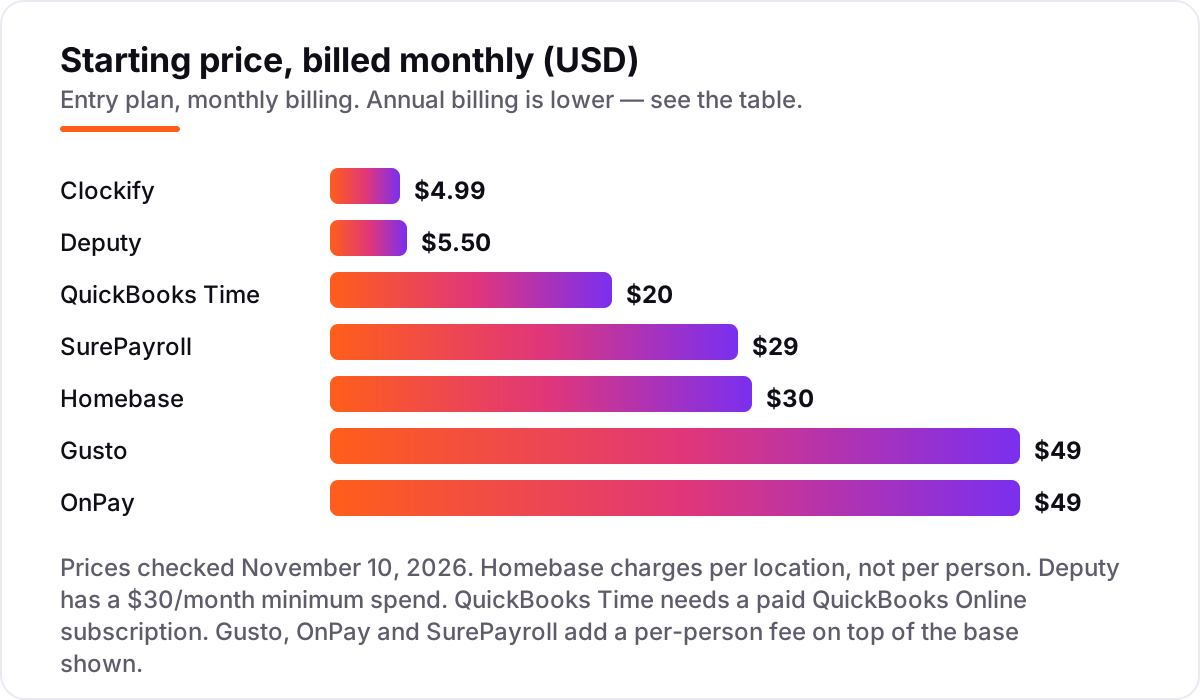
- Deputy ($5.50/user/month) and Clockify ($4.99/user/month) are the cheapest paid routes to a real time clock with approvals.
- Payroll suites charge per person on top of the base: Gusto and OnPay both cost $109/month for 10 people, SurePayroll $99 — but time tracking is an add-on or a higher tier on all three.
- The single most important buying factor is where hours end up: if approved timesheets do not flow into payroll without retyping, the clock is only half a system.
- Every price below was checked on the vendor's own pricing page on November 10, 2026. Ratings are G2, except QuickBooks Time, where no fresh rating was available.
On this page
Quick comparison
| Tool | Best for | Starting price | Free plan |
|---|---|---|---|
| Homebase | Single-location hourly teams (restaurants, cafes, retail shops) with up to 10 staff who want a free time clock | $30/mo per location | Yes (Basic plan) |
| Deputy | Multi-site shift teams in retail, hospitality or care who need scheduling, time clocking and labor-law guardrails in one app | $5.50/user/mo | No (free trial) |
| Clockify | Small desk and field teams of up to 5 who want free time tracking and only pay when they need approvals and invoicing | $4.99/user/mo | Yes (up to 5 users) |
| QuickBooks Time | QuickBooks Online users with field crews who need GPS time tracking that flows straight into payroll and invoices | $20/mo + $10/user | No (30-day trial) |
| Gusto | Small single-state teams that want payroll, benefits and time tracking handled in one login | $49/mo + $6/person | No |
| OnPay | Multi-state small teams that want one flat payroll price with time tracking as a simple add-on | $49/mo + $6/person | No (first month free) |
| SurePayroll | Very small teams of 1 to 10 people working across several states who want the lowest base fee | $29/mo + $7/employee | No (1-month trial) |
Make one of these tools?
We re-check this list every quarter. Send a correction, request a review, or ask about a clearly labeled sponsored spot.
Request a listingThe best timekeeping software

Homebase
Best for: Single-location hourly teams (restaurants, cafes, retail shops) with up to 10 staff who want a free time clock
Homebase is the only tool in this list built first for the shop floor, not the back office. The free Basic plan covers one location and up to 10 employees with scheduling and a basic time clock, enough for a small cafe or shop to drop the paper timesheet. Because pricing is per location, not per person, the bill stays flat as you hire: a 20-person restaurant pays the same $30 a month on Essentials as a 10-person one.
The catch is that the free plan cannot prove where a clock-in happened. GPS and geofencing, plus photo capture on shared tablets, only arrive on Essentials, and payroll is a separate add-on. For a single site with hourly staff, though, nothing else here starts at $0.
What we like
- Free Basic plan covers one location and up to 10 employees, with scheduling and a basic time clock included
- Per-location pricing stays flat as headcount grows — a 20-person restaurant pays the same as a 10-person one
- GPS and geofenced clock-in on Essentials stop clock-ins from outside the worksite
- Payroll add-on ($49/month + $6/person) turns approved timesheets into pay runs without an export
Watch out for
- GPS clock-in and photo capture need Essentials — the free plan has no location check, so staff can clock in from anywhere
- Per-location pricing punishes multi-site owners: three shops pay three Essentials fees
- No job costing or project billing, so it cannot track billable hours against clients

Deputy
Best for: Multi-site shift teams in retail, hospitality or care who need scheduling, time clocking and labor-law guardrails in one app
Deputy is the pick for teams that run shifts across more than one site and need the rules enforced, not just recorded. The Lite plan covers basic scheduling, timesheets and a mobile time clock with geofencing for $5.50 per user a month, and the compliance engine flags overtime and break violations before the timesheet reaches payroll. Managers build the rota, staff swap shifts in the app, and leave requests land in the same place.
The pricing needs a careful read. Every user counts as a paid seat, including the owner and every supervisor, and monthly plans carry a $30 minimum spend, so a four-person team pays more per head than the headline rate suggests. Payroll is a separate add-on. Buy Deputy when scheduling and compliance are the daily job, not when you only need a clock.
What we like
- Mobile time clock with geofencing on every plan, including Lite, plus a face-unlock kiosk on Core
- Labor-law compliance rules and overtime alerts are built in, not bolted on
- Auto-scheduling and demand forecasting on Core cut the weekly rota to minutes
Watch out for
- Every user counts as a paid seat, including owners and managers, and monthly plans carry a $30 minimum spend
- Payroll and HR are paid add-ons, so the headline price is not the whole bill
- No free plan — the trial ends and billing starts whether the rota is ready or not

Clockify
Best for: Small desk and field teams of up to 5 who want free time tracking and only pay when they need approvals and invoicing
Clockify is the cheapest way into this list and the only tool here that is free for a real, if small, team. The free plan covers up to 5 users with timers, timesheets, a kiosk mode and reports, and paid seats start at $3.99 a month billed annually — less than a coffee per person. For a small team that tracks hours by project or client, the timer, the timesheet and the reporting are all you need.
The limit is that Clockify tracks time, not attendance, on its cheapest plans. Attendance and overtime reports start on Standard, scheduling needs Pro, and there is no payroll of its own — hours export to QuickBooks or a payroll tool instead. Pick Clockify when hours feed invoices or project budgets; pick Homebase or Deputy when hours feed a shift rota.
What we like
- Free plan covers up to 5 users with timers, timesheets, a kiosk and reports — the most generous free tier here
- Cheapest paid seats in this list, from $3.99/user/month billed annually
- Kiosk mode turns any tablet into a shared clock-in station for staff without their own devices
Watch out for
- Attendance and overtime tracking start on Standard ($5.49/user/month billed annually), not on Basic
- No built-in scheduling on Basic or Standard — scheduling needs Pro ($7.99/user/month billed annually)
- Free plan capped at 5 users since May 2026, so a sixth hire forces a paid plan

QuickBooks Time
Best for: QuickBooks Online users with field crews who need GPS time tracking that flows straight into payroll and invoices
QuickBooks Time, formerly TSheets, is the timekeeping arm of the QuickBooks world, and it only makes sense inside that world. Premium costs $20 a month plus $10 per user and adds GPS time tracking, scheduling, time-off requests and overtime alerts, with approved timesheets syncing straight into QuickBooks Online payroll and invoicing. For a field crew already on QuickBooks, that sync is the whole argument.
The price on the tin is not the price you pay. A QuickBooks Online subscription is required first, from $38 a month, so a one-person business starts at $58 a month before any per-user fee, and geofencing needs the Elite plan. If your books do not live in QuickBooks, every dollar of that subscription is overhead — and Homebase or Deputy will be cheaper.
What we like
- GPS tracking shows where each clock-in happened, with mileage tracking on Elite
- Timesheets sync directly into QuickBooks Online payroll and invoicing — no export step
- Scheduling, time-off requests and overtime alerts are included on Premium
Watch out for
- Requires a paid QuickBooks Online subscription (from $38/month), so the real starting cost is $58/month before per-user fees
- No free plan, and Elite ($40/month + $12/user/month) is the only route to geofencing
- Reviewers report the mobile app can be slow to load and occasionally glitchy on clock-out

Gusto
Best for: Small single-state teams that want payroll, benefits and time tracking handled in one login
Gusto is the payroll-first entry in this list: you buy it for payroll, and timekeeping comes along once you step up a tier. Simple costs $49 a month plus $6 per person and covers single-state payroll with unlimited runs and automatic tax filing. Time tracking arrives on Plus, at $80 a month plus $12 per person, or through the Time & Attendance Plus add-on.
That structure is both the strength and the trap. A team that only needs a clock should not pay payroll prices for it — Homebase does the clock free. But a team that already runs payroll on Gusto gets time tracking in the same login, with no export and no second vendor. Choose Gusto when payroll is the purchase and the clock is the bonus.
What we like
- Unlimited payroll runs with federal, state and local tax filing included on every plan
- Time & Attendance Plus add-on syncs tracked hours straight into payroll
- Highest reviewer volume here — 4.6/5 across more than 10,000 G2 reviews — with an easy setup flow
Watch out for
- Time tracking is not on Simple — it needs Plus ($80/month + $12/person) or the Time & Attendance Plus add-on
- Simple covers payroll in one state only; hiring in a second state forces the Plus upgrade
- Per-person fees add up fast: a 25-person team pays $199/month on Simple before any add-on

OnPay
Best for: Multi-state small teams that want one flat payroll price with time tracking as a simple add-on
OnPay sells the opposite of a tier ladder: one plan, one price, $49 a month plus $6 per person, covering unlimited pay runs, tax filing in all 50 states, W-2s and 1099s. Multi-state payroll is included in that single price, which is the feature that separates it from Gusto Simple — a team spread across three states pays the same base as a team in one. The first month is free, and reviewers rate it 4.8 out of 5 on G2.
Timekeeping is the exception to the all-included story. There is no built-in time clock; time tracking is a paid add-on reported at $15 a month plus $4 per worker, so hours flow in from a separate tool. OnPay fits a multi-state team that wants payroll settled first and is happy to bolt the clock on afterwards.
What we like
- One plan and one price — no tier ladder to decode, with multi-state payroll included
- Unlimited pay runs, tax filing in all 50 states, W-2s and 1099s in the base price
- Highest rating here at 4.8/5 on G2, with reviewers praising support most
Watch out for
- No built-in time tracking — it is a paid add-on reported at $15/month plus $4 per worker
- The pricing page also shows a conflicting 'starting at $55/month' headline next to the $49 + $6 breakdown
- US-only payroll, so it is the wrong tool the moment you hire abroad

SurePayroll
Best for: Very small teams of 1 to 10 people working across several states who want the lowest base fee
SurePayroll, backed by Paychex, is the quiet specialist for very small teams: Full Service costs $29 a month plus $7 per employee and includes federal and state tax filing and deposits, unlimited runs and free two-day direct deposit. The standout is the flat $9.99 a month multi-state add-on after the first state — if your people sit in three or more states, that single line item beats per-state pricing from every competitor here.
The catches sit at the edges. Time clock integration is a paid add-on from $5 a month plus $3 per employee, year-end forms cost extra, and the vendor's own pages also show a $39 base for Full Service, so confirm the base first. Past 15 to 20 employees, $7 per head makes it one of the pricier options here — a 25-person team pays $204 a month.
What we like
- Lowest base fee in this list at $29/month, with tax filing and deposits included on Full Service
- Flat $9.99/month multi-state add-on beats per-state pricing once staff sit in three or more states
- Tax penalty guarantee on Full Service: SurePayroll covers penalties caused by its own errors
Watch out for
- Time clock integration is a paid add-on from $5/month plus $3 per employee — not built in
- Year-end W-2 and 1099 forms cost extra ($50 base plus $5 per form)
- Vendor pages also show a $39 base for Full Service, so confirm which base applies before signing up
What timekeeping software actually does
The best timekeeping software for small business answers three questions every pay period: who worked, when, and where. Staff clock in and out from a phone, a tablet kiosk or a computer, the tool checks the time against the schedule, flags late starts and overtime, and turns the approved hours into a timesheet payroll can use. That is the whole job — attendance first, payroll second.
The tools in this list split into two camps. The clock-in tools — Homebase, Deputy, Clockify and QuickBooks Time — start with the clock and add scheduling or payroll around it. The payroll suites — Gusto, OnPay and SurePayroll — start with payroll and add timekeeping on a higher tier or as an add-on. The price follows the starting point, not just the clock, so compare the whole bill before you compare the headline.
When you compare clocks, look past the monthly price to four details. First, how staff clock in: a phone app suits field crews, a shared tablet kiosk suits a shop floor, and a PIN-only clock suits staff without smartphones. Second, whether the tool checks location, so a clock-in from home does not count as a shift. Third, whether overtime and missed-punch alerts arrive before payroll runs, not after. And fourth, whether approved hours export to your payroll in one click — that single step is what separates a clock from a chore.
Clock-in tools vs payroll suites
If all you need is a trustworthy record of hours, buy a clock-in tool and stop there. Homebase is free for a single location, Clockify is free for up to five people, and Deputy covers scheduling plus the clock for $5.50 per user a month. These tools are built around the shift: the rota, the clock-in, the break, the overtime alert.
Buy a payroll suite when the pay run is the pain, not the clock. Gusto, OnPay and SurePayroll file taxes, pay staff and produce year-end forms, and their timekeeping exists to feed that run. The trade is price and scope: you pay a base fee plus a per-person fee every month, and on all three the time clock itself costs extra. If your team is local and customer-facing, our local SEO service is the other half of the same problem — the clock runs the team, search brings the customers.
Timekeeping vs time tracking: know the difference
Buyers confuse these two categories more than any other in this program, and the wrong pick wastes a subscription. Timekeeping is attendance: who clocked in, where they were, whether the shift was covered, and how many hours payroll owes. Time tracking is duration: how long a task, project or client took, and what it is worth at a billable rate.
The test is the question you ask at the end of the week. If it is "did everyone show up and how many hours do we owe them," you need timekeeping — a time clock, a schedule, overtime alerts and a payroll export. If it is "how long did the website redesign take and what do we invoice," you need time tracking — a timer, project rates and an invoice. Clockify sits on the boundary: its timer is time tracking, its kiosk and attendance reports are timekeeping, and attendance starts on Standard, not on the entry plan.
Many small businesses need a little of both, and that is where the boundary blurs. A cleaning company tracks which cleaner visited which house (timekeeping) and how long each clean took (time tracking), because the first decides pay and the second decides the invoice. Deputy and QuickBooks Time lean toward the first job, Clockify leans toward the second, and Homebase stays firmly on the attendance side. If your team does both jobs, check which side the entry plan actually covers — Clockify's attendance reports and Homebase's GPS clock-in both sit above the entry tier, so the cheapest plan may cover only half your work.
Quick comparison: tool type by need
| Buyer | Best pick | Why |
|---|---|---|
| Single shop or cafe, free start | Homebase | Free time clock for 1 location and up to 10 staff |
| Multi-site shift teams | Deputy | Geofenced clock-in plus labor-law guardrails from $5.50/user/month |
| Small team on a tight budget | Clockify | Free for up to 5 users; paid seats from $3.99/user/month billed annually |
| QuickBooks Online users | QuickBooks Time | GPS timesheets sync straight into payroll and invoicing |
| Payroll first, clock second | Gusto or OnPay | Full-service payroll from $49/month + $6/person; time tracking costs extra |
| Very small multi-state team | SurePayroll | Lowest base fee at $29/month, flat $9.99/month multi-state add-on |
How to choose the best timekeeping software for small business
- Count heads and sites first. One location with hourly staff points to Homebase; several sites with shifts point to Deputy; desk teams under five people can stay free on Clockify.
- Decide where hours must land. If approved hours have to reach payroll without retyping, pick the tool that already talks to your payroll — QuickBooks Time for QuickBooks Online, Gusto or OnPay if payroll is the purchase.
- Check the location question. Field crews need GPS or geofenced clock-in; shop and office teams on a shared tablet do not. Homebase Basic has no location check, so budget for Essentials if proof of place matters.
- Price the whole bill, not the headline. Add the per-person fee, the payroll add-on and any QuickBooks subscription before comparing. The worked example below does this for a 10-person team.
- Try the clock with real staff for one pay period. Every tool here has a free plan or a free trial. Compare the new totals against last period's paper timesheet before you cancel anything.
Before you set pay rates for the roles you are hiring, run your job post through the free SERP snippet preview tool — it shows exactly how the title and description will look in Google.
Timekeeping pricing: what you will actually pay
Take a 10-person team, one location, billed monthly. Homebase Essentials costs $30 flat, because pricing is per location. Deputy Lite costs $55 (10 × $5.50), above its $30 minimum. Clockify Basic costs $49.90 (10 × $4.99), and attendance reports need Standard at $69.90. QuickBooks Time Premium costs $120 ($20 base + 10 × $10), plus a QuickBooks Online subscription from $38, so $158 before payroll. Gusto Simple and OnPay both cost $109 ($49 + 10 × $6), and SurePayroll Full Service costs $99 ($29 + 10 × $7).
Three of those totals hide an extra line. Gusto Simple, OnPay and SurePayroll all charge more for time tracking — a higher tier or a paid add-on — so add $15 to $40 a month before comparing them with the clock-in tools. The cheapest honest total for a payroll-ready clock is Homebase at $30 plus its payroll add-on, or Deputy at $55 feeding your existing payroll.
How we chose
We checked each vendor's own pricing page on November 10, 2026 and recorded the starting price exactly as shown, including the annual-billing figure where the page lists one. Gusto's pricing page renders its plan cards in script, so the $49 plus $6 figure is corroborated by the vendor page as read on November 5, 2026 and by the runbook's canonical price. Ratings come from G2, using fresh search-index copies of the G2 pages crawled within the last three days. QuickBooks Time carries no rating because the freshest G2 copy available was 26 days old. We also flag two quirks we found on the vendor pages themselves: OnPay shows a conflicting $55 starting headline, and SurePayroll pages show both a $29 and a $39 base for Full Service. We ranked the tools by fit for the most common buyer — a small business owner who needs staff to clock in and hours to reach payroll — not by brand size. No vendor paid for a place in this list, and none of the links here are affiliate links.
What to do next
Start with the decision path above: count heads and sites, decide where hours must land, and check whether you need GPS proof of place. Then take the free plan or trial of your top pick and run it alongside your current timesheet for one full pay period. If the totals match and the reports make sense to whoever runs payroll, you have your tool. Once your tools are in place, find out what's holding your rankings back.
Your stack only works if people find you
SerpAstra fixes what keeps your site off page one and makes it easy for AI assistants to recommend.
Get a free audit→Sources we checked (13)
- Homebase pricing — joinhomebase.com/pricing (checked November 10, 2026)
- Homebase on G2 — 4.6/5, 565 reviews (checked November 10, 2026)
- Deputy pricing — deputy.com/pricing (checked November 10, 2026)
- Deputy on G2 — 4.6/5, 666 reviews (checked November 10, 2026)
- Clockify pricing — clockify.me/pricing (checked November 10, 2026)
- Clockify on G2 — 4.5/5, 205 reviews (checked November 10, 2026)
- QuickBooks Time pricing — quickbooks.intuit.com/time-tracking (checked November 10, 2026)
- Gusto pricing — gusto.com/product/pricing (checked November 10, 2026)
- Gusto on G2 — 4.6/5, 10,772 reviews (checked November 10, 2026)
- OnPay pricing — onpay.com/pricing (checked November 10, 2026)
- OnPay on G2 — 4.8/5, 415 reviews (checked November 10, 2026)
- SurePayroll pricing — surepayroll.com/pricing (checked November 10, 2026)
- SurePayroll on G2 — 4.4/5, 533 reviews (checked November 10, 2026)
Shamim
Founder of SerpAstra
A full-stack SEO and digital marketer who spends most days on Local SEO for dental practices, AI search visibility and lead generation.
Frequently asked questions
What is the best timekeeping software for small business?
Homebase is the best starting point for most small businesses: a free time clock for one location and up to 10 staff, with GPS clock-in from $30/month per location. Deputy is the better pick for multi-site shift teams, and Gusto is the best choice when payroll is the main purchase and time tracking is the bonus.
How much does timekeeping software cost?
From $0 to about $109 a month for a 10-person team. Homebase and Clockify both have free plans, Deputy Lite costs $55/month for 10 people, and QuickBooks Time Premium costs $120/month plus a QuickBooks Online subscription. Gusto and OnPay both cost $109/month for 10 people, SurePayroll $99.
Is there free timekeeping software for small business?
Yes, with limits. Homebase Basic is free for one location and up to 10 employees, with scheduling and a basic time clock. Clockify is free for up to 5 users with timers, timesheets and a kiosk. Both free plans cover real clock-in work; GPS verification and payroll sync need a paid plan.
What is the difference between timekeeping and time tracking software?
Timekeeping records attendance: who clocked in, where, and when, usually against a shift schedule, and the hours feed payroll. Time tracking records how long work took, usually by project or client, and the hours feed invoices. Many tools do both, but a time clock with GPS and overtime alerts is timekeeping; a timer with billable rates is time tracking.
Does Gusto or OnPay include time tracking?
Neither includes it on the entry plan. Gusto Simple has no time tracking; it arrives on Plus at $80/month plus $12/person, or through the Time & Attendance Plus add-on. OnPay has no built-in time tracking at all — it is a paid add-on reported at $15/month plus $4 per worker. SurePayroll is the same pattern, with time clock integration from $5/month plus $3 per employee.
Do I need GPS clock-in for my team?
You need it if staff work away from a fixed desk — field crews, delivery drivers, cleaners and care workers. GPS or geofenced clock-in proves the person was at the worksite when they clocked in. Office and shop teams on a shared tablet can skip it; Homebase, Deputy and QuickBooks Time all include GPS on their paid plans.
Can I switch timekeeping software without losing old timesheets?
Usually yes, but plan the move. Export approved timesheets and pay history as CSV before cancelling, and run the new clock alongside the old one for one pay period so the two totals can be compared. Most tools in this list import staff lists by CSV, but historical timesheets rarely import cleanly, so keep the old export as your record.
Free SEO and AI visibility audit
Find out what is holding your rankings back
Send us your site. Within 2 business days you get a written audit, an AI visibility check and a short fix list ranked by impact. Free, with no contract attached.
Request my free audit→Related guides
 HR & Recruiting9 Best Time Clock Apps for Small Business in 2026Compare the 9 best time clock app for small business picks on price, GPS punches, scheduling and free plans, with every price checked November 6, 2026.Read guide →
 Accounting, Tax & Finance10 Best Payroll Software for Small Business in 2026, ComparedCompare the 10 best payroll software for small business on base price, tax filing and free trials, with every price checked November 4, 2026.Read guide →
 HR & Recruiting8 Best HR Software for Small Business in 2026, ComparedCompare the 8 best hr software for small business options on price, free plans, payroll and hiring, with every price checked November 6, 2026.Read guide →