
10 Best Tools for Versatile Use in Digital Media in 2026, Compared
Compare the best tool for versatile use in digital media: 10 editors for design, photo and video, with real 2026 prices and free plans checked.
 Shamim Mia, Founder, SerpAstraLast verified November 10, 202612 min read
We compare pricing pages, documentation and public reviews. We never accept payment for rankings.

Key takeaways
- Canva is the best all-rounder for most buyers: design, photo editing and short video in one place from $18/month ($144/year billed annually).
- Adobe Express Premium at $9.99/month is the cheapest paid plan here, and Clipchamp's free plan exports 1080p video with no watermark.
- The single most important buying factor is what you actually make: a design tool with video templates is not a video editor, and a video editor is not a design tool.
- Every tool in this list has a free plan or a free version, so start free and pay only when the free limits block work you already do.
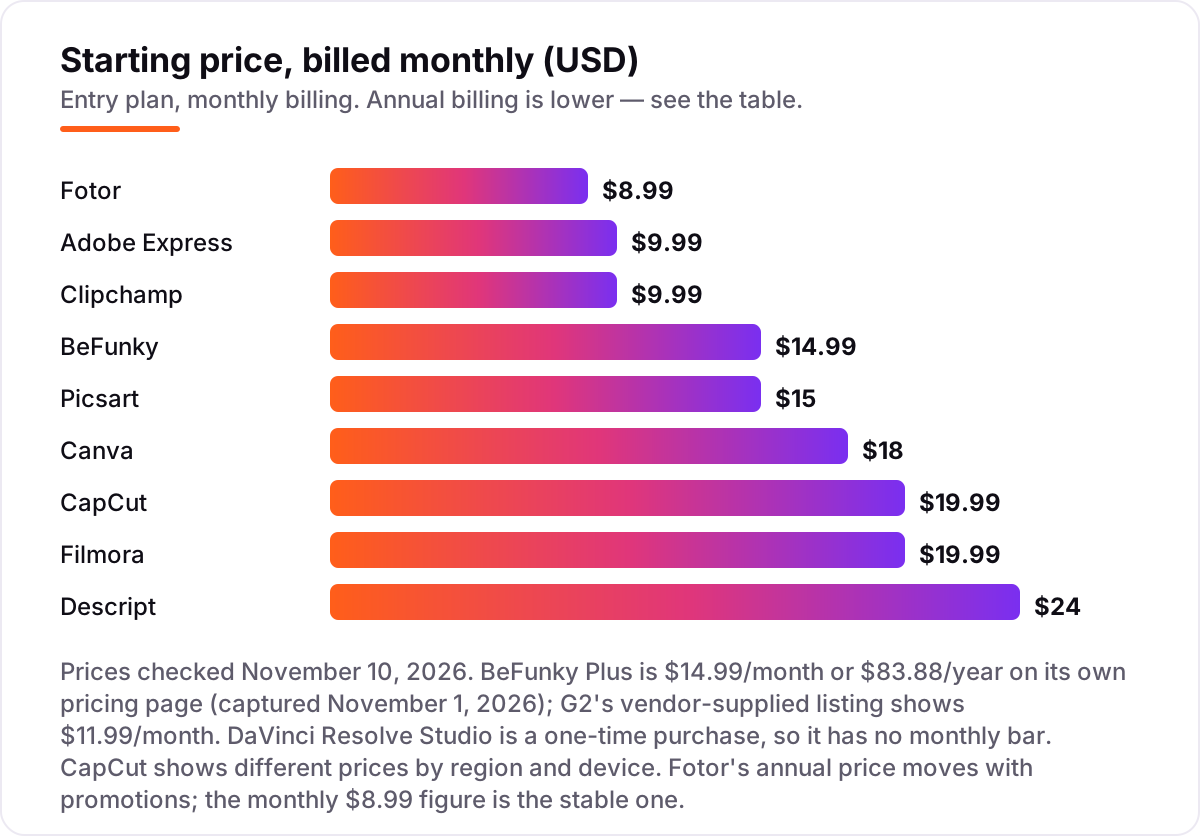
- Prices were checked on the vendors' own pricing pages on November 10, 2026; BeFunky's $14.99/month comes from its own pricing page, and CapCut's price varies by region and device.
On this page
Quick comparison
| Tool | Best for | Starting price | Free plan |
|---|---|---|---|
| Canva | Solo creators and small businesses that need social posts, presentations and short video in one place | $18/mo | Yes |
| Adobe Express | Adobe users and small teams that want quick social designs with Adobe Stock photos and Adobe Fonts included | $9.99/mo | Yes |
| CapCut | Short-form video creators editing TikTok, Reels and Shorts on phone and desktop | $19.99/mo | Yes |
| Filmora | Beginner video editors who want a desktop timeline with templates and AI tools and no pro learning curve | $19.99/mo | Yes (watermark) |
| Descript | Podcasters and YouTubers who edit talking-head video and audio by editing the transcript | $24/mo | Yes (1 hour) |
| Picsart | Phone-first creators who edit photos and short video and generate AI images every day | $15/mo | Yes |
| Fotor | Budget-conscious creators who mainly need fast AI photo edits, background removal and batch work | $8.99/mo | Yes |
| BeFunky | Casual creators who want quick photo edits, collages and simple designs in the browser | $14.99/mo | Yes |
| Clipchamp | Windows users and Microsoft 365 subscribers who edit social video in the browser | $9.99/mo | Yes (1080p) |
| DaVinci Resolve | Serious video editors who want pro color, audio and effects without a subscription | $295 one-time | Yes (free version) |
Make one of these tools?
We re-check this list every quarter. Send a correction, request a review, or ask about a clearly labeled sponsored spot.
Request a listingThe best versatile digital media tools

Canva
Best for: Solo creators and small businesses that need social posts, presentations and short video in one place
Canva is the default answer for a reason: one subscription covers social posts, presentations, photo edits, short video, documents and print, and the template library means a non-designer can ship something decent in minutes. Pro adds the full premium library, brand kits and scheduling, so a small business can keep every post on-brand without hiring a designer.
The limits show up when you outgrow templates. Video editing is basic, print work stays simple, and the AI allowance is metered, so heavy AI users will hit the cap or pay for the $100-a-month AI Pass. Start here if your work is mostly social and presentation design; move to a dedicated editor when video becomes the main job.
What we like
- Design, photo editing, short video, docs and print in one subscription, with 3.6 million templates and 141 million premium assets on Pro
- Free plan is genuinely usable, and Pro adds 5 Brand Kits, 100 GB of storage and social scheduling
- Cheapest route to a full template library for a solo creator, at $144 a year billed annually
Watch out for
- Pro covers one person only, so a second seat means moving to Business at $25 per person a month
- Video editing is template-based, so long-form or frame-accurate editing needs a dedicated editor
- AI uses are metered at up to 200 Premium uses or 20 Ultra uses a month, with an AI Pass add-on at $100 a month

Adobe Express
Best for: Adobe users and small teams that want quick social designs with Adobe Stock photos and Adobe Fonts included
Adobe Express is the quickest way into Adobe's world without the Creative Cloud price or learning curve. Premium unlocks every template, Adobe Stock photos, Adobe Fonts, brand kits and one-click resize, so one design becomes a post, a story, a flyer and a thumbnail in minutes. At $9.99 a month it undercuts Canva Pro by almost half.
The trade is depth. Express has fewer templates than Canva, only 250 Firefly credits a month, and no published annual price, so there is no yearly discount to take. It is the right pick if you already live in Adobe's ecosystem or want the cheapest paid plan here; pick Canva if template volume and scheduling matter more.
What we like
- Cheapest paid plan in this list at $9.99 a month, billed monthly with no annual commitment
- Premium includes all premium templates, brand kits, one-click resize, remove video background and 100 GB of storage
- Included free with some Creative Cloud plans, so Adobe subscribers may already own it
Watch out for
- No annual price is published for individual Premium, so there is no yearly discount to take
- Only 250 Firefly generative credits a month, against 4,000 on the $19.99 Firefly Pro plan
- Weaker than Canva on templates and on scheduling posts to more than one account per network

CapCut
Best for: Short-form video creators editing TikTok, Reels and Shorts on phone and desktop
CapCut owns short-form video. Templates, auto-captions, effects and a music library built for TikTok and Reels turn phone footage into a finished post faster than any desktop editor here, and the free plan covers the core editor. Pro adds 4K export at 60fps with HDR, 1 TB of storage and about 1,200 AI credits a month.
The price is the catch. Pro jumped to $19.99 a month in the 2026 restructure, the old $9.99 Pro is now the mobile-only Standard plan, and CapCut publishes no fixed global price, so your checkout can differ by region and device. Buy it for speed on short video; do not expect a general design tool.
What we like
- Fastest path from phone footage to a finished Reel: templates, auto-captions, effects and a music library built for short video
- Pro adds 4K export at 60fps with HDR, 1 TB of cloud storage and about 1,200 AI credits a month
- Free plan covers the core editor, so you can test the workflow before paying
Watch out for
- No G2 rating is published, and Trustpilot scores it 1.2 out of 5, mostly over billing and paywalls
- CapCut publishes no fixed global price, so the figure at your checkout can differ by region, device and promotion
- Features keep moving from free to paid, and the free plan caps exports at 1080p

Filmora
Best for: Beginner video editors who want a desktop timeline with templates and AI tools and no pro learning curve
Filmora is the friendliest desktop video editor in this list. A proper timeline on Windows and Mac, 4K export, effects packs and more than 1,000 template presets make it easy to cut a YouTube video or a product demo without learning a pro tool. Annual Basic costs $49.99 a year, the cheapest desktop entry here on yearly billing.
The extras add up. AI tools on Basic run on credits you buy separately, the full stock library is a $19.99-a-month add-on, and desktop licences do not cover the mobile apps. The free version works for learning but watermarks every export. Pick Filmora when video is your main job and you want a real timeline at a beginner price.
What we like
- Proper desktop timeline on Windows and Mac with 4K export, effects packs and 1,000+ template presets
- Annual Basic is $49.99 a year, the cheapest desktop editor entry here on yearly billing
- Advanced at $59.99 a year adds 1,000 AI credits a month and 10 GB of cloud storage
Watch out for
- AI tools on Basic run on credits bought separately, and the full stock library is a $19.99 a month add-on
- The free version watermarks every export, and desktop licences do not cover the mobile apps
- Perpetual licence covers one platform and one version, so future versions cost extra

Descript
Best for: Podcasters and YouTubers who edit talking-head video and audio by editing the transcript
Descript edits video and audio the way you edit a document: delete a sentence from the transcript and it disappears from the recording. That makes it the fastest tool here for podcasts, interviews and talking-head YouTube, with transcription, Studio Sound cleanup and captions built into the same timeline.
The meters are the thing to watch. Hobbyist gives 10 media hours and 400 AI credits a month, 4K export starts on Creator at $35 a month, and pricing is per person, so a three-person team pays $72 a month on annual billing. Buy Descript when your content is mostly spoken word; buy a visual editor when it is mostly b-roll.
What we like
- Edit audio and video by editing the transcript, with transcription, Studio Sound and captions in the same tool
- Hobbyist includes 10 media hours and 400 AI credits a month for $16 a month billed annually
- Creator adds 30 media hours, 800 AI credits, 4K export and top-ups for busy months
Watch out for
- Every plan meters media hours and AI credits, so a heavy month means an upgrade or paid top-ups
- Hobbyist exports top out at 1080p, and 4K export starts on Creator at $35 a month
- Pricing is per person, so a three-person team on Creator pays $72 a month on annual billing

Picsart
Best for: Phone-first creators who edit photos and short video and generate AI images every day
Picsart is the phone-first all-rounder: photo editing, short video and AI image and video generation in one app, with 500 AI credits a month on Pro. Advanced background and object removal, a one-tap enhancer, premium templates and 100 GB of storage cover most of what a creator posts in a day.
The credit meter is the limit. Heavy AI use burns through 500 credits fast, and in-app prices differ from the website, with the App Store selling Pro from $13.99 a month. The free tier is generous but locks several features behind the paywall. Pick Picsart if your phone is your studio; pick Canva if you work mostly on a desktop.
What we like
- Photo and video editing plus AI image and video generation in one app, with 500 AI credits a month on Pro
- Pro includes advanced background and object removal, a one-tap enhancer, premium templates and 100 GB of storage
- Bulk editing handles 50 images at once, and three brand kits come with Pro
Watch out for
- AI generation is capped at 500 credits a month on Pro, so heavy AI use hits the ceiling fast
- In-app prices differ from the website: the App Store sells Pro from $13.99 a month, cheaper on yearly billing
- Free tier locks several desirable features behind the paywall and shows ads

Fotor
Best for: Budget-conscious creators who mainly need fast AI photo edits, background removal and batch work
Fotor is the cheapest way into paid AI photo editing. Pro costs $8.99 a month or $39.99 a year, and it unlocks the full editing suite, AI batch background removal, brand kits, HD export and transparent PNG, all in the browser with nothing to install. For quick product photos and social graphics, it is hard to beat on price.
The credit cap is the catch. Pro includes only 100 AI credits a month, so a few AI video clips can eat the whole allowance, and the annual price moves with promotions: November 2026 reads showed $39.99 and $47.99 a year. Fees are non-refundable once billed. Buy Fotor for photo work; buy CapCut or Filmora when video is the priority.
What we like
- Cheapest monthly entry in this list at $8.99 a month, with Pro at $39.99 a year billed annually
- Pro includes AI batch background removal, brand kits, HD export and transparent PNG
- Browser-based with no install, and Pro+ triples the credits to 300 a month for $19.99 a month
Watch out for
- Only 100 AI credits a month on Pro, so a few AI video clips can eat the whole allowance
- The annual price moves with promotions, with November 2026 reads showing $39.99 and $47.99 a year
- Subscription fees are non-refundable once billed, and the free tier has no AI-generation credits

BeFunky
Best for: Casual creators who want quick photo edits, collages and simple designs in the browser
BeFunky is the simplest tool in this list: a photo editor, collage maker and graphic designer in one browser tab, with no install and almost no learning curve. Plus unlocks the full AI photo editing suite, premium templates and 1,000 AI Image Generator credits a month, and one login covers the web and mobile apps.
The free plan is the weak spot, with ads and locked tools that push hard toward Plus, and batch AI editing needs the higher Pro plan rather than Plus. Plus costs $14.99 a month, or $83.88 a year ($6.99 a month) billed annually. Pick BeFunky for fast everyday edits; pick Fotor for cheaper AI credits.
What we like
- Photo editor, collage maker and graphic designer in one browser tab, with no install and no learning curve
- Plus includes the full AI photo editing suite, premium templates and 1,000 AI Image Generator credits a month
- One subscription covers web and mobile apps under the same login
Watch out for
- The free plan is limited, with ads and locked tools that push hard toward Plus
- Batch AI editing and batch background removal need the higher Pro plan, not Plus
- The annual price is $83.88 a year ($6.99 a month); G2's vendor-supplied listing shows $11.99 a month, which does not match the vendor's own pricing page

Clipchamp
Best for: Windows users and Microsoft 365 subscribers who edit social video in the browser
Clipchamp has the best free plan in this list: unlimited 1080p exports with no watermark, auto-captions, voiceovers and a free stock library, all in the browser or in the Windows 11 app. Premium adds 4K export, premium stock and a brand kit, and it comes with Microsoft 365 Personal at $9.99 a month.
Premium is not sold on its own, so 4K export means paying for the whole Microsoft 365 suite, which is poor value if you only want the editor. It also runs in Edge and Chrome only, with no Mac app, and the iOS app ended in June 2026. Pick Clipchamp if you already pay for Microsoft 365; otherwise the free plan alone may be enough.
What we like
- Best free plan in this list: unlimited 1080p exports with no watermark, plus auto-captions and voiceovers
- Bundled with Windows 11 and Microsoft 365, so many buyers already own Premium
- Text to speech covers over 80 languages, and the screen and camera recorder is built in
Watch out for
- Premium is not sold on its own, so 4K export means paying for the whole Microsoft 365 suite
- Runs in Edge and Chrome only, with no Mac app, and the iOS app ended in June 2026
- Performance degrades on longer timelines, with lag and export failures reported in 2026

DaVinci Resolve
Best for: Serious video editors who want pro color, audio and effects without a subscription
DaVinci Resolve is the only pro-grade editor here with a free version that covers editing, color, effects and audio, which is why so many creators learn on it and never pay. The free version is genuinely powerful; it is the format and frame-rate caps and the missing Neural Engine tools that push serious editors toward Studio.
Studio costs $295 once, with free updates and no subscription, and $236 on a 20% sale until November 20, 2026. It adds 10-bit video, 120fps, resolutions beyond 4K and the full AI toolset. The learning curve is the steepest here, so buy it when your edits outgrow the free version, not before.
What we like
- The only pro-grade editor here with a free version that covers editing, color, effects and audio
- Studio is a one-time $295 purchase with free updates, and $236 on a 20% sale until November 20, 2026
- Studio adds 10-bit video, 120fps, resolutions beyond 4K and the full AI Neural Engine tools
Watch out for
- Steepest learning curve in this list, with a pro interface that overwhelms first-time editors
- The free version caps some formats and frame rates, and the full Neural Engine AI tools need Studio
- No subscription option on desktop, so the $295 Studio cost lands in one payment
The best tool for versatile use in digital media is the one that covers the work you actually do: social posts, photo edits and short video, without forcing you to learn three separate apps. This list compares 10 editors that each span at least two of design, photo and video, ranked by fit for the most common buyer: a solo creator or small business making content every week.
Prices below are the monthly-billed starting prices, checked on the vendors' own pricing pages on November 10, 2026, with the annual figure alongside where the vendor publishes one. Every tool here has a free plan or a free version, so the honest starting point is free: pay only when the free limits block work you already do.
Quick comparison: tool type by need
| Buyer | Best pick | Why |
|---|---|---|
| Solo creator, one tool for everything | Canva | $18/month, design, photo and short video in one place |
| Cheapest paid plan | Adobe Express | $9.99/month, premium templates and Adobe Stock included |
| Short-form video first | CapCut | $19.99/month, templates and auto-captions built for Reels and TikTok |
| Desktop video on a budget | Filmora | $49.99/year, a real timeline with templates |
| Podcasts and talking-head video | Descript | $24/month, edit by editing the transcript |
| Phone-first photo and AI images | Picsart | $15/month, 500 AI credits a month |
| Cheapest AI photo editing | Fotor | $8.99/month, full AI suite for $39.99 a year |
| Simplest browser editor | BeFunky | $14.99/month, photo, collage and design in one tab |
| Free video with no watermark | Clipchamp | $0, unlimited 1080p exports |
| Pro video, no subscription | DaVinci Resolve | Free version, Studio $295 once |
How to choose the best tool for versatile use in digital media
- Start from what you make most. If most of your work is social graphics, a design-led tool like Canva or Adobe Express fits; if it is video, start with CapCut, Filmora or DaVinci Resolve.
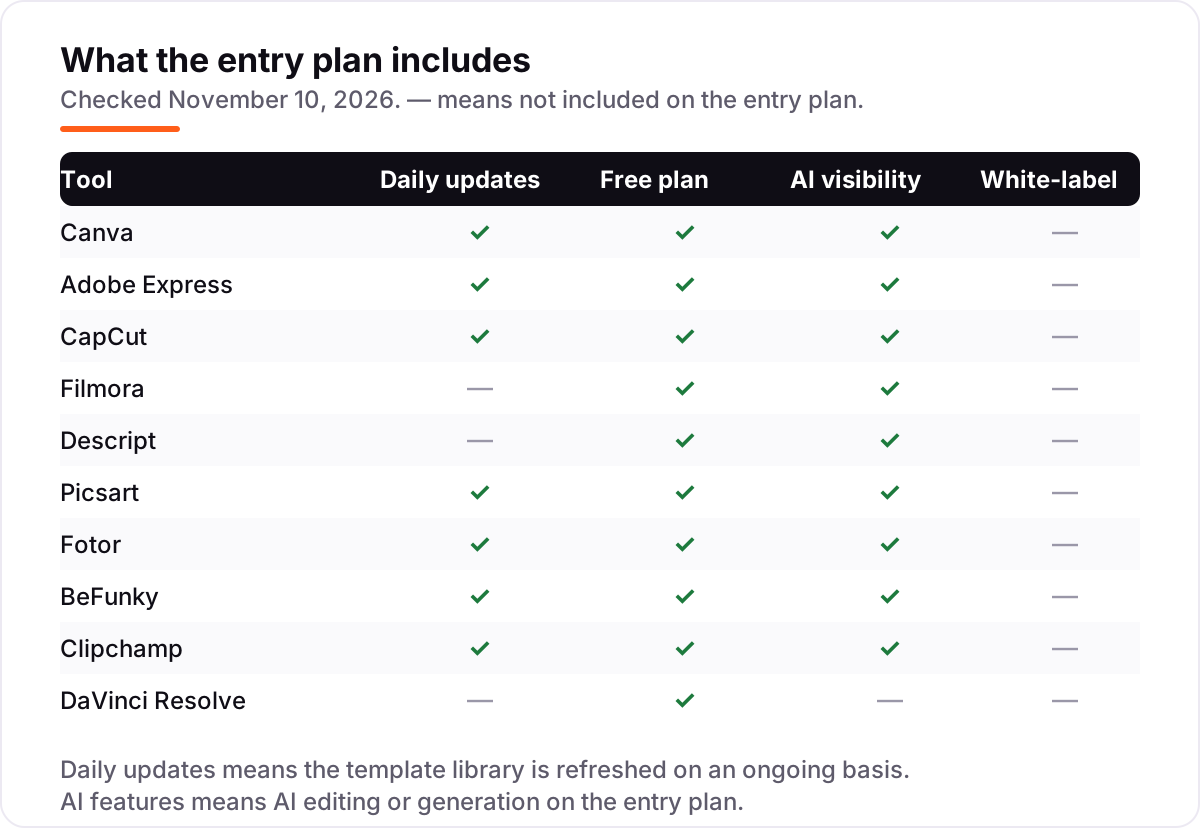
- Count the AI credits. Fotor Pro gives 100 credits a month, Picsart gives 500, and CapCut Pro gives about 1,200: the cheapest plan is not the cheapest AI if you generate daily.
- Check the free plan first. Clipchamp exports 1080p with no watermark free, and DaVinci Resolve's free version is a full editor, so many buyers never need to pay.
- Watch the billing basis. Annual billing cuts Canva Pro from $216 to $144 a year, Fotor Pro from about $108 to $39.99 and BeFunky Plus from $179.88 to $83.88, but Adobe Express publishes no annual price, so there is no yearly discount to take on it.
- Mind the platform. Clipchamp runs in the browser and on Windows only, Filmora and DaVinci Resolve are desktop apps, and Picsart and CapCut are strongest on phones.
- Check the export limits. Free plans cap resolution, watermark exports or limit AI uses, so confirm the export you need is in the plan you buy.
Before you publish what you make, run your title through the free SERP snippet preview tool to see how it will look in Google.
Versatile digital media tools pricing: what you will actually pay
Take one person making social content for a year. On Canva Pro paid annually, the year costs $144; paid monthly it costs $216, so the annual plan saves $72. On Fotor Pro the same year costs $39.99 annually against about $108 monthly, a saving of about $68. Adobe Express has no annual price, so the year costs $119.88 either way, at $9.99 a month for twelve months.
Add video and the math changes. Filmora Basic is $49.99 a year, CapCut Pro is $179.99 a year, and DaVinci Resolve Studio is $295 once, or $236 until November 20, 2026, with no renewal after that. A creator who pairs Canva Pro at $144 a year with Filmora Basic at $49.99 pays $193.99 for the year and covers design, photo and desktop video; swapping Filmora for DaVinci Resolve Studio on sale brings the year to $380 and removes the subscription entirely after year one.
Two costs sit outside these numbers. AI credits run out: Fotor Pro's 100 credits a month and Picsart's 500 cover light use, but heavy AI generation means a higher tier or paid top-ups. And CapCut's price varies by region and device, so the $19.99 figure is the US web price, not a promise at every checkout.
The $0 route is real for many buyers. Clipchamp's free plan exports 1080p with no watermark, DaVinci Resolve's free version edits, colors and mixes audio, and Canva's free plan covers basic design, so a creator starting out can ship real work for nothing. Pay when a free limit blocks you: a watermark on client work, a 1080p cap on 4K delivery, or an AI credit meter that runs dry every month.
Know the difference: an all-rounder is not a pro editor
The biggest confusion in this category is the word versatile itself. Canva, Adobe Express, Picsart, Fotor and BeFunky are design-led: they cover graphics, photo edits and short templated video, and they are fast because templates do the heavy lifting. CapCut, Filmora, Descript and DaVinci Resolve are video-led: they give you a timeline, precise cuts, audio control and export settings a design tool cannot match. Clipchamp sits between the two, with a real timeline in the browser and the best free plan here.
That split decides the buy. If your week is mostly posts, thumbnails and product photos with the occasional Reel, a design-led all-rounder is the right single tool, and it will feel faster than a video editor for that work. If your week is mostly edited video, a design-led tool will frustrate you within a month: the timeline is shallow, the audio tools are thin and the export controls are limited. Buy the tool that matches the work you do most, and add a second tool for the rest rather than expecting one app to do everything well.
A second confusion is AI credits versus subscriptions. A monthly price buys the app, but AI generation is metered separately on Fotor, Picsart, CapCut, Descript and Adobe Express, so two tools at the same monthly price can cost very different amounts once you generate daily. Read the credit allowance on the pricing page before you compare monthly prices, and treat a big AI allowance as worth real money if your workflow leans on generation. The tool makes the asset; getting it seen is a separate job, and that is what our monthly SEO service covers.
How we chose
We checked each vendor's own pricing page on November 10, 2026 and recorded the starting price exactly as shown, including the annual figure where the page publishes one. Ratings come from G2, checked the same day, except CapCut, which has no G2 rating, so it carries none. Two prices need a note: BeFunky's Plus is $14.99 a month, or $83.88 a year, on its own pricing page as captured November 1, 2026 — G2's vendor-supplied listing shows $11.99, which does not match the vendor's own page; and CapCut's $19.99 a month is the US web price, which varies by region, device and promotion. Fotor's annual price also moves with promotions. We ranked the tools by fit for the most common buyer, a solo creator or small business making design, photo and video content every week, not by brand size. No vendor paid for a place in this list, and none of the links here are affiliate links.
What to do next
Start free: open the free plan of your top pick and make one real piece of content with it, a post, a photo edit and a short video, and see where it blocks you. If the free limits never bite, stay free; if they do, the cheapest paid plan that removes them is usually the right one. Then set a reminder for the day a trial converts, and check the price at checkout before you pay. Once your tools are in place, find out what's holding your rankings back.
Your stack only works if people find you
SerpAstra fixes what keeps your site off page one and makes it easy for AI assistants to recommend.
Get a free audit→Sources we checked (19)
- Canva pricing — canva.com/pricing (checked November 10, 2026)
- Canva on G2 — 4.7/5, 7,835 reviews (checked November 10, 2026)
- Adobe Express pricing — adobe.com/express/pricing (checked November 10, 2026)
- Adobe Express on G2 — 4.5/5, 855 reviews (checked November 10, 2026)
- CapCut pricing — capcut.com/pricing (checked November 10, 2026)
- Filmora pricing — filmora.wondershare.com (checked November 10, 2026)
- Wondershare Filmora on G2 — 4.4/5, 613 reviews (checked November 10, 2026)
- Descript pricing — descript.com/pricing (checked November 10, 2026)
- Descript on G2 — 4.6/5, 936 reviews (checked November 10, 2026)
- Picsart pricing — picsart.com/pricing (checked November 10, 2026)
- Picsart on G2 — 4.5/5, 799 reviews (checked November 10, 2026)
- Fotor pricing — fotor.com/pricing (checked November 10, 2026)
- Fotor on G2 — 4.2/5, 341 reviews (checked November 10, 2026)
- BeFunky pricing — befunky.com/pricing (checked November 10, 2026)
- BeFunky on G2 — 4.3/5, 106 reviews (checked November 10, 2026)
- Clipchamp pricing — clipchamp.com/en/pricing (checked November 10, 2026)
- Clipchamp on G2 — 4.1/5, 50 reviews (checked November 10, 2026)
- DaVinci Resolve Studio — blackmagicdesign.com (checked November 10, 2026)
- DaVinci Resolve on G2 — 4.7/5, 223 reviews (checked November 10, 2026)
Shamim
Founder of SerpAstra
A full-stack SEO and digital marketer who spends most days on Local SEO for dental practices, AI search visibility and lead generation.
Frequently asked questions
What is the best tool for versatile use in digital media?
Canva is the best all-rounder for most buyers: design, photo editing and short video in one place from $18 a month. Adobe Express is the cheaper alternative at $9.99 a month, and CapCut wins for short-form video. Pick the tool that matches what you make most, not the one with the longest feature list.
How much does a versatile digital media tool cost?
Paid plans in this list run from $8.99 to $24 a month billed monthly, with annual billing lower: Fotor Pro is $39.99 a year and Canva Pro is $144 a year. DaVinci Resolve Studio is different: a one-time $295 purchase, $236 on sale until November 20, 2026. Every tool here also has a free plan or free version.
Is there a free tool for versatile use in digital media?
Yes. Every tool in this list has a free plan or a free version, and Clipchamp's is the strongest: unlimited 1080p exports with no watermark. Canva, Adobe Express, CapCut, Picsart, Fotor and BeFunky all have free plans, Filmora's free version watermarks exports, and DaVinci Resolve's free version is a full pro editor.
Canva vs Adobe Express: which is better?
Canva wins on template volume, scheduling and the range of things it covers, from presentations to print. Adobe Express wins on price at $9.99 a month against Canva Pro at $18, and on Adobe Stock photos and Adobe Fonts. If you already pay for Creative Cloud, Express Premium may already be included.
Can CapCut replace a desktop video editor?
For short-form social video, yes: templates, auto-captions and effects make it faster than Filmora or DaVinci Resolve for Reels and TikTok. For long-form YouTube, multi-camera work or precise color grading, no. CapCut's timeline is built for speed on short clips, not for the control a desktop editor gives you.
What should I check before paying for a media tool?
Four things: whether the free plan already covers your work, what counts against the AI credit allowance, whether the price is monthly or annual billing, and whether exports carry a watermark. CapCut's price also varies by region and device, and Fotor's annual price moves with promotions, so confirm the figure at checkout.
Do I need DaVinci Resolve Studio or is the free version enough?
The free version is enough for most editors: it covers editing, color, effects and audio with no subscription. Studio is worth $295 when you need 10-bit video, 120fps, resolutions beyond 4K or the full Neural Engine AI tools. Buy it on sale at $236 before November 20, 2026 if you already hit the free version's limits.
Free SEO and AI visibility audit
Find out what is holding your rankings back
Send us your site. Within 2 business days you get a written audit, an AI visibility check and a short fix list ranked by impact. Free, with no contract attached.
Request my free audit→Related guides
 Digital Marketing & Ads9 Best Editing Software for Social Media in 2026, ComparedCompare the 9 best editing software for social media on price, free plans, captions and AI tools, with every price checked November 5, 2026.Read guide →
 AI, Data & Analytics12 Best AI Tools for Video Content Creation in 2026, Compared12 best AI tools for video content creation compared with real prices, free plans and G2 ratings, so you can pick the right video maker without overpaying.Read guide →
 Digital Marketing & Ads10 Best AI Tools for Creating YouTube Videos in 2026, ComparedCompare the 10 best ai tools for creating youtube videos in 2026 on price, free plans and AI features, with every price checked November 5, 2026.Read guide →