
12 Best Tools for Visual A/B Testing in 2026 (Free and Paid, Compared)
Compare the 12 best tools for visual a/b testing on price, visual editors and free plans, with every price checked on vendor pricing pages on November 5, 2026.
 Shamim Mia, Founder, SerpAstraLast verified November 5, 202614 min read
We compare pricing pages, documentation and public reviews. We never accept payment for rankings.

Key takeaways
- VWO is the best all-round visual testing platform, but it is now quote-only; Convert Experiences is the best transparently priced dedicated tester at $399 a month, and GrowthBook is the cheapest visual editor at $40 a seat a month.
- Four of the twelve tools publish no price at all — Optimizely, VWO, AB Tasty and Adobe Target are all custom quote, so budget a sales conversation, not a checkout.
- The single most important buying factor is what the entry price actually includes: Unbounce, Instapage, Webflow Optimize, Zoho PageSense and GrowthBook all gate visual A/B testing behind a higher plan than their headline price.
- Free ways in exist: GrowthBook's Starter is free for small teams, Zoho PageSense has a free plan, and Crazy Egg's free tier covers analytics — but only GrowthBook's free tier runs unlimited experiments.
On this page
Quick comparison
| Tool | Best for | Starting price | Free plan |
|---|---|---|---|
| VWO | Marketing teams that want the most mature visual editor and the largest reviewer base in this list | Custom quote | No (free trial) |
| Convert Experiences | CRO teams that want a dedicated testing platform with published prices and no separate modules | $399/mo | No (15-day trial) |
| Optimizely | Enterprises running experimentation as a company-wide program with governance and scale | Custom quote | No (Rollouts only) |
| AB Tasty | Marketing-led European teams that want testing, personalization and feature flags in one suite | Custom quote | No (trial on request) |
| Kameleoon | Mid-market teams that want prompt-based experiment building with a published entry price | $495/mo | No (30-day trial) |
| Adobe Target | Enterprises already standardized on Adobe Analytics and Experience Manager | Custom quote | No |
| Unbounce | Paid-traffic teams that build landing pages and want testing plus AI traffic routing in one tool | $149/mo | No (14-day trial) |
| Instapage | Paid-media teams that need server-side A/B testing and ad-to-page personalization | $199/mo | No (14-day trial) |
| Webflow Optimize | Teams whose site already runs on Webflow and want testing inside the Designer | $379/mo | No (paid add-on) |
| Zoho PageSense | Small teams in the Zoho ecosystem that want the cheapest honest visual testing plan | $30/mo | Yes (free plan) |
| Crazy Egg | Small teams that want heatmaps, recordings and simple A/B tests in one easy tool | $99/mo | No (30-day trial) |
| GrowthBook | Product and engineering teams that want warehouse-native experimentation with a visual editor | $40/seat/mo | Yes (free Starter) |
Make one of these tools?
We re-check this list every quarter. Send a correction, request a review, or ask about a clearly labeled sponsored spot.
Request a listingThe best tools for visual A/B testing

VWO
Best for: Marketing teams that want the most mature visual editor and the largest reviewer base in this list
VWO is the veteran of this list: it has spent a decade refining the visual editor other tools imitate, and it shows in details like the heatmap and session-recording suite that ships in the same subscription. The Growth plan covers unlimited experiments, variations and metrics, with multi-armed bandit tests, rollout campaigns and a QA assistant that catches broken variants before they reach live traffic. Wingz AI Core, the AI analysis layer, is included on Growth rather than held for the top tier.
The catch is the price — or the lack of one. Since VWO merged with AB Tasty under Wingify in January 2026, every tier is a custom proposal priced by monthly active users, so budgeting means a sales conversation. A free trial account lets you explore a data-rich sandbox before you talk numbers.
What we like
- The most mature visual editor here, with heatmaps and session recordings in the same suite
- Wingz AI Core is included on the Growth plan, with AI analysis of campaigns
- 929 G2 reviews, the largest reviewer base of any tool in this list
- Unlimited experiments, variations and metrics on every plan tier
Watch out for
- No published price: every tier is a custom proposal, so budgeting needs a sales conversation
- The old free Starter tier is gone under the Wingify rebrand — evaluation is a free trial, not a free plan
- Pricing scales on monthly active users, so a traffic spike can move the quote

Convert Experiences
Best for: CRO teams that want a dedicated testing platform with published prices and no separate modules
Convert Experiences is the dedicated testing platform for teams that want every feature in one subscription and every price on the pricing page. The Growth plan includes the visual and code editors, A/B and split URL tests, heatmaps, session recordings and more than 90 integrations, with SmartInsert anti-flicker so visitors never see a page half-changed. It is also one of only two dedicated testers here that still publishes its full price ladder.
At $399 a month billed monthly — $299 on annual billing — for 100,000 tested users, it is the dearest transparently priced tester in this list, and multivariate testing waits for Pro. But the price buys clarity: no modules, no surprise add-ons, and support that reviewers rate more highly than any other dedicated tester here.
What we like
- One of only two dedicated testers here that still publishes its full price ladder
- Visual and code editors, split URL tests and heatmaps included on the Growth plan
- No features sold as separate modules — what you see on the pricing page is the product
- Support reviewers rate most highly among the dedicated testers in this list
Watch out for
- No free plan — only a 15-day trial, and every plan is priced by tested-user volume
- Multivariate testing, multi-page tests and full-stack support wait for Pro at $420 a month billed annually
- At $299 a month billed annually it is the dearest transparently priced dedicated tester here

Optimizely
Best for: Enterprises running experimentation as a company-wide program with governance and scale
Optimizely is the enterprise standard for experimentation, and it behaves like one: web and full-stack testing, feature flags and server-side experiments live in a single platform with a program-management layer for teams that run dozens of tests at once. The visual editor covers A/B and multivariate tests, split URL tests and multi-armed bandits, while the companion feature-flag product lets product teams ship controlled rollouts through the same system.
Every plan is individually packaged and sold on an annual contract, and third-party reports put Web Experimentation from about $36,000 a year — so this is a budget line, not a checkout. Smaller teams should start with Convert or GrowthBook and graduate to Optimizely when experimentation becomes a company program rather than a marketing project.
What we like
- The enterprise standard: web and full-stack testing, feature flags and server-side tests in one platform
- Deepest statistical rigor in this list, with a mature program-management layer
- Visual editor plus a full-stack SDK, so marketing and product teams share one system
- The largest enterprise customer base in the category
Watch out for
- Quote-only pricing with annual contracts; third-party reports put Web Experimentation from about $36,000 a year
- Needs dedicated owners and engineering involvement — overkill below serious traffic
- No self-serve tier and no monthly billing of any kind

AB Tasty
Best for: Marketing-led European teams that want testing, personalization and feature flags in one suite
AB Tasty built its reputation on a visual editor marketers can use without a developer: a drag-and-drop canvas, a widget library for fast variants, and a statistics engine that runs Bayesian, frequentist and sequential methods side by side. The platform adds personalization, recommendations and feature flags, and EmotionsAI segments visitors by psychological profile rather than just device or source.
Since the January 2026 merger with VWO under Wingify, every plan is a custom proposal priced by traffic, modules and domains, with reported entry prices around €15,000 a year. That puts AB Tasty firmly in enterprise territory — a strong fit for marketing-led teams with real traffic, a poor fit for a first test.
What we like
- A drag-and-drop visual editor built for marketers, with a widget library for fast variants
- Bayesian, frequentist and sequential statistics in one engine, with EmotionsAI segmentation
- Testing, personalization, recommendations and feature flags in a single platform
- Support reviewers praise most: fast, flexible and responsive
Watch out for
- No published prices — every plan is a custom proposal priced by traffic and modules
- Enterprise pricing pressure since the January 2026 merger with VWO under Wingify
- Reviewers repeatedly call it expensive for small businesses and startups

Kameleoon
Best for: Mid-market teams that want prompt-based experiment building with a published entry price
Kameleoon's headline feature is Prompt-Based Experimentation: describe the variant in plain language and the AI builds it, which makes it the fastest route from idea to running test in this list. The Starter plan covers 10 experiments and 50,000 tracked visitors a month, with sequential testing, sample-ratio-mismatch detection and multiple-testing correction built in, plus a Figma integration that turns winners into reusable design files.
At $495 a month it is the dearest published entry price here, and AI experimentation is metered on credits — 30 to 200 a month depending on tier — so heavy AI use costs extra. But for mid-market teams that want a published price and a genuinely different editor, Kameleoon is the most interesting option in the list.
What we like
- Prompt-Based Experimentation builds variants from a plain-language description on the Starter plan
- A published $495 entry price — rare among enterprise testers in this list
- 45+ native targeting criteria including AI Predictive Targeting
- Figma integration turns winning variants into reusable design files
Watch out for
- AI experimentation is metered on credits (30, 100 or 200 a month by tier), so heavy AI use costs extra
- Enterprise tiers are custom-quoted and the full feature set needs the higher plans
- Smaller reviewer base than VWO or Optimizely, so less community evidence to lean on

Adobe Target
Best for: Enterprises already standardized on Adobe Analytics and Experience Manager
Adobe Target is the testing layer of Adobe Experience Cloud, and its value shows most inside that stack: Analytics metrics become Target reporting metrics, and Experience Manager content drops straight into tests. Standard covers A/B and multivariate tests with Auto-Allocate and rules-based and geographic targeting; Premium adds Auto-Target, Automated Personalization and Recommendations that adapt each visitor's experience in real time.
There is no published price — licensing runs on annual page-view traffic or server calls, quoted inside a wider Adobe agreement — and the learning curve is steep. Buy Adobe Target when your stack is already Adobe; buying it standalone, without Analytics and Experience Manager, wastes most of what the price covers.
What we like
- Deepest Adobe integration: Analytics metrics become Target reporting metrics
- Auto-Allocate and multivariate testing on Standard, Automated Personalization on Premium
- Server-side optimization through APIs for apps and connected devices
- Rules-based and geographic targeting built for global enterprise sites
Watch out for
- No published prices — licensed on annual page-view traffic, quoted inside a wider Adobe agreement
- Automated Personalization and Auto-Target wait for the Premium edition, not Standard
- Steep learning curve and implementation effort; reviewers note buggy releases at a premium price

Unbounce
Best for: Paid-traffic teams that build landing pages and want testing plus AI traffic routing in one tool
Unbounce pairs a drag-and-drop landing-page builder with unlimited A/B testing, which makes it the right pick when the test is the page itself rather than a site-wide change. The Experiment plan adds unlimited pages, popups and sticky bars, dynamic text replacement that matches headlines to ad keywords, and conversion reporting — while AI copywriting, included from Build, writes the variants faster.
The trap is the tier: A/B testing starts on Experiment at $149 a month, and the $99 Build plan cannot test at all, so the headline price misleads. Every plan also caps visitors and bills $80 per extra 10,000 visits. For paid-traffic teams testing campaign pages, though, the builder-plus-tester combination is hard to beat.
What we like
- Drag-and-drop builder plus unlimited A/B testing on the Experiment plan
- AI copywriting included from Build, so variants get written faster
- 1,000+ integrations cover the ad and CRM stack most paid-traffic teams run
- Unlimited pages, popups and sticky bars on every plan
Watch out for
- A/B testing starts on Experiment at $149 a month — the $99 Build plan cannot test at all
- Every plan caps visitors (20,000 on Build) and overage bills at $80 per extra 10,000 visits
- Smart Traffic, the AI routing feature, waits for Optimize at $249 a month

Instapage
Best for: Paid-media teams that need server-side A/B testing and ad-to-page personalization
Instapage is built for paid-media teams: its server-side A/B testing avoids the flicker client-side tests can show, and AI Experiments route traffic to the winning variant automatically. AdMap maps ad accounts to matching landing pages, and dynamic text replacement swaps headlines to match the search-ad keyword that brought the visitor — small features that add up to a genuinely better post-click experience.
Testing starts on Optimize at $199 a month ($159 on annual billing); the $99 Create plan is a builder only, and heatmaps wait for the custom-priced Convert plan. The 14-day trial also requires a card. If your traffic comes from ads and your pages are the funnel, the Optimize plan earns its price quickly.
What we like
- Server-side A/B testing avoids the flicker that client-side tests can show
- AI Experiments auto-route traffic to the best-performing variant
- AdMap maps ad accounts to matching landing pages for paid-media teams
- Dynamic text replacement swaps headlines to match search-ad keywords
Watch out for
- A/B testing starts on Optimize at $199 a month — the $99 Create plan is a builder only
- Heatmaps wait for the custom-priced Convert plan, not Create or Optimize
- Visitor caps on every plan (30,000 on Optimize) and a 14-day trial that requires a card

Webflow Optimize
Best for: Teams whose site already runs on Webflow and want testing inside the Designer
Webflow Optimize is the only tool here that runs inside the site builder itself: you design variants in the Webflow Designer, publish, and read results without a separate tool or an extra tag. The entry tier covers 5 concurrent optimizations, and AI Optimize tests combinations of several changed elements at once, while personalization and audience targeting sit in the same add-on.
The price is the catch twice over: $379 a month billed monthly ($299 on annual billing) is an add-on on top of a paid Site plan, and the entry tier covers only 25,000 page views a month. It only makes sense if your site already lives on Webflow — for everyone else, the same money buys a standalone tester with far more traffic.
What we like
- Tests run inside the Webflow Designer — no separate tool, no extra tag
- AI Optimize tests combinations of several changed elements at once
- Personalization, audience targeting and audience insights in the same add-on
- Up to 5 concurrent optimizations on the entry tier
Watch out for
- A paid add-on ($299 a month billed annually) on top of a paid Site plan — never bundled
- Entry tier covers only 25,000 page views a month and 5 concurrent optimizations
- No G2 listing for the add-on itself, so no independent reviewer score to check

Zoho PageSense
Best for: Small teams in the Zoho ecosystem that want the cheapest honest visual testing plan
Zoho PageSense is the cheapest honest visual testing plan in this list, and it hides a full analytics suite behind the price: heatmaps, session recordings, funnels and form analytics all ship with the Optimize plan, alongside A/B and split URL testing and personalization. Native Zoho CRM and Zoho Analytics integrations mean no middleware, and there are no domain restrictions — test across all your sites and subdomains.
The editor is basic next to VWO or Kameleoon, and complex pages can still need a developer. Testing also starts on Optimize at $30 a month — the $16 Analyze and Engage plans cannot test — and pricing scales with visitor volume, so the $30 entry covers 10,000 visitors a month. For small teams in the Zoho ecosystem, though, nothing else comes close on value.
What we like
- The cheapest A/B-testing plan in this list at $30 a month
- Heatmaps, session recordings, funnels and form analytics bundled with testing
- Native Zoho CRM and Zoho Analytics integrations with no middleware
- No domain restrictions — test across all your client sites and subdomains
Watch out for
- The visual editor is basic next to VWO or Kameleoon, and complex pages can still need a developer
- A/B testing sits on the Optimize plan — the cheaper Analyze and Engage plans cannot test
- Pricing scales with visitor volume, so the $30 entry only covers 10,000 visitors a month

Crazy Egg
Best for: Small teams that want heatmaps, recordings and simple A/B tests in one easy tool
Crazy Egg is the simplest tool here: heatmaps, session recordings, surveys and A/B testing in one dashboard that a non-technical owner can learn in an afternoon. The Plus plan runs unlimited A/B tests with CTAs and error tracking, and hitting a plan limit pauses tracking instead of triggering an overage bill — a small mercy that keeps the budget predictable.
Two things to know before buying: A/B testing starts on Plus at $99 a month, so the $29 Starter plan cannot test, and every plan bills annually only, with no month-to-month option. Testing is also basic — no multivariate or server-side tests — but for small teams that want one easy tool, the combination is hard to beat.
What we like
- Heatmaps, session recordings, surveys and A/B testing in one simple dashboard
- Unlimited A/B tests on Plus, with CTAs and error tracking included
- No overage bills: hitting a limit pauses tracking instead of charging extra
- Unlimited domains and team members on every plan
Watch out for
- A/B testing starts on Plus — the $29 Starter plan cannot test at all
- Every plan bills annually only, with no month-to-month option on the pricing page
- Testing is basic next to dedicated platforms: no multivariate or server-side tests

GrowthBook
Best for: Product and engineering teams that want warehouse-native experimentation with a visual editor
GrowthBook is the only open-source tool in this list, and that changes the economics: self-host it free, or use the free hosted Starter for up to 3 users with unlimited experiments, feature flags and traffic. Pro adds the AI Visual Editor, split URL tests, multi-armed bandits, sequential testing and CUPED variance reduction, with Bayesian and frequentist statistics in the same dashboard.
The visual editor needs Pro at $40 a seat a month — the free Starter tests through code and flags — and full analysis wants a data warehouse, or the managed warehouse add-on. For product and engineering teams that already live in a warehouse, though, GrowthBook is the most capable testing platform that costs nothing to start.
What we like
- The only open-source tool here: self-host free, with a free hosted Starter for 3 users
- AI Visual Editor on Pro, plus multi-armed bandits and sequential testing
- Unlimited experiments, feature flags and traffic on every plan, including free
- Bayesian and frequentist statistics with variance reduction (CUPED) on Pro
Watch out for
- The AI Visual Editor needs Pro — the free Starter plan tests through code and flags only
- Needs a data warehouse (or the managed warehouse add-on) for full analysis
- No visual-editor preview for server-side experiments without activating them
The best tools for visual a/b testing let a marketer change a headline, a button or a whole page layout in a point-and-click editor, then prove which version converts better — without filing a developer ticket. This list covers twelve of them, from the $30-a-month Zoho PageSense plan to quote-only enterprise platforms like Optimizely, and every price below was checked on the vendor's own pricing page on November 5, 2026, except where we say otherwise. We ranked the tools by fit for the most common buyer — a marketing team testing its own site — not by brand size.
How to choose the best tools for visual a/b testing
- Buy the plan that actually tests. Five tools in this list gate visual A/B testing behind a higher plan than their headline price: Unbounce Build at $99, Instapage Create at $99, Crazy Egg Starter at $29 and Zoho PageSense Analyze and Engage all build pages or report analytics, but none of them runs a test. Price the testing plan, not the entry plan.
- Count your tested visitors, not your site visitors. Convert and Kameleoon meter tested users, Crazy Egg and PageSense meter tracked pageviews, and VWO and AB Tasty quote on monthly active users. A site with 200,000 monthly visitors may only need 50,000 tested users — but the plan that covers that number is the real price.
- Check whether the tool needs a host platform. Webflow Optimize is an add-on to a paid Webflow Site plan, and Adobe Target only earns its price inside the wider Adobe stack. Standalone testers like VWO, Convert and GrowthBook work on any site with a tag.
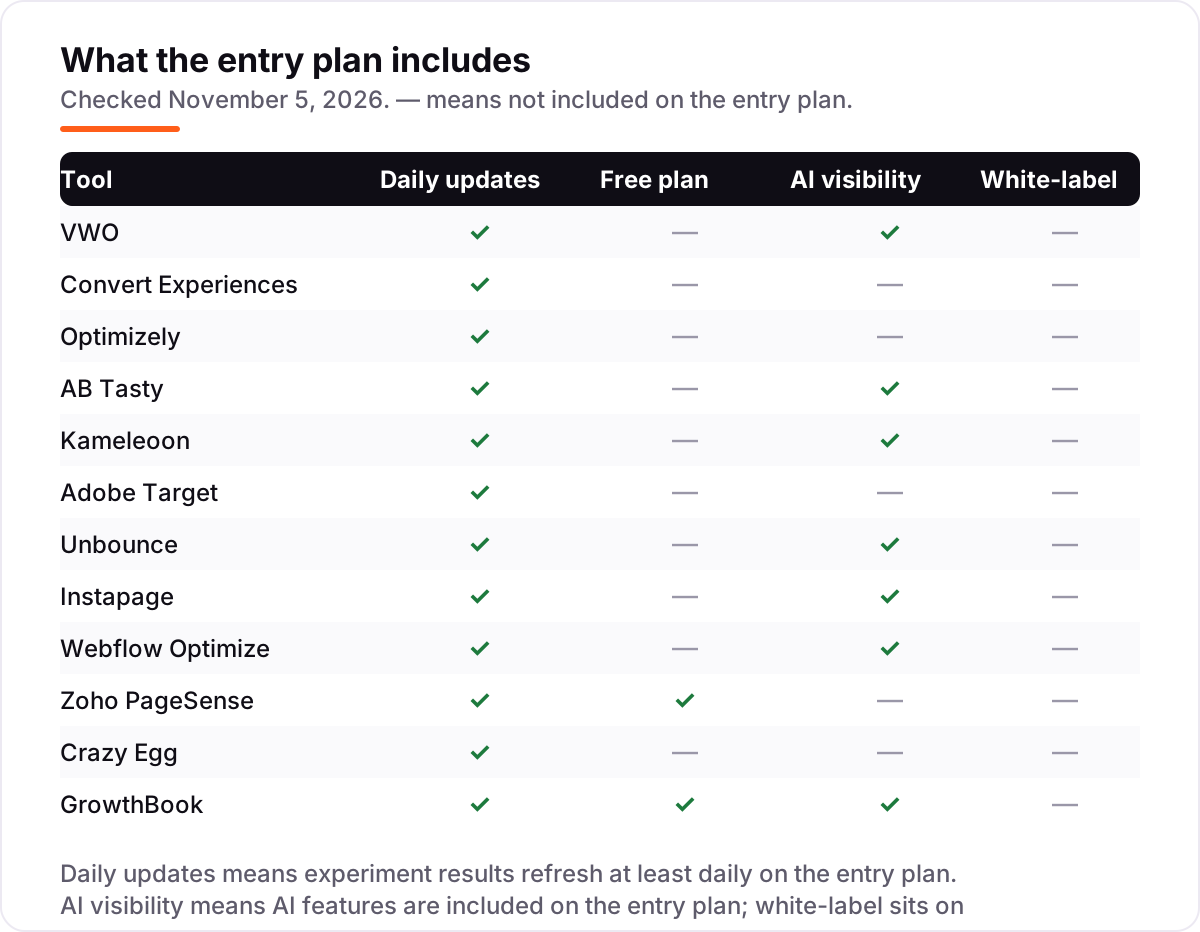
- Ask what the price leaves out. Multivariate testing, server-side tests, heatmaps and white-label reports all wait for higher tiers on several tools here. Read the plan column, not the homepage headline, before you compare prices.
- Start with a trial on real traffic. Every tool here offers a free plan or a free trial. Run one real test — a headline against a headline — and check that the editor handles your pages, the results report is readable, and the winning variant is easy to ship. Before you test, preview how the winning headline looks in search with our free SERP snippet preview tool.
Visual A/B testing pricing: what you will actually pay
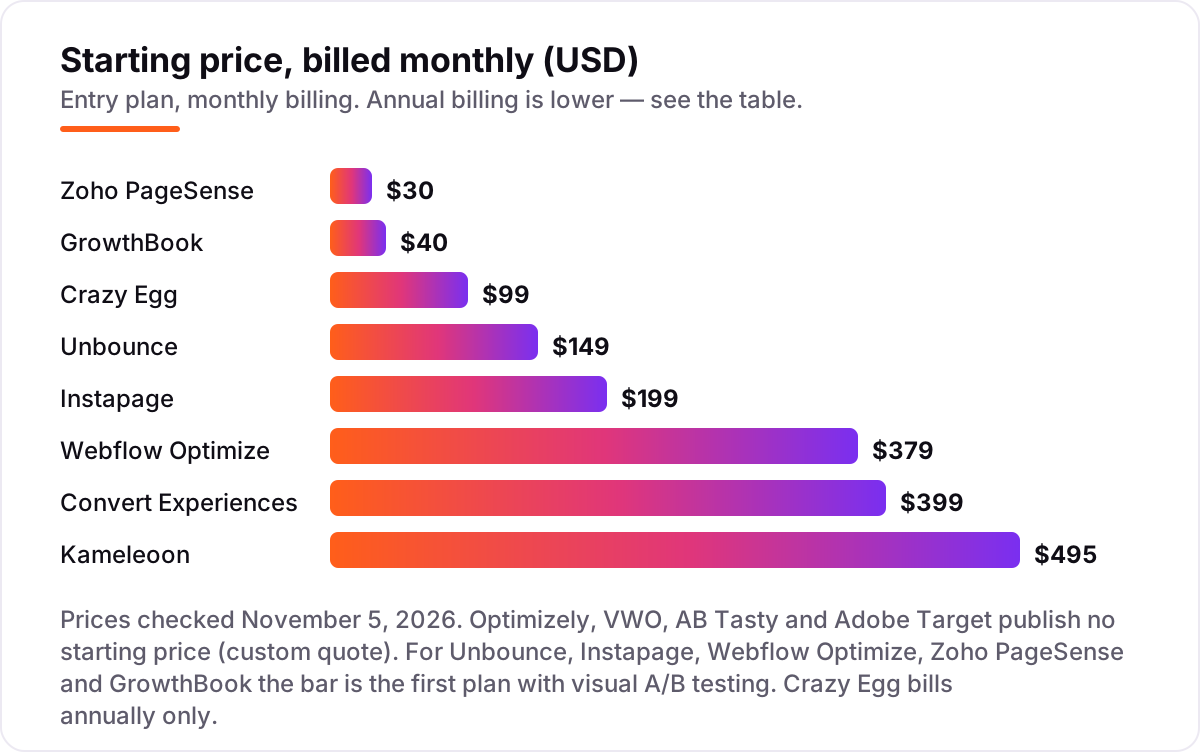
Take a five-person team testing one site with about 50,000 visitors a month. On the testing plan, the yearly bill looks like this: Zoho PageSense $360, Crazy Egg $1,188, Unbounce Experiment $1,788, Instapage Optimize $1,908 on annual billing, GrowthBook Pro $2,400 (five seats at $40), Convert Growth $3,588 on annual billing, Webflow Optimize $3,588 on annual billing plus a Site plan, and Kameleoon Starter $5,940. The four quote-only tools — VWO, Optimizely, AB Tasty and Adobe Target — do not fit this table at all, and third-party reports put Optimizely from about $36,000 a year and AB Tasty from about €15,000 a year, so treat those figures as reported, not vendor-published.
Annual billing cuts the bill on most tools here: Convert drops from $399 to $299 a month, Instapage from $199 to $159, and Webflow Optimize from $379 to $299 — but the annual figure is a monthly equivalent, not a monthly price, and Crazy Egg bills annually only with no month-to-month option. One more cost to check before you commit: traffic. A plan that covers 50,000 visitors today may not cover 200,000 next year, and on metered plans the next tier — or a custom quote — arrives with the growth.
Know the difference: visual editor vs code-based testing
The confusion in this category is between two ways of changing a page. A visual editor lets you click an element and edit it — swap a headline, recolor a button, move a form — and the tool serves the variant to visitors. A code-based test changes behavior in code, through feature flags or an SDK, and suits product changes like a new checkout flow or a pricing experiment. Most tools here offer both: the visual editor for marketing pages, code for product. GrowthBook and Optimizely lean code-first, with the visual editor as an add-on; Unbounce and Instapage are visual-first, because the page itself is the product.
There is a second, quieter confusion: a site-wide tester is not a landing-page builder. VWO, Convert, Kameleoon and GrowthBook test any page on any site. Unbounce and Instapage build the page and test it in the same tool, which is faster for campaign pages but useless for testing your homepage, pricing page or blog — those live outside the builder.
A third distinction worth knowing is testing versus personalization. AB Tasty, Adobe Target and Webflow Optimize all bundle personalization — showing different content to different visitor segments — with testing. Personalization is a bigger, more expensive program than a single A/B test, and it is priced that way. If you only want to know which headline wins, buy the testing plan and ignore the personalization upsell until you have a testing habit.
Quick comparison: tool type by need
| Buyer | Best pick | Why |
|---|---|---|
| First visual test on a budget | Zoho PageSense | Real A/B testing from $30/month, plus a free plan for small sites |
| Most marketing teams | VWO | The most mature visual editor, but quote-only since the Wingify merger |
| Transparent dedicated tester | Convert Experiences | Published prices, no modules, from $399/month |
| Enterprise experimentation program | Optimizely | Web and full-stack testing with governance, quote-only |
| Landing pages from paid ads | Unbounce | Builder plus testing in one tool, A/B from $149/month |
| Already running on Webflow | Webflow Optimize | Tests inside the Designer, $379/month add-on |
| Open-source or product team | GrowthBook | Free to start, visual editor at $40/seat/month |
Mistakes to avoid
- Buying the entry plan that cannot test. Unbounce Build at $99, Instapage Create at $99, Crazy Egg Starter at $29 and Zoho PageSense Analyze and Engage all look like the starting price, but none of them runs an A/B test. Check the plan column before you budget.
- Ignoring the visitor meter. VWO and AB Tasty quote on monthly active users, Convert and Kameleoon meter tested users, and Crazy Egg and PageSense meter pageviews. A traffic spike that doubles your visitors can push you into the next tier — or a new quote — mid-year.
- Forgetting Webflow Optimize needs a Site plan. The $299 a month billed annually is an add-on, not the whole price. Add the Site plan underneath before you compare it with a standalone tester.
- Budgeting on the annual figure as if it were monthly. Convert at $299, Instapage at $159 and Webflow Optimize at $299 are annual-billing equivalents; paying monthly costs $399, $199 and $379. Compare tools on the same billing term.
- Picking a quote-only enterprise tool for a first test. VWO, Optimizely, AB Tasty and Adobe Target all need a sales cycle before you can run a single test. Start with a published-price tool, learn what you actually need, and graduate to a quote-only platform when the program outgrows it.
How we chose
We checked each vendor's own pricing page on November 5, 2026 and recorded the starting price exactly as shown, including the annual-billing figure where the page lists one — and where a vendor publishes no price, we say custom quote rather than repeating a stale number. VWO and AB Tasty now sit under Wingify's pricing page, which lists Growth, Pro and Enterprise tiers with no figures and states plainly that there are no fixed plans, only custom proposals; Optimizely and Adobe Target likewise publish no starting price. Convert Experiences and GrowthBook were verified directly on their own pricing pages on November 5, 2026. The Unbounce Experiment $149 and Instapage Optimize $199 figures are corroborated by multiple recent reads of the vendors' own pricing pages from September to November 2026, and the Kameleoon, Webflow Optimize, Zoho PageSense and Crazy Egg figures come from the vendors' own plan and pricing pages as captured in recent reads. The Optimizely $36,000-a-year and AB Tasty €15,000-a-year figures are third-party reports, not vendor prices, and VWO's mid-2026 $314-a-month Starter figure is stale under the Wingify rebrand and was not used. Ratings are G2 scores from review pages crawled in the days before November 5, 2026; Webflow Optimize carries no rating because no G2 listing exists for the add-on itself, and we would rather show no rating than borrow Webflow the platform's score. We ranked the tools by fit for the most common buyer — a marketing team testing its own site — not by brand size. No vendor paid for a place in this list, and none of the links here are affiliate links.
What to do next
Start with the free plan or trial of your top pick and run one real test — a headline against a headline — on a page that already gets traffic. Check that the editor handles your pages, the results report is readable, and the winning variant is easy to ship before you commit to a year. If you want a second opinion on which tester fits a wider marketing stack, compare the broader field in our guide to A/B testing software. If the tests are sorted but new customers are not finding you, our monthly SEO service handles the visibility side. Once your tools are in place, find out what's holding your rankings back.
Your stack only works if people find you
SerpAstra fixes what keeps your site off page one and makes it easy for AI assistants to recommend.
Get a free audit→Sources we checked (23)
- VWO pricing — vwo.com/pricing (checked November 5, 2026)
- Convert Experiences pricing — convert.com/pricing (checked November 5, 2026)
- Optimizely plans — optimizely.com/plans (checked November 5, 2026)
- AB Tasty pricing — wingify.com/pricing (checked November 5, 2026)
- Kameleoon plans — kameleoon.com/plans (checked November 5, 2026)
- Adobe Target — adobe.com/marketing/target.html (checked November 5, 2026)
- Unbounce pricing — unbounce.com/pricing (checked November 5, 2026)
- Instapage pricing — instapage.com/pricing (checked November 5, 2026)
- Webflow pricing — webflow.com/pricing (checked November 5, 2026)
- Zoho PageSense vs Optimizely — zoho.com/pagesense/optimizely-alternative.html (checked November 5, 2026)
- Crazy Egg pricing — crazyegg.com/pricing (checked November 5, 2026)
- GrowthBook pricing — growthbook.io/pricing (checked November 5, 2026)
- VWO Testing on G2 — g2.com/products/wingify-vwo-testing/reviews (checked November 5, 2026)
- Convert Experiences on G2 — g2.com/products/convert-experiences/reviews (checked November 5, 2026)
- Optimizely Web Experimentation on G2 — g2.com/products/optimizely-web-experimentation/reviews (checked November 5, 2026)
- AB Tasty on G2 — g2.com/products/ab-tasty/reviews (checked November 5, 2026)
- Kameleoon on G2 — g2.com/products/kameleoon/reviews (checked November 5, 2026)
- Adobe Target on G2 — g2.com/products/adobe-adobe-target/reviews (checked November 5, 2026)
- Unbounce on G2 — g2.com/products/unbounce-unbounce-landing-pages/reviews (checked November 5, 2026)
- Instapage on G2 — g2.com/products/instapage/reviews (checked November 5, 2026)
- Zoho PageSense on G2 — g2.com/products/zoho-pagesense/reviews (checked November 5, 2026)
- Crazy Egg on G2 — g2.com/products/crazy-egg/reviews (checked November 5, 2026)
- GrowthBook on G2 — g2.com/products/growthbook/reviews (checked November 5, 2026)
Shamim
Founder of SerpAstra
A full-stack SEO and digital marketer who spends most days on Local SEO for dental practices, AI search visibility and lead generation.
Frequently asked questions
What is the best tool for visual A/B testing?
VWO is the best all-round pick, with the most mature visual editor and 929 G2 reviews, but it is quote-only. Convert Experiences is the best transparently priced dedicated tester at $399 a month. For a small team on a budget, Zoho PageSense tests from $30 a month and GrowthBook starts free — pick the one that matches your traffic, not the biggest name.
How much does visual A/B testing software cost?
Published entry prices run from $30 a month (Zoho PageSense) to $495 a month (Kameleoon), with Convert at $399 and GrowthBook Pro at $40 a seat. Four tools — VWO, Optimizely, AB Tasty and Adobe Target — publish no price and are quoted on traffic, with third-party reports from about $36,000 a year for Optimizely. A small team should budget $30–$150 a month.
Is there a free visual A/B testing tool?
Yes, with limits. GrowthBook's free Starter plan covers 3 users with unlimited experiments, feature flags and traffic, though the visual editor needs Pro at $40 a seat a month. Zoho PageSense has a free plan for up to 2,000 visitors a month. VWO's old free Starter tier is gone under the Wingify rebrand — evaluation there is a free trial, not a free plan.
What is the difference between a visual editor and a code-based test?
A visual editor lets you click a headline, image or button and change it, then run the variant — no developer needed. A code-based test changes behavior in code, through feature flags or SDK calls, and suits product changes like a new checkout flow. Most tools here offer both: the visual editor for marketing pages, code for product. GrowthBook and Optimizely lean code-first; Unbounce and Instapage are visual-first.
Do I need a developer to run visual A/B tests?
No, for most of these tools — that is the point of the visual editor. A marketer can change copy, images, buttons and layouts in VWO, AB Tasty, Kameleoon or Zoho PageSense and launch the test alone. You will still want a developer for server-side tests, complex single-page apps, and anything behind a login, where code-based tools like GrowthBook and Optimizely earn their place.
Can I switch A/B testing tools later?
Yes. Tests do not carry over, so plan the switch between campaigns: finish or pause running tests, export your results history, and install the new tool's tag before launching fresh tests. Historical results stay in the old tool's reports, so export the winners and their lift numbers first. Switching is easiest from a monthly plan — annual plans like Crazy Egg's lock you in for the year.
Free SEO and AI visibility audit
Find out what is holding your rankings back
Send us your site. Within 2 business days you get a written audit, an AI visibility check and a short fix list ranked by impact. Free, with no contract attached.
Request my free audit→Related guides
 Digital Marketing & AdsBest A/B Testing Software for 2026: 12 Options Compared by Use CaseCompare the 12 best a/b testing software options on price, free plans and stats engines, with every price checked November 4, 2026, and sorted by use case.Read guide →
 Digital Marketing & AdsBest A/B Testing Software for 2026: 11 Options Compared by Use CaseCompare the 11 best a/b testing software tools for marketers and product teams on price, free plans and test types, with prices checked November 4, 2026.Read guide →
 Digital Marketing & Ads9 Best A/B Testing Software for App Developers in 2026, ComparedCompare the 9 best A/B testing software for app developers on price, free tiers, SDKs and stats, with every price checked today, November 4, 2026.Read guide →