
11 Best Workload Management Tools in 2026 (Free and Paid, Compared)
11 best workload management tools compared with real prices, free plans and workload views. Find the right fit for your team, from $5 a person a month.
 Shamim Mia, Founder, SerpAstraLast verified November 10, 202612 min read
We compare pricing pages, documentation and public reviews. We never accept payment for rankings.

Key takeaways
- Float is the best pure workload tool for most teams: live capacity bars and time-off tracking from $7 per scheduled person a month billed annually.
- The workload view is often on a higher tier: Asana needs Advanced ($24.99), monday.com needs Pro ($19), ClickUp needs Business ($17) and Wrike needs Business ($25).
- The cheapest real workload tools are Resource Guru at $5 and Float and Runn at $7 a person a month billed annually.
- The single most important buying factor is whether the plan you buy actually includes the workload view, because the entry price rarely does.
- Every price below was checked on the vendor's own pricing page or pricing FAQ on November 10, 2026. Ratings are G2, with review counts shown; three tools have no rating because their G2 listings were stale or mismatched.
On this page
Quick comparison
| Tool | Best for | Starting price | Free plan |
|---|---|---|---|
| Float | Agencies and delivery teams of 5 to 50 people who need a live view of who is overbooked | $7/mo (annual) | No (30-day trial) |
| ClickUp | Small teams of 5 to 30 people who want workload, tasks, docs and time tracking in one workspace | $9/mo (annual) | Yes (Free Forever) |
| Asana | Cross-functional teams of 10 to 100 people running campaigns and launches across departments | $10.99/mo (annual) | Yes (up to 2 users) |
| monday.com | Visual teams of 3 to 50 people who plan work on color-coded boards and want a workload widget | $9/mo (annual) | Yes (up to 2 seats) |
| Resource Guru | Agencies and service teams of 5 to 100 people who schedule named people and equipment by the day | $5/mo (annual) | No (30-day trial) |
| Runn | IT services firms and consultancies of 20 to 200 people who tie utilization to project cost | $7/mo (annual) | No (30-day trial) |
| Teamwork.com | Client-services agencies of 5 to 50 people who bill hours and need workload planning next to retainers and invoices | $9.99/mo (annual) | Yes (up to 5 users) |
| Wrike | Departments of 5 to 200 people that need workload charts plus approvals, proofing and request forms | $10/mo (annual) | Yes |
| Smartsheet | Spreadsheet-first teams of 1 to 100 people who want workload tracking inside a familiar grid | $9/mo (annual) | No (30-day trial) |
| Forecast | Professional-services firms of 10 to 100 people that want resource planning, budgets and AI scheduling in one suite | $29/mo (annual) | No (14-day trial) |
| Paymo | Small firms of 2 to 20 people that want scheduling, time tracking and invoicing in one account | $16.90/mo (annual) | Yes (1 user) |
Make one of these tools?
We re-check this list every quarter. Send a correction, request a review, or ask about a clearly labeled sponsored spot.
Request a listingThe best workload management tools

Float
Best for: Agencies and delivery teams of 5 to 50 people who need a live view of who is overbooked
Float is the purest workload tool in this list: a drag-and-drop schedule where every person has a capacity line, and overbooked hours turn red the moment you assign them. The Starter plan covers scheduling, capacity, time off and project scoping for $7 per scheduled person a month billed annually, and you only pay for people who are actually on the schedule.
The trade-off is scope. Float does not manage tasks, so most teams pair it with a project tool such as Asana or ClickUp, and time tracking sits on the $12 Pro plan. If your only question is who can take more work this week, Float answers it faster than any suite here.
What we like
- Live capacity bars show overbooking the moment you assign work
- Only scheduled people are billed, so viewers and guests cost nothing
- Time-off, holidays and project scoping are built in, not add-ons
Watch out for
- No task management, so most teams pair it with a second tool
- Time tracking and advanced reporting need Pro at $12 a person a month

ClickUp
Best for: Small teams of 5 to 30 people who want workload, tasks, docs and time tracking in one workspace
ClickUp puts the workload view inside a full workspace, so capacity sits next to the tasks that cause it. The catch is the tier: workload management, timesheets and resource management arrive on Business at $17 per user a month billed annually, while the new Core plan at $9 covers tasks, Gantt charts and custom fields. AI credits are bundled into every plan, which the old Unlimited plan did not do.
The free plan is the most generous here, with unlimited members, and that makes ClickUp the cheapest way to trial a workload workflow before paying. The downside is complexity: the workspace has so many views and settings that new teams need a week to settle it. Buy it when you want one tool for everything, not when you want the simplest schedule.
What we like
- Workload view sits next to tasks, docs, goals and time tracking in one workspace
- Free Forever plan covers unlimited members
- AI credits are bundled into Core and Business, with 1,000 and 1,500 credits per seat a month
Watch out for
- Workload management needs Business at $17, not the $9 Core plan
- Reviewers report a steep learning curve and slow loading on large workspaces

Asana
Best for: Cross-functional teams of 10 to 100 people running campaigns and launches across departments
Asana is the safest all-rounder in this list, with portfolios, goals and the widest integration list of any tool here. Its workload view lives on Advanced at $24.99 per user a month billed annually, more than double the $10.99 Starter plan, so price the tier you will actually use. Starter still gives you timelines, Gantt charts, dashboards and unlimited automations.
The free Personal plan now stops at two users, so almost any real team pays from day one. Asana is the right pick when several departments share work and you need one place where a task can live in several projects at once. It is the wrong pick if you only need a capacity chart, because Float or Resource Guru do that for a third of the price.
What we like
- Portfolios and goals roll team workload up to company level on Advanced
- Widest integration list in this list, with timeline, Gantt and dashboards on Starter
- Unlimited free guests on paid plans
Watch out for
- Workload view needs Advanced at $24.99, more than double Starter
- Free Personal plan is capped at two users

monday.com
Best for: Visual teams of 3 to 50 people who plan work on color-coded boards and want a workload widget
monday.com is the most visual tool here: boards, timelines and a workload widget that colors overbooked people red at a glance. The workload widget needs Pro at $19 per seat a month billed annually; Basic at $9 has no automations or integrations at all, and Standard at $12 is the first plan that feels complete. Every paid plan has a three-seat minimum, so the smallest bill is $27 a month on Basic.
Seats are sold in buckets, so a team of six pays for ten seats once it passes five, which is the pricing catch to model before you buy. The upside is speed: most teams build their first board in an afternoon, and the free plan covers two seats for a trial. Pick monday.com when the board is the work, not when you need deep financial reporting.
What we like
- Workload widget colors overbooked people red at a glance
- Boards, timelines and Gantt are fast to set up
- Free plan covers two seats for a real trial
Watch out for
- Workload widget needs Pro at $19 a seat a month
- Seats are sold in buckets with a three-seat minimum, so small teams overpay

Resource Guru
Best for: Agencies and service teams of 5 to 100 people who schedule named people and equipment by the day
Resource Guru is the cheapest tool in this list and the simplest to explain: a booking grid where you drag people, and everything else, onto days. Grasshopper costs $5 per person a month billed annually after a price rise on July 1, 2026, and it covers scheduling, leave and calendar sync. Reports, timesheets and bill rates start on Blackbelt at $8.
The billing rule to know is that every person you add is billed whether they log in or not, and non-human resources such as rooms or vans cost extra per item. There is no free plan, only a 30-day trial, and the reporting is thinner than Float or Runn. For a team that just needs to know who is booked when, nothing here is cheaper or clearer.
What we like
- Cheapest entry price here at $5 a person a month billed annually
- Drag-and-drop booking grid with leave management and calendar sync
- Free placeholder allowance on every plan (1 on Grasshopper, 5 on Blackbelt, 10 on Master)
Watch out for
- No free plan, only a 30-day trial
- Every person added is billed whether they log in or not, and equipment costs extra

Runn
Best for: IT services firms and consultancies of 20 to 200 people who tie utilization to project cost
Runn was built for one job: showing who is doing what, and what it costs. The Lite plan at $7 per resource a month billed annually covers scheduling, capacity and utilization charts, while Standard at $11 adds timesheets, the API and project cost reporting. People who only log in are free, and placeholders cost nothing, so you pay for resources, not viewers.
The catch is the 20-seat minimum on every plan, so the smallest Standard bill is $220 a month billed annually even for a ten-person team. Runn also retired its free plan in December 2025, leaving a 30-day trial as the only free route. It is the right pick when utilization and margins matter as much as the schedule itself.
What we like
- Utilization and project cost sit in the same view as the schedule
- People who only log in are free, and placeholders cost nothing
- Rate cards and project budgets are included from Lite
Watch out for
- 20-seat minimum on every plan, so small teams pay for seats they do not use
- No free plan since December 2025, only a 30-day trial

Teamwork.com
Best for: Client-services agencies of 5 to 50 people who bill hours and need workload planning next to retainers and invoices
Teamwork.com is built for client work: projects, budgets, retainers and invoices in one place, with client users free. The workload planner sits on Accelerate at $24.99 per user a month billed annually, while Basics at $9.99 covers project delivery and billable time tracking without timesheets or capacity planning. Basics needs three seats minimum, Accelerate needs five.
That tier jump is the decision. Basics is cheap but stops before the features an agency buys Teamwork for, so most agencies should budget for Accelerate from the start. The free plan covers five users and five projects, which is enough to test the workflow. Pick Teamwork when the work is client work and the invoice matters as much as the schedule.
What we like
- Client users are free, and retainers, budgets and invoicing sit next to the schedule
- Workload Planner, time budgets and intake forms on Accelerate
- Free plan covers five users and five projects
Watch out for
- Workload planning needs Accelerate at $24.99, not the $9.99 Basics plan
- Optimize and Enterprise, with full financials, are quote-only

Wrike
Best for: Departments of 5 to 200 people that need workload charts plus approvals, proofing and request forms
Wrike is the most structured tool here, with request forms, approvals, proofing and portfolio management around its workload charts. Workload charts arrive on Business at $25 per user a month billed annually; the Team plan at $10 covers Gantt charts and dashboards for 2 to 15 users but not resource management. Business and above are sold as annual subscriptions only.
The learning curve is the honest trade-off: reviewers praise the flexibility and then warn that onboarding takes time, and the interface feels heavier than Asana or monday.com. Wrike fits departments that need governance around the work, with audit trails on approvals. Smaller teams that only need a capacity view will find Float or Resource Guru faster and cheaper.
What we like
- Workload charts plus approvals, proofing and request forms in one system
- Gantt charts, dashboards and 50 automation actions per seat on Team
- Free plan for up to five users
Watch out for
- Workload charts need Business at $25, and Business is annual-only
- Reviewers warn the learning curve is steep and the interface feels heavy

Smartsheet
Best for: Spreadsheet-first teams of 1 to 100 people who want workload tracking inside a familiar grid
Smartsheet feels like a spreadsheet that learned project management: grids, Gantt charts, dashboards and automations, with free Contributors who can comment without a paid seat. Pro costs $9 per member a month billed annually and caps at ten members, while Business at $19 adds unlimited automations and a one-terabyte storage allowance. There is no free plan for new sign-ups, only a 30-day trial.
The workload catch is that true resource management is a separate add-on, priced on quote, so the entry plans give you workload tracking on Business but not the full resource suite. That makes Smartsheet a good pick for teams that already think in sheets and need light capacity views, and a poor pick if dedicated resource planning is the whole job.
What we like
- Familiar spreadsheet grid with Gantt, dashboards and automations
- Unlimited free Contributors can view, comment and attach files
- Pro starts at $9 a member a month billed annually
Watch out for
- Full Resource Management is a separate add-on priced on quote
- No free plan for new sign-ups, only a 30-day trial

Forecast
Best for: Professional-services firms of 10 to 100 people that want resource planning, budgets and AI scheduling in one suite
Forecast combines project management, resource planning, time tracking and financial reporting, with AI scheduling that suggests who should take the next task. The Lite plan costs $29 per seat a month billed annually with a ten-seat minimum, so the smallest annual bill is $290 a month, and Pro at $49 adds financial portfolio reporting and retainer management. There is no free plan, only a 14-day trial.
That entry price is the highest in this list, and it buys a suite, not just a schedule. Smaller teams will get the same capacity answer from Float or Runn for a quarter of the price. Forecast earns its place when a firm needs budgets, rates and utilization in one system and is willing to pay for the financial layer that the cheaper tools leave out.
What we like
- Resource planning, budgets, rates and time tracking in one suite
- AI scheduling suggests assignments based on capacity and skills
- Financial portfolio reporting on Pro
Watch out for
- Highest entry price here at $29 a seat a month, with a ten-seat minimum
- No free plan, only a 14-day trial

Paymo
Best for: Small firms of 2 to 20 people that want scheduling, time tracking and invoicing in one account
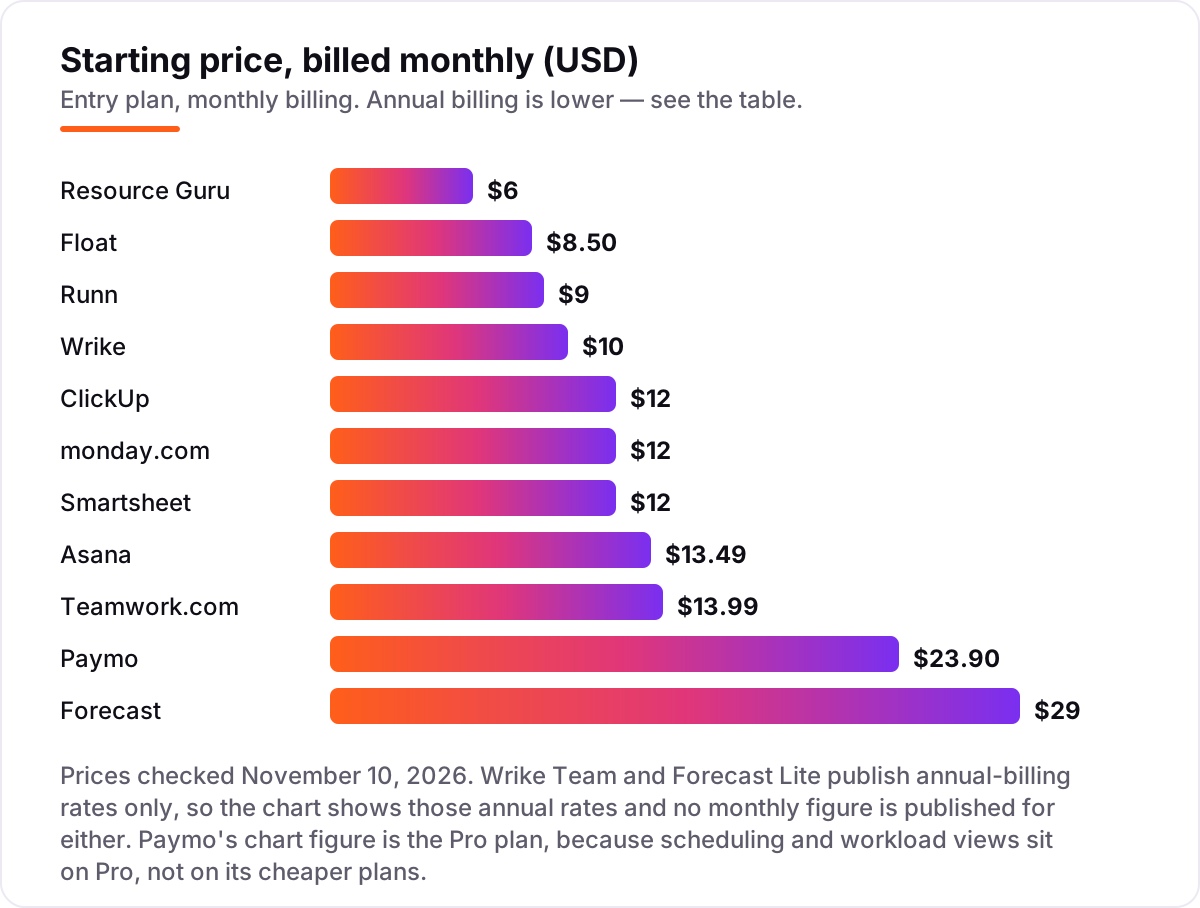
Paymo covers the whole client-work loop: tasks, time tracking, expenses, estimates and invoices in one account, with employee scheduling and workload views on the Pro plan. Pro costs $16.90 per user a month billed annually, or $23.90 billed monthly, while the cheaper Solo and Plus plans do not include the workload view at all. The free plan covers one user only, so a team starts paying on Plus.
Paymo is at its best below twenty people, where one login for work and billing saves real admin time. Above that size the reporting and portfolio views feel thin next to Teamwork or Forecast, and the per-seat price climbs with the plan. Pick it when invoicing sits next to scheduling every day, not when you need enterprise resource planning.
What we like
- Scheduling, time tracking, invoicing and expenses in one account
- Gantt charts, dependencies and leave management on Pro
- Free plan with unlimited time tracking for one user
Watch out for
- Workload and scheduling need Pro at $16.90 a user a month billed annually
- Reporting feels thin above twenty people next to Teamwork or Forecast
A best workload management tool shows who is overloaded, who has room, and what slips if nothing changes. This list ranks 11 tools by how well they answer that question for a typical team of 5 to 50 people, with every starting price checked on the vendor's own pricing page on November 10, 2026.
Quick comparison: tool type by need
| Buyer | Best pick | Why |
|---|---|---|
| Team that only needs capacity planning | Float | Live capacity bars and time off from $7 a person a month billed annually |
| Small team replacing spreadsheets | ClickUp | Workload view plus tasks, docs and time tracking from $9 a user a month billed annually |
| Cross-functional team already on Asana | Asana | Portfolio workload on Advanced, with the widest integrations in this list |
| Visual team that plans in boards | monday.com | Workload widget on Pro, with color-coded boards from $9 a seat a month billed annually |
| Agency scheduling people by the day | Resource Guru | Drag-and-drop bookings and leave from $5 a person a month billed annually |
| Consultancy tracking utilization and cost | Runn | Utilization and project cost in one view from $7 a resource a month billed annually |
| Client-services team billing by the hour | Teamwork.com | Workload planner on Accelerate, with retainers and invoicing |
| Department needing approvals and proofing | Wrike | Workload charts on Business, with request forms and proofing |
| Spreadsheet-first team | Smartsheet | Familiar grid with workload tracking on Business and above |
| Professional-services firm | Forecast | Resource planning, budgets and AI scheduling from $29 a seat a month billed annually |
| Small firm that also invoices | Paymo | Scheduling and workload on Pro, with time tracking and invoicing built in |
How to choose the best workload management tool
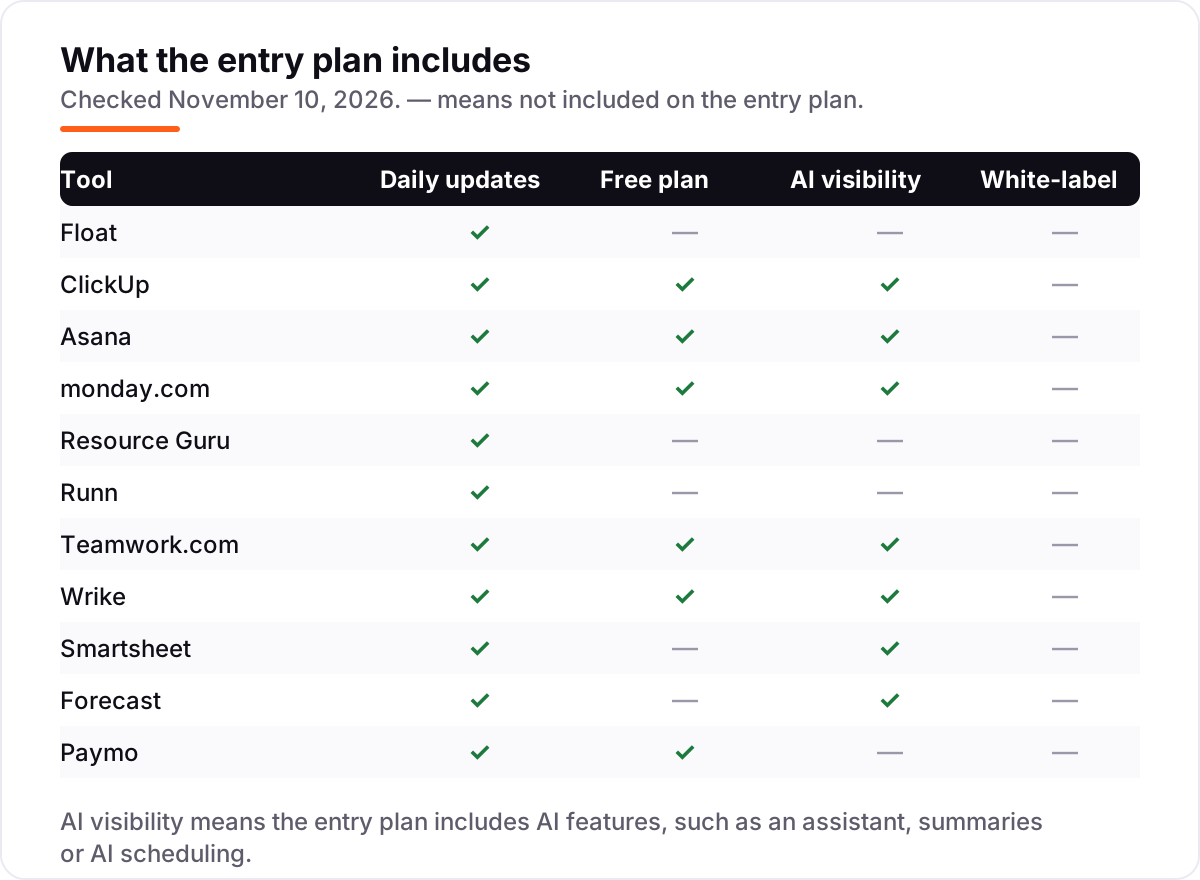
- Workload view included. Check the tier, not the headline price: six of the eleven tools in this list keep the workload view off the entry plan.
- Capacity in hours, not just tasks. A task count hides the truth when one task takes an hour and another takes a week; look for capacity measured against real working hours.
- Time off and holidays. A schedule that ignores leave will overbook people the week they are away, so the tool must count time off against capacity.
- Utilization and cost. If you bill by the hour, you need utilization and bill rates in the same view as the schedule, not in a separate report.
- Integrations. The workload view is only as good as the data feeding it, so check the tool connects to the calendar, task manager and time tracker your team already uses.
- Trial with real data. Load your real team, real capacity and real projects into the trial before you pay; a demo with five fake people hides every pricing catch in this list.
Workload management tool pricing: what you will actually pay
The headline price is rarely the workload price. For a ten-person team on annual billing, the plan that actually includes the workload view costs $50 a month on Resource Guru Grasshopper, $70 on Float Starter, $170 on ClickUp Business, $190 on monday.com Pro, $220 on Runn Standard (billed as 20 seats, the plan minimum), $249.90 on Asana Advanced, $249.90 on Teamwork.com Accelerate, $250 on Wrike Business, $290 on Forecast Lite (a ten-seat minimum), and $169 on Paymo Pro. Smartsheet Business is $190 a month for ten members, with full Resource Management quoted separately as an add-on.
Three catches sit behind those numbers. First, seat minimums: Runn bills a minimum of 20 seats, Teamwork.com Accelerate a minimum of five, and monday.com a minimum of three, so small teams pay for seats they do not use. Second, billing cadence: paying monthly instead of annually adds roughly 20 to 40 percent, so ClickUp Core rises from $9 to $12 a user a month and Asana Starter from $10.99 to $13.49. Third, the add-ons: Smartsheet Resource Management, Asana timesheets at $5.99 a user a month, and ClickUp's extra AI credits all sit outside the prices above. If you want to see how the wider search picture affects the choice, our monthly SEO service covers the visibility side, and the free SERP snippet preview tool shows how your pages will look in Google.
Know the difference: a workload view, capacity planning and resource scheduling
These three phrases are sold as one thing, but they answer different questions. A workload view shows who is over or under capacity this week, usually as a bar against each person's hours. Capacity planning looks forward: how many hours the team has next month against the work already promised. Resource scheduling is the act of assigning named people to dated work, which is what Resource Guru and Float do best.
The confusion costs money. A team that needs a workload view can buy monday.com Basic and find no widget, or Asana Starter and find no portfolio workload, because both keep that view on a higher tier. A team that needs forward capacity planning can buy a scheduling tool and find it only shows this week. Match the phrase to your question first: overloaded this week means a workload view, next quarter means capacity planning, and who does what on Tuesday means resource scheduling.
How we chose
We checked each vendor's own pricing page on November 10, 2026 and recorded the starting price exactly as shown, including the annual-billing figure where the page lists one; Resource Guru's prices come from its own pricing FAQ, which publishes the July 1, 2026 rates. Wrike Team and Forecast Lite publish annual-billing rates only, so no monthly figure is asserted for either, and Paymo's price is the Pro plan because scheduling and workload sit on Pro. Ratings come from G2, taken from fresh search-index copies of the G2 pages; Wrike, Forecast and Runn carry no rating because the freshest G2 copies for Wrike were weeks old, Forecast's G2 listing mixes in a different product, and Runn has no G2 listing of its own. ClickUp's new Core and Business plans apply to new workspaces; existing workspaces may still see the old Unlimited $7 and Business $12 plans until price updates begin in January 2027. We ranked the tools by fit for the most common buyer, a team lead who needs to see who is overloaded, not by brand size. No vendor paid for a place in this list, and none of the links here are affiliate links.
What to do next
Start with the decision path above: check whether the workload view is on the plan you would actually buy, count your real seats against the minimums, and price the annual bill for ten people. Then take the free plan or trial of your top pick and load your real team, real capacity and real projects for a week. If the overbooked people turn red before the work slips, you have your tool. Once your tools are in place, find out what's holding your rankings back.
Your stack only works if people find you
SerpAstra fixes what keeps your site off page one and makes it easy for AI assistants to recommend.
Get a free audit→Sources we checked (19)
- Float pricing — float.com/pricing (checked November 10, 2026)
- Float on G2 — 4.2/5, 2,247 reviews (checked November 10, 2026)
- ClickUp pricing — clickup.com/pricing (checked November 10, 2026)
- ClickUp on G2 — 4.6/5, 13,731 reviews (checked November 10, 2026)
- Asana pricing — asana.com/pricing (checked November 10, 2026)
- Asana on G2 — 4.4/5, 13,867 reviews (checked November 10, 2026)
- monday.com pricing — monday.com/pricing (checked November 10, 2026)
- monday.com on G2 — 4.7/5, 17,931 reviews (checked November 10, 2026)
- Resource Guru pricing FAQ — help.resourceguruapp.com (checked November 10, 2026)
- Resource Guru on G2 — 4.6/5, 506 reviews (checked November 10, 2026)
- Runn pricing — runn.io/pricing (checked November 10, 2026)
- Teamwork.com pricing — teamwork.com/pricing (checked November 10, 2026)
- Teamwork.com on G2 — 4.4/5, 1,215 reviews (checked November 10, 2026)
- Wrike pricing — wrike.com/pricing (checked November 10, 2026)
- Smartsheet pricing — smartsheet.com/pricing (checked November 10, 2026)
- Smartsheet on G2 — 4.4/5, 22,187 reviews (checked November 10, 2026)
- Forecast pricing — forecast.app/pricing (checked November 10, 2026)
- Paymo pricing — paymoapp.com/pricing (checked November 10, 2026)
- Paymo on G2 — 4.6/5, 594 reviews (checked November 10, 2026)
Shamim
Founder of SerpAstra
A full-stack SEO and digital marketer who spends most days on Local SEO for dental practices, AI search visibility and lead generation.
Frequently asked questions
What is the best workload management tool in 2026?
Float is the best pure workload tool for most teams: live capacity bars, time-off tracking and project scoping from $7 per scheduled person a month billed annually. If you also need tasks and docs in the same workspace, ClickUp Business at $17 is the better buy, and Asana Advanced at $24.99 suits cross-functional teams.
How much does a workload management tool cost?
Entry prices run from $5 to $29 a person a month billed annually. Resource Guru starts at $5, Float and Runn at $7, and Forecast at $29. But the workload view often sits on a higher tier, so a ten-person team can pay $170 to $250 a month for the plan that actually includes it.
Is there a free workload management tool?
Yes, with limits. ClickUp has a Free Forever plan for unlimited members, Asana Personal covers two users, monday.com has a free plan for two seats, and Teamwork.com covers five users. Wrike and Paymo also have free plans. The free tiers rarely include the workload view, so treat them as trials.
What is the difference between workload management and project management?
Project management tracks tasks, deadlines and deliverables. Workload management tracks people: who is assigned how much work, who is over capacity, and who has room. Most teams need both, which is why the suites in this list bundle the two, while Float, Resource Guru and Runn sell the people side on its own.
Do I need the workload view or will the entry plan do?
Check the tier before you buy, because the entry plan often does not include the workload view. Asana needs Advanced, monday.com needs Pro, ClickUp needs Business, Wrike needs Business, Teamwork.com needs Accelerate and Paymo needs Pro. Only the dedicated tools, Float, Resource Guru, Runn and Forecast, include it from the entry plan.
Can I switch workload tools without losing my schedule?
Yes, but plan for a week of setup. Export your current assignments, rebuild the team with real capacity and time off, then re-enter the live projects. Most tools in this list import from CSV or from Asana, monday.com and Jira, and every one of them offers a free plan or trial to test the import first.
Which workload management tool is best for agencies?
Resource Guru for simple day-by-day scheduling at $5 a person a month, Float for live capacity across client work, and Teamwork.com when retainers, budgets and invoicing must sit next to the schedule. Forecast suits larger professional-services firms that also need financial reporting and AI scheduling.
Free SEO and AI visibility audit
Find out what is holding your rankings back
Send us your site. Within 2 business days you get a written audit, an AI visibility check and a short fix list ranked by impact. Free, with no contract attached.
Request my free audit→Related guides
 Digital Marketing & Ads12 Best Project Management Software for Marketing Teams in 2026, ComparedCompare the 12 best project management software for marketing teams on price, proofing, timelines and client seats, with prices checked November 5, 2026.Read guide →
 Digital Marketing & Ads10 Best Marketing Project Management Tools in 2026, ComparedCompare the 10 best marketing project management tools on price, free plans, proofing and AI features, with every price checked November 5, 2026.Read guide →
 SEO & AI Search10 Best Workload Automation Tools in 2026 (Free and Paid, Compared)10 best workload automation tools compared on price, platforms and scheduling depth in 2026. Only two publish a price; the rest are custom quote.Read guide →