
8 Best Software Development Analytics Tools in 2026, Compared
Compare the 8 best software development analytics tools for 2026 on price, DORA metrics and AI features, with every price checked November 7, 2026.
 Shamim Mia, Founder, SerpAstraLast verified November 7, 202613 min read
We compare pricing pages, documentation and public reviews. We never accept payment for rankings.

Key takeaways
- LinearB is the best fit for most mid-size teams at $29 per contributor a month; Swarmia follows at $45 per developer a month with a free tier under 10 developers, and Typo and Haystack both start at $20 a month.
- Four of the eight tools publish no starting price — Jellyfish, DX, Waydev and Allstacks are priced by quote, so budget for a sales call with each of them.
- The single most important buying factor is the seat minimum: LinearB's 50-seat floor can triple the bill for a small team, while Swarmia and Typo charge only for developers who actually contribute.
- DORA metrics and developer surveys answer different questions — Git data shows what shipped, surveys show why it felt slow — so pick the tool that matches the question you are asking.
On this page
Quick comparison
| Tool | Best for | Starting price | Free plan |
|---|---|---|---|
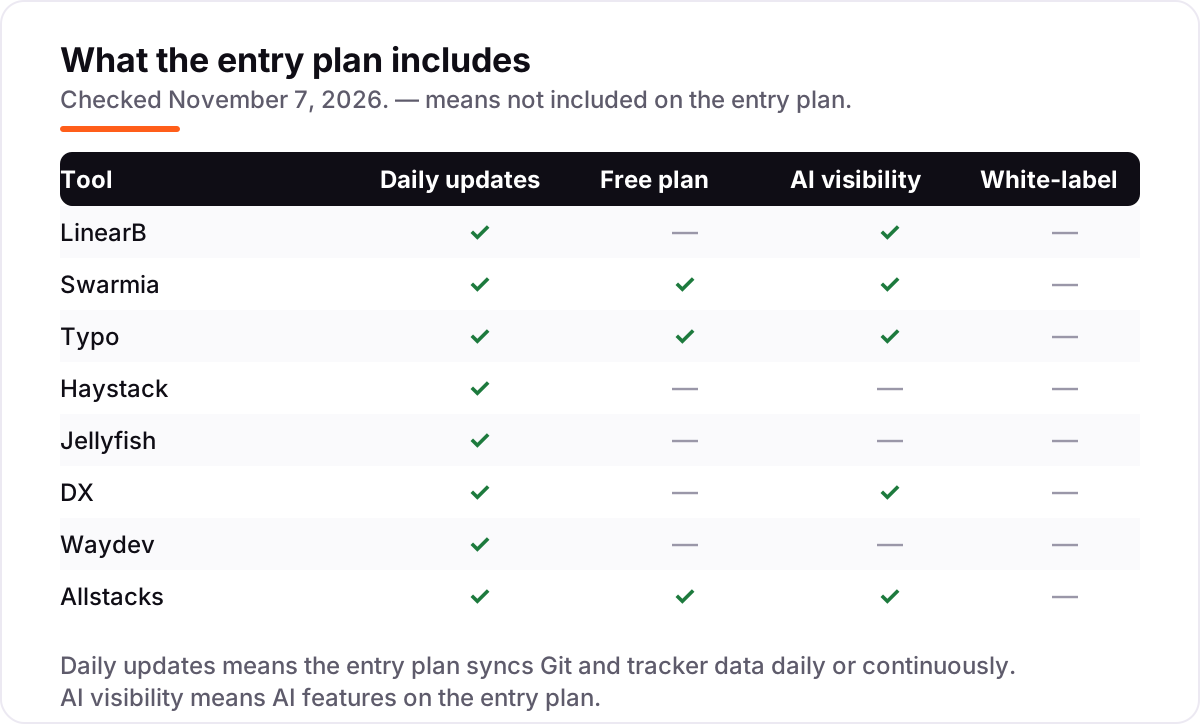
| LinearB | Mid-size engineering teams that want DORA metrics plus pull-request workflow automation | $29/mo | No (45-day trial) |
| Swarmia | Growing teams that want DORA metrics, working agreements and developer surveys in one place | $45/mo | Yes (under 10 devs) |
| Typo | Budget-conscious teams that want delivery analytics with AI code review included | $20/mo | Yes (free plan) |
| Haystack | Smaller teams that want sprint risk alerts and delivery status without a heavy setup | $20/mo | No (14-day trial) |
| Jellyfish | Enterprises that need engineering allocation, software capitalization and finance reporting | Custom quote | No (demo only) |
| DX | Organizations measuring developer experience with surveys plus system metrics | Custom quote | No (proof of concept) |
| Waydev | Teams that want executive-ready reports while managers view free as operational users | Custom quote | No (free trial) |
| Allstacks | Leaders who need delivery forecasting and audit-ready software capitalization | $400/yr | Yes (Starter free) |
Make one of these tools?
We re-check this list every quarter. Send a correction, request a review, or ask about a clearly labeled sponsored spot.
Request a listingThe best software development analytics tools

LinearB
Best for: Mid-size engineering teams that want DORA metrics plus pull-request workflow automation
LinearB is the best-known name in engineering metrics, and it pairs measurement with action: beyond dashboards for cycle time, DORA metrics and review speed, it automates parts of the pull-request workflow, such as routing reviews and flagging risky changes, so teams fix bottlenecks instead of just looking at them. Essentials costs $29 per contributor a month on annual billing, and Enterprise costs $59 with a 100-contributor minimum, unlimited admins and support for GitHub on-premises, GitLab, Bitbucket and Azure DevOps.
The minimums are the main catch. A 20-person team still pays for 50 seats on Essentials, which is $1,450 a month before any discount, and Essentials connects to GitHub Cloud only. The 45-day trial needs no payment method, so run it on your real repositories and check whether the automation saves review time before you commit to a year.
What we like
- Published pricing with a long 45-day free trial and no payment method needed
- Automates pull-request routing and flags risky changes, not just dashboards
- Benchmarks your metrics against a live cohort of millions of pull requests
- 1,000 AI credits per user a month included on Essentials
Watch out for
- 50-contributor minimum on Essentials — a 20-person team still pays for 50 seats
- Essentials supports GitHub Cloud only; GitLab, Bitbucket and Azure DevOps need Enterprise
- Annual billing only, with no monthly option

Swarmia
Best for: Growing teams that want DORA metrics, working agreements and developer surveys in one place
Swarmia, based in Finland, has a reputation for being developer-friendly. Its working agreements feature lets teams set their own targets, such as review time or work-in-progress limits, and get nudges in Slack when they drift. That approach helps avoid the surveillance-tool reaction that metrics platforms sometimes get from engineers, and the free tier for companies with fewer than 10 developers makes it the easiest tool here to try properly.
Pricing is unusually flexible. The full Standard plan is $45 per developer a month and Enterprise is $55, both billed annually, and you can also buy single modules: AI adoption and cost tracking for $5, developer surveys for $9, software capitalization for $18, and productivity and AI impact metrics for $23. Only developers added to teams are billed, so product managers and executives can view dashboards without adding cost.
What we like
- Free for companies with fewer than 10 developers, with nearly all Standard features
- Single modules from $5/developer a month if you do not need the full suite
- Only developers added to teams are billed — managers and executives view free
- Working agreements with Slack nudges keep teams on their own targets
Watch out for
- Full Standard plan costs more per developer than several rivals once the free tier ends
- No monthly billing option published — annual billing only
- Interface can feel crowded for new users, per G2 reviewers

Typo
Best for: Budget-conscious teams that want delivery analytics with AI code review included
Typo bundles delivery analytics with code quality tools, which makes it good value for a small or mid-size team. Starter, at $20 per developer a month on annual billing, includes delivery insights, AI code impact, team performance, developer experience surveys, unlimited repositories and six months of data history. Pro, at $28, adds code health analysis, automated pull-request reviews, AI pull-request summaries, AI-suggested fixes, code coverage and unlimited history, plus a dedicated success manager.
The billing model is the quiet advantage: Typo counts only developers who committed code in the past 30 days, so occasional contributors do not inflate the bill. The trade-off is track record — Typo is younger than LinearB or Jellyfish, with fewer published enterprise references. Run the 14-day trial on real repositories and compare its review suggestions with your existing tools.
What we like
- Low entry price with a genuinely free plan for up to 10 developers
- Pro adds automated pull-request reviews, AI summaries and code health for $28
- Billed only for developers who committed code in the past 30 days
- Unlimited repositories on every paid plan
Watch out for
- Younger company with fewer published enterprise references than LinearB or Jellyfish
- Starter keeps only 6 months of data history
- Configuration can be fiddly during onboarding, per G2 reviewers

Haystack
Best for: Smaller teams that want sprint risk alerts and delivery status without a heavy setup
Haystack focuses on delivery: is the sprint on track, which epics are at risk, and what changed this week. It connects Jira and Git, detects risks automatically and sends them to Slack, and posts status updates so managers do not have to chase people in standups. The Growth plan costs $20 per member a month with an annual commitment and is suggested for teams under 100 engineers, with unlimited alerts, 12 months of historical data and email, Slack and account specialist support.
Enterprise is custom, adds on-premises integrations and a dedicated performance specialist, and targets teams of 100 or more. The 14-day trial needs no credit card. The trade-off is depth: Haystack is lighter on finance reporting and AI cost tracking than Jellyfish or Swarmia, so it suits teams that want delivery answers, not a finance platform.
What we like
- Lowest published entry price in this list alongside Typo
- Automated risk alerts and status updates land in Slack without standup chasing
- Simple setup with Jira and Git — live in minutes, not weeks
- Pricing is based on team members added, so viewers cost nothing extra
Watch out for
- Growth keeps only 12 months of historical data
- On-premises integrations are Enterprise-only
- Lighter on finance reporting and AI cost tracking than Jellyfish or Swarmia

Jellyfish
Best for: Enterprises that need engineering allocation, software capitalization and finance reporting
Jellyfish is built for the conversation between engineering leaders, the CFO and the board. Its standout capability is allocation: showing how engineering time splits across new features, maintenance, support and strategic initiatives, then feeding that into DevFinOps reports and software capitalization. Finance teams that chase engineers for time estimates will see the value quickly. It also covers operational metrics, a life cycle explorer, developer surveys and an AI Impact module.
Pricing depends on seat count and modules — AI Impact, Developer Productivity and DevFinOps — and you need a quote. Third-party estimates put it around $20 to $40 per developer a month with annual minimums near $30,000, but treat those as estimates, not list prices. For a 30-person startup, Jellyfish is likely more platform than needed; for a 200-person R&D org reporting to finance, it is the natural fit.
What we like
- Strongest allocation and software capitalization reporting in this list
- Benchmarks against a large cohort of engineering organizations
- Custom metrics in plain English or SQL for teams with unusual definitions
- AI Impact module tracks AI tool adoption, token cost and vendor comparisons
Watch out for
- Quote-only pricing with annual contracts — no way to sanity-check cost before a sales call
- Heavier setup than the lighter tools in this list
- Likely more platform than a startup under 30 engineers needs

DX
Best for: Organizations measuring developer experience with surveys plus system metrics
DX combines system metrics with structured developer surveys, and it is the tool most associated with measuring developer experience. Its Developer Experience Index, DevSat surveys and experience sampling capture friction that Git data alone cannot show, such as slow local builds or unclear requirements. The DX Core 4 framework gives leaders a balanced set of productivity measures with published benchmarks. DX also tracks AI-generated code by commit, pull request, team, agent and repository.
Pricing is by demo: modular pricing by the tools you license, developer-seat licensing, usage tiers for MCP access, contracts starting at one year, and a free proof-of-concept for part of the organization. Atlassian completed its acquisition of DX in November 2025, so teams heavily invested in GitHub and Linear rather than Atlassian tools should ask how integrations and pricing will evolve under the new owner.
What we like
- Research-backed surveys and the DX Core 4 framework, not just Git telemetry
- AI measurement down to commit, pull request, team and agent level
- Developer Experience Index gives one comparable score across teams
- Free proof of concept before any contract
Watch out for
- Quote-only, modular pricing with one-year minimum contracts
- Reporting can feel overwhelming from the sheer volume of metrics, per G2 reviewers
- Roadmap may shift toward Atlassian tools after the acquisition

Waydev
Best for: Teams that want executive-ready reports while managers view free as operational users
Waydev is one of the earlier engineering analytics vendors and bills per active contributor, while managers and executives join free as operational users — 5 on Pro, 20 on Premium, unlimited on Enterprise. That suits organizations where many stakeholders want to view reports but only developers generate data. Plans differ mainly by limits: Pro covers 100 repositories with 6 months of data, Premium covers 300 with 36 months and 200 AI agent queries a month, and Enterprise removes the caps.
The pricing page asks you to request a quote for each plan, so budget for a sales call — though Waydev's own site states Pro starts at $348 a year per active contributor. A free proof of concept and a 90-day money-back guarantee lower the risk of trying it. Teams with more than 300 repositories will land on Enterprise.
What we like
- Managers and executives are free operational users, so reporting costs nothing extra
- 90-day money-back guarantee lowers the risk of trying it
- Bills per active contributor, with unlimited users and teams on every plan
- Premium adds planning, automation and AI modules with SSO and API access
Watch out for
- Prices are not published — every plan needs a private quote
- Pro is limited to 100 repositories and 6 months of data
- Waydev Agent natural-language questions need Premium, not Pro

Allstacks
Best for: Leaders who need delivery forecasting and audit-ready software capitalization
Allstacks targets leaders who need to answer when it will ship with evidence. Its engineering intelligence product calculates DORA metrics, traces delays to root causes across Jira, GitHub, GitLab and Jenkins, forecasts delivery timelines and measures whether AI tools add velocity or rework. Software cost capitalization is a strong second use case: Allstacks maps development activity to people and projects to produce audit-ready reports without asking engineers to fill in timesheets.
Pricing is published per contributor per year: Growth is $400 a year per contributor for up to 500 contributors, Enterprise is $600 with a 100-contributor minimum, and a standalone capitalization module is $200. A free Starter plan covers the Product Studio workspace for a limited time. Enverus says it finished capitalization reports nearly three quarters faster with Allstacks — verify that kind of result in a trial before signing.
What we like
- Delivery forecasting answers when work will ship, with root-cause tracing
- Software capitalization reports without asking engineers to fill in timesheets
- Measures whether AI tools add velocity or rework, not just adoption
- Reviewers rate its support and dashboard design highly on G2
Watch out for
- Growth is priced per contributor per year, so the monthly equivalent is not published
- Only 57 G2 reviews — a thinner track record than the bigger names here
- Enterprise needs a 100-contributor minimum
The best software development analytics tools turn Git history, tickets and surveys into answers a manager can act on: where work stalls, which teams are overloaded, and whether AI coding tools are helping or just costing money. We ranked the eight tools below by fit for the most common buyer — an engineering leader at a growing software company — starting with the published-price options and ending with the quote-only enterprise platforms, and every price was checked on the vendor's own pricing page on November 7, 2026.
How to choose the best software development analytics tools
- Count the developers you will actually pay for. LinearB bills every contributor assigned to a team with a 50-seat floor, while Swarmia bills only developers added to teams and Typo bills only developers who committed code in the past 30 days.
- Decide whether you need surveys or just Git data. If the question is why delivery feels slow, you need a survey tool like DX or Swarmia; if the question is where work stalls, DORA metrics from LinearB or Haystack are enough.
- Check the integrations before the trial. Essentials on LinearB supports GitHub Cloud only, and on-premises Git and ticketing integrations sit on Enterprise plans at Haystack, DX and Waydev.
- Ask what the AI features cost. LinearB bundles 1,000 AI credits per user a month, while DX and Jellyfish charge for AI measurement by module or usage tier — the headline price is not the AI price.
- Match the tool to the audience. Finance teams need Jellyfish or Allstacks for capitalization; executives need Waydev's free operational seats; engineers need a tool they will not read as surveillance.
Analytics is one system in your stack, not the whole stack. If the team also needs to be found online, our monthly SEO service covers the visibility side. And before you publish new pages for the services you sell, run your titles through the free SERP snippet preview tool — it shows exactly how the title and description will look in Google.
Whatever you shortlist, try it with real data before you pay. The free plans and trials in this list are long enough to run one genuine sprint — your repositories, your Jira board, your team — and that sprint tells you more than any review can. Check two things in the trial: that the metrics match what your engineers see in GitHub, and that the team trusts the numbers enough to act on them. Every tool here connects to GitHub, so there is no reason to buy before your engineers have looked at the dashboards.
Software development analytics tools pricing: what you will actually pay
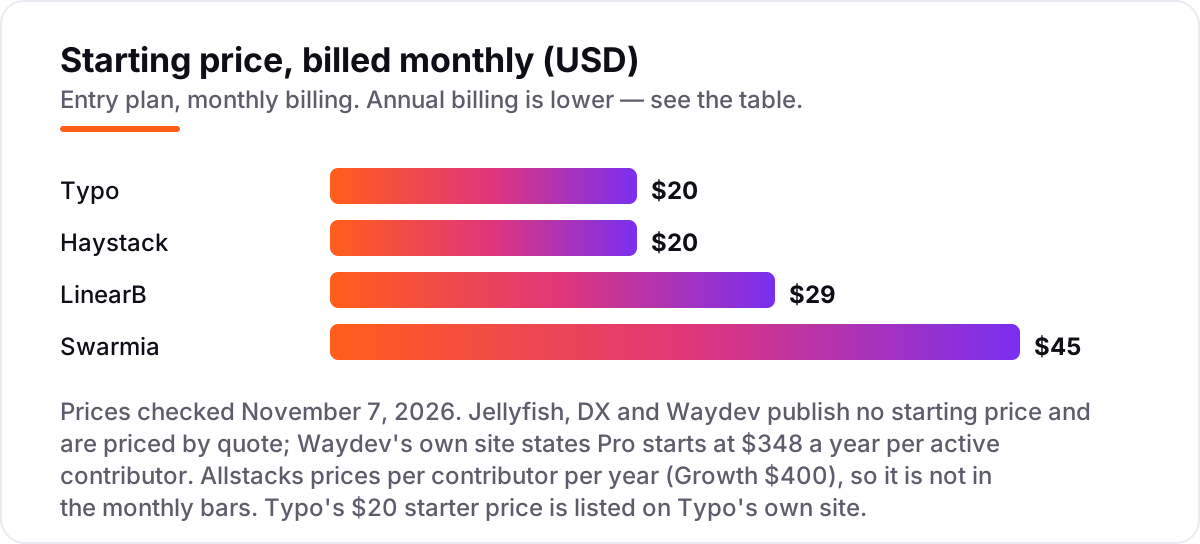
Take a 20-developer team. On list prices, the subscription costs $400 a month on Haystack Growth or Typo Starter, $900 a month on Swarmia Standard, and $1,450 a month on LinearB Essentials — because LinearB's 50-contributor minimum means a 20-person team pays for 50 seats. Allstacks Growth costs $8,000 a year for the same 20 developers, which is $400 a year per contributor with no monthly figure published. Jellyfish, DX and Waydev publish no price at all, so their cost is a quote.
Over a year, that is $4,800 on Haystack or Typo, $8,000 on Allstacks, $10,800 on Swarmia and $17,400 on LinearB Essentials. The same 20 developers and the same repositories cost $4,800 a year at the cheap end and $17,400 at the dear end — a $12,600 gap that comes entirely from seat minimums and billing units, not from features. Two of those numbers need adjusting before they are real: Swarmia is free for companies with fewer than 10 developers, so a 9-person team pays $0, and Typo's free plan covers up to 10 developers, so a 10-person team pays $0 there too.
Three costs sit outside every number above. First, the AI extras: LinearB includes 1,000 AI credits per user a month and charges from $0.015 for more, while DX prices MCP access by usage tier and Jellyfish sells AI Impact as a separate module. Second, implementation: the quote-only tools all involve onboarding services, and DX contracts start at one year. Third, the modules: Swarmia's single modules run $5 to $23 per developer a month, so a team that buys all four separately pays more than the $45 Standard bundle. If you run a finance team rather than an engineering team, the reporting tools differ too — see our guide to the best AI data analytics tools.
Annual billing is the only option on the published-price tools here: LinearB, Swarmia, Haystack and Typo all bill annually, so there is no monthly price to compare against. One more cost to check before you commit: a second team is not a second subscription on any tool in this list — all eight price per developer or per contributor across the whole organization — but adding a second Git host can push you onto Enterprise at LinearB and Haystack, which is a step change in price, not a small add-on.
Know the difference: delivery metrics vs developer experience vs code quality
The confusion in this category is between three different measurements that all call themselves analytics. Delivery metrics — DORA metrics, cycle time, throughput — come from Git, CI and tickets, and they answer what shipped and how fast. Developer experience comes from surveys and sampling, and it answers how the work felt: slow builds, unclear requirements, too many meetings. Code quality comes from static analysis of the code itself, and it answers whether the code is maintainable — that is a different product category, and none of the eight tools here is a code quality scanner.
There is a second, quieter confusion: benchmarks versus targets. A benchmark tells you how your cycle time compares with other companies; a target is a number your own team agreed to hit. Swarmia's working agreements are targets, LinearB's benchmarks are benchmarks, and the two do different jobs — one motivates a team, the other tells a board where the company stands.
A third distinction worth knowing is AI adoption versus AI impact. Adoption counts how many developers use an AI coding tool and what it costs in tokens; impact asks whether the AI-made code ships faster with less rework. Jellyfish, Swarmia and Allstacks all track impact, not just adoption, and that is the number that matters when the CFO asks what the AI spend bought.
Quick comparison: tool type by need
| Buyer | Best pick | Why |
|---|---|---|
| Small team under 10 developers | Swarmia | Free tier with nearly all Standard features, then $45/developer a month |
| Most mid-size teams | LinearB | DORA metrics plus pull-request automation, from $29/contributor a month |
| Budget team that wants AI code review | Typo | Free plan for up to 10 developers, Starter is $20/developer a month |
| Team that needs sprint risk alerts | Haystack | Growth is $20/member a month, with automated Slack risk alerts |
| Enterprise that needs finance reporting | Jellyfish | Allocation and software capitalization, priced by quote |
| Org measuring developer experience | DX | Surveys plus the DX Core 4 framework, priced by quote |
Mistakes to avoid
- Budgeting on the per-seat price without the seat minimum. LinearB Essentials at $29 looks cheap until the 50-seat floor turns it into $1,450 a month for a 20-person team. Multiply the price by the minimum, not by your headcount.
- Buying a quote-only enterprise platform for a 15-person team. Jellyfish and DX are built for organizations with finance teams and annual contracts; a small team gets the same answers from Swarmia's free tier or Typo's free plan.
- Confusing DORA metrics with developer surveys. Git data shows what shipped; surveys show why it felt slow. Buying one when you need the other means a dashboard nobody trusts.
- Ignoring the AI extras. LinearB bundles AI credits, DX tiers MCP access by usage and Jellyfish sells AI Impact as a module — the headline price is not the price of the AI features.
- Forgetting that history does not transfer. Switching tools means re-syncing repositories and losing old dashboards and benchmarks, so run the new tool in parallel for a month before cancelling the old one.
How we chose
We checked each vendor's own pricing page on November 7, 2026 and recorded the starting price exactly as shown, including the annual-billing figure where the page lists one, and we ranked the tools by fit for the most common buyer — an engineering leader at a growing software company — not by brand size. Typo's $20 starter price appears on Typo's own site; the annual-billing qualifier comes from a fresh read of its pricing page, since the page itself would not load for us on November 7, 2026. Waydev's G2 rating is omitted because the freshest crawl of its G2 page was 11 days old, and we would rather show no rating than a stale one. The other seven ratings come from fresh search-index copies of the exact G2 pages, crawled within the last few days. No vendor paid for a place in this list, and none of the links here are affiliate links.
What to do next
Start with the free plan or trial of your top pick and run one real sprint of data through it. Check that the metrics match what your engineers see in GitHub and that the team trusts the numbers enough to act on them before you commit to a year. If the engineering side is sorted but new customers are not finding you, our monthly SEO service handles the visibility side — or compare providers in our guide to AI code review tools. Once your tools are in place, find out what's holding your rankings back.
Your stack only works if people find you
SerpAstra fixes what keeps your site off page one and makes it easy for AI assistants to recommend.
Get a free audit→Sources we checked (15)
- LinearB pricing — linearb.io/pricing (checked November 7, 2026)
- Swarmia pricing — swarmia.com/pricing (checked November 7, 2026)
- Typo pricing — typoapp.io/pricing (checked November 7, 2026)
- Haystack pricing — usehaystack.io/pricing (checked November 7, 2026)
- Jellyfish pricing — jellyfish.co/pricing (checked November 7, 2026)
- DX pricing — getdx.com/pricing (checked November 7, 2026)
- Waydev pricing — waydev.co/pricing (checked November 7, 2026)
- Allstacks pricing — allstacks.com/pricing (checked November 7, 2026)
- LinearB reviews — g2.com/products/linearb/reviews (checked November 7, 2026)
- Swarmia reviews — g2.com/products/swarmia/reviews (checked November 7, 2026)
- Typo reviews — g2.com/products/typo/reviews (checked November 7, 2026)
- Haystack reviews — g2.com/products/haystack-2020-05-26/reviews (checked November 7, 2026)
- Jellyfish reviews — g2.com/products/jellyfish-2025-10-22/reviews (checked November 7, 2026)
- DX reviews — g2.com/products/dx-platform/reviews (checked November 7, 2026)
- Allstacks reviews — g2.com/products/allstacks/reviews (checked November 7, 2026)
Shamim
Founder of SerpAstra
A full-stack SEO and digital marketer who spends most days on Local SEO for dental practices, AI search visibility and lead generation.
Frequently asked questions
What is the best software development analytics tool?
LinearB is the best fit for most mid-size teams: DORA metrics, benchmarks and pull-request automation from $29 per contributor a month, with a 45-day trial. Swarmia is the better pick for growing teams that want surveys and working agreements, and Typo is the best budget pick at $20 a month with AI code review included.
How much do software development analytics tools cost?
Published entry prices run from $20 to $45 per developer a month, all billed annually: Typo and Haystack at $20, LinearB at $29 and Swarmia at $45. Allstacks charges $400 a year per contributor. Jellyfish, DX and Waydev publish no price and quote per deal, with third-party estimates for Jellyfish around $20 to $40 a month.
Is there a free software development analytics tool?
Yes, with limits. Swarmia is free for companies with fewer than 10 developers, with nearly all Standard features. Typo has a free plan for up to 10 developers and 5 repositories, and Allstacks has a free Starter plan for a limited time. The other tools offer free trials of 14 to 45 days instead.
What are DORA metrics?
DORA metrics are four delivery measures from Google's DevOps Research and Assessment team: deployment frequency, lead time for changes, change failure rate and time to restore service. Every tool in this list reports at least some of them, and LinearB, Swarmia, Haystack and Allstacks all put them at the center of their dashboards.
What is the difference between DORA metrics and developer experience?
DORA metrics come from system data — Git, CI and tickets — and show what shipped and how fast. Developer experience comes from surveys and shows how the work felt: slow builds, unclear requirements, too many meetings. DX and Swarmia cover both; LinearB and Haystack lean toward system data. Most teams need both views.
Can I switch software development analytics tools later?
Yes, but your history does not transfer. Each tool rebuilds metrics from your Git and tracker data, so a switch means re-syncing repositories and losing the old dashboards and benchmarks. Run the new tool's trial in parallel for a month and compare its numbers with the old tool before you cancel anything.
Do these tools read my source code?
No. They work from metadata returned by standard APIs — timestamps, titles, pull-request status and commit counts — and do not store or read the code itself. That is the vendors' stated position, and it is worth confirming in the security review before you connect a private repository, especially on the Enterprise plans.
Free SEO and AI visibility audit
Find out what is holding your rankings back
Send us your site. Within 2 business days you get a written audit, an AI visibility check and a short fix list ranked by impact. Free, with no contract attached.
Request my free audit→Related guides
 IT, Security & DevOpsBest AI Code Review Tools for 2026: 12 Picks Ranked by What You NeedCompare the 12 best ai code review tools on price, free plans, Git platforms and AI review depth, with every price checked November 6, 2026.Read guide →
 Digital Marketing & Ads9 Best A/B Testing Software for App Developers in 2026, ComparedCompare the 9 best A/B testing software for app developers on price, free tiers, SDKs and stats, with every price checked today, November 4, 2026.Read guide →
 IT, Security & DevOps9 Best Agentic Analytics Tools for Data Analysis in 2026, ComparedCompare the 9 best agentic analytics tools for data analysis on price, free plans, governance and AI agents, with every price checked November 6, 2026.Read guide →