
10 Best YouTube Analytics Tools in 2026 (Free and Paid, Compared)
Compare the 10 best youtube analytics tools on price, free plans, competitor tracking and AI features, with every price checked November 6, 2026.
 Shamim Mia, Founder, SerpAstraLast verified November 6, 202614 min read
We compare pricing pages, documentation and public reviews. We never accept payment for rankings.

Key takeaways
- YouTube Studio is free and its numbers are the ground truth — every other tool here estimates or builds on top of what Studio reports, so learn Studio first and buy one add-on, not three.
- vidIQ Boost at $19 a month is the best all-round paid pick for keyword research and video SEO; TubeBuddy Pro at $15 a month wins for creators with a big back catalog to fix in bulk.
- Social Blade's free tier is the fastest way to check any public channel, but its earnings figures are estimates — never treat them as real payouts.
- The dearest tools here are built for brands and teams: Sprout Social starts at $99 a seat a month and NoxInfluencer at $239 a month, so solo creators should skip both.
On this page
Quick comparison
| Tool | Best for | Starting price | Free plan |
|---|---|---|---|
| YouTube Studio | Every creator: the free built-in analytics that report your channel's real numbers | Free | Yes (free) |
| vidIQ | Creators who plan videos from search demand and want keyword scores, trends and daily ideas | $19/mo | Yes (free plan) |
| TubeBuddy | Creators with a large back catalog who want bulk editing and A/B testing | $15/mo | Yes (free plan) |
| Social Blade | Anyone who wants a fast, free look at any public channel's growth and rankings | $3.99/mo | Yes (free plan) |
| ViewStats | Creators who plan content by finding videos that overperform for their channel size | $49.99/mo | Yes (free Basic) |
| Morningfame | New creators who want coaching-style guidance that explains what each metric means | $4.90/mo | No (1-month trial) |
| NexLev | Faceless-channel creators who want niche research, title ideas and a research Chrome extension | €13/mo | Yes (free plan) |
| Metricool | Freelancers and small teams who manage YouTube alongside other networks and want client-ready reports | $25/mo | Yes (free plan) |
| Sprout Social | Teams and brands that need YouTube reporting inside a full social suite with an inbox | $99/mo | No (30-day trial) |
| NoxInfluencer | Brands and agencies finding YouTube creators and running sponsorship campaigns | $239/mo | Yes (free tools) |
Make one of these tools?
We re-check this list every quarter. Send a correction, request a review, or ask about a clearly labeled sponsored spot.
Request a listingThe best youtube analytics tools

YouTube Studio
Best for: Every creator: the free built-in analytics that report your channel's real numbers
YouTube Studio is the baseline every other tool on this list is measured against. It is free, it is already in your account, and its numbers are exact because they come from YouTube itself: views, watch time, subscribers gained, audience retention graphs, traffic sources and revenue if you are monetized. Learn its retention graphs first, because most channel problems are visible right there.
The analytics go deeper than many creators realize. You can compare recent videos against your channel average, see exactly where viewers drop off, and check real-time views for the first 48 hours after publishing. What Studio will not do is look outward: no competitor analytics, no keyword difficulty scores and no bulk editing. Every serious creator uses it, and most growing creators pair it with one research tool from this list.
What we like
- Completely free with every channel, with exact views, watch time, retention and revenue data straight from YouTube
- Real-time reporting for the first 48 hours after publishing, plus traffic sources and search terms
- The research tab shows what your own audience searches for, which is a starting point for video ideas
- Content, comments, subtitles and monetization live in the same place as the analytics
Watch out for
- No competitor analytics, keyword difficulty scores or thumbnail testing
- It reports what happened, not what to publish next — there is no content-idea engine
- Historical comparisons are limited next to dedicated research tools

vidIQ
Best for: Creators who plan videos from search demand and want keyword scores, trends and daily ideas
vidIQ is one of the two long-established YouTube workflow tools, and its strength is answering what you should make next with data. The keyword research tool scores search terms by demand and competition, trending alerts flag rising topics in your niche, and daily ideas suggest video concepts matched to your channel's history. Boost costs $19 a month, or $199 a year; the free plan covers the basics with 150 AI credits a month.
Most users experience vidIQ through the browser extension, which overlays stats, scores and suggestions directly onto YouTube pages, so research happens while you browse. The trade-off is the credit system — most AI output spends credits, and the free tier gates the deeper keyword data. vidIQ fits creators who treat YouTube as a search engine and want a systematic way to pick topics.
What we like
- Keyword scores based on search demand and competition help you pick topics before you film
- Browser extension overlays scores, stats and suggestions directly onto YouTube pages
- Daily video ideas and trending alerts matched to your channel's history
- Channel audits grade publishing consistency, metadata and engagement, then prioritize fixes
Watch out for
- AI features run on monthly credits — Boost includes 2,000, and heavy use can run through them
- The free plan caps keyword results and research, so serious planning needs Boost
- Upsell prompts for Max and coaching appear often inside the product

TubeBuddy
Best for: Creators with a large back catalog who want bulk editing and A/B testing
TubeBuddy is vidIQ's longtime rival, and where vidIQ leans toward research, TubeBuddy leans toward doing the work. Its standout features are operational: bulk processing that updates descriptions, cards and end screens across dozens of old videos at once, and A/B testing that tries two titles or thumbnails and reports which one wins. Pro costs $15 a month, or $144 a year, and Legend costs $32.99 a month.
The publishing checklist is the day-to-day win. It walks you through titles, tags, descriptions, chapters and end screens before each upload, which prevents the sloppy metadata that buries good videos. The frustration is the tier structure: A/B testing sits on Legend, so the entry price buys less than it appears. TubeBuddy suits creators with established libraries who want to optimize systematically rather than one video at a time.
What we like
- Bulk processing updates titles, descriptions, cards and end screens across dozens of old videos at once
- A/B testing for titles and thumbnails shows which version actually wins (Legend plan)
- Publishing checklist walks through titles, tags, chapters and end screens before every upload
- Keyword Explorer and SEO Studio give search scores inside YouTube Studio itself
Watch out for
- A/B testing and full bulk tools sit on Legend at $32.99 a month, not on Pro
- Creator licences are for individual creators only, so larger channels and teams are steered to Enterprise pricing
- The extension packs in so many tools that new users can find it cluttered

Social Blade
Best for: Anyone who wants a fast, free look at any public channel's growth and rankings
Social Blade remains the quickest free way to check any public channel's stats. It tracks subscriber counts, view totals, upload frequency and a channel rank across YouTube, Twitch, TikTok, Instagram and X, with no signup required. Paid plans start at Bronze for $3.99 a month and run through Silver, Gold and Platinum up to $99.99 a month.
What the paid tiers add is mostly access, not insight: no ads, more favorited channels to track, extended historical data and more report generations. The number to be careful with is the estimated monthly earnings figure — it is not real payout data, because Social Blade has no access to a channel's AdSense account. Read it as a direction, not a bank statement, and use the tool for what it is good at: fast public comparisons.
What we like
- Free, no signup: real-time subscriber and view counts for any public channel on YouTube and four other platforms
- Daily history charts, future projections and the SBRank letter grade make comparisons quick
- Cheapest paid entry here — Bronze at $3.99 a month removes ads and extends history
- Top-creator lists by country and category are handy for finding channels to study
Watch out for
- Estimated earnings are modeled ranges, not real payouts — the spread is wide and often misleading
- Free tier shows only about 14 days of history, so tracking a rival over months needs a paid plan
- Counts can lag and search needs near-exact channel names

ViewStats
Best for: Creators who plan content by finding videos that overperform for their channel size
ViewStats does one thing well: find videos that are overperforming. It scans YouTube for uploads getting far more views than their channel size would predict, which is the closest thing to a data-backed content idea feed. The free Basic plan offers a taste, while Pro at $49.99 a month opens the full discovery filters, thumbnail search, competitor tracking, alerts and collections. Annual billing brings Pro to $39.99 a month, or $479.88 a year.
The interface stays focused: outlier feeds, topic filters and performance multiples that tell you how many times above average a video is performing. The narrowness is also the limit: ViewStats will not manage your channel, optimize your metadata or report your revenue. It fits best as a research add-on for creators whose bottleneck is ideas, not execution.
What we like
- Outlier search surfaces videos earning far more views than their channel size predicts
- Thumbnail search and a database of real thumbnail tests show what packaging works
- Competitor tracking, alerts and collections keep research in one focused feed
- Free Basic plan covers public stats, top lists and the Chrome extension
Watch out for
- Pro at $49.99 a month is a considered purchase for a solo creator, with no mid-priced tier
- It researches other channels — it will not manage yours, optimize metadata or report revenue
- Users report occasional outages and slow loading on the research tools

Morningfame
Best for: New creators who want coaching-style guidance that explains what each metric means
Morningfame takes a different approach from every other tool here: it coaches. Instead of dumping dashboards on you, it interprets your channel's data and tells you what to do next, with explanations aimed at creators who find analytics intimidating. Its keyword research is tuned for small channels, surfacing terms a new creator can actually rank for. Basic costs $4.90 a month, or $46.80 a year.
That guidance-first design is the whole pitch. New creators often know their numbers are bad without knowing which lever to pull, and Morningfame's reports connect metrics to actions in plain language. The trade-off is breadth: no bulk processing, no A/B testing, no influencer database, and the feature list is short next to vidIQ or TubeBuddy. Morningfame is for creators in their first year who want a patient teacher, not a power tool.
What we like
- Coaching-style reports connect each metric to a concrete next step, in plain language
- Keyword research is tuned for small channels, surfacing terms a new creator can actually rank for
- Cheapest paid entry for guided analytics — Basic at $4.90 a month, Plus at $12.90
- One-month free trial gives full Basic access before you pay anything
Watch out for
- Invite-only signup — you may wait for an invitation before you can join
- No bulk processing, A/B testing or influencer database; the feature list is short
- Basic limits keyword research to a 24-hour session every 12 days

NexLev
Best for: Faceless-channel creators who want niche research, title ideas and a research Chrome extension
NexLev is a newer, leaner entry focused on the research job: finding niches, topics and titles worth making videos about. The workflow is straightforward: enter a niche or competitor, get back content gaps, trending topics and title ideas scored by opportunity. Lite starts at €13 a month, or €120 a year, and covers the Chrome extension with 40+ tools plus the MCP connection; Pro at €42 a month adds the full Niche Finder.
The appeal is focus and price. Where the established suites bundle research with publishing tools, audits and extensions, NexLev keeps the surface area small and the cost low. Being newer has costs: the user community is small, so tutorials and third-party reviews are thinner than for vidIQ or TubeBuddy. NexLev suits budget-conscious creators who want modern niche research without paying for a suite they will not use.
What we like
- Niche Finder and content-gap research show which topics are underserved in your niche
- Chrome extension packs 40+ research tools, including thumbnail generation and sponsorship analysis
- Title-idea generator breaks the habit of repeating the same five title formulas
- Free plan gives limited access to the MCP research tools before you pay
Watch out for
- Priced in euros, so US buyers pay a conversion on top and the dollar cost moves with the rate
- Pro at €42 a month is needed for the full Niche Finder, and there is no team plan
- Smaller user base means fewer tutorials and third-party reviews than vidIQ or TubeBuddy

Metricool
Best for: Freelancers and small teams who manage YouTube alongside other networks and want client-ready reports
Metricool is the cross-network pick in this list: YouTube analytics live in the same dashboard as Instagram, TikTok, LinkedIn and the rest, with scheduling and reporting built in. Starter costs $25 a month, or $20 billed annually, for up to 5 brands, and covers unlimited posting, LinkedIn, 100 competitor profiles and PDF and PowerPoint reports. A free plan covers 1 brand with 20 scheduled posts a month and 30 days of analytics.
Metricool charges per brand, and each brand gets one profile per network, so the bill steps up with every brand you add — up to 10 brands costs $45 a month. X is never included on any plan and costs $10 a month per connected account. Pick Metricool when YouTube is one of several networks you report on, not the only one.
What we like
- YouTube analytics sit beside every other network in one dashboard, with unlimited history on paid plans
- One-click PDF and PowerPoint reports are ready to send to clients
- Free plan covers 1 brand with 20 scheduled posts a month, so small setups cost nothing
- Competitor tracking covers up to 100 profiles on Starter
Watch out for
- Priced per brand, not per channel — a second brand moves you to the next price step
- X (Twitter) is never included: connecting it costs $10 a month per account on every plan
- Mobile apps get poor reviews for bugs and disconnects; the desktop experience is stronger

Sprout Social
Best for: Teams and brands that need YouTube reporting inside a full social suite with an inbox
Sprout Social is the team suite in this list: YouTube reporting sits inside a full social media platform with publishing, a shared inbox and review management. Essentials costs $99 a seat a month, or $79 billed annually, and covers 5 social profiles. Standard at $199 a seat adds the consolidated inbox, keyword and location monitoring and review management; Professional and Advanced run to $299 and $399 a seat.
The reporting is the reason teams pay this much: cross-network comparisons and presentation-ready exports, backed by the largest G2 review base here at 4.4 out of 5 from 6,873 reviews. The cost to watch is per-seat pricing — every teammate pays the full seat price, and the inbox and listening features that justify the suite start on higher tiers or as add-ons. Solo creators should look at Metricool instead.
What we like
- Deepest reporting in this list, with presentation-ready exports and cross-network YouTube comparisons
- Smart Inbox, publishing calendar and review management cover the whole social workflow
- 30-day free trial with no credit card required, and the largest G2 review base here
- Listening and Premium Analytics add-ons go deeper when a team needs them
Watch out for
- Per-seat pricing multiplies fast — three people on Essentials costs about $297 a month billed monthly
- The consolidated inbox starts on Standard at $199 a seat a month, not on Essentials
- Listening and Premium Analytics are paid add-ons with no published price

NoxInfluencer
Best for: Brands and agencies finding YouTube creators and running sponsorship campaigns
NoxInfluencer is built for the brand side of YouTube: finding creators, evaluating them and managing sponsorship campaigns. Its database covers up to 20 million influencers with engagement metrics, audience demographics and estimated pricing data, which is what a marketing manager needs when shortlisting creators. The Basic plan is listed at $239 a month in the vendor-supplied pricing on G2, with limited free tools for basic lookups.
Campaign features distinguish it from pure analytics tools: discovery filters, outreach tracking and performance reporting for sponsored content. For agencies and brands running YouTube influencer programs, that consolidation matters. For individual creators, the price is hard to justify and the feature set points the wrong way — you would be paying for tools designed to evaluate people like you. Note the pricing caveat in How we chose before budgeting around the $239 figure.
What we like
- Database of up to 20 million influencers with engagement, audience and estimated pricing data
- Discovery filters, outreach tracking and campaign reporting in one workflow
- Covers YouTube, TikTok and Instagram, so one subscription informs several platforms
- Free public tools give basic channel lookups without paying
Watch out for
- Expensive for individual creators — the feature set is built for brands evaluating other people
- The vendor's own pricing page now leads with quarterly Business plans, so the $239 figure needs confirming at checkout
- No free plan beyond the public tools, and no trial of the paid features
The best youtube analytics tools answer two different questions: how is my channel doing, and what should I publish next. YouTube Studio already answers the first one for free, with exact numbers straight from the platform. The nine other tools in this list exist for the second question — researching topics, checking competitors, fixing old videos and reporting results — and they range from free to $239 a month. We checked every price below on the vendor's own pricing page, or on the vendor-supplied listing where the vendor page no longer shows it, on November 6, 2026.
How to choose the best youtube analytics tools
- Start with the job, not the tool. If your problem is understanding your own performance, YouTube Studio already answers it for free. If your problem is deciding what to publish, you need a research tool: vidIQ for keyword-driven planning, ViewStats or NexLev for outlier and niche discovery, Morningfame if you want guidance with your data.
- Count the channels and seats before you compare prices. vidIQ, TubeBuddy and ViewStats price per channel, Sprout Social prices per seat, and Metricool prices per brand — the same headline number buys very different coverage.
- Check what the entry plan actually unlocks. TubeBuddy's A/B testing sits on Legend, not Pro; Sprout Social's inbox starts on Standard, not Essentials; and ViewStats' outlier tools all sit behind Pro.
- Treat every estimate as a direction, not a fact. Social Blade earnings, vidIQ keyword scores and NoxInfluencer pricing estimates are all modeled numbers. Only YouTube Studio reports exact platform data.
- Budget for one paid tool, not three. These subscriptions overlap heavily, and two research tools will tell you similar things about the same niche. A common working setup is Studio plus one paid research or optimization tool, with Social Blade's free tier covering competitor checks.
YouTube analytics is one system in your stack, not the whole stack. If the channel also needs to be found in search, our guide to the best YouTube SEO tools covers the visibility side, and our guide to AI tools for YouTube automation covers the production side. And before you publish new pages for the services you sell, run your titles through the free SERP snippet preview tool — it shows exactly how the title and description will look in Google.
Whatever you shortlist, try it with real data before you pay. The free plans and trials in this list are long enough to run one genuine month — your channel, your videos, your competitors — and that month tells you more than any review can. Check two things in the trial: that the data matches what YouTube Studio reports for your own channel, and that the research actually changes what you decide to film next. If neither happens, the tool is not earning its subscription.
YouTube analytics tools pricing: what you will actually pay
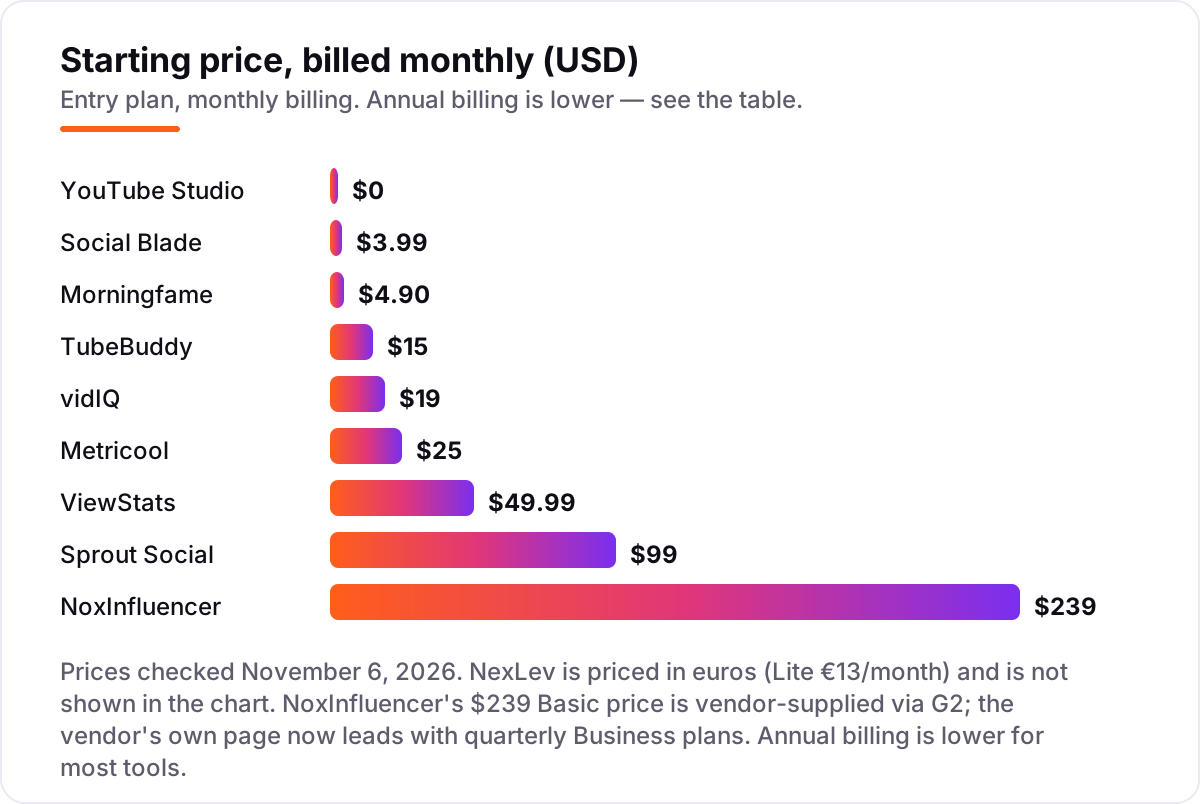
Take a solo creator who buys the two most common paid tools together: vidIQ Boost at $19 a month and ViewStats Pro at $49.99 a month. That is $68.99 a month, or $827.88 over a year on monthly billing. Switch both to annual billing and the bill falls to $16.58 plus $39.99 a month — $678.84 a year, a saving of about $149 for the same tools. The annual discount is real money here, but only buy the year if you have already run a paid month and the research changed what you filmed.
The cheaper path is just as real. Morningfame Basic at $4.90 a month costs $58.80 a year, and Social Blade Bronze at $3.99 a month costs $47.88 — together under $107 a year for guided analytics plus extended public stats, against $828 for the vidIQ and ViewStats pairing. The difference is what you get: the cheaper pair coaches and checks, while the dearer pair researches outliers and keywords at depth. A creator with a small channel should start cheap and upgrade when the research, not the price, becomes the limit.
Teams pay a different bill entirely. Three people on Sprout Social Essentials at $99 a seat a month billed monthly costs $297 a month, or $3,564 a year — and that is before the Standard upgrade to $199 a seat a month that adds the inbox. Metricool's brand pricing is kinder to small teams: one Starter plan at $25 a month covers up to 5 brands with no per-seat charge. Count seats and brands before you compare headline prices, because the cheapest card on the pricing page is rarely the cheapest bill for your setup.
Know the difference: YouTube Studio analytics vs third-party estimates
The confusion in this category is between exact data and modeled data. YouTube Studio reports what actually happened on your channel, because the numbers come straight from the platform. Every third-party tool in this list estimates something: Social Blade models earnings from view counts, NoxInfluencer models creator pricing from engagement, and vidIQ and TubeBuddy score keywords with their own formulas. Those estimates are useful for comparisons and planning, but they are not YouTube's numbers, and two tools will give you two different scores for the same video.
There is a second, quieter confusion: analytics tools are not optimization tools. An analytics tool tells you what happened; an optimization tool changes what happens next. vidIQ and TubeBuddy straddle both jobs, with keyword research and bulk editing, while ViewStats, NexLev and Social Blade are mostly research — they show you what works elsewhere and leave the fixing to you. If you buy a research tool expecting it to fix your metadata, you will be disappointed.
A third distinction worth knowing is your own channel versus everyone else's. YouTube Studio only ever shows your own channel, in full detail. Social Blade, ViewStats, NexLev and NoxInfluencer mostly show other people's channels, in public detail. The right setup uses both: Studio for the truth about your channel, and one outward-looking tool for what to make next. Buying two outward-looking tools usually means paying twice for the same competitor data.
Quick comparison: tool type by need
| Buyer | Best pick | Why |
|---|---|---|
| New creator on a budget | Morningfame | Coaching plus keyword research for small channels at $4.90/month |
| Most creators | vidIQ | Keyword research, trends and daily ideas from $19/month |
| Big back catalog to fix | TubeBuddy | Bulk editing and A/B testing from $15/month |
| Checking any public channel | Social Blade | Free public stats and rankings, Bronze from $3.99/month |
| Finding ideas from outliers | ViewStats | Overperforming-video discovery from $49.99/month |
| Teams reporting across networks | Sprout Social | Deep reporting and inbox from $99 a seat a month |
Mistakes to avoid
- Paying for two research tools that answer the same question. vidIQ and TubeBuddy overlap heavily on keyword research, and ViewStats and NexLev overlap on idea discovery. Pick one per job and spend the saving on a year of the one you keep.
- Budgeting on the annual price before a paid trial month. Annual billing saves about $149 a year on vidIQ Boost plus ViewStats Pro, but only if you actually use both for twelve months. Run one paid month first.
- Quoting Social Blade earnings as real income. The earnings figure is a modeled range built from view counts and a generic CPM spread. It is not a payout, and repeating it as one misleads sponsors and creators alike.
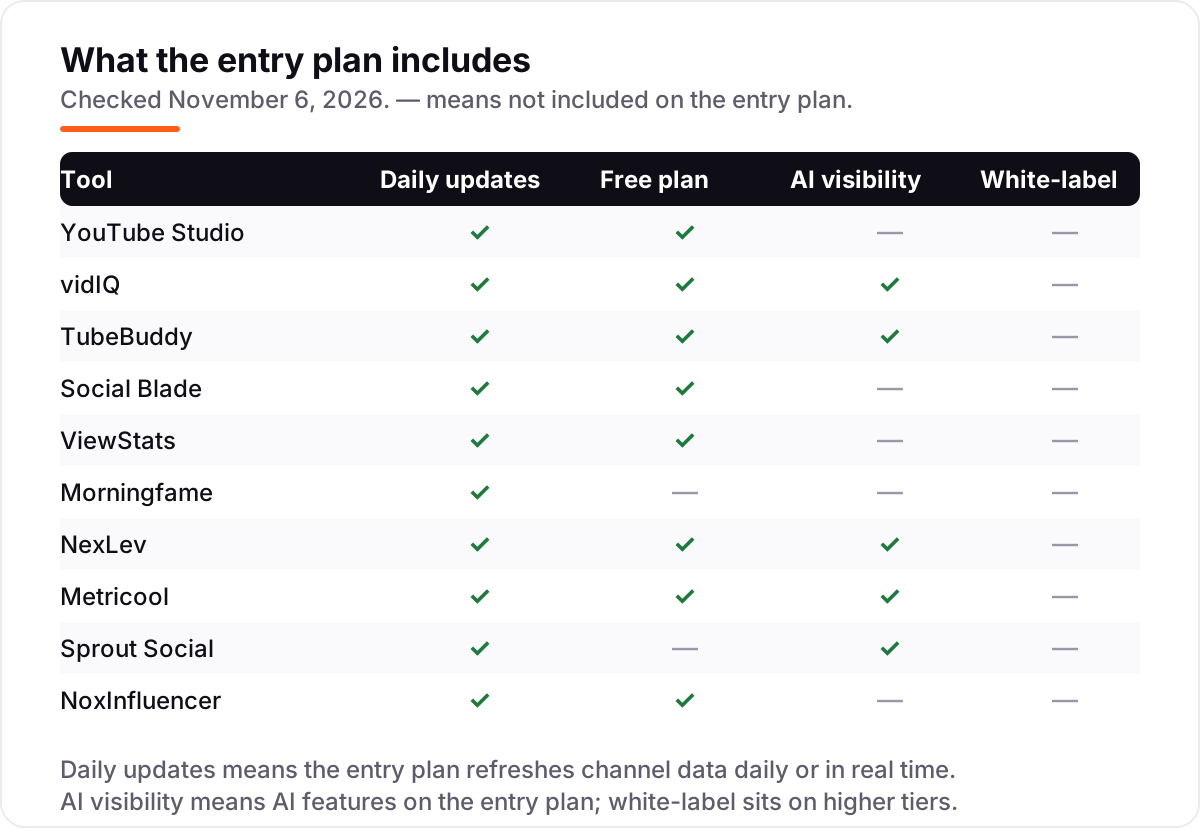
- Buying on the entry price, then finding the feature you need is a tier up. TubeBuddy's A/B testing is on Legend, Sprout Social's inbox is on Standard, and ViewStats' outlier tools are all behind Pro. Read the feature matrix, not the headline price.
- Forgetting the per-seat and per-brand maths. Sprout Social charges per seat, Metricool per brand and vidIQ per channel. A team of three on Sprout Essentials pays $297 a month, not $99 — count your people and brands before you commit.
How we chose
We checked each vendor's own pricing page on November 6, 2026 and recorded the starting price exactly as shown, including the annual-billing figure where the page lists one, and we ranked the tools by fit for the most common buyer — a solo creator growing a channel — not by brand size. Three prices need a note. NoxInfluencer's $239 a month is the vendor-supplied Basic figure listed on G2: the vendor's own pricing page now leads with Business plans at $1,499 a quarter and $3,899 a year, so confirm the $239 figure at checkout. NexLev prices in euros — Lite is €13 a month — so US buyers pay a conversion on top. TubeBuddy's Pro at $15 a month is the US list price read on November 5, 2026; a few sources show $3 to $4.50 a month, which appear to be regional or discounted variants.
Two more caveats. Social Blade's Bronze at $3.99 a month is the monthly-billing figure; one source read on October 29, 2026 lists annual-only pricing from $59.99 a year, so the annual figure may have changed. Ratings come from fresh search-index copies of the exact G2 pages, crawled within the last few days: vidIQ 4.5 out of 5 from 34 reviews, TubeBuddy 4.6 from 44, Social Blade 4.2 from 15, Metricool 4.5 from 98 and Sprout Social 4.4 from 6,873. YouTube Studio, ViewStats, Morningfame and NexLev have no G2 listing, so they carry no rating, and NoxInfluencer's G2 score rests on only 2 reviews, which we do not treat as meaningful. No vendor paid for a place in this list, and none of the links here are affiliate links.
What to do next
Start with YouTube Studio, which you already have, and spend a week reading its retention graphs and traffic sources before you spend anything. Then take the free plan or trial of your top pick — vidIQ for keyword planning, TubeBuddy for bulk fixes, Social Blade for competitor checks — and run one real month of research through it. If the research changes what you film next, pay for the year; if it only confirms what Studio already told you, cancel and keep the money.
If the channel is sorted but new viewers are not finding you, our monthly SEO service handles the visibility side — or compare providers in our guide to SEO companies for small business. Once your tools are in place, find out what's holding your rankings back.
Your stack only works if people find you
SerpAstra fixes what keeps your site off page one and makes it easy for AI assistants to recommend.
Get a free audit→Sources we checked (16)
- YouTube Studio — studio.youtube.com (checked November 6, 2026)
- vidIQ pricing — vidiq.com/pricing (checked November 6, 2026)
- TubeBuddy pricing — tubebuddy.com/pricing (checked November 6, 2026)
- Social Blade pricing — socialblade.com/products/subscription/personal (checked November 6, 2026)
- ViewStats — viewstats.com (checked November 6, 2026)
- Morningfame pricing — morningfame.com/pricing (checked November 6, 2026)
- NexLev pricing — nexlev.io/pricing (checked November 6, 2026)
- Metricool pricing — metricool.com/pricing (checked November 6, 2026)
- Sprout Social pricing — sproutsocial.com/pricing (checked November 6, 2026)
- NoxInfluencer pricing — noxinfluencer.com/pricing (checked November 6, 2026)
- vidIQ on G2 — g2.com/products/vidiq/reviews (checked November 6, 2026)
- TubeBuddy on G2 — g2.com/products/tubebuddy/reviews (checked November 6, 2026)
- Social Blade on G2 — g2.com/compare/hootsuite-vs-social-blade (checked November 6, 2026)
- Metricool on G2 — g2.com/compare/socialbee-vs-metricool (checked November 6, 2026)
- Sprout Social on G2 — g2.com/compare/buffer-vs-sprout-social (checked November 6, 2026)
- NoxInfluencer pricing on G2 — g2.com/products/noxinfluencer/pricing (checked November 6, 2026)
Shamim
Founder of SerpAstra
A full-stack SEO and digital marketer who spends most days on Local SEO for dental practices, AI search visibility and lead generation.
Frequently asked questions
What is the best YouTube analytics tool?
YouTube Studio is the best starting point because it is free and its data is exact. For paid help, vidIQ Boost at $19 a month is the best all-round pick for keyword research and video SEO, while TubeBuddy Pro at $15 a month wins for creators with a large back catalog to fix in bulk.
How much do YouTube analytics tools cost?
Entry prices run from $0 to $239 a month. YouTube Studio and Social Blade are free, Morningfame starts at $4.90 a month, and the two established workflow tools cost $15 to $19 a month. Team suites are dearer: Sprout Social starts at $99 a seat a month and NoxInfluencer at $239 a month.
Is YouTube Studio enough on its own?
For understanding your own channel, yes — Studio reports exact views, watch time, retention and revenue, and no third-party tool improves on that accuracy. What Studio cannot do is research competitors, score keywords or test thumbnails, so most growing creators add one research tool alongside it.
Are Social Blade's earnings estimates accurate?
No, not as paychecks. Social Blade estimates earnings by multiplying view counts against a wide, generic CPM range, and it has no access to a channel's real AdSense account. Treat the figure as a rough direction for comparing channels, and never quote it as what a creator actually earns.
Do I need both vidIQ and TubeBuddy?
Usually not. The two tools overlap heavily on keyword research and video SEO, so paying for both buys the same answers twice. Pick vidIQ if your bottleneck is choosing what to film, and TubeBuddy if your bottleneck is fixing and testing videos you have already published.
What is the cheapest YouTube analytics tool?
YouTube Studio and Social Blade are both free, and they cover exact channel data and public channel checks respectively. The cheapest paid plan here is Social Blade Bronze at $3.99 a month, followed by Morningfame Basic at $4.90 a month for guided, coaching-style analytics.
Can I track my competitors' YouTube channels?
Yes. Social Blade shows any public channel's subscribers, views and growth for free, ViewStats tracks outliers and competitor performance from $49.99 a month, and vidIQ and TubeBuddy both include competitor tracking on paid plans. Only YouTube Studio is limited to your own channel.
Free SEO and AI visibility audit
Find out what is holding your rankings back
Send us your site. Within 2 business days you get a written audit, an AI visibility check and a short fix list ranked by impact. Free, with no contract attached.
Request my free audit→Related guides
 Digital Marketing & Ads10 Best AI Tools for YouTube Automation in 2026, ComparedCompare the 10 best ai tools for youtube automation on price, free plans and AI features, with every starting price checked November 5, 2026.Read guide →
 Digital Marketing & Ads8 Best AI Tools for YouTube Content Creation in 2026, ComparedCompare the 8 best ai tools for youtube content creation in 2026 on price, free plans and AI features, with every price checked November 5, 2026.Read guide →
 Digital Marketing & Ads10 Best AI YouTube Thumbnail Generator Tools in 2026, ComparedCompare the 10 best ai youtube thumbnail generator tools on price, free plans, AI generation and A/B testing, with every price checked November 5, 2026.Read guide →