
6 Best Free Rendering Software in 2026, Compared
Compare the 6 best free rendering software for 3D, architecture and product renders, with each free licence and commercial-use limits checked on vendor sites.
 Shamim Mia, Founder, SerpAstraLast verified November 4, 20269 min read
We compare pricing pages, documentation and public reviews. We never accept payment for rankings.
Key takeaways
- Blender is the only renderer here that is free for any use with no conditions: it is open source under the GNU GPL, with Cycles and Eevee render engines built in.
- Twinmotion and Unreal Engine are free for companies under $1 million a year in gross revenue, including commercial work; above that, Twinmotion costs $445 a seat a year and Unreal $1,850.
- D5 Render's free Community edition renders up to 16K images but is licensed for non-commercial use only; Pro costs $30 a month billed annually.
- Read the licence before client work: D5 Community and Fusion's personal-use licence both rule out commercial projects.
On this page
Quick comparison
| Tool | Best for | Starting price | Free plan |
|---|---|---|---|
| Blender | Anyone who wants a full 3D suite with production renderers, free for any use | Free (open source) | Yes (any use) |
| Twinmotion | Architects and small studios that want fast real-time architectural renders, free under $1M revenue | Free (<$1M revenue) | Yes (<$1M revenue) |
| D5 Render | Students and hobbyists who want high-quality real-time architectural renders for non-commercial work | Free; Pro $30/mo (annual) | Yes (non-commercial) |
| Unreal Engine | Visualisation specialists who want maximum real-time control, free under $1M revenue | Free (<$1M revenue) | Yes (<$1M revenue) |
| Autodesk Fusion | Hobbyists and makers who want to render their own product and part designs inside CAD | Free (personal use) | Yes (non-commercial) |
| Sweet Home 3D | Homeowners who want simple free interior renders of a floor plan, offline | Free (open source) | Yes (open source) |
Make one of these tools?
We re-check this list every quarter. Send a correction, request a review, or ask about a clearly labeled sponsored spot.
Request a listingThe best free rendering software

Blender
Best for: Anyone who wants a full 3D suite with production renderers, free for any use
Blender is the safest free choice because there are no strings: it is open source under the GNU GPL, with no paid tier or feature locks, and you can use it for client work. It ships with two render engines, Cycles for physically based path tracing and Eevee for fast real-time previews, and the same program handles modelling, texturing, lighting and animation.
The cost is time. The interface is dense and takes weeks to learn, and there is no commercial support, only documentation and a very large community. That community is also its strength: almost every rendering question already has a tutorial. It is rated 4.6 out of 5 on G2 from 319 reviews.
What we like
- Completely free and open source under the GNU GPL, with no paid tier or feature locks
- Ships two render engines: Cycles for physically based path tracing and Eevee for fast real-time previews
- One program covers modelling, texturing, lighting, animation and rendering
- Largest tutorial library in 3D, so almost every rendering question already has an answer
Watch out for
- Cycles path tracing looks more convincing than real-time tools, but each frame can take minutes or hours
- Dense interface takes weeks to learn, because one program covers the whole 3D pipeline
- No commercial support included; help comes from the community and documentation

Twinmotion
Best for: Architects and small studios that want fast real-time architectural renders, free under $1M revenue
Twinmotion is Epic Games' real-time visualisation tool for architecture and design. Import a model, drop in materials, vegetation, people and weather, and get images, panoramas and walkthrough videos in minutes rather than hours. For an architect who needs client-ready visuals quickly, it is the fastest free route here.
Since Epic's 2024 licensing change, companies earning under $1 million a year in gross revenue can use Twinmotion free, including for commercial work, as can students, educators and hobbyists. Larger companies pay $445 a seat a year, which includes Twinmotion Cloud. Check the current licence page before relying on the free tier for a growing firm.
What we like
- Free for commercial work at companies under $1 million revenue
- Free for students, educators and hobbyists
- Paid seats at $445 a year include Twinmotion Cloud
Watch out for
- Companies above the revenue threshold must buy seats
- Real-time rendering trades some realism for speed
- Licence terms are set by Epic and have changed before

D5 Render
Best for: Students and hobbyists who want high-quality real-time architectural renders for non-commercial work
D5 Render is a real-time ray-traced renderer popular with architecture students and interior designers. The free Community edition includes unlimited projects, image and panorama rendering up to 16K, and LiveSync and file import from major modelling programs, so a SketchUp or Revit model can be lit and rendered without exporting by hand.
The limit is the licence: Community is for non-commercial use only, and revenue-generating work needs Pro at $30 a month billed annually, or $38 monthly. Pro adds 11,000+ models and materials, VR walkthroughs, frame-sequence rendering and .exr output. Teams costs $59 a seat a month billed annually. Use Community to learn, then budget Pro for client work.
What we like
- Community edition renders images and panoramas up to 16K
- Unlimited projects and LiveSync with major modelling tools
- Pro is $30 a month billed annually, or $360 a year
Watch out for
- Community licence is non-commercial only
- VR walkthroughs, frame sequences and EXR output need Pro
- Free asset library is a fraction of Pro's 11,000+ models and materials

Unreal Engine
Best for: Visualisation specialists who want maximum real-time control, free under $1M revenue
Unreal Engine is the most powerful real-time renderer here, the same engine used for games, film production and interactive configurators. For visualisation studios it means full control over lighting, materials and interaction, and output that can be a still, an animation or an app the client explores. Twinmotion sits on the same technology with a simpler interface.
It is free for individuals and small businesses with less than $1 million in annual gross revenue, and educators and schools have no revenue limit. Above that, non-game commercial users pay $1,850 a seat a year. Expect a steep learning curve; most architects will get results faster in Twinmotion or D5 first.
What we like
- Free for individuals and businesses under $1 million revenue
- No revenue limit for educators and schools
- Same engine used for games, film and interactive experiences
Watch out for
- Steep learning curve compared with Twinmotion or D5
- Non-game companies over $1 million need seats at $1,850 a year
- Built for real-time interactive work more than quick stills

Autodesk Fusion
Best for: Hobbyists and makers who want to render their own product and part designs inside CAD
Autodesk Fusion is a CAD tool first, but it includes rendering, so a hobbyist can model a product or part and produce a clean presentation image in the same program. The free personal-use licence covers core parametric modelling, 2D drawings and basic CAM, with cloud version history that saves every change.
The personal-use licence is non-commercial and limited to under $1,000 a year in revenue, with a 10-document editable limit. Commercial users need the subscription at $680 a year billed annually, or $85 a month. Files live in Autodesk's cloud, so a poor connection can block access. Pick it when the render is part of a design you are building anyway.
What we like
- Full parametric CAD plus CAM, simulation and PCB tools in one workspace, so a part can go from sketch to 3D-printer toolpath without leaving the app
- Free personal-use licence covers the core modelling tools hobbyists actually use, with a 10-document editable limit
- Cloud version history saves every change, so a failed experiment never loses the working model
- Large tutorial library and maker community, so most beginner questions already have a video answer
Watch out for
- Personal-use licence is non-commercial: earning over $1,000 a year from your designs means the $680/year subscription
- Cloud-based files and sign-in mean a poor connection can block access to your own designs
- Advanced simulation, generative design and some manufacturing tools need paid extensions on top of the subscription

Sweet Home 3D
Best for: Homeowners who want simple free interior renders of a floor plan, offline
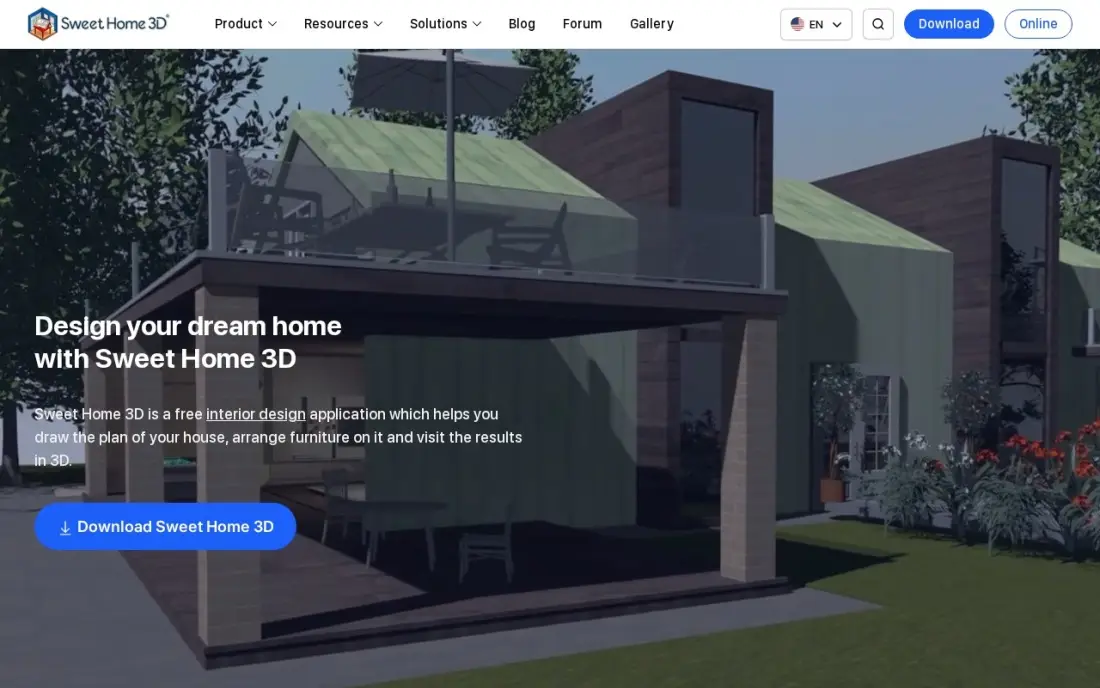
Sweet Home 3D is the simplest renderer here, aimed at homeowners rather than 3D artists. Draw the rooms in 2D, furnish them from the catalogue and the 3D view updates alongside, with a virtual visitor walkthrough and photo renderings of the finished room. It is free and open source under the GNU GPL, runs offline on Windows, macOS and Linux, and needs no account.
Its renders will not match Blender or D5 for realism, and it has no roof tool or terrain modelling, so it suits interiors rather than whole exteriors. The interface looks dated, and DWG export needs a plug-in. The Mac App Store edition is a separate paid subscription at $49.99 a year.
What we like
- Completely free and open source under the GNU GPL, with no account and no subscription
- Runs offline on Windows, macOS and Linux, plus a free online version in any WebGL browser
- Draws rooms in 2D, furnishes them from the catalog and shows a live 3D view with a virtual visitor walkthrough
- Plug-ins add features like DWG export, and the community supplies extra furniture libraries
Watch out for
- No built-in roof tool and no terrain modeling, so it cannot plan a whole house exterior
- The interface looks dated next to the browser tools, and DWG export needs a plug-in
- The Mac App Store edition is a separate paid subscription, $49.99 a year, for the larger catalog
The best free rendering software turns a 3D model into an image good enough to show a client, without a licence fee — but "free" means different things on each tool. We compared six options, from open-source suites to real-time engines with revenue thresholds and non-commercial editions, on render quality, speed and exactly what each free licence allows, with terms checked on vendor pages in November 2026.
How to choose the best free rendering software
- Read the licence first. Some free editions are for non-commercial use only; others are free for commercial work up to a revenue limit.
- Pick real-time or offline. Real-time tools give instant previews and quick exports; offline path tracers give more realism at the cost of render time.
- Check the import path. LiveSync or direct import from SketchUp, Revit or Rhino saves hours of exporting and fixing models.
- Look at the asset library. Furniture, plants, people and materials make or break architectural renders, and free tiers often include fewer.
- Match your graphics card. Real-time renderers lean on the GPU; an older laptop may struggle with D5 or Unreal.
- Plan the upgrade. If you will take paid work, know what the commercial licence costs before you build a workflow on the free one.
Great renders only win clients if prospects see them. If you run a design or architecture practice, our local SEO service helps you show up when people search nearby, and the free article schema generator helps portfolio and project pages appear properly in search.
Which free rendering software fits your situation
A freelancer who wants to take paid work with no licence risk. Blender is the only tool here that is free for any use with no conditions, under the GNU GPL. Cycles handles the realistic hero image and Eevee gives fast previews in the same program. The trade-off is learning time: the interface takes weeks to learn, and support comes from documentation and the community rather than a vendor.
A small architecture studio under $1 million in revenue. Twinmotion is the fastest free route to client-ready images, panoramas and walkthrough videos, and it is free for commercial work below that revenue threshold. Review the threshold each year, because a firm that grows past it pays $445 a seat a year, and Epic has changed the licence terms before. Unreal Engine sits on the same technology if you later need full control, but expect a much steeper learning curve.
An architecture or interior design student. D5 Render Community gives unlimited projects, 16K image and panorama renders and LiveSync with major modelling tools, which is plenty for coursework and a portfolio. It is non-commercial only, and VR walkthroughs, frame sequences and EXR output need Pro at $30 a month billed annually. Plan that upgrade before your first paid client.
A maker or hobbyist designing products and parts. Autodesk Fusion makes sense when the render is part of a design you are already building, since modelling, CAM and rendering live in one workspace. The personal-use licence is non-commercial, capped at under $1,000 a year in revenue and 10 editable documents, and files sit in Autodesk's cloud, so a poor connection can block access.
A homeowner planning a room or a renovation. Sweet Home 3D is the simplest choice: draw the rooms in 2D, furnish them from the catalogue and take photo renderings, offline and without an account. It will not match Blender or D5 for realism, and it has no roof or terrain tools, so use it for interiors rather than full exterior plans.
Free rendering software pricing: what you will actually pay
For students, hobbyists and personal projects, all six tools here cost nothing. The cost appears with commercial work. Blender stays free regardless. Twinmotion and Unreal Engine stay free while your company earns under $1 million a year in gross revenue; a firm above that pays $445 a seat a year for Twinmotion or $1,850 a seat a year for Unreal Engine, so a three-person visualisation team would pay $1,335 or $5,550 a year.
D5 Render needs Pro for any commercial work: $30 a month billed annually, or $360 a year, versus $38 a month, or $456 a year, billed monthly. Teams costs $59 a seat a month billed annually. Autodesk Fusion's commercial subscription is $680 a year, or $85 a month. Sweet Home 3D is free on every desktop platform, with only the Mac App Store edition priced at $49.99 a year.
Know the difference: real-time vs path-traced rendering
Real-time renderers draw the final scene continuously, the way a video game does, so you see lighting and materials change as you edit and can export a still or a walkthrough video in seconds. Twinmotion, D5 Render and Unreal Engine work this way, and they are why architects can now produce client visuals the same day as the model.
Path-traced renderers such as Blender's Cycles simulate light bouncing around the scene sample by sample. The result handles glass, soft shadows and indirect light more convincingly, but each frame can take minutes or hours. Many artists use both: real-time for design reviews and animations, path tracing for the hero image that goes on the website.
Quick comparison: tool type by need
| Buyer | Best pick | Why |
|---|---|---|
| Any use, no conditions | Blender | Open source GPL suite with Cycles and Eevee |
| Architects under $1M revenue | Twinmotion | Free commercial real-time renders; $445/seat/year above |
| Students and hobbyists | D5 Render | Free Community edition, 16K renders, non-commercial |
| Visualisation specialists | Unreal Engine | Full real-time control, free under $1M revenue |
| Product designers and makers | Autodesk Fusion | Rendering inside free personal-use CAD |
| Homeowners | Sweet Home 3D | Free offline floor plans with photo renderings |
Mistakes to avoid
- Using a non-commercial licence for client work. D5 Community and Fusion personal use both forbid it; budget the paid licence first.
- Ignoring the revenue threshold. Twinmotion and Unreal are free only below $1 million in annual gross revenue; review it each year.
- Underpowering the GPU. Real-time renderers on weak graphics cards crash or crawl; test on your own hardware before a deadline.
- Rendering a messy model. Overlapping faces and missing materials show up in every render; clean the model before lighting it.
- Skipping composition. Camera height, lens and light direction matter more than render settings for a convincing image.
Related comparisons: Website Design Services · Publishing Software · Presentation Platforms · Platforms for Artists
How we chose
We read each vendor's licensing or pricing page in November 2026 and recorded who can use each tool free, what the free edition restricts and what the commercial licence costs, exactly as published; for Twinmotion, the current terms come from Epic's licensing announcement. We favoured tools that produce client-quality renders and grouped them by licence type, because that decides whether a free tool is usable for paid work. Ratings come from G2 pages checked on the dates shown in the sources. No vendor paid for a place in this list, and none of the links here are affiliate links.
What to do next
Take one model you already have and render the same view in Blender and in Twinmotion or D5, then compare quality, speed and licence fit for your work. If your renders are ready but too few clients see your portfolio, book a free SEO consultation.
Frequently asked questions
What is the best free rendering software?
Blender is the best free rendering software overall because it is open source and free for any use, with the Cycles and Eevee engines. Twinmotion is the best free option for fast architectural renders at companies under $1 million revenue, and D5 Render Community is excellent for non-commercial work.
Which free rendering software can I use commercially?
Blender can be used commercially with no conditions. Twinmotion and Unreal Engine are free for commercial work at companies under $1 million in annual gross revenue. D5 Render Community and Fusion's personal-use licence are non-commercial only.
Is Twinmotion free?
Yes, for companies earning under $1 million a year in gross revenue, and for students, educators and hobbyists. Larger companies pay $445 a seat a year, which includes Twinmotion Cloud.
Is D5 Render free?
The Community edition is free with unlimited projects and 16K image rendering, but it is licensed for non-commercial use only. Commercial work needs Pro at $30 a month billed annually, or $38 billed monthly.
What is the difference between real-time and offline rendering?
Real-time renderers such as Twinmotion, D5 and Unreal Engine show the final image as you work and export in seconds. Offline renderers such as Blender's Cycles trace light more thoroughly for higher realism but take minutes or hours per frame.
What computer do I need for free rendering software?
Real-time tools rely heavily on the graphics card, so a recent dedicated GPU with plenty of video memory makes the biggest difference. Check each vendor's system requirements before installing, especially for D5 Render and Unreal Engine.
Sources we checked (9)
- Blender — www.blender.org/download (checked November 10, 2026)
- Blender reviews on G2 (checked November 10, 2026)
- Twinmotion — www.twinmotion.com/news/we-are-updating-twinmotion-pricing-in-late-april (checked November 16, 2026)
- D5 Render — www.d5render.com/pricing (checked November 16, 2026)
- Unreal Engine — www.unrealengine.com/en-US/license (checked November 16, 2026)
- Autodesk Fusion — www.autodesk.com/products/fusion-360/subscribe (checked November 4, 2026)
- Autodesk Fusion reviews on G2 (checked November 4, 2026)
- Sweet Home 3D — www.sweethome3d.com (checked November 12, 2026)
- Sweet Home 3D reviews on G2 (checked November 12, 2026)
Make one of these tools?
We re-check this list every quarter. Send a correction, request a review, or ask about a clearly labeled sponsored spot.
Request a listingShamim
Founder of SerpAstra
A full-stack digital marketer and SEO strategist covering technical and local SEO, AI search visibility, paid ads and lead generation for local businesses, e-commerce brands and SaaS teams.
Free SEO and AI visibility audit
Find out what is holding your rankings back
Send us your site. Within 2 business days you get a written audit, an AI visibility check and a short fix list ranked by impact. Free, with no contract attached.
Request my free audit→Related buying guides
 Graphic Design & Creative9 Best 3D Design Software in 2026, ComparedCompare the 9 best 3D design software for modeling, animation, product and architectural design, with free versions, licences and real yearly costs checked.Read guide →
 Architecture & Interior Design9 Best Software for Architects in 2026, ComparedCompare the 9 best software for architects across BIM, 3D modeling, rendering, PDF review and practice management, with real annual prices from vendor pages.Read guide →
 Architecture & Interior Design10 Best Free CAD Software for Home Design in 2026, ComparedCompare the 10 best free cad software for home design options on price, free plans, 3D views and rendering, with every price checked November 4, 2026.Read guide →