
10 Best Paid Email Services in 2026: Prices, Pros and Cons Compared
Compare the 10 best paid email services in 2026 on price, free plans and automation, with every real starting price checked on November 6, 2026.
 Shamim Mia, Founder, SerpAstraLast verified November 6, 202614 min read
We compare pricing pages, documentation and public reviews. We never accept payment for rankings.

Key takeaways
- Brevo is the cheapest way in at $9/month for 5,000 emails, MailerLite is the easiest at $12/month, and Mailchimp is the best-connected at $13/month — those three cover most small businesses.
- Free plans are real but smaller than they used to be: Brevo sends 300 emails a day with up to 100,000 contacts, Kit covers up to 10,000 subscribers, and Mailchimp covers 250 contacts.
- The single most important buying factor is how the price scales with your list — Mailchimp charges for unsubscribed contacts, and ActiveCampaign jumps from $19 to $149 a month between 1,000 and 10,000 contacts.
- Prices below were confirmed against the vendors' own pricing pages on November 6, 2026, except ActiveCampaign, whose prices are third-party reported because it publishes none. Ratings are G2, checked November 6, 2026.
On this page
Quick comparison
| Tool | Best for | Starting price | Free plan |
|---|---|---|---|
| Mailchimp | Small businesses that want the biggest template and integration library in one familiar platform | $13/mo | Yes (250 contacts) |
| Brevo | Businesses with a large list that email it a few times a month and want SMS and CRM in the same account | $9/mo | Yes (300/day) |
| Constant Contact | Small businesses and nonprofits that want phone support and guided setup instead of learning a new tool alone | $12/mo | No (30-day trial) |
| MailerLite | Small teams that want a clean editor, solid automation and the highest-rated support in this list at a low price | $12/mo | Yes (250 subscribers) |
| GetResponse | Businesses that want unlimited sends plus landing pages, webinars and funnels in one subscription | $19/mo | Yes (500 contacts) |
| ActiveCampaign | Marketers who need deep, behavior-based automation and a built-in CRM and are ready to learn the tool | $19/mo | No (14-day trial) |
| HubSpot Marketing Hub | Teams that already run sales and service on HubSpot and want email on the same contact record | $20/mo per seat | Yes (2,000 sends) |
| Kit | Creators and newsletter writers who sell digital products and want automations built for audiences, not stores | $39/mo | Yes (10,000 subs) |
| AWeber | Small businesses that want a simple, long-running tool with real human support and built-in landing pages | $15/mo | No (14-day trial) |
| Omnisend | Online stores on Shopify or WooCommerce that want email, SMS and web push built for ecommerce | $16/mo | Yes (250 contacts) |
Make one of these tools?
We re-check this list every quarter. Send a correction, request a review, or ask about a clearly labeled sponsored spot.
Request a listingThe best paid email services

Mailchimp
Best for: Small businesses that want the biggest template and integration library in one familiar platform
Mailchimp is the name most small businesses start with, and the reason is breadth: Essentials covers campaigns, landing pages and signup forms, and it connects to almost any store or site through the largest integration library in this list. For Shopify or WooCommerce shops, the ecommerce automation — abandoned cart, win-back and post-purchase flows — is the real selling point, and 24/7 support starts on Essentials.
The catch is how the bill grows with the list. Essentials costs $13 a month for 500 contacts but $75 at 5,000 and $110 at 10,000, and unsubscribed contacts count toward the tier until you archive them. The free plan covers 250 contacts and 500 sends a month, with no automation. Pick Mailchimp when you want the familiar all-rounder your future tools will already connect to.
What we like
- The widest integration library in this list, with native connections to Shopify, WooCommerce and most CRMs
- Clean drag-and-drop builder with a large template library that looks good with little effort
- 24/7 email and chat support from the entry paid plan, not only on the top tier
- Free plan covers 250 contacts, so a brand-new list costs nothing to start
Watch out for
- Price climbs steeply with list size — Essentials is $75/month at 5,000 contacts and $110 at 10,000
- Unsubscribed and non-subscribed contacts count toward your billing tier until you archive or delete them
- Generative AI writing and design tools sit on Standard ($20/month), not Essentials

Brevo
Best for: Businesses with a large list that email it a few times a month and want SMS and CRM in the same account
Brevo wins on the pricing model. Because you pay for emails sent rather than contacts stored, a business with a big list and a monthly newsletter pays $9 a month for 5,000 emails while contact-based rivals charge for every subscriber. The free plan allows 300 emails a day with up to 100,000 contacts, and SMS, WhatsApp and a basic CRM sit in the same account.
The catch is the contact cap hiding inside the volume tiers. Starter at $9 stores only 500 contacts, so a 5,000-person list cannot sit on the cheapest tier even if it emails once a month — that list needs the 20,000-email tier at $32 a month. Removing the Brevo logo costs another $12 a month. Choose Brevo when the list is large and sending is light.
What we like
- Bills by emails sent, not contacts stored, so a big list emailed rarely stays cheap
- The most generous free plan here: 300 emails a day with up to 100,000 contacts
- SMS, WhatsApp, transactional email and a basic CRM live in the same account
- AI content generator included on Starter, not held for a higher tier
Watch out for
- The $9 tier stores only 500 contacts, so a 5,000-contact list needs the $32/month tier at 20,000 emails
- Removing the Brevo logo costs an extra $12/month on Starter
- Automation, A/B testing and landing pages wait for Standard at $18/month

Constant Contact
Best for: Small businesses and nonprofits that want phone support and guided setup instead of learning a new tool alone
Constant Contact is the guided option. The editor is plain, the templates are built for a monthly newsletter rather than a sales funnel, and the support team — phone and chat — has a reputation for walking beginners through setup step by step. Event marketing and social posting are built in, which suits nonprofits, clubs and local businesses that promote events as much as they send email.
The trade-off is a thin entry plan. Lite allows one automation template and one user, and there is no free plan at all — only a 30-day trial. The price also jumps fast past 500 contacts, reaching $30 a month at 1,000. Pick Constant Contact when hand-holding matters more than automation depth; pick MailerLite when the same $12 a month should buy automations, landing pages and an AI assistant.
What we like
- Phone and chat support with a reputation for walking beginners through setup step by step
- Built-in event marketing and social posting, which most rivals here do not include
- Simple editor and templates that suit owners who send a newsletter, not a funnel
- Nonprofits get 20% off at six months and 30% off at twelve months
Watch out for
- Lite allows only one automation template and one user, so teams outgrow it fast
- No free plan — the 30-day trial is the only way to try it without paying
- Price jumps sharply past 500 contacts: Lite is $30/month at 1,000 contacts

MailerLite
Best for: Small teams that want a clean editor, solid automation and the highest-rated support in this list at a low price
MailerLite is the easiest tool in this list to learn, and the G2 numbers back that up: 4.6 out of 5, the highest rating here, with reviewers praising the clean editor and the support team most. The Comfort plan costs $12 a month and includes the full feature set — dynamic emails, multivariate testing, smart sending and the AI writing assistant — rather than holding features for higher tiers.
The limits are the free plan and the automation cap. The free tier covers only 250 subscribers and 2,500 emails a month, and Comfort stops at 50 automations, so heavy journey builders need Power at $25 a month. There are also fewer native ecommerce integrations than Mailchimp or Omnisend. Choose MailerLite when the sender is a person, not a team, and the newsletter is the product.
What we like
- The highest G2 rating in this list at 4.6 out of 5, with reviewers praising the support
- Clean, fast editor with landing pages, signup forms and paid-newsletter selling built in
- AI writing assistant and smart sending included on Comfort, not reserved for Power
- Simple subscriber-based pricing with no separate charge for extra users up to 3 seats
Watch out for
- Free plan covers only 250 subscribers and 2,500 emails a month, down from the old limits
- Comfort caps at 50 automations — unlimited automation waits for Power at $25/month
- Fewer native ecommerce integrations than Mailchimp or Omnisend

GetResponse
Best for: Businesses that want unlimited sends plus landing pages, webinars and funnels in one subscription
GetResponse is the all-in-one pick. Starter costs $19 a month for 1,000 contacts and includes unlimited sends, a landing page builder, signup forms and an AI email generator, plus webinars and sales funnels in the same account — features rivals sell as separate products. The free plan covers 500 contacts and 2,500 emails a month, and 24/7 live support is included on every plan.
The catch is the single automation workflow on Starter. One welcome series is fine, but a business running abandoned cart, win-back and onboarding journeys together needs Marketer at $59 a month. Prices also rise with list size, and each list counts separately for billing. Pick GetResponse when the plan is to send often and sell through webinars and funnels; pick MailerLite when one good workflow is enough.
What we like
- Unlimited monthly sends on every paid plan, so heavy senders never hit a send cap
- Landing page builder, signup forms and an AI email generator included on Starter
- Webinars and sales funnels in the same account, which rivals charge extra for
- 24/7 live support on every plan, including the free one
Watch out for
- Only one automation workflow on Starter — unlimited workflows need Marketer at $59/month
- Prices rise with list size, and each list counts separately for billing
- No free automation on the free plan, and the 14-day trial is short for testing funnels

ActiveCampaign
Best for: Marketers who need deep, behavior-based automation and a built-in CRM and are ready to learn the tool
ActiveCampaign has the deepest automation in this list. The visual builder handles branching, tagging, lead scoring and goal-aware journeys, and the built-in CRM keeps deals and email in one record, so a sales team can see exactly which campaign moved a contact. More than 110 native integrations cover most CRMs, stores and helpdesks, and predictive sending is included from Starter.
The price needs careful reading. ActiveCampaign publishes no prices at all, so the $19 monthly and $15 annual-billing figures are third-party reported, not vendor-verified. The cost also scales hard with list size: Starter is $149 a month at 10,000 contacts, nearly eight times the entry price. And since November 2025, new accounts are billed for every contact, including unsubscribed ones. Pick it when automation is the job, not just sending.
What we like
- The deepest automation builder in this list, with branching, tagging and lead scoring
- Built-in CRM with deal pipelines, so email and sales live in one record
- More than 110 native integrations, covering most CRMs, stores and helpdesks
- Predictive sending and AI automation help included from the Starter plan
Watch out for
- The vendor publishes no prices — the $19 monthly and $15 annual rates are third-party reported
- Starter caps each automation at 5 actions, so real journeys need Plus at $49/month billed annually
- Price climbs fast: Starter is $99/month at 5,000 contacts and $149 at 10,000

HubSpot Marketing Hub
Best for: Teams that already run sales and service on HubSpot and want email on the same contact record
HubSpot Marketing Hub makes sense when the CRM is already HubSpot. Email, landing pages, live chat and ads share one contact record, so there is no syncing to maintain and reporting can tie an email open to a deal and a dollar amount. The free plan covers 2,000 sends a month, Starter removes the HubSpot branding, and the $20-a-seat list price is cut to $7 a seat billed annually for new customers on the current promo.
The warning is the cliff. Marketing Hub Professional starts at $800 a month, and Starter automation is basic — real workflows, A/B testing and lead scoring live on Professional. Per-seat pricing also means a five-person team pays $100 a month before contact overages. Pick HubSpot when the whole business already runs on it; pick a standalone sender when email is the only job.
What we like
- Email, CRM, landing pages and live chat share one contact record with no syncing to maintain
- Free plan covers 2,000 sends a month and the free CRM has no time limit
- 192 integrations, the widest connector list in this roundup
- Strong reporting that ties email opens and clicks to deals and revenue
Watch out for
- The Starter-to-Professional cliff is steep: Marketing Hub Professional starts at $800/month
- Priced per seat, so a five-person team pays $100/month before contact overages
- Automation is basic on Starter — real workflows need Professional

Kit
Best for: Creators and newsletter writers who sell digital products and want automations built for audiences, not stores
Kit is built for creators, not stores. The free plan covers up to 10,000 subscribers with unlimited broadcasts, forms and landing pages, and Creator adds visual automations, sequences and built-in commerce, so a newsletter writer can sell a course or ebook without a separate checkout tool. Tagging and segmentation stay simple by design, and the free migration service moves a list and its automations from another tool.
The catch is that the free plan has no automations or sequences, so a welcome series needs the Creator plan at $39 a month — the September 2025 reprice raised it from $25, so roundups show the stale $25 or $29 figures. Prices climb fast: $59 at 3,000 subscribers and $139 at 10,000. Choose Kit when the audience is the business; choose a cheaper sender when it is not.
What we like
- Free plan covers up to 10,000 subscribers with unlimited broadcasts, forms and landing pages
- Visual automations and sequences built for creators, with tagging and segmentation that stay simple
- Built-in commerce sells digital products with no separate checkout tool
- Free migration service moves your list and automations from another tool
Watch out for
- The free plan has had no automations or sequences since September 2026, so a welcome series needs Creator
- Creator at $39/month is the most expensive entry price in this list
- Price rises in steep bands: Creator is $89/month at 5,000 subscribers

AWeber
Best for: Small businesses that want a simple, long-running tool with real human support and built-in landing pages
AWeber is the veteran of this list, in business since 1998, and it shows in the support: 24/7 phone, chat and email with real people, which reviewers still praise. Lite costs $15 a month for 500 subscribers and includes landing pages, web push, paid-subscription selling and AI builders for landing pages and signup forms, so a small business can run a newsletter and a simple sales page from one login.
The limits are the caps and the look. Lite allows only 3 lists, 3 landing pages and 3 automations, and there is no free plan — only a 14-day trial. The editor and templates also look dated next to MailerLite and Mailchimp. Pick AWeber when simple, supported sending matters more than modern design; pick MailerLite when the same $12 a month should buy a fresher editor and more automations.
What we like
- In business since 1998, with 24/7 phone, chat and email support reviewers praise
- AI landing page and signup form builders included, with AI subject-line help on Lite
- Landing pages, web push and paid-subscription selling built into the same account
- Simple pricing with no separate charge for extra users up to 3 seats on Lite
Watch out for
- No free plan — the 14-day trial is the only no-cost way to try it
- Lite caps at 3 lists, 3 landing pages and 3 automations, which small senders outgrow fast
- Editor and templates look dated next to MailerLite and Mailchimp

Omnisend
Best for: Online stores on Shopify or WooCommerce that want email, SMS and web push built for ecommerce
Omnisend is the ecommerce specialist. Standard costs $16 a month for 500 contacts and 6,000 emails, and the automations are built for stores: abandoned cart, browse abandonment and post-purchase flows that sync deeply with Shopify and WooCommerce. Email, SMS and web push sit in one account, and billing counts only subscribers who received automated messages, not unsubscribed contacts.
The catches are the store-first design and the SMS change. Non-ecommerce senders pay for features they will not use, there is no published annual rate, and since May 2026 SMS is not included on Standard — it needs Pro plus a separate credits subscription. New paid users get 30% off the first three months. Pick Omnisend when the store is the business; pick Mailchimp when the store is only part of it.
What we like
- Ecommerce automations built in: abandoned cart, browse abandonment and post-purchase flows
- Email, SMS and web push in one account, with deep Shopify and WooCommerce sync
- Counts only subscribers who received automated messages, not unsubscribed contacts
- 24/7 support on every plan, including the free one
Watch out for
- Built for stores first — non-ecommerce senders pay for features they will not use
- No annual billing option published, so there is no discount for paying yearly
- SMS is not included on Standard since May 2026 — it needs Pro plus a separate credits subscription
The best paid email service for most buyers is the one whose billing unit matches how they actually send: a small list emailed often is cheap on Mailchimp, while a large list emailed rarely is far cheaper on Brevo. We ranked the ten tools below by fit for the most common buyer — a small business or solo marketer sending regular campaigns to a growing list — and every price was checked on the vendor's own pricing page on November 6, 2026, except ActiveCampaign, which publishes no prices.
How to choose the best paid email service
- Check the billing unit first. Mailchimp, MailerLite, Kit and GetResponse charge by contacts or subscribers stored; Brevo charges by emails sent. A large list emailed once a month is far cheaper on Brevo, while a small list emailed daily is cheaper on a contact-priced tool.
- Count the contacts you will have in a year, not today. Every price in this list climbs with list size, and the jumps are steep: Mailchimp Essentials goes from $13 at 500 contacts to $75 at 5,000, and ActiveCampaign Starter from $19 at 1,000 to $99 at 5,000.
- Match the automation to the job. A monthly newsletter needs almost no automation, so MailerLite or Constant Contact is enough. A welcome series, abandoned cart and win-back flow together need GetResponse Marketer or ActiveCampaign Plus, not their entry plans.
- Check what the free plan really covers. Brevo sends 300 emails a day with up to 100,000 contacts, Kit covers 10,000 subscribers, and Mailchimp covers 250 contacts — but Constant Contact, ActiveCampaign and AWeber have no free plan at all, only a trial.
- Think about who else touches the account. HubSpot charges per seat, Mailchimp caps Essentials at 3 users, and Constant Contact Lite allows only one user. A team of three pays more than a solo sender on most tools here.
Email is one system in your stack, not the whole stack. If the business also needs to be found online, our guide to marketing platforms for small business SEO covers the visibility side. And before you send a campaign that links to a new page, run the page title through the free SERP snippet preview tool — it shows exactly how the title and description will look in Google.
Whatever you shortlist, try it with real data before you pay. The free plans and trials in this list are long enough to run one genuine month — your list, your templates, your automations — and that month tells you more than any review can. Check two things in the trial: that the editor lets you build the email you actually send, and that the price at your next list size still fits the budget.
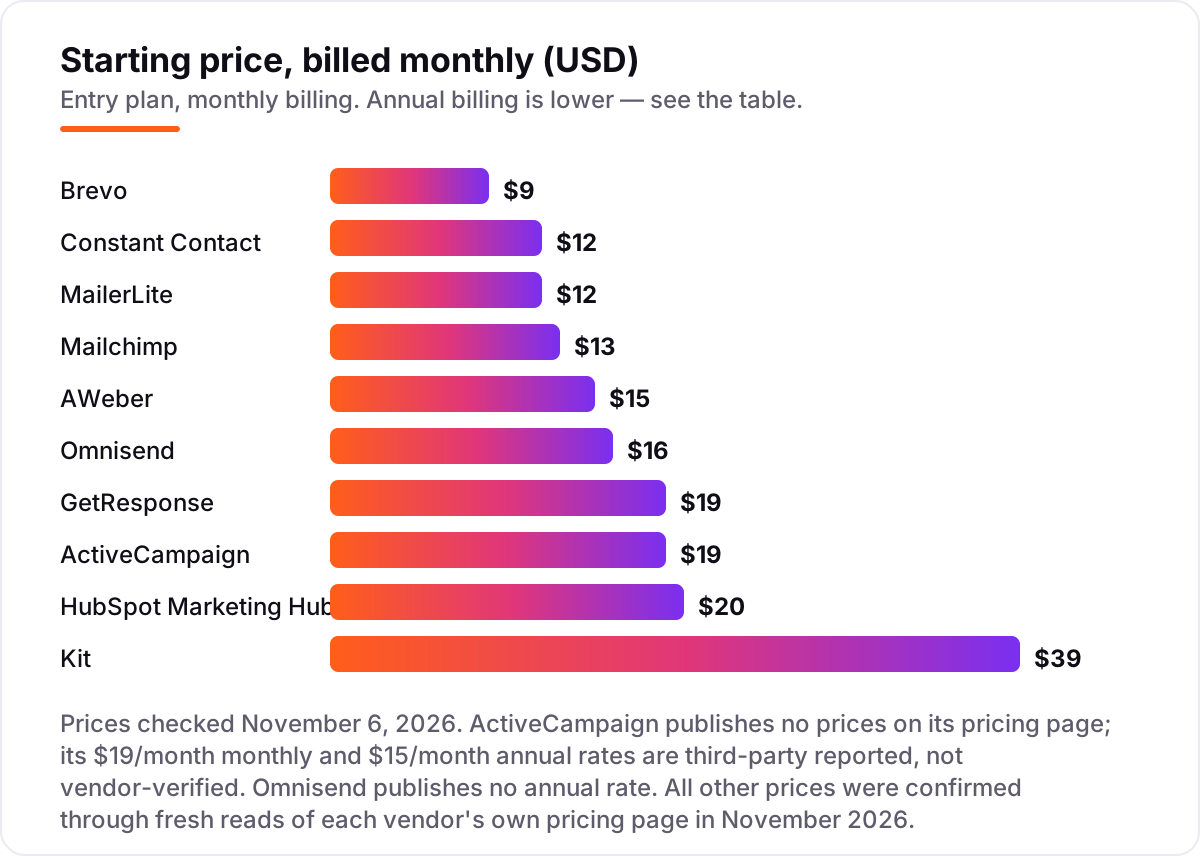
Paid email service pricing: what you will actually pay
Take a 500-contact list mailed once a week, which is about 2,000 emails a month. On list prices, the subscription costs $9 a month on Brevo, $12 on MailerLite Comfort or Constant Contact Lite, $13 on Mailchimp Essentials, $15 on AWeber Lite, $16 on Omnisend Standard, $19 on GetResponse Starter or ActiveCampaign Starter, $20 a seat on HubSpot Marketing Hub Starter, and $39 on Kit Creator. GetResponse, ActiveCampaign, HubSpot and Kit all start their ladders at 1,000 contacts or subscribers, so a 500-contact list pays the 1,000-contact price on those four.
Over a year on monthly billing, that is $108 on Brevo, $144 on MailerLite or Constant Contact, $156 on Mailchimp, $180 on AWeber, $192 on Omnisend, $228 on GetResponse or ActiveCampaign, $240 on HubSpot per seat, and $468 on Kit. Annual billing cuts the bill where it exists: Brevo drops from $9 to $8.08 a month, or $96.96 a year; MailerLite from $12 to $10.80, or $129.60; Constant Contact from $12 to $10.20, or $122.40; AWeber from $15 to $12.50, or $150; GetResponse from $19 to $15.58, or $186.96; ActiveCampaign from $19 to $15, or $180; Kit from $39 to $33, or $390. Mailchimp publishes no annual discount on its marketing plans, and Omnisend publishes no annual rate at all.
The same 500 contacts and the same weekly send cost $96.96 a year at the cheap end and $468 at the dear end — a $371 gap that comes entirely from the billing unit and the plan ladder, not from features. One warning on those annual figures: ActiveCampaign publishes no prices, so its $19 and $15 rates are third-party reported, not vendor-verified, and HubSpot's $7-a-seat figure is a new-customer promo on annual billing only — the list price is $20 a seat.
Now watch what happens when the list grows to 5,000 contacts. Mailchimp Essentials rises to $75 a month, ActiveCampaign Starter to $99, Kit Creator to $89, and GetResponse Starter to $54 — while Brevo charges $32 a month for the 20,000 emails that list needs. The cheapest tool at 500 contacts is not the cheapest at 5,000, which is why the list size a year from now matters more than the list size today. If you run an online store rather than a newsletter, the ecommerce tools differ too — see our guide to the best email marketing platforms for ecommerce.
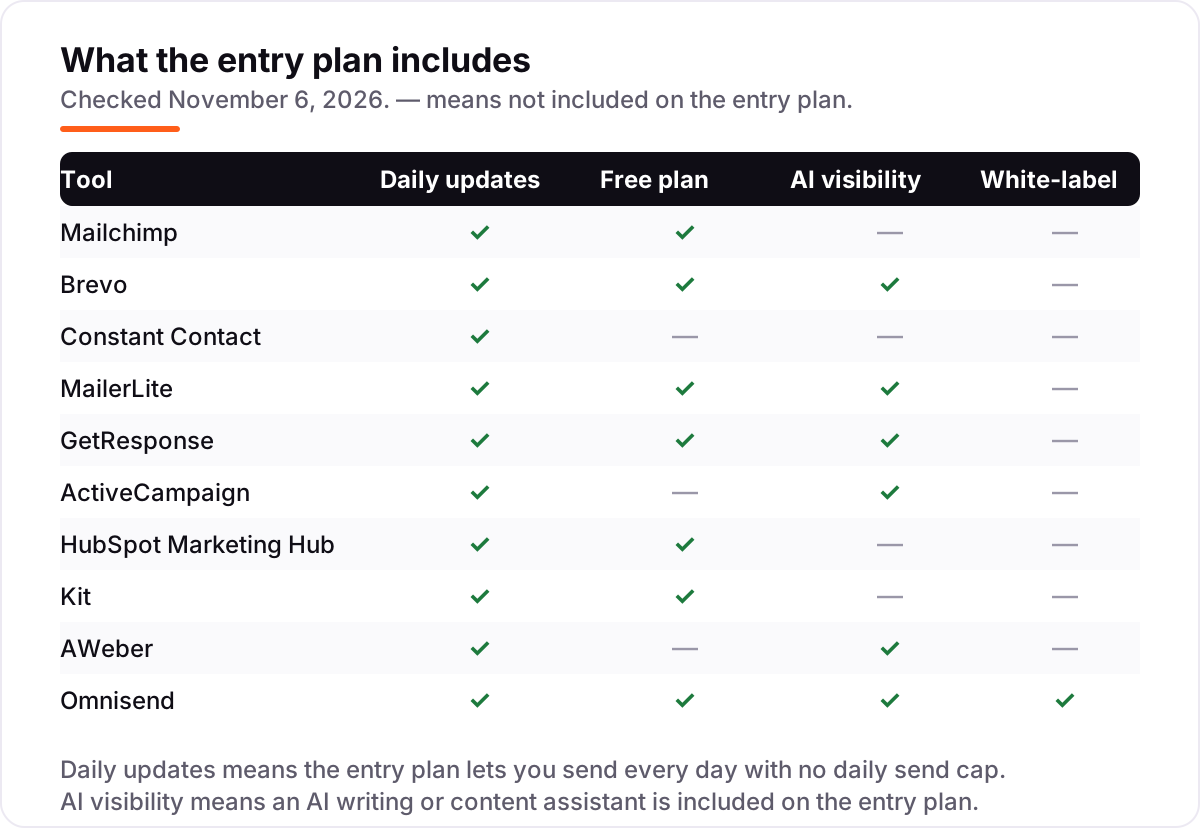
Know the difference: contact pricing vs send pricing
The confusion in this category is the billing unit. Most tools charge by contacts stored: Mailchimp, MailerLite, Kit, GetResponse, ActiveCampaign, Constant Contact, AWeber, Omnisend and HubSpot all price by how many people are on your list, and the bill rises as the list grows — even if you email less often. Brevo is the exception in this list: it charges by emails sent, so the bill rises with sending volume instead of list size.
That difference decides the winner for most buyers. A business with 25,000 contacts sending one newsletter a month pays roughly $32 on Brevo for 20,000 emails, where Mailchimp charges $270-plus for the same list. The same Brevo plan is a bad deal for a small list mailed daily: 500 contacts emailed every day costs more in sends than a flat $12 MailerLite subscription.
There is a second, quieter confusion: the contact count is not always the subscriber count. Mailchimp counts unsubscribed and non-subscribed contacts toward the tier until you archive them, and ActiveCampaign bills every contact on accounts created since November 2025, including unsubscribed ones. Omnisend and Kit, by contrast, count only subscribers who received automated messages or confirmed subscribers. Before you compare two prices, check whose count you are paying for — the same list can sit on two different tiers.
A third distinction worth knowing is the free plan versus the free trial. A free plan never expires but caps contacts, sends or features; a trial gives you the full paid plan for 14 or 30 days and then charges you. Constant Contact, ActiveCampaign and AWeber offer trials only, so the first bill arrives after the trial ends whether you are ready or not.
Quick comparison: tool type by need
| Buyer | Best pick | Why |
|---|---|---|
| Solo sender with a small list | MailerLite | Clean editor, solid automation and the highest G2 rating here, from $12/month |
| Most small businesses | Mailchimp | The familiar all-rounder with the biggest integration library, from $13/month |
| Large list, light sending | Brevo | Bills by emails sent, not contacts stored, from $9/month |
| Business that wants guidance | Constant Contact | Phone support and event marketing built in, from $12/month |
| Automation-first marketer | ActiveCampaign | The deepest workflows and a built-in CRM, from $19/month |
| Online store | Omnisend | Ecommerce automations and SMS in one account, from $16/month |
Mistakes to avoid
- Budgeting on the entry tier. The $9 to $39 prices in this list cover the smallest list size. Price the list you will have in a year: Mailchimp Essentials is $75 a month at 5,000 contacts, and Kit Creator is $89.
- Comparing prices without checking the billing unit. A $9 Brevo plan and a $13 Mailchimp plan are not the same job — one buys 5,000 emails, the other buys 500 contacts. Compare sends against sends and contacts against contacts.
- Trusting a directory price. Several directories still show Kit's old $25 or $29 Creator figures — the current price is $39 a month, or $33 billed annually, after the September 2025 reprice. Always check the vendor's own pricing page, and confirm whether the price shown is monthly or annual billing.
- Buying on the free plan, then finding automation costs extra. Kit's free plan has had no automations or sequences since September 2026, and Mailchimp's free plan has none either. If a welcome series is the job, count the paid plan in the price from day one.
- Forgetting the seats. HubSpot charges $20 per seat, Mailchimp Essentials caps at 3 users, and Constant Contact Lite allows only one. A three-person team pays more than a solo sender on most tools here — price the team, not the individual.
How we chose
We checked each vendor's own pricing page on November 6, 2026 and recorded the starting price exactly as shown, including the annual-billing figure where the page lists one, and we ranked the tools by fit for the most common buyer — a small business or solo marketer sending regular campaigns to a growing list — not by brand size. ActiveCampaign publishes no prices, so its $19 monthly and $15 annual-billing figures are third-party reported, not vendor-verified, and we say so wherever they appear. Ratings come from G2, checked November 6, 2026, with review counts shown. This post is the representative for its overlap group, so the close variant phrase "best email service" is covered in the FAQ where it fits naturally. No vendor paid for a place in this list, and none of the links here are affiliate links.
What to do next
Start with the free plan or trial of your top pick and run one real month of campaigns through it. Check that the editor builds the email you actually send, that the automations trigger when they should, and that the price at your next list size still fits the budget before you commit to a year. If email is sorted but new customers are not finding you, our monthly SEO service handles the visibility side — or compare providers in our guide to email marketing software for small business. Once your tools are in place, find out what's holding your rankings back.
Your stack only works if people find you
SerpAstra fixes what keeps your site off page one and makes it easy for AI assistants to recommend.
Get a free audit→Sources we checked (20)
- Mailchimp pricing — mailchimp.com/pricing (checked November 6, 2026)
- Brevo pricing — brevo.com/pricing (checked November 6, 2026)
- Constant Contact pricing — constantcontact.com/pricing (checked November 6, 2026)
- MailerLite pricing — mailerlite.com/pricing (checked November 6, 2026)
- GetResponse pricing — getresponse.com/pricing (checked November 6, 2026)
- ActiveCampaign pricing — activecampaign.com/pricing (checked November 6, 2026)
- HubSpot Marketing Hub pricing — hubspot.com/pricing/marketing (checked November 6, 2026)
- Kit pricing — kit.com/pricing (checked November 6, 2026)
- AWeber pricing — aweber.com/pricing.htm (checked November 6, 2026)
- Omnisend pricing — omnisend.com/pricing (checked November 6, 2026)
- Mailchimp G2 reviews — g2.com/products/mailchimp/reviews (checked November 6, 2026)
- Brevo G2 reviews — g2.com/products/sendinblue/reviews (checked November 6, 2026)
- Constant Contact G2 reviews — g2.com/products/constant-contact/reviews (checked November 6, 2026)
- MailerLite G2 reviews — g2.com/products/mailerlite/reviews (checked November 6, 2026)
- GetResponse G2 reviews — g2.com/products/getresponse/reviews (checked November 6, 2026)
- ActiveCampaign G2 reviews — g2.com/products/activecampaign/reviews (checked November 6, 2026)
- HubSpot Marketing Hub G2 reviews — g2.com/products/hubspot-marketing-hub/reviews (checked November 6, 2026)
- Kit G2 reviews — g2.com/products/convertkit/reviews (checked November 6, 2026)
- AWeber G2 reviews — g2.com/products/aweber/reviews (checked November 6, 2026)
- Omnisend G2 reviews — g2.com/products/omnisend/reviews (checked November 6, 2026)
Shamim
Founder of SerpAstra
A full-stack SEO and digital marketer who spends most days on Local SEO for dental practices, AI search visibility and lead generation.
Frequently asked questions
What is the best paid email service for a small business?
Mailchimp is the best fit for most small businesses: the widest integrations, solid ecommerce automation and 24/7 support, from $13/month. Brevo is cheaper at $9/month when the list is large and the sending is light, and MailerLite is the easiest at $12/month.
What is the best email service overall?
There is no single best email service — it depends on the buyer. Mailchimp suits most small businesses, Brevo suits large lists emailed rarely, Kit suits creators selling products, and Omnisend suits online stores. Compare the billing unit first, then the automation depth.
How much does a paid email service cost?
Entry prices run from $9 to $39 a month. Brevo starts at $9, MailerLite and Constant Contact at $12, Mailchimp at $13, AWeber at $15, Omnisend at $16, GetResponse and ActiveCampaign at $19, HubSpot at $20 per seat, and Kit at $39. Every price climbs with list size.
Is there a free paid email service?
Most tools here have a free plan with limits: Brevo sends 300 emails a day, Kit covers up to 10,000 subscribers, and Mailchimp, MailerLite, GetResponse and Omnisend cover 250 to 500 contacts. Constant Contact, ActiveCampaign and AWeber have no free plan, only a trial.
What is the difference between Mailchimp and Brevo?
The billing unit. Mailchimp charges by contacts stored, so a 5,000-contact list costs $75 a month on Essentials. Brevo charges by emails sent, so the same list emailed once a month costs far less. Mailchimp has the bigger integration library; Brevo has the cheaper model for large, rarely emailed lists.
Can I switch email services later?
Yes, and every tool here offers free migration or import help. Export your contacts, tags and segments first, then rebuild your automations in the new tool before you send — automations do not transfer. Plan the move for a quiet week and warm up the new sending domain gradually.
Do paid email services include SMS?
Some do. Brevo includes SMS and WhatsApp in the same account, and Omnisend includes SMS on Pro with a separate credits subscription. Mailchimp, MailerLite, Kit and GetResponse are email-first, so SMS needs a separate tool or a higher plan. Check the plan page before assuming SMS is included.
Free SEO and AI visibility audit
Find out what is holding your rankings back
Send us your site. Within 2 business days you get a written audit, an AI visibility check and a short fix list ranked by impact. Free, with no contract attached.
Request my free audit→Related guides
 Digital Marketing & Ads8 Best Email Marketing Platforms for 2026 (Pros, Cons and Pricing)8 best email marketing platforms compared on real starting prices, free plans and automation. Brevo $9/month, Mailchimp $13. Checked Nov 4, 2026.Read guide →
 Digital Marketing & Ads11 Best Email Marketing Software for Small Business in 2026, ComparedThe 11 best email marketing software for small business, compared on real 2026 prices, free plans and automation — Brevo starts at $9/month.Read guide →
 Digital Marketing & Ads12 Best Email Marketing Software for Beginners in 2026, Compared12 best email marketing software for beginners compared on price, free plans and automation. Real starting prices, gathered November 4, 2026.Read guide →