
8 Best Desktop Video Editing Software in 2026, Compared
Compare the 8 best desktop video editing software for Windows, Mac and Linux on free versions, buy-once vs subscription cost and learning curve, checked 2026.
 Shamim Mia, Founder, SerpAstraLast verified November 6, 20269 min read
We compare pricing pages, documentation and public reviews. We never accept payment for rankings.
Key takeaways
- DaVinci Resolve is the strongest free desktop editor, and its Studio upgrade is a one-time $295, so most editors never need a subscription.
- Final Cut Pro at $299.99 once is the Mac buy-once pick; Adobe Premiere at $22.99 a month on an annual plan is the pick when clients and agencies expect Adobe files.
- Filmora ($49.99 a year) and PowerDirector ($59.99 a year) are the beginner-friendly paid editors, and both cost far less on annual billing than monthly.
- Shotcut, Kdenlive and iMovie cost nothing and add no watermark, which makes them the right first editor for anyone not yet sure how much video they will make.
On this page
Quick comparison
| Tool | Best for | Starting price | Free plan |
|---|---|---|---|
| DaVinci Resolve | Editors who want a pro desktop editor for free, with a one-time upgrade instead of a subscription | $295 one-time | Yes (free version) |
| Adobe Premiere | Professional editors who share projects with clients, agencies or other Adobe users | $22.99/mo | No (7-day trial) |
| Final Cut Pro | Mac editors who want a fast professional editor bought once | $299.99 once | No (90-day trial) |
| Filmora | Beginners who want a friendly desktop timeline with templates on Windows or Mac | $49.99/yr; $19.99/mo | Yes (watermark) |
| PowerDirector | Windows editors who want pro features like multicam and motion tracking at a mid-range price | $59.99/yr; $24.99/mo | Yes (Essential, free) |
| Shotcut | Anyone who wants a free cross-platform desktop editor with no account or watermark | Free | Yes (free forever) |
| Kdenlive | Linux users who want a free, full multi-track desktop editor | Free | Yes (free forever) |
| iMovie | Mac users making their first videos who want a free editor already installed | Free | Yes (free with Apple) |
Make one of these tools?
We re-check this list every quarter. Send a correction, request a review, or ask about a clearly labeled sponsored spot.
Request a listingThe best desktop video editing software

DaVinci Resolve
Best for: Editors who want a pro desktop editor for free, with a one-time upgrade instead of a subscription
DaVinci Resolve gives you a professional desktop editor, colour grading, Fusion effects and Fairlight audio in one free download for Windows, Mac and Linux. For most YouTube, business and wedding work the free version is enough, and it exports without a watermark. The paid Studio version costs $295 once, with free updates, and is $236 on a 20% sale until November 20, 2026.
Studio earns its price with 10-bit video, 120fps, resolutions beyond 4K and the full Neural Engine AI tools. The cost is time: Resolve has the steepest learning curve here and wants a capable graphics card. Install the free version first and only buy Studio when a format or AI tool you need is locked.
What we like
- The only pro-grade editor here with a free version that covers editing, color, effects and audio
- Studio is a one-time $295 purchase with free updates, and $236 on a 20% sale until November 20, 2026
- Studio adds 10-bit video, 120fps, resolutions beyond 4K and the full AI Neural Engine tools
Watch out for
- Steepest learning curve in this list, with a pro interface that overwhelms first-time editors
- The free version caps some formats and frame rates, and the full Neural Engine AI tools need Studio
- No subscription option on desktop, so the $295 Studio cost lands in one payment

Adobe Premiere
Best for: Professional editors who share projects with clients, agencies or other Adobe users
Adobe Premiere, renamed from Premiere Pro in early 2026, is the desktop editor most agencies and production teams still exchange project files in. Multicam, Lumetri colour, Essential Sound clean-up, text-based editing and Dynamic Link to After Effects make it a complete professional workstation on Windows and Mac.
It is subscription only. The single-app plan costs $22.99 a month on an annual plan billed monthly, or $34.49 month to month, and there is only a 7-day free trial. Cancelling the annual plan early can carry a fee, so treat it as a 12-month commitment. Choose it when the work comes from clients who expect Premiere files; otherwise Resolve does the same job without the monthly bill.
What we like
- The industry-standard timeline with the deepest professional toolset
- Dynamic Link with After Effects and deep Creative Cloud integration
- Text-based editing and Auto Reframe recut horizontal videos for Shorts
- Multicam editing, Lumetri color and Essential Sound audio cleanup included
Watch out for
- Subscription only, so the cost never ends — $275.88 a year at the list price
- Overkill for simple talking-head videos that a free editor handles
- The interface can intimidate first-time editors, and cancelling early can carry a fee

Final Cut Pro
Best for: Mac editors who want a fast professional editor bought once
Final Cut Pro is the buy-once desktop editor for the Mac: $299.99 on the Mac App Store with free updates and no subscription. It renders faster on Apple silicon than anything else here, handles ProRes and HDR natively, and its magnetic timeline makes rough cuts quick once you learn it. The 90-day free trial is the longest in this list.
The limits are the platform and the ecosystem. It runs only on macOS, the iPad edition is sold separately, and some premium content now needs Apple Creator Studio at $12.99 a month. Fewer freelancers and agencies exchange Final Cut projects than Premiere ones. For a solo Mac editor who hates subscriptions it is the easiest professional choice.
What we like
- One-time $299.99 purchase with free updates — no subscription, ever
- Fastest rendering here on Apple silicon, with ProRes and HDR built in
- Magnetic timeline makes rough cuts quick once learned
- 90-day free trial, the longest here
Watch out for
- Mac only, and the iPad edition is sold separately
- Some premium content now needs Apple Creator Studio at $12.99 a month
- Fewer freelancers and agencies exchange Final Cut projects than Premiere ones

Filmora
Best for: Beginners who want a friendly desktop timeline with templates on Windows or Mac

Filmora sits between the free basic editors and the professional suites. It gives you a real multi-track timeline on Windows and Mac, 4K export, effects packs and more than 1,000 template presets, so a beginner can finish a polished YouTube video or product demo on the first evening. Basic costs $49.99 a year billed annually, or $19.99 billed monthly.
The base price is not the whole bill. AI tools on Basic run on credits bought separately, the full stock library is a $19.99-a-month add-on, and the free version watermarks every export. Advanced at $59.99 a year adds 1,000 AI credits a month. Pay annually, skip the stock add-on until you need it, and Filmora stays cheap.
What we like
- Proper desktop timeline on Windows and Mac with 4K export, effects packs and 1,000+ template presets
- Annual Basic is $49.99 a year, the cheapest desktop editor entry here on yearly billing
- Advanced at $59.99 a year adds 1,000 AI credits a month and 10 GB of cloud storage
Watch out for
- AI tools on Basic run on credits bought separately, and the full stock library is a $19.99 a month add-on
- The free version watermarks every export, and desktop licences do not cover the mobile apps
- Perpetual licence covers one platform and one version, so future versions cost extra

PowerDirector
Best for: Windows editors who want pro features like multicam and motion tracking at a mid-range price
PowerDirector packs more features into a mid-range price than any other editor here: multicam, motion tracking, 360-degree editing and 4K export, with guided templates for quick turnaround. The 365 subscription costs $59.99 a year billed annually, while monthly billing at $24.99 adds up to $299.88 a year, so monthly is a poor deal.
It is a Windows-first product, and the Mac subscription is separate at $24.99 a month. Some reviewers report crashes on heavy projects, so save often. Editors who prefer to own their software can buy a perpetual licence for $139.99, which beats the subscription within about two and a half years. The free Essential edition watermarks exports but is fine for learning the layout.
What we like
- Strong all-round toolset: multicam, motion tracking, 360-degree and 4K editing
- 1,200 AI credits a year and a large stock library on the 365 plan
- Perpetual licence at $139.99 for editors who prefer to buy once
- Easy to learn, with guided templates for fast YouTube turnaround
Watch out for
- Monthly billing is a poor deal — $24.99 a month against $59.99 for the whole year
- Windows-first: the Mac subscription is separate and costs $24.99 a month
- Reviewers note occasional crashes on intensive projects

Shotcut
Best for: Anyone who wants a free cross-platform desktop editor with no account or watermark
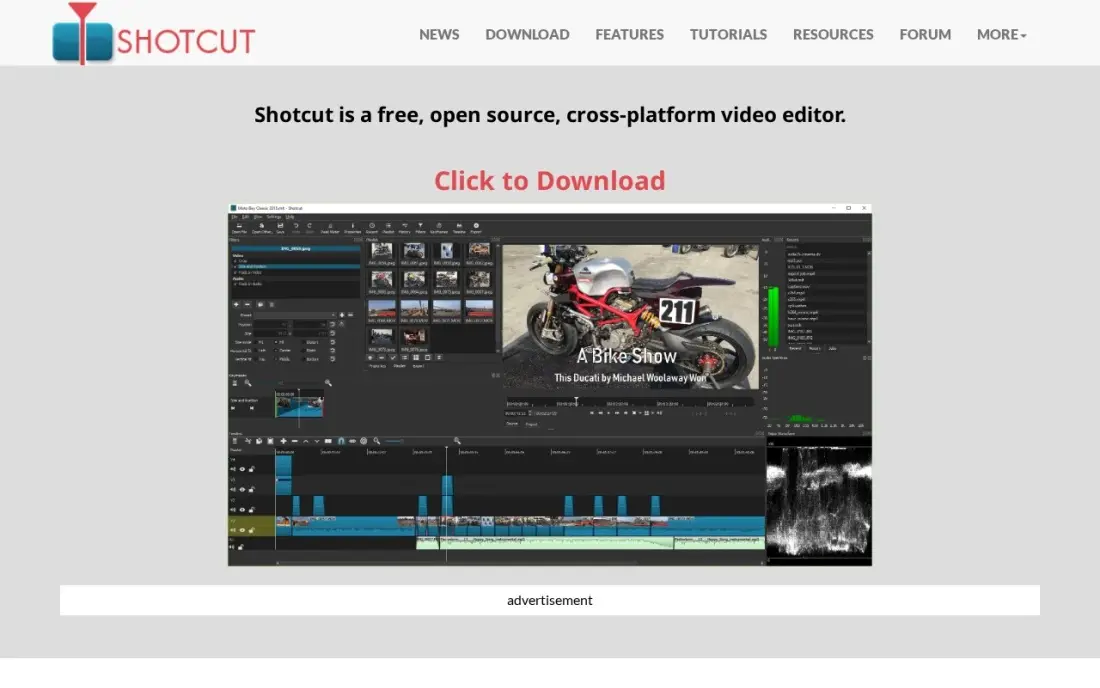
Shotcut is a free, open-source desktop editor for Windows, Mac and Linux with no account, no watermark and no paid tier waiting to upsell you. It edits most formats natively through FFmpeg, so there is no transcoding wait, and its multi-track timeline handles filters, keyframes and 4K footage.
What it lacks is guidance. The interface is plain, there are no templates or AI tools, and stability on very large projects gets mixed reports. Expect to spend an evening learning where everything is. In return you get a capable editor whose terms cannot change next quarter, which makes it a sound first editor for anyone on a zero budget.
What we like
- Completely free with no upsell, no account and no watermark
- Wide format support through FFmpeg, with native editing and no transcoding wait
- Multi-track timeline with filters, keyframes and 4K support
- Runs on Windows, Mac and Linux from the same free download
Watch out for
- The interface is plain and takes an evening to learn
- No templates, AI tools or guided wizards — it expects you to know what you want
- Stability on very large projects gets mixed reports

Kdenlive
Best for: Linux users who want a free, full multi-track desktop editor
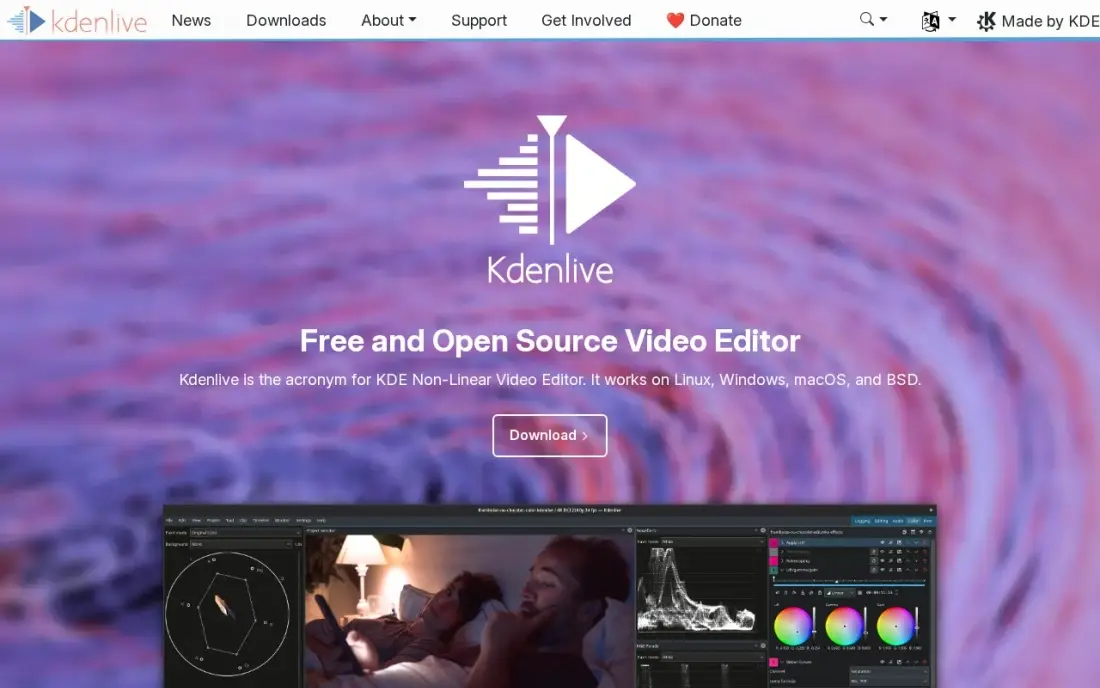
Kdenlive is the free open-source editor Linux users reach for first, built on the same MLT framework as Shotcut but with a more customisable interface. It gives you a proper multi-track timeline with effects, transitions and keyframes, exports directly to YouTube and has no watermark or export cap.
The Linux build is the polished one; the Windows and Mac versions work but trail it, and long projects can be unstable, so save often. Like Shotcut, it has no AI tools, templates or stock library. Pick Kdenlive when you edit on Linux, or when you want a free editor whose layout you can rearrange to suit the way you work.
What we like
- Completely free and open source, with no watermark or export caps
- Proper multi-track timeline with effects, transitions and keyframes
- Exports directly to YouTube and handles most formats through FFmpeg
- Customizable interface that grows with the editor using it
Watch out for
- Windows and Mac builds exist but are less polished than the Linux version
- Stability reports are mixed — save often on long projects
- No AI tools, templates or built-in stock library
iMovie
Best for: Mac users making their first videos who want a free editor already installed
iMovie is free on every Mac, iPhone and iPad and is the simplest desktop editor here: drag clips in, trim, add a title and a theme, and export in 4K. Its trailers and themes make a first family video or social clip look more finished than the effort suggests, and projects can start on an iPhone and finish on the Mac.
The ceiling comes quickly. There is no multicam, no keyframing and no advanced colour grading, and there is no paid upgrade inside the app, so growing editors move to Final Cut Pro or DaVinci Resolve and start new projects there. Use it to learn cutting and pacing for free, then move up when a project needs more control.
What we like
- Free on every Mac, iPhone and iPad — nothing to buy or install
- The simplest editor here: drag, drop, trim and publish in minutes
- Clean templates, trailers and themes that make first videos look polished
- Shares straight to YouTube in 4K from the phone or the Mac
Watch out for
- No Windows version and no paid upgrade path inside the app
- Limited to basic editing — no multicam, keyframes or advanced color tools
- Projects outgrow it fast once a channel starts posting weekly
The best desktop video editing software gives you a fast, stable timeline on your own computer, with the colour, audio and export controls that browser editors still cannot match. We compared eight desktop editors for Windows, Mac and Linux, from free open-source tools to professional suites, on what they cost to own, how quickly a new editor gets productive, and where each one runs out of road. Every price below comes from the vendor's own page, checked in November 2026.
How to choose the best desktop video editing software
- Match the editor to your operating system first. Final Cut Pro and iMovie are Mac only, PowerDirector is Windows-first, and only DaVinci Resolve, Shotcut and Kdenlive run on Linux.
- Decide between owning and renting. DaVinci Resolve Studio and Final Cut Pro are one-time purchases; Adobe Premiere is subscription only, and Filmora and PowerDirector are cheapest on annual billing.
- Try the free version before you pay. Resolve, Shotcut, Kdenlive and iMovie are free with no watermark, so you can learn editing before spending anything.
- Check the export watermark. Filmora's and PowerDirector's free versions watermark every export, which rules them out for client or business work until you pay.
- Think about who you share files with. Agencies and production companies mostly exchange Premiere projects, so freelancers working for them often need Adobe even if another editor suits them better.
- Be honest about your hardware. 4K footage, colour grading and AI effects need a capable graphics card; Resolve is the most demanding editor here, so test it on your actual machine.
A good edit is only half the job; the video still has to be found. If your videos live on your website as well as YouTube, our video SEO guide covers titles, transcripts and video schema, and our monthly SEO service can handle that work for you.
Desktop video editing software pricing: what you will actually pay
Take one editor who expects to keep editing for three years. DaVinci Resolve costs $0, or $295 once for Studio; Final Cut Pro costs $299.99 once; Shotcut, Kdenlive and iMovie cost $0. Over the same three years, Adobe Premiere costs $22.99 a month on the annual plan, which is $275.88 a year and $827.64 in total, or $34.49 a month if you want to cancel at any time.
The beginner editors depend on how you bill. Filmora Basic is $49.99 a year billed annually, or $149.97 over three years, against $19.99 a month billed monthly. PowerDirector 365 is $59.99 a year billed annually, but monthly billing at $24.99 adds up to $299.88 a year; its $139.99 perpetual licence works out cheaper than the subscription in under three years. The cheapest paid path to professional tools is a one-time Resolve Studio or Final Cut Pro licence, and the cheapest path overall is a free editor until a project demands more.
Know the difference: consumer editors vs professional editors
Consumer editors such as iMovie, Filmora and PowerDirector are built to get a first-time editor to a finished video quickly. They lean on templates, themes, guided wizards and one-click effects, and they hide most of the technical settings. That makes them faster for simple work and less frustrating to learn, but they offer less control over colour, audio and delivery formats.
Professional editors such as DaVinci Resolve, Adobe Premiere and Final Cut Pro expose everything: colour scopes, audio mixing, multicam, proxy workflows and exact export settings. They take longer to learn but scale from a short clip to a feature film without forcing a switch later. Shotcut and Kdenlive sit in between, with professional-style timelines but no templates. If you expect video to become a regular part of your work, learning a professional editor early saves a second learning curve later.
Quick comparison: tool type by need
| Buyer | Best pick | Why |
|---|---|---|
| Pro editing for free | DaVinci Resolve | Free pro editor, colour and audio; Studio $295 once |
| Agency and client work | Adobe Premiere | Industry-standard files, $22.99/month on an annual plan |
| Mac editors who buy once | Final Cut Pro | $299.99 once, fastest on Apple silicon, 90-day trial |
| Beginners on Windows or Mac | Filmora | Template-led timeline, $49.99/year billed annually |
| Windows mid-range | PowerDirector | Multicam and motion tracking, $59.99/year billed annually |
| Free with no watermark | Shotcut | Open source on Windows, Mac and Linux |
| Linux editors | Kdenlive | Free multi-track timeline, most polished on Linux |
| First videos on a Mac | iMovie | Free, simple, already installed |
Mistakes to avoid
- Paying monthly for software you will use all year. PowerDirector costs $299.88 a year on monthly billing against $59.99 annually, and Filmora shows the same gap.
- Buying a pro suite for a first video. Premiere's annual plan is a 12-month commitment; learn on a free editor first and buy when you know what you need.
- Ignoring watermarks on free versions. Filmora and PowerDirector stamp every free export, so a client video made on them will need a paid plan before delivery.
- Editing 4K without proxies. Slow playback is usually a settings problem, not a reason to buy a new computer; create proxy files and edit at full speed.
- Picking an editor nobody you work with uses. If a client or collaborator needs your project file, agree on the editor before you start cutting.
Related comparisons: AI Video Editing Software · Video Editing Software for Small Business · Real Estate Video Editing Software · Video Editing Software for YouTube Beginners
How we chose
We checked each vendor's own pricing or download page in November 2026 and recorded the starting price exactly as listed, including annual and monthly billing where both are offered and one-time licences where they exist. We limited the list to editors that install on a desktop computer, grouped them by operating system and buyer, and ranked them by fit for the most common buyer: a creator or small business editing regular videos without a dedicated editor on staff. Ratings come from G2 pages checked on the dates shown in the sources. No vendor paid for a place in this list, and none of the links here are affiliate links.
What to do next
Download DaVinci Resolve or Shotcut today and cut one real video from start to finish before you spend anything; you will learn more about what you need from one finished edit than from any feature list. When your videos are ready to bring in traffic, book a free call and we will show you where they can rank.
Frequently asked questions
What is the best desktop video editing software?
DaVinci Resolve is the best all-round desktop editor because its free version covers professional editing, colour and audio, and Studio is a one-time $295. Final Cut Pro at $299.99 once is the best Mac pick, and Adobe Premiere at $22.99 a month on an annual plan is the standard for agency and client work.
What is the best free desktop video editor?
DaVinci Resolve is the most capable free desktop editor and adds no watermark. Shotcut and Kdenlive are free open-source alternatives that are lighter to run, and iMovie is free on every Mac. Filmora and PowerDirector have free versions too, but both watermark exports.
Is it better to buy video editing software once or subscribe?
Buying once is usually cheaper over time. Final Cut Pro costs $299.99 once and DaVinci Resolve Studio $295 once, while Adobe Premiere costs $22.99 a month on an annual plan, or $275.88 a year. Subscribe when you need Adobe's file compatibility or the cloud and AI extras that come with it.
What desktop video editor is easiest for beginners?
iMovie is the easiest on a Mac and costs nothing. On Windows or Mac, Filmora at $49.99 a year billed annually is the friendliest paid editor, with more than 1,000 template presets. PowerDirector at $59.99 a year is similar, with more advanced features once you grow.
Do I need a powerful computer for desktop video editing?
For 1080p work, most recent laptops are fine. 4K editing, colour grading and AI effects lean on the graphics card and memory, and DaVinci Resolve is the most demanding editor here. Proxy files, which most editors in this list can create, let a modest computer edit 4K footage smoothly.
Which desktop video editors run on Linux?
DaVinci Resolve, Shotcut and Kdenlive all run on Linux. Kdenlive's Linux build is its most polished, and Resolve's Linux version is the same professional editor as on Windows and Mac. Premiere, Final Cut Pro, Filmora, PowerDirector and iMovie do not run on Linux.
What is the best video editing software for PC?
DaVinci Resolve is the best pick for most Windows PC users: the free version covers editing, color, effects and audio, and Studio is a one-time $295 upgrade. Adobe Premiere, at $22.99 a month on an annual plan, suits editors who exchange projects with agencies. Filmora is the friendliest for beginners at $49.99 a year, and PowerDirector is Windows-first. Final Cut Pro and iMovie are Mac only.
Is there free PC video editing software without a watermark?
Yes. DaVinci Resolve, Shotcut and Kdenlive are all free on Windows and add no watermark to exports. Shotcut is completely free and open source, with no account, no upsell and a multi-track timeline with 4K support. Kdenlive's Windows build works but trails its Linux version. Avoid the free versions of Filmora and PowerDirector Essential for finished work, because both watermark every export.
Sources we checked (13)
- DaVinci Resolve — www.blackmagicdesign.com/products/davinciresolve (checked November 10, 2026)
- DaVinci Resolve reviews on G2 (checked November 10, 2026)
- Adobe Premiere — www.adobe.com/products/premierepro.html (checked November 6, 2026)
- Adobe Premiere reviews on G2 (checked November 6, 2026)
- Final Cut Pro — www.apple.com/final-cut-pro (checked November 8, 2026)
- Filmora — filmora.wondershare.com/shop/buy/buy-video-editor-mus.html (checked November 10, 2026)
- Filmora reviews on G2 (checked November 10, 2026)
- PowerDirector — www.cyberlink.com/products/powerdirector-video-editing-software/overview_en_US.html (checked November 6, 2026)
- PowerDirector reviews on G2 (checked November 6, 2026)
- Shotcut — shotcut.org (checked November 6, 2026)
- Shotcut reviews on G2 (checked November 6, 2026)
- Kdenlive — kdenlive.org/en (checked November 6, 2026)
- iMovie — www.apple.com/imovie (checked November 6, 2026)
Make one of these tools?
We re-check this list every quarter. Send a correction, request a review, or ask about a clearly labeled sponsored spot.
Request a listingShamim
Founder of SerpAstra
A full-stack digital marketer and SEO strategist covering technical and local SEO, AI search visibility, paid ads and lead generation for local businesses, e-commerce brands and SaaS teams.
Free SEO and AI visibility audit
Find out what is holding your rankings back
Send us your site. Within 2 business days you get a written audit, an AI visibility check and a short fix list ranked by impact. Free, with no contract attached.
Request my free audit→Related buying guides
 Video Editing & Streaming10 Best Video Editing Software for Small Business in 2026, ComparedCompare the 10 best video editing software for small business tools on price, free plans and AI features, with prices checked November 4, 2026.Read guide →
 Video Editing & Streaming11 Best Software to Edit YouTube Videos in 2026, ComparedCompare the 11 best software to edit youtube videos on price, free plans, AI features and export quality, with every price checked November 6, 2026.Read guide →
 Video Editing & StreamingBest YouTube Editing Software Free in 2026: 8 Tools ComparedCompare the 8 best youtube editing software free options on price, export limits, watermarks and AI features, with every price checked November 6, 2026.Read guide →